Printing barcode labels from a Mac without hunting for Windows-only tools
You need shelf stickers, asset tags or product labels, and most barcode programs you find assume Windows. Barcode Label Design - Mac Edition is built for Apple Mac OS X machines. It makes barcode labels, stickers, ribbons and rolls using linear and 2D barcode standards.
Quick facts
- Platform: Apple Mac OS X
- Price: $69
- Output: barcode labels, stickers, ribbons, rolls and coupons
- Symbologies: linear and 2D
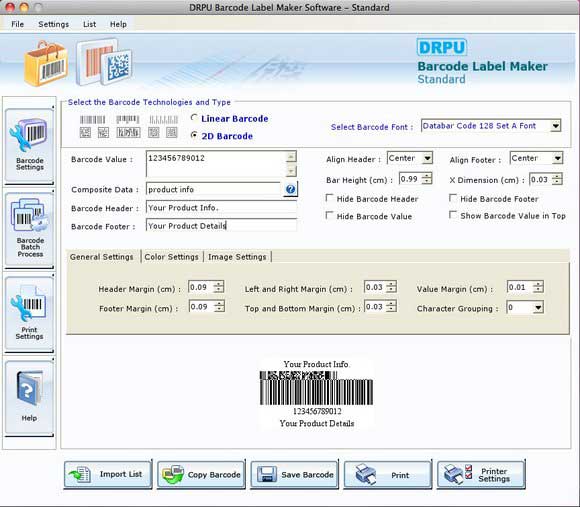
Key features
Make many labels in one run with series generation
The software has series generating options that build a batch of barcode labels at the same time. That saves you from creating each label by hand.
Pick from common linear and 2D barcode types
Linear symbologies include Code 39, Code 128 (sets A, B and C), Codabar, EAN-13, EAN-8, Interleaved 2 of 5, PostNet, Planet, UPCA and UPCE. For 2D you get QR Code, PDF417 and DataMatrix.
Print with flexible settings
You can generate and print labels, stickers and coupons using flexible print settings.
Export to PDF, copy into other apps, or email a label
The Export PDF option saves labels as PDF files. Copy Barcode lets you paste a label into TextEdit, MS Word or MS Excel. Built-in email settings send a designed label to an address you specify.
Colour and header/footer alignment
Colour settings let you make coloured labels, and you can align the barcode header and footer.
Who it's for
It suits Mac users in small shops, offices and warehouses who need to label stock, tag assets or print price stickers. It also suits anyone who wants barcodes dropped into documents or sent as PDFs.
Pros and cons
- Pro: It runs natively on Mac OS X.
- Pro: It covers the common linear symbologies plus QR Code, PDF417 and DataMatrix.
- Pro: You can batch-generate labels and export to PDF.
- Con: The vendor sells separate Standard, Professional and Corporate Mac editions, so check which one has what you need.
- Con: The Mac Edition page doesn't list system requirements.
FAQs
Does it run on a Mac?
Yes. It is made for Apple Mac OS X computers.
Can I make QR codes?
Yes. QR Code, PDF417 and DataMatrix are the supported 2D types.
Can I get a label out as a PDF?
Yes, through the Export PDF option.
Can I paste a barcode into Word or Excel?
Yes. Use Copy Barcode and paste into TextEdit, MS Word or MS Excel.
How much does it cost?
The Mac Edition is priced at $69.