You're timing a sprint, a lab reaction or a billable task, and the clock on the wall isn't precise enough. Your phone is across the room. Free Stopwatch is a small Windows program that sits on your desktop and counts time in hundredths of a second. It starts with one press.
Quick facts
- Version: 5.2.0
- Platforms: Windows 11, 10, 8.1, 8, 7, Vista and XP
- Price: Free
- Installer size: about 2.4 MB, with a 2.3 MB portable version
- Default precision: 10-millisecond increments
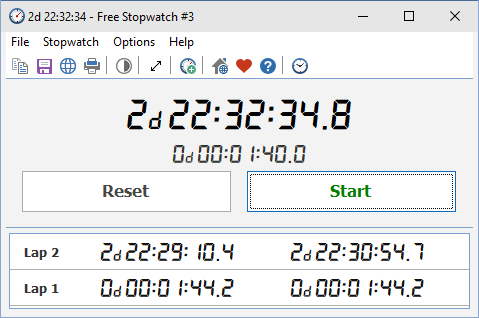
Key features
Time down to the millisecond, with simple Start, Stop and Lap buttons
The stopwatch measures hours, minutes, seconds and milliseconds. Press Start to begin and Stop at the finish line. Press Lap to record the time between laps.
Record as many laps as you need and delete the bad ones
The program records an unlimited number of laps. If you tap Lap by mistake, hover over that entry in the list and click the cross button to remove it.
Export results to a file or the clipboard
When you finish measuring, export the results to a file that opens in Notepad or Microsoft Excel. You can also copy them to the clipboard and paste them into another program.
Full-screen mode that a whole room can read
Click the arrow button and the stopwatch expands to fill the monitor or projector. This helps during exams, tests, reports and lab experiments. Press Esc or click the screen to exit.
Run several independent stopwatches at once
You can open multiple instances on one computer. Each one works fully on its own, so you can time several things in parallel.
Carry it on a USB drive
A portable version runs straight from a flash drive. Extract it to any folder and launch FreeStopwatch.exe. Your settings are stored in a file named Data.ini.
Who it's for
- Timekeepers at sports events such as sprints.
- Lab workers and students who time experiments.
- Teachers and exam supervisors who want a large countdown-style display on a projector.
- Anyone tracking work time who wants a simple desktop tool.
Pros and cons
Pros
- Free, and the installer is only about 2.4 MB.
- Unlimited laps with easy removal of individual entries.
- Full-screen mode for classrooms and auditoriums.
- Portable build that needs no installation.
- Works on a wide range of Windows versions, from XP to 11.
Cons
- Windows only.
- It does one job. It is a stopwatch, not a full time-tracking or project tool.
- Export is to a file or the clipboard, so reports need to be built in another program.
FAQs
Is Free Stopwatch really free?
Yes. The vendor offers it as a free download, in both an installer and a portable version.
How precise is it?
By default it counts in 10-millisecond increments and shows hours, minutes, seconds and milliseconds.
Can I run more than one stopwatch?
Yes. Open several instances, and each runs independently of the others.
Can I save my lap times?
Yes. Export them to a file that opens in Notepad or Excel, or copy them to the clipboard.
Can I use it without installing?
Yes. The portable version runs from any folder or USB drive.
System requirements
Microsoft Windows 11, 10, 8.1, 8, 7, Vista or XP. The download is about 2.4 MB.