AV Voice Changer Software Diamond
AV Voice Changer Software Diamond icon

AV Voice Changer Software Diamond

$99.95
Version
9.5.33
License
Shareware
Trial Limitations
14 Days, Free trial for 14 days
Operating Systems
Windows Vista/7/8/8.1/10 (32-bit & 64-bit)
System Requirements
1GHz compatible processor, 2GB Ram, Full Duplex Sound Card, Speakers & Microphone (headset recommended to avoid echo and static), Windows Vista and above
File Size
52.86 MB
Release Date
3/20/2021
Last Updated
11/13/2026
50804 views 5500 downloads
Easy access to all menus, including special nickvoices Just click and talk.

You want to sound different on a Discord call, a Twitch stream or a voice-over, and the voice you get sounds like a cheap robot. AV Voice Changer Software Diamond is built to avoid that. It changes your voice live, and it also lets you record and edit the result.

Quick facts

  • Version: 9.5.33
  • Platforms: Windows Vista, 7, 8, 8.1 and 10 (32-bit and 64-bit)
  • Trial: a free trial is available
  • Languages: English, Italian and Japanese
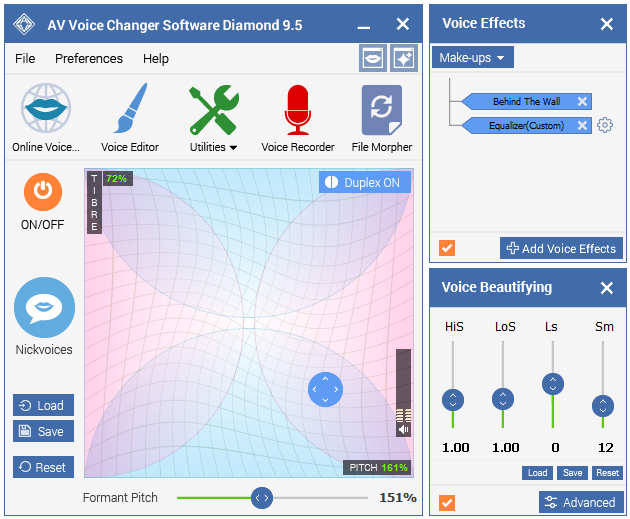
AV Voice Changer Software Diamond main panel

Key features

Change your age and gender sound in real time

You adjust pitch and timbre to sound deeper, higher, younger, older, more feminine or more masculine. Each combination of settings can be saved and reused later.

Use your new voice in chat and game apps

A digitally signed virtual audio driver connects the program to VoIP programs, instant messengers, in-game voice chat and web chat. The product page shows setup for Skype, Discord, Twitch and Steam.

Switch voices with 100+ nickvoices and hotkeys

The nickvoices are ready-made voices you can tie to an online nickname or persona. Global hotkeys let you swap voices or toggle features even while you are in a game.

Get a large effects library to play with

You get 30 voice effects, 70 background effects, 17 non-human voices and 40 plug-in audio effects. Free add-on voice and sound packs are available from an online library.

Record and edit your morphed voice in one place

The Voice Recorder captures your microphone or audio from VoIP programs, Internet radio and music clips. The Voice Editor cuts, splits and copies, and applies effects to all or part of a recording.

Process a whole folder of audio files at once

The File Morpher adds effects and converts formats for a batch of pre-recorded files in one pass.

Analyze and imitate voices

The Voice Analyzer scores harmony, brightness and pitch. The Voice Comparator checks how close your voice is to an imported one, and the Parody Mixer blends voices into a new one.

Who it's for

It suits you if you chat or stream and want a convincing alternate voice. It also suits you if you produce voice-overs, ads or narration and want to build several characters from your own voice. The editing and batch tools make it more than a toy for live chat.

Pros and cons

Pros

  • Real-time changing plus recording, editing and batch processing in one program
  • Works through a virtual driver with common chat and game apps
  • Large set of voices, effects and free add-on packs
  • Free trial to test it with your own microphone

Cons

  • Windows only
  • Interface offered in only three languages
  • The many panels and settings take time to learn
  • A headset is recommended to avoid echo and static

FAQs

Can I use it in Discord, Skype or Twitch?

Yes. The virtual audio driver connects it to most VoIP programs, in-game voice chat and web chat applications.

Can it change recorded files, not only live speech?

Yes. You can modify any audio file in waveform editing, or batch-process many files with the File Morpher.

Does it run on Windows 11 or Mac?

The listed platforms are Windows Vista through Windows 10, in 32-bit and 64-bit. No Mac version is listed.

Is there a free trial?

Yes, a free trial version is available so you can test it first.

Do I need a headset?

It is highly recommended. A headset avoids echo and static when you use a microphone and speakers.

System requirements

  • 1GHz compatible processor
  • 2GB RAM
  • Full duplex sound card
  • Speakers and microphone (a headset is highly recommended)
  • Windows Vista or later
Ivertech Editorial Team
Reviewed by Tony Iverson, The Ivertech Editorial Team
Researched from AVSoft Corp.'s own site and independent review sites, keeping the complaints as well as the praise. How we review software
Last updated 11/13/2026
AV Voice Changer Software Diamond icon AV Voice Changer Software Diamond Reviews by Users
Average Rating: AV Voice Changer Software Diamond is rated 5 stars. (5 Stars)
Total Reviews: 4
Rated 5 stars (5 Stars)

I've been looking for this software!
Reviewed by jackwood2710 on 1/25/2016

This is the software that you don't know that you need it! I've been playing online games for many years and i always wanted to have my voice changed when talking to my team. Nothing personal, i just don't want to use my real voice there.

It gets better when the software is not only able to change my voice completely, it also offers many many other voices like female, robots, or even monsters. I can totally live in my fantasy world now!
Rated 5 stars (5 Stars)

Unique program for real time voice modification
Reviewed by Promytius on 5/12/2015

Nicely organized, user friendly interface allows anyone to alter any voice they can capture or one from a file, and change that voice in infinite ways; some are just crazy, but most are able to be fine-tuned to make some amazing changes; you can also use "nickvoices" which are pre-saved settings for the voice-changing process; so simply applying one of these, the voice is transformed to the target sound.

The Smartphone-like interface is well-organized and detailed for fast navigation between controls. There are an amazing amount of online aids and mods and voices to access, and there's a great audio player included.

The online community is very fun and very active and very global; you will find people from everywhere to help with this program. It works with just about everything; online MMORPGs, online chats, prerecorded files; you can even do your own narration or even replace dialog in videos with it.

A program with a long history of being on the leading edge of voice alteration.

This is a powerful voice-altering program with many features and abilities, and applications in many places. If you work with audio/voice at all, this is a must-have program for your work suite. It allows you to be very creative, and precise, can save in virtually any format, handles audio as well as video, has great support (both official and online friends) and should handle all your audio needs.
Rated 5 stars (5 Stars)

Brilliant program
Reviewed by Sonic Jyvaskyle on 6/17/2014

There are more preset voices to choose from and they are very vivid and natural. I now use it quite frequently whenever I'm on YH and Skype.

It's super fun!
Rated 5 stars (5 Stars)

Outstanding software!
Reviewed by Web Worm on 10/29/2006

Outstanding software! This one is just simply going beyond other voice changers that I've tried. It can produce unlimited number of new voices and change voice so fast in chat and PC phone, which makes Voice Changer Software distinguished. I also like the Voice Comparator, one of the cool things...

Related Videos
Use Voice Changer Software in Skype

Video Length: 02:50
Uploaded By: Alex Lowe (3/20/2012)
View Count: 37,437

AV Voice Changer 7.0 Diamond - Add an application into the Ignore Filter list

Video Length: 03:19
Uploaded By: Alex Lowe (6/15/2009)
View Count: 24,725

AV Voice Changer Software-Making a fun call with AV Voice Changer Software and MSN

Video Length: 03:53
Uploaded By: Alex Lowe (10/26/2009)
View Count: 30,529

Trolling friends on Skype with Optimus Prime voice's by AV Voice Changer Software Diamond 8.0

Video Length: 04:22
Uploaded By: Voice Changer (3/11/2014)
View Count: 51,459

AV Voice Changer Software - Making a fun call with AV Voice Changer Software 7.0 and Y!M9

Video Length: 02:44
Uploaded By: Alex Lowe (10/16/2009)
View Count: 74,550

Voice Changer - Change Voice On You PC With Voice Changer Software 7.0

Video Length: 05:16
Uploaded By: Tran Trieu Phu (4/17/2013)
View Count: 203,304

AV Voice Changer Software - Voice Morpher

Video Length: 01:55
Uploaded By: Alex Lowe (5/15/2008)
View Count: 162,887

AV Voice Changer Software - Free Key

Video Length: 03:10
Uploaded By: Alex Lowe (5/19/2008)
View Count: 278,843

AV Voice Changer 7.0 Diamond - How to Use Voice Morpher

Video Length: 02:20
Uploaded By: Alex Lowe (6/15/2009)
View Count: 371,129

AV Voice Changer Software - Darth Vader fun prank call through Skype

Video Length: 05:47
Uploaded By: Alex Lowe (12/14/2008)
View Count: 1,076,950

Copyright © 2026, Ivertech. All rights reserved.