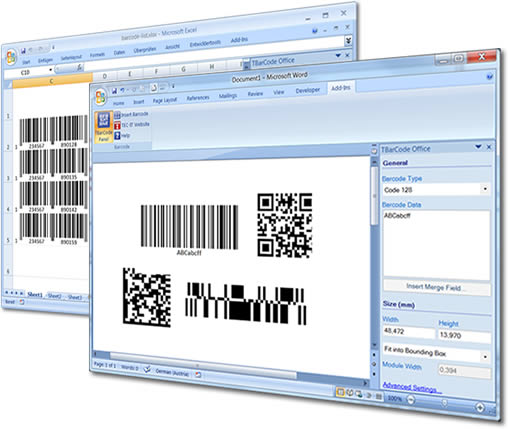
You paste a barcode image into a Word letter or an Excel sheet, then the article number changes and the barcode is wrong. Nobody notices until the labels are printed. TBarCode Office is built to prevent that. It adds a barcode engine to Word and Excel, so the codes follow your data.
Quick facts
- Works in: Word and Excel desktop applications for Windows, including Microsoft 365 desktop apps
- Operating systems: Windows 11, Windows Server 2022 / 2025
- Barcode types: more than 100
- Licensing: annual license per device, with product updates and standard support included
- Price: listed at 12.42 EUR per month per device, billed annually
- Trial: a free demo version you can test in your own documents
Key features
Barcodes that update when an Excel cell changes
You link a barcode to a cell once. When the value in that cell changes, the barcode changes with it. You can select several cells and turn them into barcodes with one click on Insert Barcode.
A different barcode on every mail-merge letter
In Word you assign mail merge fields to the barcode data, such as a customer number or a personalised URL. Word then produces one document per recipient, each with its own code. QR Code, Data Matrix and other 1D and 2D types work in a merge, and you don't need programming.
More than 100 symbologies with correct check digits
The list covers common types such as UPC-A, EAN-13 and Code 128. It also covers 2D codes like QR Code, Data Matrix and PDF417, plus GS1 barcodes. Check digits are calculated for you.
No barcode fonts to install
You choose the barcode type in the add-in panel and insert it straight into the document or worksheet. The add-in draws the code itself, so you don't need extra fonts. Module width, size and other parameters stay adjustable.
One add-in for both Word and Excel
Both Office applications are covered by a single product, so you use the same panel and settings in each.
Who it's for
It suits people who already keep their data in Excel or Word and need the codes to stay correct. That includes anyone producing article lists, serial letters, or documents with customer or order numbers. It also suits teams that have no developer to call. If you need to generate barcodes from code, TEC-IT points you to a separate SDK instead.
Pros and cons
Pros
- Barcodes stay linked to Excel cells and Word merge fields
- Broad choice of symbologies, including GS1 and 2D codes
- No barcode fonts and no programming needed
- A free demo lets you test it in your own files
Cons
- Word/Excel automation and VBA are not supported
- In Excel, the GDI object limit restricts how many barcodes a workbook can hold
- Windows only: the browser and macOS versions of Office are not supported
- Sold as an annual license rather than a one-time purchase
FAQs
Do I need barcode fonts or programming skills?
No. You pick the barcode type in the add-in and insert it. The add-in generates the code.
Can I use QR Codes in a Word mail merge?
Yes. QR Code, Data Matrix and other 1D and 2D barcodes work in Word mail merges. Merge fields supply the data.
Can I use it with Word and Excel on a Mac or in the browser?
No. It supports the Windows desktop applications, and the browser and macOS versions of Office are not supported.
Can I automate it with VBA?
No. For VBA you would need the vendor's separate SDK product.
Can I try it first?
Yes. The demo version is free. The setup includes a user manual and quick-start guides.
System requirements
- Word and Excel desktop applications for Windows, including Microsoft 365
- Windows 11 or Windows Server 2022 / 2025
- Microsoft .NET Framework 4.6.2 or later
- VSTO 4.0 Runtime, included in the setup
- Microsoft Common Runtime Libraries 14.2 or later, downloaded by the setup