Got a file you just deleted? Here is how UndeletePlus handles it
You emptied the Recycle Bin, or held SHIFT while deleting, and a minute later you realize the file mattered. Deleting rarely wipes the data right away. The space is marked as free, and the file can often be recovered until something new is written over it. UndeletePlus scans a drive for those leftovers and lets you restore them.
Quick facts
- Platforms: Windows XP through Windows 11
- Type: Commercial file recovery utility
- Trial: You can scan your PC and evaluate the results before buying. A purchased license is required for full file recovery.
- Install file: A small installer, around 5 MB
Key features
Recover files from the Recycle Bin, network drives and SHIFT-deletes
The vendor describes it as a way to get back files removed from the Recycle Bin, deleted in a DOS window, deleted from a network drive, or deleted in Windows Explorer with SHIFT held down.
Work with hard drives, floppies and memory cards
It supports FAT12/16/32 and NTFS/NTFS5 file systems on hard and floppy drives. It can also recover images from CompactFlash, SmartMedia, MultiMedia and Secure Digital cards.
Browse deleted files in a folder view and filter by type
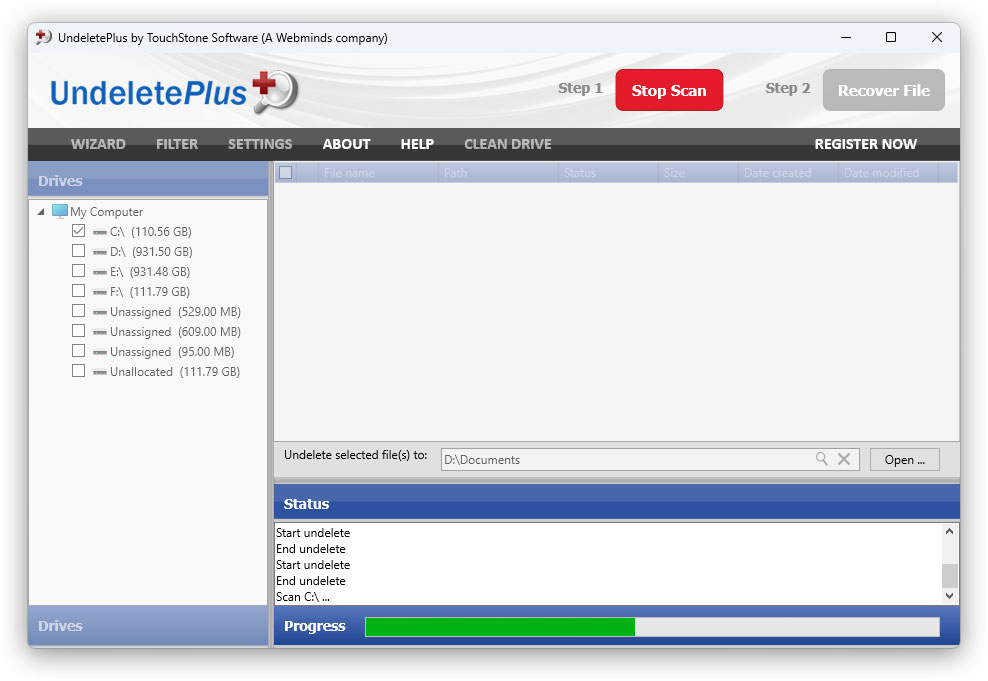
After a scan, UndeletePlus builds a folder view of the deleted files. Type icons on the left let you filter by file type. You can also filter by size, change date and part of the file name, which helps when a scan returns a long list.
Scan first, decide later
The trial lets you scan your PC and see what is recoverable before you pay anything.
Who it's for
It suits you if you are a home user or small office who needs to bring back a few deleted documents, photos or files from a camera card. You get a scan, a file list and a restore step. It is not aimed at deep forensic work.
Pros and cons
- Pro: Small, quick installer.
- Pro: The scan is free, so you can check whether your file is findable first.
- Pro: Filters by type, size, date and name make results easier to sort.
- Con: Recovery needs a paid license. The trial only scans.
- Con: Windows only.
- Con: Files that have been overwritten can't be brought back, and that is true of any undelete tool.
Tip
Install it on a different drive from the one holding your lost files. Installing onto the same disk could overwrite some of the data you want back. Stop using that drive until the recovery is done.
FAQs
Can I try it before paying?
Yes. The trial scans your PC so you can evaluate the results. Full recovery needs a purchased license.
Does it work with memory cards?
Yes. It handles image recovery from CompactFlash, SmartMedia, MultiMedia and Secure Digital cards.
Which Windows versions does it support?
Windows XP through Windows 11. A 32-bit version is also offered.
Which file systems does it read?
FAT12, FAT16, FAT32, NTFS and NTFS5.
System requirements
- Windows XP through Windows 11
- Installer size of roughly 5 MB