You have a voice recording with a hum in the background, a podcast episode that needs its dead air trimmed, or a song you want to cut into a ringtone. Opening a full studio suite for any of those is overkill. WavePad from NCH Software is a sound editor built for exactly these jobs, and the version for home use is free.
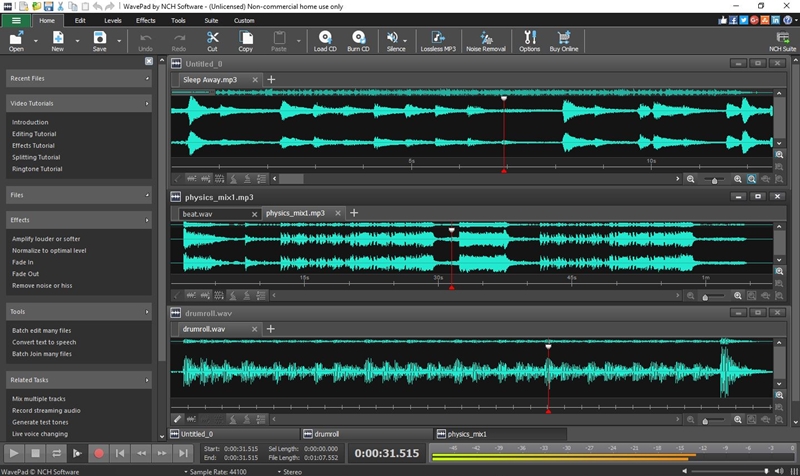
Quick facts
- Platforms: Windows 7 to 11, Mac (macOS 10.5 or above), iPhone, iPad, Android and Kindle apps
- Price: Free for non-commercial use; a paid license is available for commercial use and the Masters edition
- Trial terms: The free version does not expire and no signup is required
- Formats: More than 50 audio formats, including MP3, WAV, WMA, AIF, FLAC, OGG, AAC and M4A
Key features
Cut, trim, split and join audio without fuss
The basic editing set covers cut, copy, paste, delete, insert, silence and auto-trim, plus compression and pitch shifting. You can set bookmarks and regions to find your place in long recordings, and scrub through audio to find the exact spot.
Clean up noisy recordings
A Noise Removal Wizard runs noise reduction automatically. It targets clicks, pops, hums and background noise, and there are tools for reducing reverb and echo. The current version also lists AI-powered noise removal and audio enhancement.
Apply effects to thousands of files at once
Batch processing applies effects or format conversion to many files in a single run. Effects include amplify, normalize, equalizer, envelope, reverb, echo and reverse, along with high-pass and low-pass filters.
Separate or reduce vocals in a song
You can reduce or isolate vocals in a music track, which helps with practice tracks and remixes.
Analyze, extend and export
Tools include spectral analysis (FFT), beat detection and text to speech. DirectX and VST plugin support lets you add more effects. A built-in library has hundreds of sound effects and royalty-free music clips. Sample rates run from 6 to 192kHz, in stereo or mono, at 8, 16, 24 or 32 bits. You can also edit the audio from video files and export audio to video with a waveform visualization.
Who it's for
It suits people doing podcasts, voiceovers, radio-style edits, ringtones and home audio restoration. It also suits anyone who wants to convert a batch of files from one format to another. If you later need more effects, NCH sells a Masters edition with additional features. WavePad also works alongside NCH's MixPad multitrack mixer when you want to layer several tracks.
Pros and cons
Pros
- Free for home use, with no expiry and no signup
- Wide format support and batch conversion
- Noise, click, pop and reverb removal built in
- Runs on Windows, Mac and mobile
Cons
- The free version is for non-commercial use only
- Some additional effects and features are reserved for the Masters edition
- It edits one file at a time visually; layering several tracks calls for NCH's separate MixPad mixer
FAQs
Is WavePad really free?
Yes, for non-commercial use. The free audio editor does not expire. Commercial users need a paid license.
Can I try it before paying?
Yes. The trial is the full program, not yet activated. After you buy, you enter a registration code from the File menu.
Does it edit MP3 files?
Yes. You can record and edit MP3s, split, trim and merge them, and cut MP3 files losslessly.
Can it remove background noise?
Yes. The Noise Removal Wizard handles hums, clicks, pops and other background sounds, and there are tools for reverb and echo.
Does it run on older Windows?
The current version works on Windows 7 to 11. NCH offers separate older builds for Windows 98, 2000 and XP/Vista.
System requirements
- Windows 7 to 11
- macOS 10.5 or above for the Mac version