Xilisoft iPad Video Converter: Convert Video Files to Play on an iPad
Xilisoft iPad Video Converter is a $29.95 Windows program that converts video and audio files into the H.264, MPEG-4, AAC and MP3 formats an iPad, iPhone or iPod plays, and can copy the results to a connected iPad. It is an older, simple tool for people who want a one-click way to make a folder of AVI, WMV or MKV files playable on Apple devices.
Quick facts
- Developer: Xilisoft Corporation
- Platform: Windows 11, 10, 8, 7, Vista and XP (SP2 or later). Xilisoft sells a separate Mac version
- Input: HD and SD video including AVCHD, H.264, H.265/HEVC, MPEG-2, AVI, WMV, MKV, MOV, FLV, RM, RMVB, VOB and TS, and audio including WMA, FLAC, APE, OGG, AC3 and CD audio
- Output: H.264 HD, H.264 and MPEG-4 video, AAC, M4A and MP3 audio, and GIF, BMP, JPEG or PNG stills
- Price: $29.95 on Xilisoft's store
- Money-back: 30-day money-back guarantee
- What we checked: the product page, price and tech specs on Xilisoft's English site on October 15, 2026
Before you buy
Xilisoft iPad Video Converter is an old program. Its speed-up uses NVIDIA CUDA and ATI Stream (AMD APP) rather than current hardware encoders, and its device list stops at the iPad Pro 11-inch and the iPhone 15 series, with Android and Windows phones from around 2012. It still does the basic job, but newer converters are faster and support current codecs and devices, so try it on your own files before paying.
What It Does
Converts almost any video to iPad format
Xilisoft iPad Video Converter decodes HD video (AVCHD, H.264/AVC, H.265/HEVC, MPEG-2 HD, MPEG-4 TS HD, QuickTime HD, WMV HD) and standard video (AVI, MPEG, WMV, DivX, MP4, MOV, RM, RMVB, ASF, 3GP and more) and re-encodes it as iPad H.264 or MPEG-4 video, including a 720p H.264 HD profile.
Turns videos and CDs into iPad music
Xilisoft iPad Video Converter extracts the soundtrack from a video and saves it as MP3, AAC or WAV, converts audio files such as WMA, RA, AC3, OGG, APE and MP2, and converts audio CDs to music files for the iPad.
Trimming, splitting and output control
Xilisoft iPad Video Converter can convert just one segment of a video, split a large file into several smaller ones, and convert one source into several formats at once. A Bitrate Calculator works out the video bitrate for a target file size, and you can change bit rate, codec, frame rate and sample rate in a profile and save it as your own. It also grabs still pictures from a video at set intervals or during preview.
Batch conversion and transfer to the iPad
Xilisoft iPad Video Converter converts a list of files in one batch using multiple CPU cores, can run in the background, and can shut down, hibernate or put the PC on standby when it finishes. Finished files can be copied straight to a connected iPad. The interface is available in English, French, Spanish, German, Japanese and Chinese.
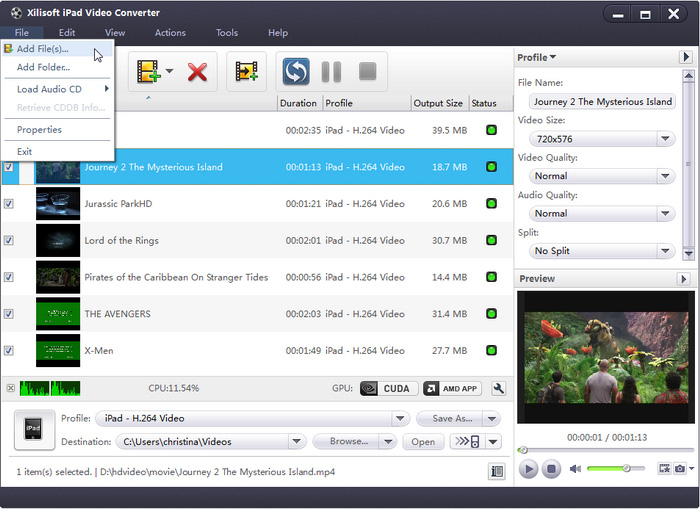
The main window with the File menu open (Add File(s), Add Folder, Load Audio CD), a list of movie clips set to the iPad H.264 Video profile, profile settings on the right, a preview player, and CUDA and AMD APP buttons next to the CPU meter.
How to Use It
- Install Xilisoft iPad Video Converter and open it.
- Choose File > Add File(s) or Add Folder to add videos, or Load Audio CD for a CD.
- Pick an output profile at the bottom, such as iPad H.264 Video, and set the destination folder.
- Optionally change video size, quality and split settings in the Profile panel on the right, and preview a file in the player below it.
- Start the conversion from the toolbar, then copy the finished files to your iPad.
FAQs
Does Xilisoft iPad Video Converter work on Windows 11?
Xilisoft lists Windows 11, 10, 8, 7, Vista and XP as supported. The program itself dates from the Windows 7 era, so check it on your PC with the trial before buying.
Is there a Mac version of Xilisoft iPad Video Converter?
Yes. Xilisoft sells Xilisoft iPad Video Converter for Mac as a separate product with its own license.
Does Xilisoft iPad Video Converter support the newest iPads?
Xilisoft iPad Video Converter's device list includes the iPad, iPad mini, iPad Air and iPad Pro (12.9, 9.7, 10.5 and 11-inch). Its H.264 MP4 output plays on any iPad, including newer models not on the list.
Can Xilisoft iPad Video Converter rip DVDs?
No. Xilisoft iPad Video Converter reads video files, including unprotected VOB files copied from a DVD, but it doesn't load DVD discs. Xilisoft sells DVD ripping in other products.
System Requirements
- Operating system: Windows 11, 10, 8, 7, Vista or XP (SP2 or later)
- Processor: 1 GHz Intel or AMD CPU or faster
- Memory: 256 MB RAM (512 MB or more recommended)
- Disk space: 100 MB for installation
- Display: Super VGA (800 x 600) with a 16-bit graphics card or better
Conclusion
Xilisoft iPad Video Converter is a straightforward way to batch-convert a folder of mixed video files into iPad-ready MP4s, with handy extras like trimming, splitting and a bitrate calculator. Its age shows in the hardware acceleration and the device list, so it makes most sense for simple conversions on an older PC rather than as a long-term video tool.