Make sense of unfamiliar code without tracing it by hand
You open a project someone else wrote and find nested loops and branches that take an hour to follow. AthTek Code to FlowChart reads the source files and draws the logic as a flowchart or NS chart, so you don't have to draw it yourself.
Quick facts
- Platform: Windows
- Languages: C, C++, VC++, PHP, Pascal and Delphi
- Output: flowcharts or NS charts
- Export formats: MS Word, Visio, XML, Bitmap and SVG
- License: shareware, with a free trial that includes code samples
Key features
Flowchart and code stay in sync
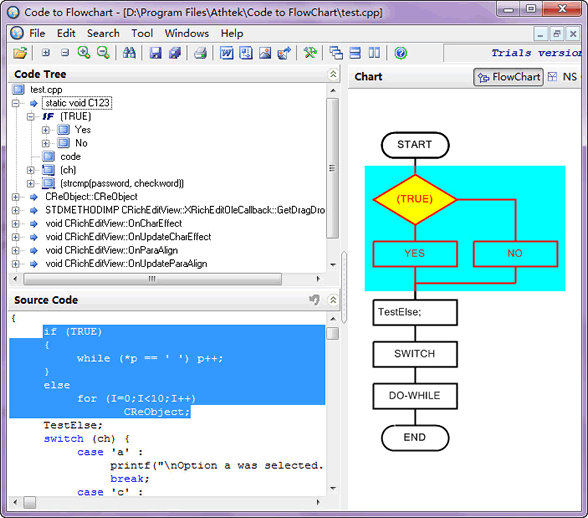
The flowchart window is synchronized with the code editor. Click a box in the chart and the matching source code is highlighted.
Chart just a code segment
You can generate a flowchart from a selected piece of code. That helps when you're checking function logic or looking for errors and extra code in a large project.
Project overview through a code tree
Open a project and the functions and procedures are listed. Pick one to load its chart. You can also search the source code with filters.
Export charts for documentation
Send the finished chart to Word, Visio, XML, Bitmap or SVG files and edit it there.
Auto formatting and options
The program can auto-format source code. You can change colors, box width and size, and the interface language.
Who it's for
It suits software engineers who inherit unfamiliar code and document writers who need flowcharts for technical documents without drawing them manually.
Pros and cons
- Pro: charts are generated automatically from your project files.
- Pro: the chart and the code are linked, so you can jump between them.
- Pro: you can export to several document formats.
- Con: it supports a limited set of languages (C, C++, VC++, PHP, Pascal, Delphi).
- Con: it is paid software; you get a trial first.
- Con: it works on project files saved on your computer, not online files.
FAQs
Which languages can it convert?
C, C++, VC++, PHP, Pascal and Delphi.
Can I edit the exported chart?
Yes. You can export to Word, Visio, XML, Bitmap or SVG and edit the result in those tools.
Can I try it before buying?
Yes. A free trial version is available and includes several code samples to open.
Can it chart only part of a file?
Yes. It can generate a flowchart from a source code segment.