Xilisoft DAT Converter
You have an old DAT file, probably ripped from a VCD or SVCD, and your phone, MP4 player or upload site won't open it. Xilisoft DAT Converter turns DAT, VOB and MPEG/MPG files into formats those devices accept.
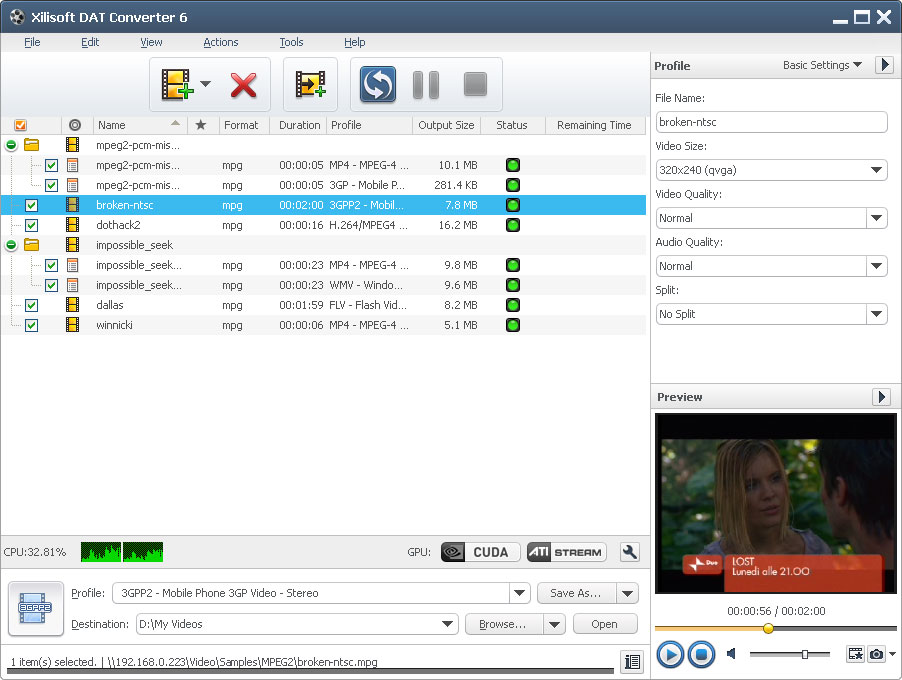
Quick facts
- Source formats: MPG, MPEG, MPA, DAT, VOB
- Output formats: M4A, MP3, AVI, DivX, MP4, MPEG1, MPEG2, MPEG4/H.264, WMV, 3GP, 3G2, FLV
- Platform: Windows
- License: shareware with a free trial
- Languages: English, Japanese, German, French, Chinese
Key features
Play DAT files on phones, MP4 players and YouTube
You convert DAT video to AVI, DivX, MP4, H.264, WMV, 3GP or FLV. You can also convert VOB, MPEG and MPG files to the same formats.
Pull the music out of a DAT video
You can extract M4A or MP3 audio from DAT video files.
Hit an exact file size with the Bitrate Calculator
You enter the file size you want. The built-in Bitrate Calculator works out the video bit rate for you.
Make several outputs from one file at once
You can add multiple output formats to one source file and get different files in a single run. Batch processing and multithreading let you convert many files together, and you can enable or disable individual CPU cores.
Split large files and convert only a segment
You can split a large file into several pieces with a preset or custom split mode. You can also convert just one segment by setting its start time and duration.
Adjust the output settings and run it in the background
You can change the video codec, size, bit rate, frame rate, audio codec and channels. You can preview the source and take snapshots. The converter can run in the background, and you can set an after-done action: quit, shut down, hibernate or standby. You can also turn JPG, PNG, BMP or GIF pictures into video.
Who it's for
It suits you if you have DAT files from old VCDs, or VOB and MPEG files from DVD rips. It also suits you if you want them on a phone or portable player, or ready to upload online.
Pros and cons
Pros
- Handles DAT, VOB and MPEG sources in one tool.
- Batch conversion, splitting and exact-size control.
- Adjustable output parameters.
Cons
- Windows only.
- Shareware, so you try it before you buy.
- It covers a narrow set of source formats: MPG, MPEG, MPA, DAT and VOB.
FAQs
Which files can it open?
It opens MPG, MPEG, MPA, DAT and VOB files.
Can it extract audio?
Yes. You can save the soundtrack of a DAT video as MP3 or M4A.
Can I convert several files at once?
Yes. Batch processing and multithreading are supported.
Can I try it first?
Yes. The vendor offers a free trial.
System requirements
The listing gives a 1GHz Intel/AMD processor or better, 256MB RAM and 100MB of disk space. It runs on Windows XP, Vista and Windows 7.