You have a folder of QuickTime clips, and your MP4 player won't touch them. Xilisoft MOV to MP4 Converter is built for that one job. It turns MOV and QT files into MP4 or MPEG-4/H.264 video, many files at a time.
Quick facts
- Input: MOV, QT
- Output: MP4, MPEG-4/H.264; images in BMP, JPEG, GIF and PNG are also listed
- Platforms: Windows 11, 10, 8, 7, Vista and XP (SP2 or later)
- Interface languages: English, Japanese, German, French, Spanish and Chinese
- Trial: a free trial is offered
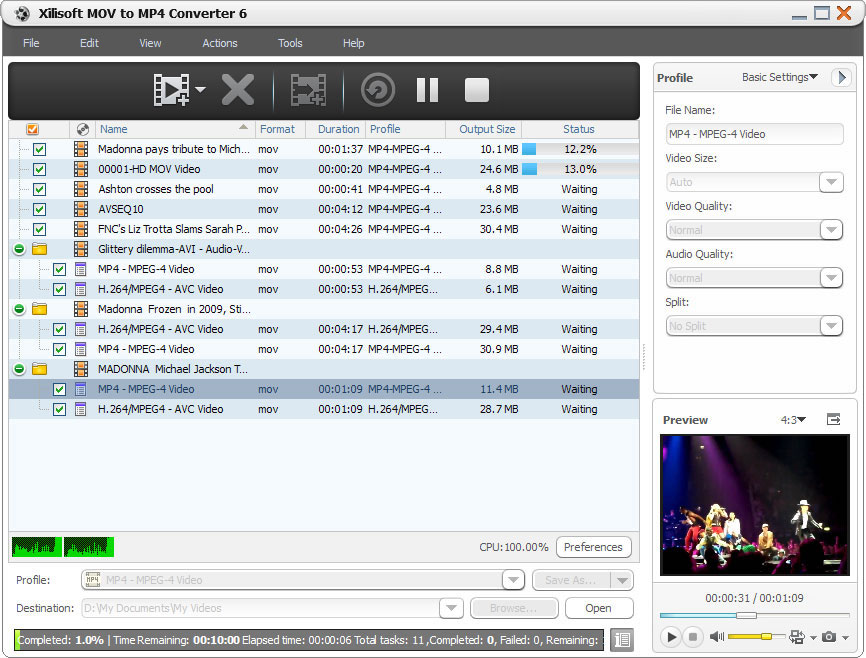
Key features
Convert MOV and QT files for MP4 players
You pick MP4 or MPEG-4/H.264 as the output, and you can choose different resolutions to suit different players.
Convert batches faster with multi-core support
The converter uses multithreading and batch processing. It also supports multi-core CPUs, so more cores mean faster conversion.
Hit an exact file size
A built-in Bitrate Calculator works out the bit rate from the size you enter. You can also split a large file into smaller pieces using a split mode.
Cut out just the segment you need
Set a start time and duration before converting to extract one part of a video. Advanced settings cover video codec, video size, bit rate, frame rate, audio codec and channels.
Let it run unattended
The converter can run in the background to conserve CPU resources. When it finishes, it can quit, shut down, hibernate or put the PC on standby. You can also preview a source file in a resizable player (4:3 and 16:9 zoom) and take snapshots.
Who it's for
It suits you if you have QuickTime footage and a player or device that wants MP4. It also suits you if you want to trim, split or size-limit files while converting. If you want a converter that handles many formats, a general video converter fits better, because this one handles MOV/QT input only.
Pros and cons
- Pro: It does one task, MOV/QT to MP4, with batch processing.
- Pro: It has fine controls for codec, bit rate, frame rate and output size.
- Pro: It can split files and extract segments.
- Con: Input is limited to MOV and QT.
- Con: Output is limited to MP4 and MPEG-4/H.264.
- Con: It is a Windows-only program.
FAQs
Which files can it convert?
It takes MOV and QT video as input and outputs MP4 or MPEG-4/H.264.
Can I convert many files at once?
Yes. It supports batch processing and multithreading.
Can I make a smaller file?
Yes. You can enter a target size and the Bitrate Calculator works out the bit rate, or you can split the video into parts.
Can I convert only part of a video?
Yes. Set a start time and duration to extract a segment before converting.
System requirements
- OS: Windows 11 / 10 / 8 / 7 / Vista / XP (SP2 or later)
- Processor: 1GHz Intel/AMD or above
- RAM: 256MB (512MB or above recommended)
- Disk space: 100MB for installation
- Graphics: Super VGA (800×600), 16-bit graphics card or higher