You have a folder of fonts on a CD and another few hundred installed on your PC, and you need the right one for a heading. Installing them one by one just to preview them is slow. FontLister is a Windows font manager built to solve that problem.
Quick facts
- Version: 3.4.9 (about 1.1 MB download)
- Platforms: Windows 95, 98, ME, NT4, 2000, XP, 2003, Vista, 7 and 8
- Price: $5
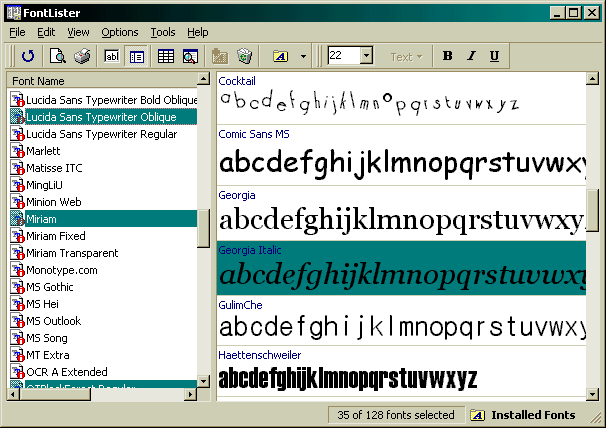
Key features
Browse fonts without installing them
You can look through fonts stored on CDs or in any folder using the Fonts in a Folder view. The view modes also cover screen, printer and installed fonts.
Install or remove fonts in one step
Pick the fonts you want, then use the Edit menu to install or delete them. Deleted fonts go to the Recycle Bin, so a mistake can be undone. You can also turn off the delete confirmation in the Options menu.
Test your own paragraph in every font
The author built it to try a full paragraph of text in every installed font. Edit mode shows one font at a time. Compare mode uses the first line of the edit-mode text as its sample. You can also import a text file as your default sample.
Print complete font samples
FontLister prints complete samples of all fonts, including ones loaded from CDs. You can set a custom header and footer and the margins, and there is a print preview for building "font books". Later versions add character glyph inspectors and handle both ATM and TTF formats.
Who it's for
It suits anyone with a large font collection who wants to compare typefaces quickly. That includes web designers choosing fonts for a site, which is what the author originally used it for.
Pros and cons
- Pro: Previews uninstalled fonts straight from a CD or folder.
- Pro: Low price and a small download.
- Pro: Detailed printing options.
- Con: Some fonts may print with a default font like Arial unless you tell your printer to print TrueType as graphics.
- Con: Badly made fonts, typically those bundled with HP printers, can make it lock up.
- Con: Older toolbar images may go missing without an updated COMCTL32.DLL.
FAQs
How do I install fonts with it?
Choose Fonts in a Folder from the View menu, browse to the directory and select the fonts. Then use Install font in the Edit menu.
How do I change the sample text in compare mode?
Switch to edit mode and write your sample on the first line of the text window. Then switch back to compare mode.
Why do some fonts print wrongly?
If a font falls back to a default such as Arial, enable Print TrueType as graphics in your printer's properties.
Why doesn't Refresh reload my fonts?
Refresh only redraws the windows. To reload the list, click the checked mode in the View menu.
System requirements
Runs on Windows 95, 98, ME, NT4, 2000, XP, 2003, Vista, 7 and 8. The download is about 1.1 MB.