You have a recording with a dead stretch at the start, a cough in the middle and a volume that is too quiet. Opening a full studio suite to fix that is overkill. Wave Editor is a small, free audio editor for Windows and macOS that handles those basic jobs quickly.
Quick facts
- Version: 5.0.1.1
- Platforms: Windows Vista, 7, 8, 10, 11 and macOS 12 to 26
- Price: free
- Downloads: 32-bit and 64-bit Windows builds, plus a macOS build
- Maximum file size: 2 GB
Key features
Select audio blocks while the track plays
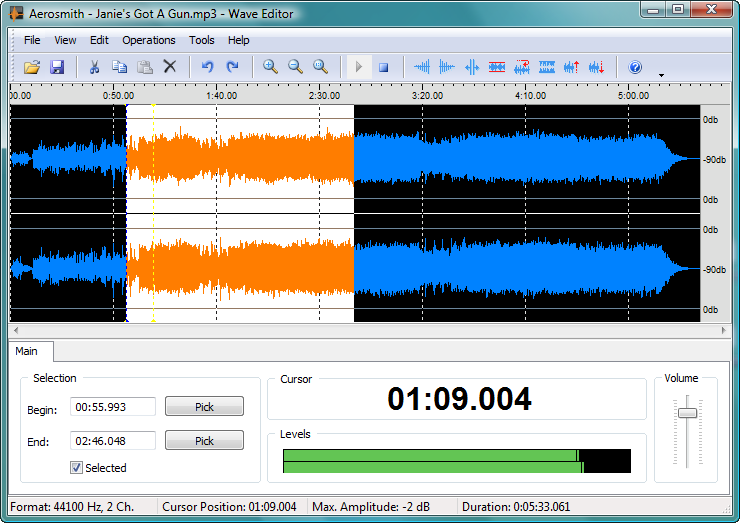
The main idea is simple selection of audio blocks during playback. You can mark the part you want without stopping to place the cursor.
Edit without overwriting the original
Non-destructive editing lets you make simulated changes to a track while the original file stays untouched.
The everyday operations are covered
You get cut, copy, paste and delete, insert silence, normalize, amplify with a peak limiter, fade in and out, reverse/invert, and save selected fragment. Unlimited undo and redo make it safe to experiment, and you can zoom in and out on the waveform.
Opens common formats and exports to WAV or MP3
It reads MP3, WMA and WAV, including PCM, ADPCM, GSM61, DSP, A-LAW and U-LAW. It supports 8-bit and 16-bit audio, mono or stereo, at sample rates from 8000 Hz to 96000 Hz. You export to WAV and MP3.
Extras that save a little time
It has an update checker, integration with other audio tools, and a multilingual interface. The site is offered in English, German, Dutch, Russian, Polish, Greek and Brazilian Portuguese.
Who it's for
It suits beginners who want to trim, clean up and export a recording without learning a complex program. It also suits anyone who wants a light editor for quick fixes. The vendor says it was built from the ground up to be easy to use and fast, not on a generic ActiveX engine.
Pros and cons
Pros
- Completely free, and the vendor says it has no spyware or adware.
- Simple interface aimed at speed.
- Non-destructive editing and unlimited undo.
- Windows 32-bit, 64-bit and macOS builds.
Cons
- Basic editing only. The vendor points to a separate advanced editor if you want more features.
- Limited to 8-bit and 16-bit audio, mono or stereo.
- Exports only to WAV and MP3.
What users say
"I have been incredibly pleased with how small, efficient and simple it is." (Testimonial on wave-editor.com)
FAQs
Is Wave Editor really free?
Yes. The vendor describes it as fully functional and completely free.
Which operating systems does it run on?
Windows Vista, 7, 8, 10 and 11, and macOS 12 and later.
Which formats can I export to?
WAV and MP3.
Can I edit large files?
The maximum audio file size is 2 gigabytes.
Will my original file be changed?
Not with non-destructive editing. Changes are simulated until you save.
System requirements
Windows Vista, 7, 8, 10 or 11 (32-bit or 64-bit), or macOS 12 and later.