You have a folder of Excel workbooks, and another system wants the data as XML. Opening each file and rebuilding it by hand is slow and easy to get wrong. Excel Export to XML Files is built for this one job: you pick the workbooks, decide how the XML should look, and export them in one go.
Quick facts
- Price: $29.95 (USD)
- Input files: .xls and .xlsx Excel documents
- Output: XML files
- Platforms: the vendor states its tools are supported on Windows 95/98/2000/XP/Vista
- Trial: a free evaluation version is available to try first
Key features
Convert several Excel files in one pass
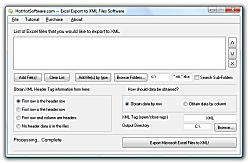
You select multiple Excel documents using a browse button, for both .xls and .xlsx files. You don't have to export one workbook at a time.
Shape the XML structure to fit your data
You choose which data counts as the header row, if there is one. You can also customize the opening and closing XML tags, so the output matches what the receiving system expects.
Export by row or by column
Depending on how your data is laid out in Excel, you may need to export by column instead of by row. You can switch the hierarchy type with a click.
Who it's for
It suits anyone who regularly turns spreadsheet data into XML, such as when feeding data to another application or a web project. It also fits you if you have a batch of workbooks to convert and don't want to repeat the same steps for each one.
Pros and cons
Pros
- Batch selection of many Excel files at once
- Control over header row, tag names and row or column hierarchy
- Handles both older .xls and newer .xlsx files
- A free trial lets you test it on your own data before you buy
Cons
- Windows only
- It does one thing: Excel to XML. If you need other formats, the vendor sells separate tools
- The listed Windows support is for older versions, up to Vista
FAQs
Can it convert more than one file at a time?
Yes. You can select multiple Excel documents and export them together.
Which Excel formats does it read?
It works with .xls and .xlsx files.
Can I change how the XML is laid out?
Yes. You can choose the header row, edit the opening and closing tags, and export by row or by column.
Can I try it before paying?
Yes. The vendor offers a free version to try first. The full version costs $29.95.
System requirements
The vendor states its tools are fully supported on Windows 95/98/2000/XP/Vista. The program works on Excel files, so you will have Excel documents to convert.