Stop hand-writing window.open code
You want a thumbnail to open the full-size image in a window that fits it exactly. Then you find that window.open options are easy to get wrong. Set one attribute and the others quietly switch off. Free PopUp Maker from Yaldex is a WYSIWYG tool that writes the HTML and JavaScript for you, so you can set up the window and copy the result.
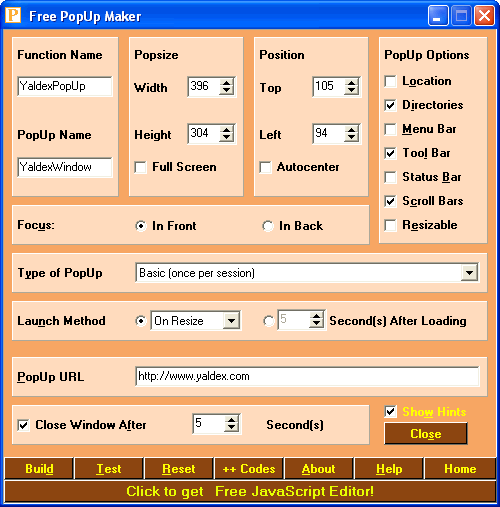
Quick facts
- Version: 5.2
- Platform: Windows desktop program
- Price: Free
- Download size: about 1.45 MB (ZIP)
Key features
Generate the code to open a URL in a new window
You pick the URL and the program produces the HTML and JavaScript that opens it in a new popup window. You don't need to remember the syntax.
Control the window's size, attributes and name
You can set the size, name, and whether the window is resizable, has a menu bar, and so on. A common use is opening a larger image when a visitor clicks a thumbnail. You can make the window the exact size of the image.
Mini HTML editor with syntax highlighting
This version includes a mini HTML editor with full HTML and JavaScript highlighting. You can check and tweak the generated code without leaving the program.
How window attributes behave
If you set no attributes, the popup opens with the size and attributes of the window that launched it. If you set any attribute, every attribute you haven't turned on is switched off. Set only a width of 640 and a height of 480, and you get a bare window with no toolbars, menu bar, resize handles or scroll bars.
Who it's for
It suits you if you build or maintain web pages by hand and want popup windows without writing the script yourself. It also works if you want to see how the window options affect the result.
Pros and cons
- Pro: Free to download, and the download is small.
- Pro: Visual setup of window properties instead of hand-coded options.
- Pro: Built-in editor with HTML and JavaScript highlighting.
- Con: It only generates popup-window code. It isn't a general web editor.
- Con: If you use the generated code on your site, the vendor asks you to place a link to its website on a page of your site.
- Con: It's a Windows desktop program, so you can't use it in a browser or on other systems.
FAQs
Is Free PopUp Maker really free?
Yes. The vendor offers it as a free ZIP download.
Can I make a popup fit an image exactly?
Yes. You set the window's width and height to match the image, so a thumbnail can open the larger picture in a window of the right size.
Why do my other window features disappear when I set a size?
That is how popup windows work. Once you set any attribute, the ones you haven't explicitly turned on are switched off.
Do I have to credit the vendor?
The vendor asks that you place a link to its website on a page of your site if you use code made with the program.
System requirements
It runs on Windows. The download is a ZIP file of about 1.45 MB.