Checking on a computer you can't sit in front of
You've got a family PC, or a few office machines, and you can't be there to see how they're used. Walking over, or connecting to each machine one by one, isn't practical. Realtime-Spy from Spytech takes a different route. You deploy it remotely, and then you read the activity logs from a web browser, wherever you happen to be.
Quick facts
- Vendor: Spytech Software and Design, Inc.
- Type: Cloud-based computer monitoring software
- Platforms: PC and Mac; also available for Android and Chromebook
- Log access: Any web browser, through your own Realtime-Spy Webspace
- Online demo: Available on the Realtime-Spy site
Key features
Watch activity from any browser, with no IP addresses to remember
You open your own Realtime-Spy Webspace and view logs from every machine you've set up. You don't connect directly to the remote PC. The logs are password protected.
Install it remotely instead of visiting each machine
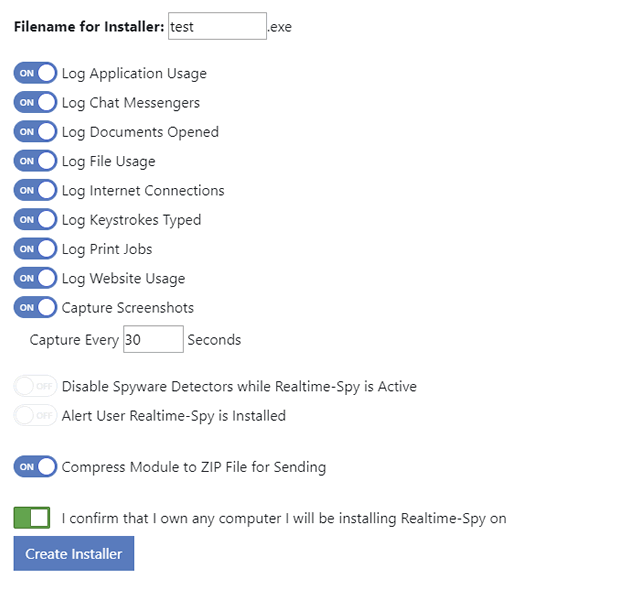
The software is remotely installable, so you can put it on a computer without physical access to it.
See what was typed, visited and run
It records keystrokes, websites, applications, chats, emails, and file system usage. It also captures screenshots of user activity.
Get a quick summary with Top 10 reports
Graphical Top 10 reports summarize the most popular activities, so you can scan the highlights before you read individual logs.
Who it's for
Parents who want to see how a child uses a home computer, and businesses that need to review activity on company machines. It suits anyone who needs to check logs away from the computer itself. Only monitor computers you own or are legally permitted to monitor.
Pros and cons
Pros
- Logs are viewable from any web browser.
- Remote installation saves trips to each machine.
- Covers keystrokes, screenshots, web, chat, email and file activity.
- Versions exist beyond Windows PCs: Mac, Android and Chromebook.
Cons
- Monitoring depends on legal permission, so you must have the right to monitor each device.
- Logs are stored online, so you rely on a cloud service rather than keeping everything local.
FAQs
Do I need to be at the computer to see its logs?
No. You view the logs from your own Realtime-Spy Webspace in a web browser.
Can I install it without touching the target machine?
Yes. Realtime-Spy is described as remotely installable.
What does it record?
Keystrokes, websites, applications, chats, emails, file system usage and screenshots.
Does it work on Mac or mobile?
The vendor says you can monitor a PC or Mac, and that it is also available for Android and Chromebook.
Can I try it first?
The vendor offers an online demo of the log viewer.