AKVIS Coloriage AI: Colorize Black-and-White Photos on Your Own Computer
AKVIS Coloriage AI is a Windows, macOS and Linux program that adds color to black-and-white photos, either automatically with a neural network or by hand with pencil strokes. It runs offline, suits family archive projects, and the Home license costs $75 once.
Most AI colorizers are web services: you upload a family photo, pay per image or per month, and take what you get. Coloriage AI does the work on your own computer, and when the AI guesses wrong about a dress or a car, the manual tools let you change it.
Quick facts
- Version: 16.0, released September 23, 2026
- Developer: AKVIS
- Platforms: Windows 10-11 (64-bit only), macOS 10.15 to macOS 27 (64-bit), Linux 64-bit (standalone only)
- Editions: standalone app, or a plugin for AliveColors, Adobe Photoshop, Corel PaintShop Pro and other editors
- Price: $75 Home, $90 Home Deluxe, $199 Business, all one-time
- License: never expires, covers 2 computers
- Trial: 10 days, all features, no registration
- What we checked: the license comparison table and requirements on the vendor site, the 64-bit Windows installer on the download server (54 MB, file dated September 23, 2026), and the price of all four licenses on the order page on November 6, 2026. We didn't install the program or colorize our own photos
Before you buy
The AI mode is on every license, so the $75 Home license does colorize automatically. What Home leaves out is the Variations of Colorization feature, the Multicolor Pencil and the Tuning Brush. Home Deluxe adds all three for $15 more, plus both the plugin and the standalone app.
Batch processing works in AI mode only. Home licenses are for personal use, so a paid colorizing service needs Business at $199. AKVIS recommends 16 GB of RAM and a discrete graphics card, and Windows 7 and 8 are not supported.
Download Free TrialBuy Now
Overview
The program has two modes. In AI mode you press Run and a neural network colors the whole picture. You can then adjust Color Distribution and Saturation and touch up with brushes. In Classic mode you draw strokes of color on each area, like a coloring book, and the program finds the object's edges and fits the color to the gray tones underneath.
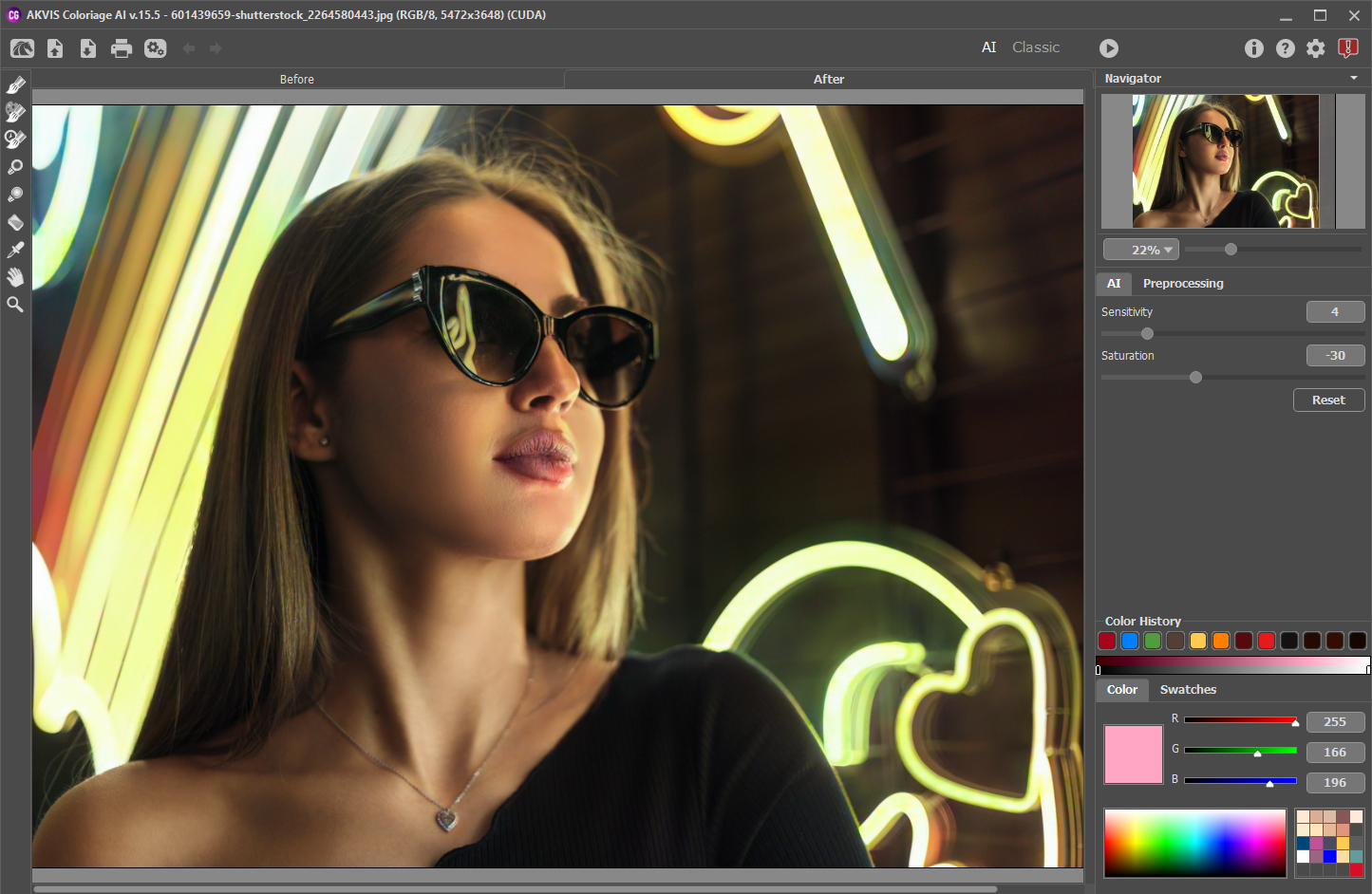
AKVIS Coloriage AI 16 in AI mode, with the Color Distribution and Saturation sliders on the right.
Version 16 retrained the colorization model for old photographs, with AKVIS naming better handling of faded details, uneven tones, film grain and scratches, and fewer artifacts on damaged images.
Features
AI colorization that works offline
AKVIS Coloriage AI colors a photo with one click using a neural network, with no internet connection needed, in the trial as well as under the license.
Classic mode with color strokes
AKVIS Coloriage AI still includes manual coloring. The Color Library offers skin, sky, greenery and other realistic color sets, and you can pick colors from a sample photo. You can also save and reload your strokes.
Brushes for fixing the result
AKVIS Coloriage AI has Recolor, History, Darken, Lighten and Saturation brushes on all licenses, and these work in both modes. The Tuning Brush needs Home Deluxe or Business.
Variations of Colorization
AKVIS Coloriage AI on Home Deluxe and Business can generate several colorings of one image in a strip along the bottom of the window, so you can pick a version instead of reworking one.

Variations of Colorization: the same car in several colors along the bottom of the window. This feature needs Home Deluxe or Business.
Color replacement and batch processing
AKVIS Coloriage AI also changes colors in existing color photos, such as a car or hair color. In AI mode, it can color a folder of images automatically, including the frames of a black-and-white film.
Benefits
You keep control and privacy together: nothing is uploaded, and no result is final. For a family project, that matters more than raw speed, because the person who remembers the color of a coat can correct it. Paying once also beats per-image pricing if you have hundreds of scans.
Real-World Uses
- A family gift: color a grandmother's school photo for a birthday.
- Genealogy books: process a folder of scans in AI mode and fix the important ones by hand.
- Local history projects: bring old town photographs to life for an exhibit. A museum selling prints would need Business.
- Trying out colors: see a car, a wall or your hair in a new color.
Who It's For, and Who Should Skip It
AKVIS Coloriage AI suits family historians and hobby restorers who want offline work and the option of manual control.
Skip it if you have one or two photos, since a free online colorizer will be quicker. Skip it if you want damage repaired too: Coloriage adds color but does not remove scratches, so you would want Retoucher AI as well. AKVIS sells the two together as the Restoration Bundle.
Usage Guide
- Download the installer and run it. The Windows setup contains the standalone and the plugin.
- Open a black-and-white photo in the standalone app, or call the plugin from your editor.
- In AI mode press Run, then adjust Color Distribution and Saturation.
- Touch up wrong areas with the Recolor Brush, or switch to Classic mode and draw strokes.
- Save the picture, and use batch processing for the rest of the folder.
Where it falls short
- Classic mode takes learning. TopTen AI wrote that the software "isn't particularly easy to work with", though that review dates from January 2021, before the current AI mode.
- AI colors are a guess. A neural network can't know the real color of a dress in 1950, so expect to correct the details that matter.
- Home has no Tuning Brush. This is the brush AKVIS provides for adjusting an object's color and shadows, which is why Home Deluxe is the better fit.
- Batch is AI only. Classic mode work is one image at a time.
What Users Say
We found little independent review coverage of the current AI version, and no sizeable set of reviews on the big software review sites. The notes below come from published roundups and from the vendor's testimonials page.
Reviewers
"The software isn't particularly easy to work with but once you figure it out, you'll be able to do a lot more with it than just recolor black and white images." TopTen AI, January 2021
"As you play with the brush strokes, the software will automatically identify the edges and borders of the object." TopTen AI, January 2021
Users, on the AKVIS testimonials page
"AKVIS Coloriage is a very good computer program, I use it quite often and I am very satisfied." Lech Chlebowicz
"I did all the colors with Akvis Coloriage." Richard Prosek, on coloring his old family photos
Users are happiest with results on family photos. The common caution is the learning curve of the manual mode. Testimonials are chosen by the vendor, and we found no independent test of version 16.
Editions and Pricing
| License | Price at checkout | Edition | Use | What you get |
|---|
| Home Standalone | $75 | Standalone app only | Personal, non-commercial | AI and Classic modes, no PSD |
| Home Plugin | $75 | Plugin only | Personal, non-commercial | AI and Classic modes, PSD |
| Home Deluxe | $90 | Plugin and standalone | Personal, non-commercial | Adds Variations, Tuning Brush, Multicolor Pencil |
| Business | $199 | Plugin and standalone | Commercial use allowed | Everything in Deluxe |
Buy Home Standalone ($75)Buy Home Plugin ($75)Buy Home Deluxe ($90)Buy Business ($199)
FAQs
Does AKVIS Coloriage AI need an internet connection?
No. AKVIS Coloriage AI runs its neural network on your computer, so it works offline, during the trial and after you buy.
Is the AI mode of AKVIS Coloriage AI in the Home license?
Yes. AKVIS Coloriage AI includes AI mode and Classic mode on every license. Home leaves out Variations, the Tuning Brush and the Multicolor Pencil.
Can AKVIS Coloriage AI change colors in a color photo?
Yes. AKVIS Coloriage AI can replace colors in color photos as well as colorize black-and-white ones.
Is AKVIS Coloriage AI a subscription?
No, AKVIS Coloriage AI is a one-time purchase and the license never expires. Newer versions after your update period need 1 Year of Updates at $19.95.
How many PCs does an AKVIS Coloriage AI license cover?
Each AKVIS Coloriage AI license registers on 2 computers, which can run different operating systems.
Will AKVIS Coloriage AI run on an older PC?
AKVIS Coloriage AI needs 64-bit Windows 10 or 11 and at least 8 GB of RAM. AKVIS recommends 16 GB and a discrete AMD or NVIDIA card with 3 GB or more of memory.
System Requirements
- Windows: Windows 10-11, 64-bit only. Minimum Core Duo, 8 GB RAM, 8 GB disk and a DirectX 9+ graphics card. Recommended Core i5, 16 GB RAM, 10 GB disk and a discrete AMD or NVIDIA card (DirectX 12+) with 3 GB or more of memory.
- macOS: 10.15 Catalina to macOS 27, 64-bit. Minimum Intel, 8 GB RAM and 8 GB disk, recommended Intel or M1, 16 GB RAM and 10 GB disk.
- Linux: 64-bit Debian, Ubuntu, Red Hat, CentOS, Fedora or openSUSE, standalone only. Minimum Core i3 and 8 GB RAM, recommended Core i5 and 16 GB RAM.
- Plugin: needs a photo editor that supports plugins.
Conclusion
AKVIS Coloriage AI is worth it for a serious family archive, especially at Home Deluxe for $90. The one reason to buy is that it combines one-click AI with real manual control, offline, for a one-time price. The main reason not to is a small job, where a free web tool is simpler. The 10-day trial includes the full AI mode, so test it on your own old photos first.
Download Free TrialBuy Now