Stuck on a game because you can't afford the next upgrade?
You've spent an hour grinding for money, ammunition or resources, and the game still won't let you move on. ArtMoney is a game memory editor for Windows. It finds the value the game uses for that number, so you can change it or freeze it.
Quick facts
- Developer: System SoftLab
- Platform: Windows, with 32-bit and 64-bit editions
- Free edition: ArtMoney SE (freeware)
- Paid edition: ArtMoney PRO, a one-time payment of $24.90 for one user
- Updates: free updates for PRO
Key features
Find a value by exact, unknown or coded search
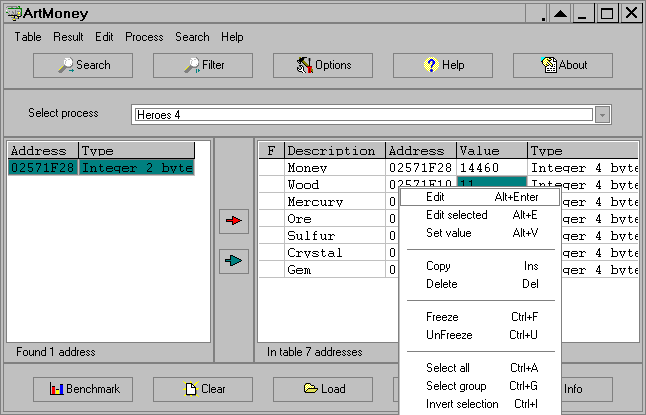
If your character has 1,431 dollars, you search for that number. ArtMoney lists the memory addresses that hold it. When you don't know the number, you can run an unknown-value search or a coded-value search. You then filter the results until one address is left.
Edit or freeze the address you found
Once you've found the address, you can change the value or freeze it. Despite the name, it works on any number in a game: money, bullets, health points or resources.
Scan memory, files and folders
The scanner isn't limited to running programs. It can also search files and folders.
Advanced tools for experienced users
If you want to go further, ArtMoney supports pointers, structures, formulas, a Memory Editor and a debugger.
Ready-made tables and online documentation
The vendor publishes tables for games, plus a complete online manual that covers search methods and the advanced features. Language plug-ins and emulator options are available as separate downloads.
Who it's for
It suits you if you play single-player PC games and want to tweak numbers in them. It also suits you if you're curious how games store their data. The basic exact-value search is easy to learn. Pointers and structures take more patience.
Pros and cons
Pros
- The SE edition is free.
- 32-bit and 64-bit builds are both offered.
- It offers deeper tools (pointers, formulas, debugger) when simple searches aren't enough.
- PRO is a one-time payment with free updates.
Cons
- Full technical support by email and the extra features come only with PRO.
- Some searches return hundreds of addresses, so you'll need several filtering passes.
- The vendor warns that you should follow the license and the rules of the games and services you use it with. Online games may not allow memory editing.
FAQs
Is ArtMoney free?
Yes. The SE edition is freeware. PRO is the paid edition.
Does it only work for money values?
No. It can change any quantity in a game, including bullets and health points.
What's the difference between SE and PRO?
PRO adds advanced memory-search and analysis features. It also includes full technical support by email.
Is there a version for 64-bit Windows?
Yes. Both 32-bit and 64-bit editions are available.
Does PRO need paying for again with each update?
No. Updates of the v8 PRO edition are free.
System requirements
- Windows 7, Windows 8, Windows 10, Windows 11 or a compatible Windows version.
- 32-bit and 64-bit editions available.