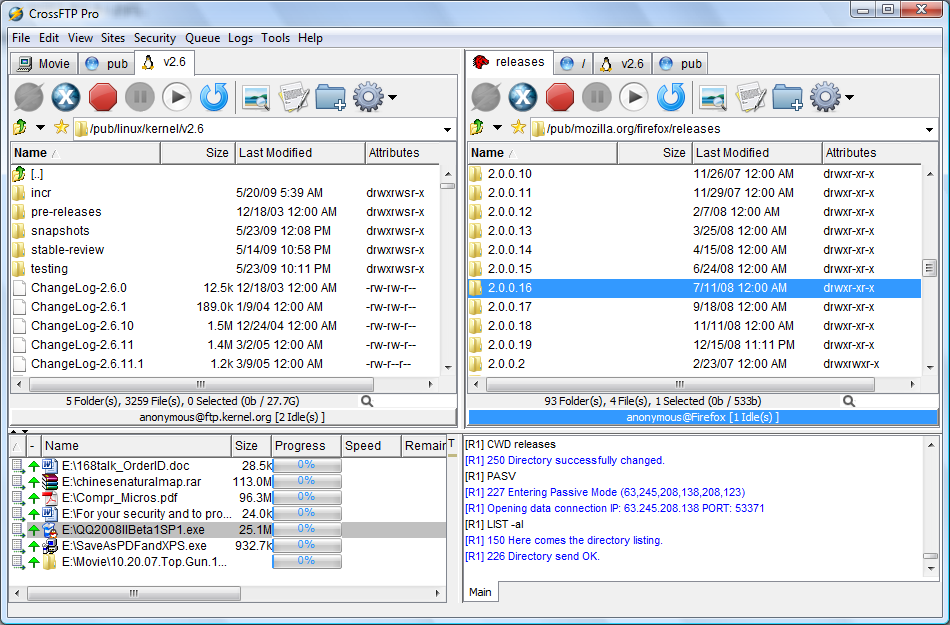
You have files on a web host, a bucket in Amazon S3, and maybe a second server to copy things to, and each one seems to want its own tool. CrossFTP puts FTP, SFTP, WebDAV and cloud storage in one window with local files on the left and remote files on the right.
Quick facts
- Latest version: 2.01.1
- Platforms: Windows, Mac, Linux
- Price: a free edition is available. Pro and Enterprise editions require a license.
- Requires: Java
Key features
Manage FTP and cloud storage from one familiar layout
The interface is the traditional two-pane layout. The free edition covers FTP, WebDAV, Amazon S3, Amazon Glacier, Microsoft Azure, Google storage and OpenStack Swift. You can keep many accounts in a site manager.
Work with several locations at once and browse archives
You get multi-tab navigation, archive browsing (zip, tar.gz and others) with extraction and compression, and fast filtering by masks. It also has Unicode support for international sites and Bonjour service discovery.
Keep long transfers going without babysitting
Batch transfer, auto-reconnect and anti-idle keep queues moving. Transfer compression (Mode Z) is supported, and site passwords are encrypted. You can add a master password.
Pro adds sync, secure protocols and faster transfers
The paid editions add SFTP, FTPS (TLS/SSL), FXP site-to-site transfers, directory synchronization, scheduling, multipart download, and editing remote files in any app. Enterprise includes CrossFTP Commander, a command-line tool for sync, transfer and backup on Linux, Solaris, Windows and Mac.
Who it's for
It suits you if you manage a few web hosts or S3 buckets and want one tool for them. The free edition covers everyday transfers. If you need SFTP, scheduled syncs or FXP, you will need Pro.
Pros and cons
- Pro: A free edition covers many storage services.
- Pro: It runs on Windows, Mac and Linux.
- Pro: Pro licenses are a one-time purchase.
- Con: SFTP, FTPS, sync and multipart download are Pro-only.
- Con: One AlternativeTo user finds the interface not great and misses CHMOD functions.
What users say
"There aren't all that many options for a graphical S3 browser; this is the best one I have found." (AlternativeTo)
FAQs
Is CrossFTP free?
Yes. The standard edition is free. Pro and Enterprise require a license.
Does it work with Amazon S3?
Yes. It supports Amazon S3 and Glacier, along with Azure, Google storage and OpenStack Swift.
Which operating systems does it run on?
Windows, Mac and Linux.
Can it synchronize folders?
Directory synchronization and scheduling are part of CrossFTP Pro.
System requirements
The listing gives Java as the requirement. The program runs on Windows, Mac and Linux.