Atomic Mail Verifier: Desktop Email List Cleaning for a One-Time $69.85
Atomic Mail Verifier is a $69.85 Windows program from AtomPark Software that finds dead addresses in a mailing list before you send to it. It's for small businesses and email marketers who want to clean lists on their own PC for a one-time price and not pay per address.
A list that's a few years old is full of people who changed jobs and domains that no longer exist. Send to it and the bounces pile up, which can hurt how receiving servers treat your later mail. Atomic Mail Verifier checks each address in stages and sorts the list into valid, invalid and unchecked, so you can export only the ones worth keeping.
Quick facts
- Version: 10.14
- Developer: AtomPark Software
- Platform: Windows 7, 8, 10 and 11
- Price: $69.85 one-time, per PC
- Trial: 7 days, 50 addresses, no saving of results
- Updates: free upgrades for one year from purchase
- Needs: outgoing port 25 for the mailbox check
What we checked: the price of $69.85 and a one-time, non-renewing term on the order page, plus version 10.14 and the trial limits on the vendor's download page, all on November 5, 2026. The installer now sits behind an email form, so we didn't download or run it, and we didn't test its accuracy on a real list.
Before you buy
- Check port 25 first. The mailbox step talks directly to the receiving mail server over port 25. Many home and office internet connections block it, and without it only the syntax and domain checks are of much use.
- The trial needs your email address. The download page asks for one before the installer comes through.
- Expect an antivirus warning. AtomPark says the program contains nothing malicious "even if your antivirus software says otherwise", and it needs administrator rights to install and run.
- Refunds are limited. Refunds are for software that doesn't work and can't be fixed, and only within 30 days. A product that works as described can be refused.
- Use it on lists you have permission to mail. Cleaning a list doesn't make bought or scraped addresses legal or welcome.
Download Free TrialBuy Now
Overview
Atomic Mail Verifier is a desktop app, not a web service. You load your list, choose how deep to check, and the program does the work from your own computer and internet connection. There's no per-address charge, and your list doesn't go to a third-party verification service. The trade-off is that the results depend on your connection and on how the receiving servers respond.
AtomPark is plain about that limit. Its page says "there can be no 100% correct email verification because the software relies on responses of the receiving SMTP servers and they sometimes block verification attempts or give incorrect replies."
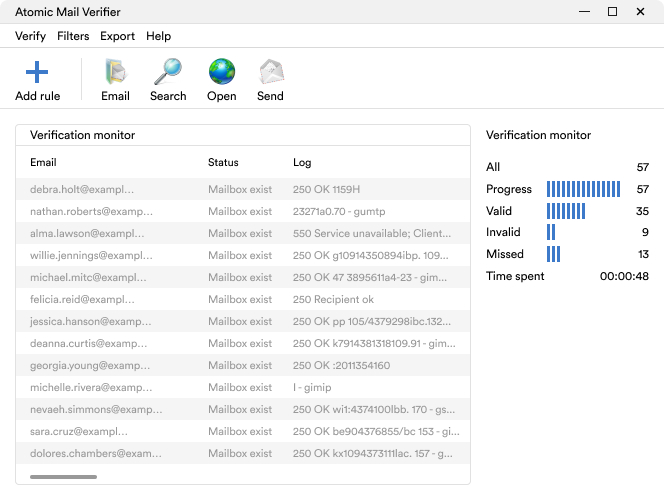
AtomPark's image of the verification monitor: a status and server reply for each address, with totals for valid, invalid and missed on the right.
Features
Check addresses in four steps
Atomic Mail Verifier checks syntax, then whether the domain exists, then asks the domain's SMTP server whether the mailbox exists, and finally runs a catch-all test. For the catch-all test it tries a random address at the same domain. If the server accepts that too, the real address is flagged, since that server would say yes to anything. AtomPark advises running only the first two steps on very large lists, because the mailbox check takes much longer.
Advanced validation and domain rules
Atomic Mail Verifier has a standard mode and an advanced algorithm that you switch on for the domains you name. Domain rules let you force a default status, such as Always Correct, Always Incorrect or Always Missed, for a domain. That helps with a provider you already know gives unreliable answers. Add rules before you start the check.
Detailed statuses, not just yes or no
Atomic Mail Verifier records why an address failed, such as a connection error or a mailbox that doesn't exist on a real domain. You can keep only the addresses with the status you want, or run the unclear ones again later instead of throwing them away.
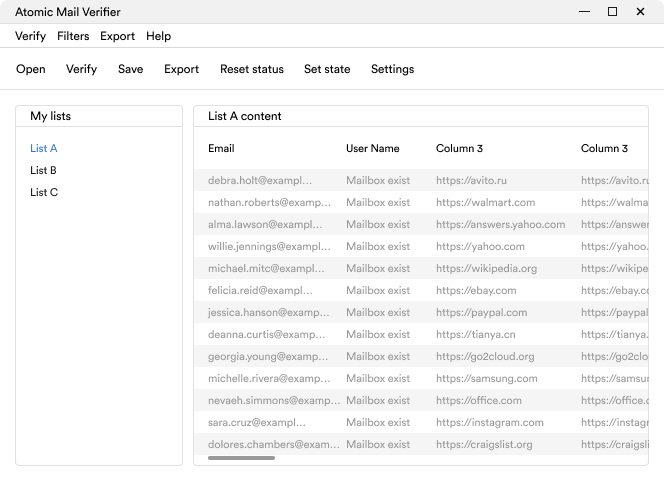
AtomPark's image of the list view, with separate lists on the left and status and extra columns on the right.
Import and export lists
Atomic Mail Verifier imports from the clipboard, DOC, DOCX, TXT, XLS and XLSX files and the Outlook Address Book. It saves verified addresses to Word, Excel, OpenOffice, text files or the clipboard. An Export Wizard writes all statuses with column names to a new file when you want the full picture.
Works with the other Atomic tools
Atomic Mail Verifier takes lists directly from AtomPark's extractors and passes checked addresses straight to Atomic Mail Sender and Atomic List Manager without temporary files. If you don't use those tools, this adds nothing for you.
Benefits
- Fewer bounces. Removing addresses that can't receive mail is the most direct way to bring a bounce rate down.
- Predictable cost. You pay once, which suits people who clean large lists a few times a year.
- Your list stays on your PC. That matters if you'd rather not upload customer addresses to an outside service.
Real-World Uses
- A small shop cleans a five-year-old customer list before its first newsletter in a long time.
- A marketer runs quick syntax and domain checks on a very large list, then does the full mailbox check on the part that matters.
- A recruiter or agency keeps an old contact database usable by checking it before each campaign.
- A team on Atomic Mail Sender verifies a list and sends it straight to the mailer.
Who It's For, and Who Should Skip It
Atomic Mail Verifier fits Windows users who clean lists regularly, can open port 25 or run it from a connection that allows it, and prefer a one-time price.
Skip it if you're on a Mac, or on a network where port 25 is blocked and you can't change that. Skip it too if you need the highest accuracy on large webmail lists, because big providers often refuse or fake these checks. A paid online verification service with its own sending reputation is a better fit there, and it needs no setup. If you only have a few hundred addresses to check once, a pay-as-you-go service will also cost less.
Usage Guide
- Fill in the form on the download page, then install with administrator rights.
- Open your list from a file, the clipboard or Outlook.
- In Settings, choose which checks to run. Use syntax and domain only for a very large first pass.
- Add any domain rules, then start the verification.
- Watch the monitor for valid, invalid and missed counts.
- Rerun the unclear addresses, then export the good ones.
Where it falls short
- It can't be fully accurate. Servers may block the check or reply falsely, so "valid" means likely valid.
- Catch-all domains stay unknown. The program flags them, and AtomPark advises avoiding them in campaigns unless necessary.
- Port 25 setup can be a hurdle. A SnapFiles reviewer in Brazil needed support to get around a block.
- Long lists are slow at the mailbox step. That's why AtomPark suggests skipping it on huge lists.
- Updates end after a year. The key keeps working, but newer versions after the first year mean paying for an upgrade.
- Its reviews are scarce and the product pages disagree on the details. The product page still shows 10.11 in places, and mentions both three-step and four-step checks.
What Users Say
Capterra and G2
Capterra shows 4.6 out of 5 from 17 users under the name Atomic Email Verifier. One reviewer there says other verifiers they tried weren't nearly as accurate, and another calls it an easy way to check a list in a few clicks. A more cautious reviewer says it doesn't verify every address and double-checks results with another service. On G2, one reviewer found verification easy, while another gave it 2 out of 5 and wrote that the vendor doesn't tell you everything.
SnapFiles
A 5-star review of version 9.10 from hackstock427, December 21, 2016:
- "Not that easy to set if in Brazil as we have port 25 blocked here."
- "Tech support was great and they provided us with the info on how to overgo the blocking issue of this kind."
- "Pros: cheap (as per the software of this kind), precise and accurate"
- "Cons: not easy to set in some countries, may seem not to be fast enough - but precision takes time:)"
Testimonials on AtomPark's site
These are chosen by the vendor, so read them that way.
- "Very user-friendly platform. Fast and accurate verification of bulk email list. Strongly recommended for email marketers!" Jeremy
- "Tried the demo. Bought the software. Works great." David Lincenberg, ICFS LLC
- "Atomic mail verifier is very useful for me it save lots of my time in cleaning and maintaining a good data base for our site." aang, go4jobs.net
The pattern: people like the price and how simple it is. The doubts are about accuracy on every address and getting past a port 25 block. There are only a handful of independent reviews, and several are old.
Comparisons
Desktop verifier vs online verification service
Atomic Mail Verifier charges once and keeps your list on your PC, but it depends on your connection and port 25. Online services charge per address or per month, and they handle the mail server side for you. Many users could reasonably pay for either, so the deciding factor is how often you clean lists and whether port 25 is open.
Atomic Mail Verifier vs Atomic List Manager
Atomic Mail Verifier tests whether addresses work. Atomic List Manager, at $39.85, is for sorting and managing contact lists. They do different jobs and work together.
FAQs
Does Atomic Mail Verifier work without port 25?
Atomic Mail Verifier still runs syntax and domain checks without port 25, but the mailbox check that gives the most useful answer needs it open.
Can I use one Atomic Mail Verifier license on two PCs?
No, one license covers one machine, and AtomPark sells extra keys with volume discounts. You can move it to a new PC if you uninstall it from the old one.
Is Atomic Mail Verifier a subscription?
No. The order page shows a one-time payment with no renewal. Free upgrades run for one year from purchase.
Does Atomic Mail Verifier run on a Mac?
Atomic Mail Verifier is a Windows program. AtomPark's site has a note on installing it on macOS, but we didn't check how that works, so a Mac user should test the trial first.
Can Atomic Mail Verifier check Gmail and Yahoo addresses reliably?
Atomic Mail Verifier asks each provider's server, and AtomPark's own example shows a yahoo.com server accepting a made-up address. Treat results from large providers with some caution.
Why won't my old Atomic Mail Verifier key activate?
AtomPark suggests adding the program to your antivirus exceptions and checking that the key is for that product and for a version that was current when you bought it.
System Requirements
- Windows 7, 8, 10 or 11
- Administrator rights to install and run
- Internet connection, with outgoing port 25 open for the mailbox check
Conclusion
Atomic Mail Verifier is worth $69.85 if you clean lists several times a year, can use port 25, and want to avoid per-address fees. The one reason to buy it is a low, one-time price for a tool that does the job from your own PC. The main reason not to is that the most useful check depends on your network and on servers that don't always tell the truth. Run the 50-address trial on addresses you already know the status of, and you'll see how far you can trust it on your connection.
Download Free TrialBuy Now