You have a few hundred machines, a spreadsheet that was out of date the day you made it, and a manager asking how many PCs need replacing next year. Walking from desk to desk is not an option. Total Network Inventory (TNI) collects that data over the network from one computer.
Quick facts
- Version: 6.8.6
- Platform: Windows
- Trial: free for 30 days
- Editions: Standard and Professional
- Licensing: priced by number of nodes; perpetual license for the current version, one year of updates included, unlimited users and installations
Key features
Scan Windows, macOS, Linux, FreeBSD and ESXi without agents
You only need an administrator password. Nothing is installed on the remote machines. You can scan single devices, an IP range, or your whole Active Directory structure. SNMP-capable network devices can be scanned too.
Keep inventory in a simple folder-based storage
Each scanned computer is saved as a separate file in a standard folder, and each takes only a few dozen kilobytes. You can back the folder up, move it, or share it with teammates. You can also attach notes, inventory labels, price and purchase date to every asset.
Build table reports and export them
Combine any number of computers and categories in one report, then export to XLSX, PDF, RTF, CSV, HTML and other formats. The scheduler can generate reports on a timetable and send them by email or save them to an FTP server.
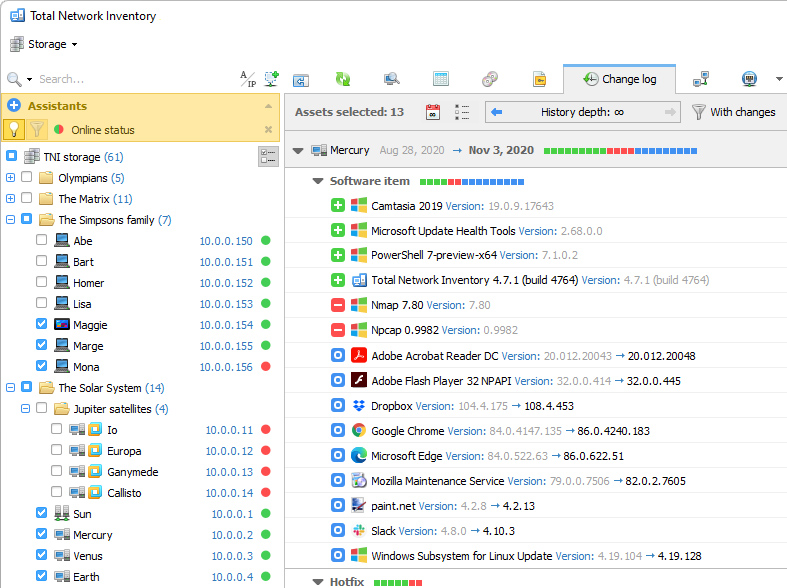
See what changed between scans
Every rescan creates a snapshot, and the Change Log compares snapshots. You see software installed, updated or removed, hotfixes applied, service changes and hardware changes.
Get warned about temperature, fans and power on Windows PCs
Scans check hardware sensors, and Alerts and Assistants flag problems such as an overheating processor, low disk space or a failing fan. The Professional edition adds a Sensors mode for analyzing statistics over a chosen period.
Track assets with barcodes and draw a network map
TNI supports QR, PDF417 and Code 93 barcodes. You can generate them from templates and search by scanning one. The Professional edition includes a network map editor with custom shapes, backgrounds and link types.
Schedule scans and Active Directory sync
Set up unlimited scheduled tasks for scanning, exporting and reporting, with daily, weekly or monthly triggers. AD synchronization can run on a schedule as well.
Who it's for
It suits IT admins in small and mid-sized companies, schools and clinics who need a current list of hardware and software. It also suits MSPs and IT consultants, since there is an MSP license for inventorying clients' computers.
Pros and cons
Pros
- No agents to install on scanned machines
- Covers Windows, macOS, Linux, FreeBSD, ESXi and SNMP devices
- Plain folder storage that is easy to back up and share
- Perpetual license with unlimited users and installations
- 30-day free trial
Cons
- The program itself runs on Windows only
- Pricing depends on the number of nodes, so cost grows with your network
- The network map, sensor statistics analysis and software accounting features need the Professional edition
- Updates after the first year cost extra (30% of the license price, optional)
FAQs
Do I need to install anything on the computers I scan?
No. You install TNI on one computer and supply an administrator password for the targets.
What counts as a node?
A node is any computer, server, network printer, router or other device with an IP address. Custom assets you add by hand are not counted.
Can I try it before buying?
Yes. You get a free 30-day trial.
What happens after the first year?
The license is perpetual for the current version and includes one year of updates. Later updates cost 30% of the license price, and buying them is not mandatory.
Can several people use the same data?
Yes. Share the storage folder with your team, and several users can work with the data from different computers.
System requirements
TNI 6 runs on Windows. It can scan Windows, macOS, Linux, FreeBSD and VMware ESXi systems.