Keeping a child's computer time under control
You tell your child the game session ends at nine, and at ten the screen is still glowing. Or you leave for work and have no idea how many hours the PC ran. User Time Control Center handles this on the computer itself. You set the rules once, and the program applies them.
Quick facts
- Product: User Time Control Center, from 1st Security Software Center
- Platform: Windows
- Interface: multiuser and multilanguage
- Trial: a downloadable zip package is offered
Key features
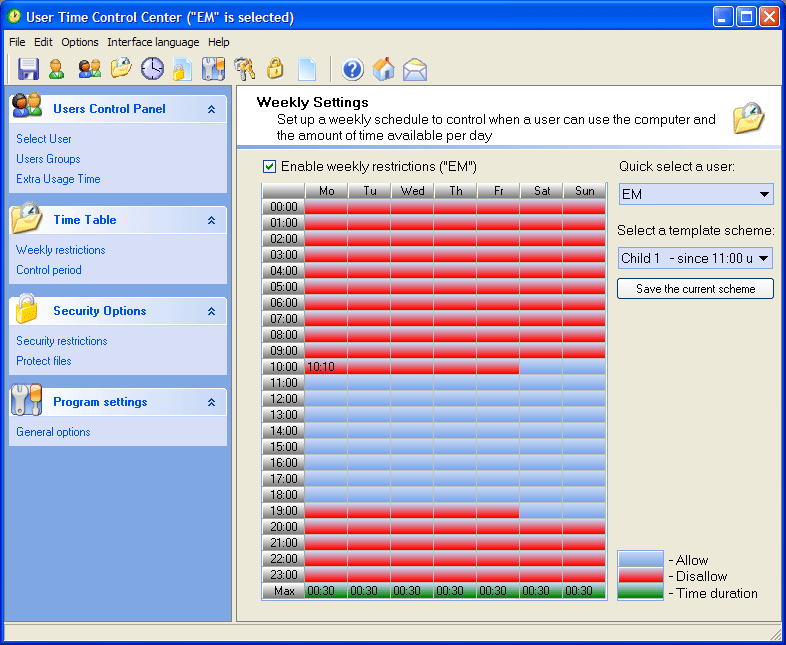
A weekly schedule for each user or group
You set when a user can use the computer and how much time is available per day. You can build an individual time table for each user or group, or start from predefined time tables. The program logs your child out automatically when it is time for lights out.
Block the PC for a whole period of time
You can prevent computer use until a date, after a date or between two dates. This suits holidays, exam weeks or a punishment that lasts several days.
Security restrictions for the selected user
You can disable the Task Manager and stop the user changing the system time. You can also block user account management and the Add/Remove Programs applet in Control Panel. Setup.exe and install.exe files are hidden to prevent installing applications.
Hide folders from kids
The internal Folder Guard system hides any folders you choose. The file guard also protects the program's own files, so an unwanted person can't delete it.
Extra time when a child has earned it
You can give the selected user an additional amount of time without rewriting the schedule.
A log and a password
The program records all actions to a log file, so you can see when and for how long your child used the PC. Password control stops other users changing settings or uninstalling the product. You can also define users who may use the computer without any limits.
Who it's for
It is aimed at parents who share one Windows PC with children and want hard limits on when and how long it runs. It also suits anyone who wants to keep the computer unusable while they are asleep or away.
Pros and cons
- Pro: per-user and per-group schedules, with daily hour limits.
- Pro: date-range blocking and extra-time grants.
- Pro: password protection and file guarding make it harder to remove.
- Con: it is a Windows-only tool.
- Con: the vendor's site shows an older, dated-looking interface and no price on the product page.
FAQs
Can I let one user skip the limits?
Yes. You can define users who are allowed to use the computer without any limits.
Can I see what my child did?
The program records all actions to a log file, showing when and how much the PC was used.
Can my child uninstall it?
Password control prevents unauthorized users from changing settings or uninstalling the product.
Can I give extra time as a reward?
Yes. The extra usage time feature lets you add time for the selected user.
System requirements
The listing states no special requirements. It runs on Windows, including Windows XP, 2000, 2003 and Vista.