Your USB device works on one machine and fails on another, or your driver sends something the device won't answer, and you can't see what is actually crossing the bus. Advanced USB Port Monitor from AGG Software captures that traffic in software, so you can read it packet by packet without buying extra hardware.
Quick facts
- Version: 2.8.2 build 1007
- Platforms: Windows 11, 10, 8.1, 8, 7, Vista, XP and 2000, plus Windows Server 2025 down to 2003 (x86 and x64)
- Price: Professional 70 USD, Standard 55 USD, Lite 20 USD; an unlimited site license is 690 USD
- Trial: The trial can't save your work and runs for thirty minutes before you must restart the application
- Licensing: One license per computer. It never expires, and free updates last 1 year
What it does
The program works as a USB sniffer. It captures the data exchanged between other programs and an external device. It shows High (480Mbps), Full (12Mbps) and Low (1.5Mbps) speed devices. You install only the application on the PC you already use. No extra hardware or software is needed.
Key features
Watch several devices live at the same moment
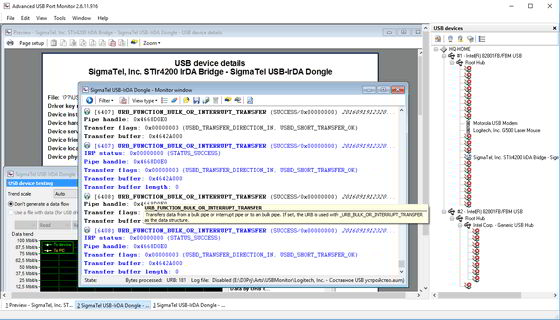
With real-time monitoring, logging and viewing, you can follow traffic for multiple USB devices at once as the data flows. The packets appear in a chronological list with the peripheral's address and endpoint number.
See URB packets and PnP and power IRPs, at the detail level you pick
You can view URB packets of the USB protocol, along with IRPs of the PnP system and the power management system. You choose how much detail to see, and tooltips explain keywords in the monitor window. The decoded information refers back to the USB specification.
Cut the noise with filters and color coding
Configurable filtering automatically excludes non-essential and redundant packets. Color coding makes the packets you care about easier to spot.
Measure how fast your device really moves data
The performance monitor window shows the parameters of the data flow your device generates or can generate. Real-time statistics let you check the bus status before you read the captured packets.
Browse a detailed device tree and print the report
The USB devices tree lets you explore devices and related devices such as USB drives. For each device you can see interfaces, endpoints, registry information and class information. You can print the details for any device, URB or IRP.
Save workspaces and export to PDF, XML or Word
You can save custom workspaces and keep your settings between sessions. Reports and data can be exported to PDF, XML and Microsoft Word for post-processing.
Under the hood it uses kernel driver technology with support for WDM, WMI, Power Management and PNP. It is meant to work with fast devices such as USB disks and cameras.
Who it's for
It suits USB hardware and software developers who need to test a device during development. It also suits advanced users who want to find out why a peripheral or its driver misbehaves. You can use it to display the packets sent, decode descriptors, detect errors in peripherals or drivers, and measure device and driver performance.
Getting started
- Install the program and restart your PC.
- Connect your USB device to a free port.
- Start the program and choose File → New.
- Follow the wizard to create a monitor window, then capture data.
Pros and cons
Pros
- Software-only capture, with no analyzer hardware to buy
- Covers low, full and high speed devices
- Filtering, color coding and several levels of detail make long captures easier to read
- Exports to PDF, XML and Word
- Perpetual license, with lower-priced Standard and Lite editions
Cons
- The trial can't save your work and stops after thirty minutes of use until you restart it
- Free updates last only 1 year, and renewing costs 50% of the equivalent new license
- A license covers one computer only
- It is Windows-only
FAQs
Do I need extra hardware?
No. You only need the application installed on your computer.
Can I try it before buying?
Yes. The trial has limits: it can't save your work, and it runs for thirty minutes before you must restart the application.
Does the license expire?
No. The license is perpetual, but new licenses include 12 months of product updates. After that you keep using the last version available to you unless you renew.
Which editions are there?
Professional, Standard and Lite, plus an unlimited site license for the Professional edition. A feature matrix on the vendor's site compares them.
Which Windows versions work?
Windows 7 through Windows 11 are supported, along with older Windows versions down to 2000 and Server editions from 2003 to 2025.
System requirements
Windows 11, 10, 8.1, 8, 7, Vista, XP or 2000, or Windows Server 2025, 2022, 2019, 2016, 2012 R2, 2012, 2008 R2, 2008 or 2003, in x86 or x64. You need a USB port to connect the device you want to analyze.