A client sends you a DWG, your software only opens DXF, and you don't have AutoCAD installed. Or you have a whole folder of drawings that need saving in an older format. Any DWG DXF Converter is a stand-alone tool for exactly that job.
Quick facts
- Platform: Windows 98/Me/NT/2000/XP/Vista/7/8/8.1/10/11, plus Windows NT/2003/2008/2019
- Hardware: 300 MHz CPU, 256 MB RAM, 128 MB free disk space
- Price: $75.00 for the full version
- Trial: a free trial can be downloaded
Key features
Convert in both directions without AutoCAD
It is a stand-alone utility. It converts DWG to DXF and DXF to DWG, and AutoCAD does not need to be installed.
Process whole folders in one run
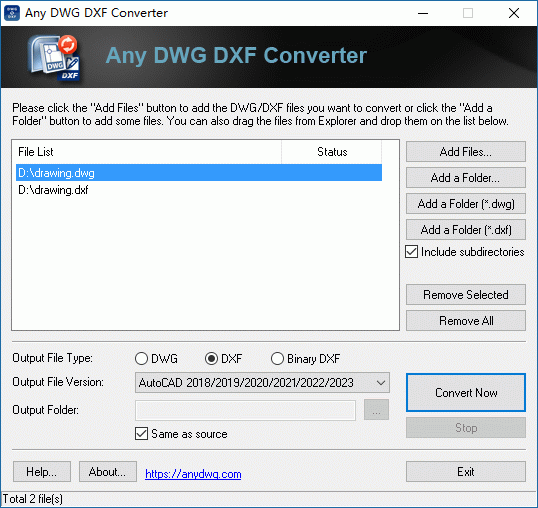
Batch conversion lets you add many files, or drag them in from Windows Explorer. You then pick the output type, file version and output folder, and click Convert Now.
Pick the output format and version
It outputs DWG, ASCII DXF and Binary DXF. As a version converter, it writes AutoCAD R2.5 up to the newest releases, and it reads all versions of DWG/DXF.
Who it's for
It suits you if you receive CAD files in a format your software can't open, or need to save drawings for colleagues on older CAD versions. You don't need a CAD licence. It is built around one task, so you won't find drawing or editing tools.
Pros and cons
- Pro: Converts both ways and works in batches.
- Pro: Light hardware needs.
- Pro: Runs without AutoCAD.
- Con: Command line support is only in the separate Pro edition.
- Con: Windows only.
- Con: It converts files only; it does not view or edit them.
What users say
Software Informer: "The most remarkable aspect of this application is its very neat and simple interface."
FAQs
Do I need AutoCAD installed?
No. The converter works on its own.
Can I convert many files at once?
Yes. Add multiple files and convert them in one batch.
Can I choose the AutoCAD version of the output?
Yes. You choose the output file type and version before converting.
Can I automate it from the command line?
Only with the Pro edition, which adds command line support.
System requirements
- OS: Windows 98/Me/NT/2000/XP/Vista/7/8/8.1/10/11, Windows NT/2003/2008/2019
- CPU: 300 MHz or higher
- RAM: 256 MB or above
- Disk space: 128 MB free