Softaken EML to Gmail Importer: Put Saved EML Emails Back in Gmail
Softaken EML to Gmail Importer is a $29 desktop tool (Windows, with Mac and Linux packages) that uploads saved .eml and Apple Mail .emlx messages straight into a Gmail mailbox over IMAP, in bulk and with the folder tree kept. It's for people sitting on a folder of exported emails from Windows Live Mail, Thunderbird or Apple Mail who want them searchable in Gmail. The free demo uploads only the first few files.
Gmail has no import button for loose EML files. Its own import tool pulls from another live mailbox, not from files on your disk, so an archive exported years ago from an old mail client just sits there. The usual workaround, setting Gmail up in Thunderbird and dragging the files in, works for a few dozen messages but gets slow and messy with thousands spread across nested folders.
Quick facts
- Developer: Softaken Software
- What you download: Softaken Mail Importer 2.0, a general tool for uploading local mail files to an IMAP server; the EML to Gmail license covers EML and EMLX into Gmail
- Input: single EML or EMLX files, or whole folders with subfolders
- Destination: a Gmail account over IMAP (imap.gmail.com, port 993), into an existing or new folder
- Platforms: Windows 11 to 7; Softaken also offers Mac (10.15 and later) and Linux packages
- Price: Personal $29 (1 PC, one year), Business $99 (2 to 10 PCs, lifetime), Enterprise $299 (10 to 50 PCs, lifetime)
- Demo: the product page lists 10 items, the Mail Importer guide the first 25 local files
- What we checked: the Windows installer on November 27, 2026: mailimporterdemo.exe, 19.4 MB, Softaken Mail Importer - Demo version 2.0, digitally signed by Datavare Software and Services LLP; and the order page on November 27, 2026: Personal $29.00, Business $99.00 and Enterprise $299.00. We didn't upload a mailbox ourselves.
Before you buy
- You'll need a Google app password. The tool logs in to Gmail over IMAP with your address and a password, not Google's sign-in window. With 2-Step Verification on (most accounts now), create an app password in your Google Account and use that.
- The Personal license lasts one year on one PC. Business and Enterprise never expire. Softaken's own product page quotes Mail Importer from $99; the $29 Personal license on the order page covers the EML to Gmail job only.
- Refunds are narrow. Softaken's 30-day refund applies when the full version fails at something the demo did and support can't fix it. Buying the wrong product, buying without trying the demo, duplicate orders and bundles aren't refunded, so run the demo on your own files first.
Download Free TrialBuy Personal ($29)
Overview
The program walks you through four screens. You pick the source format (EML or EMLX), add files or a folder, enter Gmail's IMAP details, choose a target folder, and start the upload. Each message goes into Gmail with its sender, recipients, date and attachments, and if you upload a folder tree, the subfolders come across as matching Gmail labels.
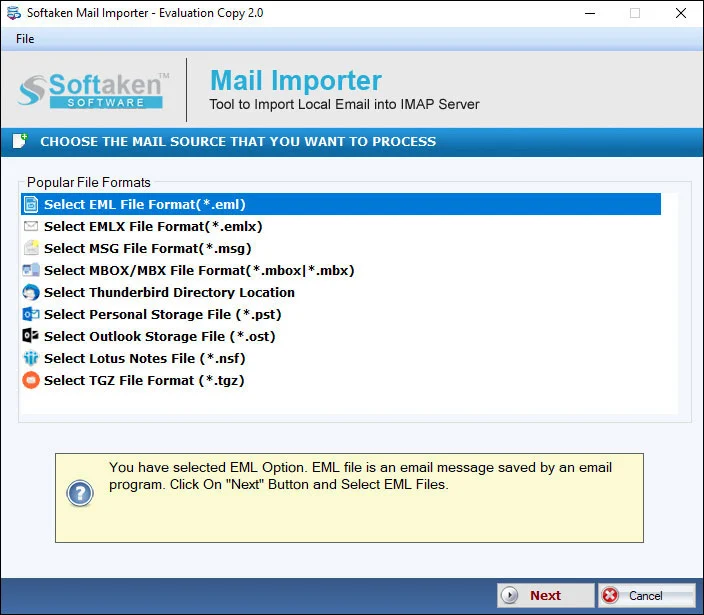
The first screen of Mail Importer 2.0 (Evaluation Copy): EML, EMLX, MSG, MBOX/MBX, a Thunderbird folder, PST, OST, NSF and TGZ are the possible sources.
Features
Bulk upload of EML and EMLX files
Softaken EML to Gmail Importer takes individual files or a whole folder, walks every subfolder underneath it, and uploads all the messages in one run. Softaken says file count and size don't stop the job; big archives simply take longer.
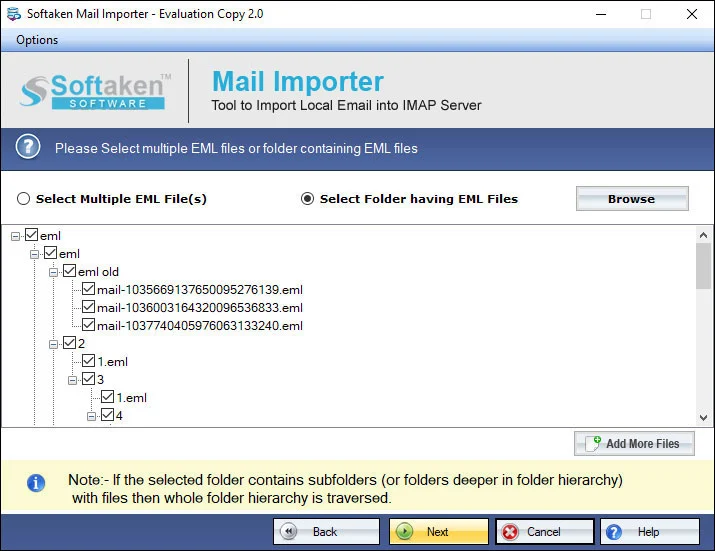
Mail Importer 2.0 after choosing Select Folder having EML Files: the whole folder tree is ticked, and a note says subfolders are traversed.
Folder structure kept in Gmail
Softaken EML to Gmail Importer recreates the folder hierarchy of the source, so an archive sorted into Clients, Invoices and Personal shows up in Gmail with the same labels instead of one flat pile.
Pick or create the Gmail folder
Softaken EML to Gmail Importer lists the folders in the connected Gmail account and lets you drop the upload into one of them, or type a name for a new folder, which keeps imported mail apart from your current inbox.
Date filter
Softaken EML to Gmail Importer can limit the upload to messages in a date range, set with From and To dates on the upload screen, handy when you only want, say, the last two years of an old archive.
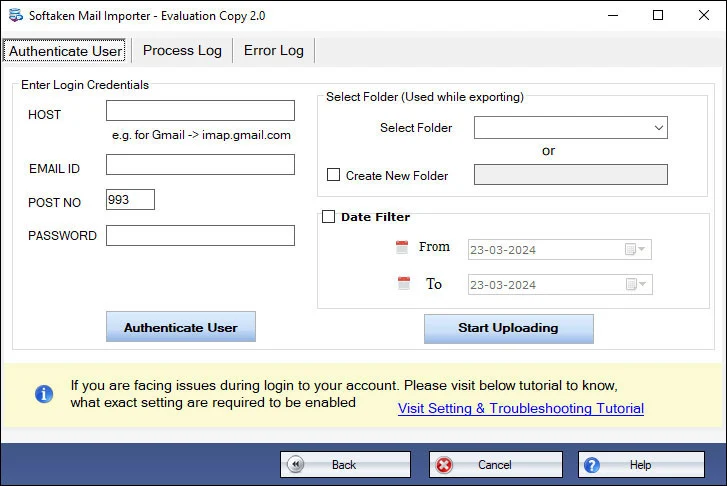
The upload screen in version 2.0: host (imap.gmail.com is the example), email ID, port 993 and password, then an existing or new folder and an optional date filter.
Message details and attachments preserved
Softaken EML to Gmail Importer uploads the whole message, so To, CC, BCC, the original date and attached files stay with each email, and Gmail sorts it by its real date rather than the upload day.
Benefits
- Old mail becomes searchable with Gmail's search, on any device, instead of sitting in files you can't open.
- No mail client needed: you don't have to install Thunderbird or set up Windows Live Mail again to get the messages in.
- Labels that match your old folders, so the archive stays organised.
Real-World Uses
- Retiring Windows Live Mail: its store folders are full of EML files that can go straight into Gmail.
- Moving from Apple Mail on a Mac to a Gmail account, using the EMLX files Apple Mail keeps.
- Archiving a departed employee's exported mail into a shared Gmail or Workspace mailbox.
- Restoring messages someone saved as EML files to a USB drive years ago.
Who It's For, and Who Should Skip It
It's for anyone with hundreds or thousands of EML or EMLX files who wants them in Gmail with their folders intact and doesn't want to fiddle with a desktop mail client.
Skip it if you only have a handful of messages: Thunderbird, connected to Gmail over IMAP, lets you drag EML files in for free. If your old mail is still in a live mailbox (Outlook.com, Yahoo, a work server), Gmail's own import from another account is simpler. And if the files are PST or MBOX rather than EML, buy the Softaken tool for that format instead.
Usage Guide
- Download and install the demo, then launch Softaken Mail Importer.
- In your Google Account, turn on 2-Step Verification if needed and create an app password.
- Choose Select EML File Format (or EMLX) and click Next.
- Pick Select Multiple EML File(s) or Select Folder having EML Files, browse to them and check the list.
- Choose Export To IMAP Account, enter imap.gmail.com, your Gmail address, port 993 and the app password, and click Authenticate User.
- Select an existing folder or tick Create New Folder, set a date range if you want one, and click Start Uploading.
- Check the Process Log and Error Log tabs when it finishes, then open Gmail.
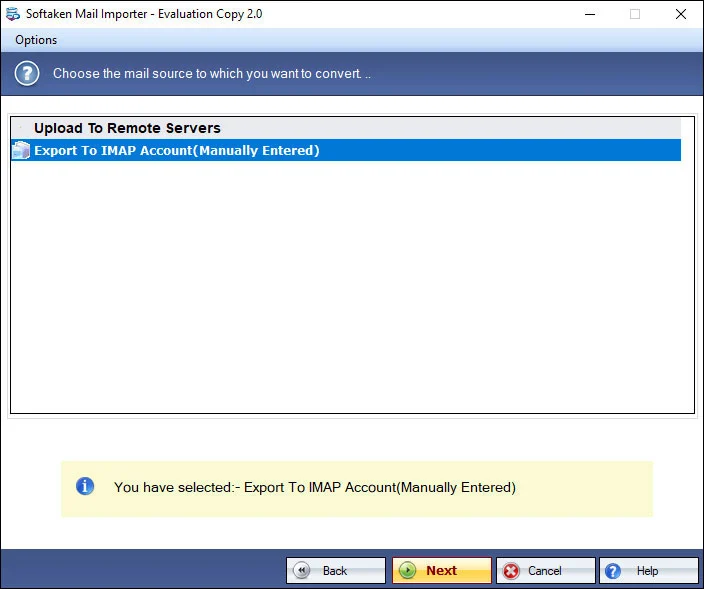
The destination step in version 2.0 offers one choice, Export To IMAP Account (Manually Entered): Gmail and Yahoo are reached through their IMAP servers.
Where it falls short
- The demo is small: 10 to 25 files isn't enough to test a big archive's tricky folders, only that the connection works.
- Gmail's own limits still apply. Google caps how much a mailbox can receive over IMAP in a day, so a very large archive may need several runs.
- Inconsistent vendor pages. Softaken's product page mixes the old EML to Gmail product with Mail Importer pricing and older screenshots, so read the order page for what you're buying.
- Healthy files only. Softaken says the tool reads intact EML files; it doesn't repair damaged ones.
What Users Say
Customer feedback on Softaken's site
We found no reviews of this tool on the big review sites (Capterra, G2, Trustpilot). Softaken's product page shows a few customer comments, all five stars, so treat them as testimonials rather than independent reviews.
Lawrence Dixon (United States): "I would like to thanks Softaken for this effective EML to Gmail Migrator. With this application, I have imported unlimited EML files to my Gmail account whom I can access anytime anywhere."
Mattia cuoghi (Italy): "I love the working of this software. The process is so simple and straight-forward. I have not faced any difficulty and any help to use this tool."
Kurt Helm (Austria): "After trying several tools, I was just fed up and confused which tool should I use to import EML files to my Gmail account. My friend suggested me Softaken EML to Gmail Importer and I decided to give a try to this tool. I am amazed that the tool worked perfectly and it met my expectations."
The comments praise the simple steps and unlimited bulk upload. With no independent reviews, the demo is the only real test, so run it against Gmail before buying.
Comparisons
Softaken EML to Gmail Importer versus Thunderbird
Thunderbird is free and, once your Gmail account is added over IMAP, can take EML files dragged into a Gmail folder. It's fine for small batches, but you recreate folders by hand and it struggles with thousands of files. Softaken's tool keeps the folder tree, adds a date filter and handles big batches unattended, for $29.
EML to Gmail Importer versus EML to Yahoo Importer
Both are the same Mail Importer program sold under separate $29 licenses, one for Gmail and one for Yahoo Mail. Buy the one for the mailbox you're moving into.
Editions and Pricing
Prices as the order page showed them on November 27, 2026. Each Buy button orders that license. Softaken also sells a Home license for $49 on its own site.
| License | Price | Computers | Term | Buy |
|---|
| Personal | $29 | 1 | One year of use, updates and support | Buy Personal |
| Business | $99 | 2 to 10 | Lifetime use, updates and support | Buy Business |
| Enterprise | $299 | 10 to 50 | Lifetime use, updates and support | Buy Enterprise |
FAQs
Does Softaken EML to Gmail Importer work with 2-Step Verification?
Yes. Softaken EML to Gmail Importer connects over IMAP, so with 2-Step Verification on you create a Google app password and enter it in place of your normal password.
Does Softaken EML to Gmail Importer work with Google Workspace accounts?
Softaken EML to Gmail Importer uploads to any mailbox reachable at imap.gmail.com, which includes Workspace accounts where the admin allows IMAP and app passwords. Softaken also sells a separate EML to G Suite Importer.
Will imported emails keep their original dates in Gmail?
Yes. Softaken EML to Gmail Importer uploads the full message with its Date header, so Gmail files each email under the date it was sent.
Can Softaken EML to Gmail Importer run on a Mac?
Softaken lists Mac (macOS 10.15 or later) and Linux packages alongside the Windows installer, so you can run it on a Mac. The Personal license covers one computer.
Does the tool keep my Gmail password?
Softaken says Softaken EML to Gmail Importer doesn't save your login details. Using an app password also means you can revoke it in your Google Account when the job is done.
What happens after the Personal license's year ends?
The Personal license of Softaken EML to Gmail Importer is valid for one year. For a one-off migration that's plenty; if you'll use it longer, the Business license never expires.
System Requirements
- Windows 11, 10, 8.1, 8 or 7 (32 and 64-bit)
- macOS 10.15 or later, or 64-bit Linux (Ubuntu 18.04+, Debian 9+, CentOS 7+)
- Pentium-class processor, 512 MB RAM, 100 MB free disk space
- An internet connection and a Gmail account with IMAP access
Conclusion
Softaken EML to Gmail Importer is worth $29 if you have a large, folder-sorted archive of EML or EMLX files and want it inside Gmail without rebuilding the folders by hand. The reason to buy it is bulk upload with the folder tree and dates kept. The reasons to hesitate are a tiny demo, no independent reviews, a one-year Personal license and a refund policy that won't cover a change of mind. For a few dozen messages, free Thunderbird does the job; for thousands, try the demo against your Gmail account and then buy.
Download Free TrialBuy Personal ($29)Buy Business ($99)Buy Enterprise ($299)