Trend Micro Maximum Security: Antivirus and Web Protection for 5 Devices
Trend Micro Maximum Security is a security suite that protects up to 5 devices (Windows PCs, Macs, Android phones, iPhones and Chromebooks) against malware, ransomware, scam websites and phishing emails. On Trend Micro's UK store a one-year subscription costs £49.95 for the first year and renews at £84.95 a year.
It's Trend Micro's most popular plan for a household: one subscription for the family laptop, a work PC, a Mac and a couple of phones, with Pay Guard for online banking and parental controls for the children's accounts.
Quick facts
- Version: Trend Micro Maximum Security 2026 (17.9 on Windows)
- Developer: Trend Micro Incorporated
- Devices: 5, in any mix of Windows, Mac, Android, iOS and Chromebook
- Price (UK store): £49.95 for the first year, then £84.95 a year. 24 months: £99.90
- Trial: no free trial on the UK store. Purchases from the Trend Micro online shop have a 30-day money-back guarantee
- What we checked: the first-year, 24-month and renewal prices of all four Trend Micro suites on Trend Micro's UK store, that the Buy Now link opens the UK store's Maximum Security page, the Windows version (17.9) in Trend Micro's UK Download Centre and the size of the Windows downloader (11.3 MB), on November 26, 2026. We didn't run our own malware tests.
Before you buy
UK store, prices in pounds. The Buy Now button opens Trend Micro's UK online store, which charges in pounds sterling (GBP). The prices on this page are the UK store's, and your card issuer converts them if you pay in another currency.
The renewal price is much higher. The first-year price is an introductory price. The subscription renews automatically at £84.95 a year unless you turn auto-renewal off in your Trend Micro account. The 24-month plan costs £99.90, so it keeps the introductory price for both years.
Download Trend MicroBuy Now
Overview
Trend Micro Maximum Security runs the same Windows protection as Trend Micro's cheaper suites: a real-time scanner backed by Trend Micro's cloud threat data, Folder Shield against ransomware, web threat and phishing blocking, Pay Guard and parental controls. What the higher price adds is coverage: 5 devices instead of 3, and apps for Android and iOS as well as Windows, Mac and Chromebook. The comparison table on Trend Micro's site also lists password management for this plan.
The Windows app keeps everything behind four tabs, Device, Privacy, Data and Family, with a large Scan button in the middle. Most people install it, let it run and only open it when a warning appears.
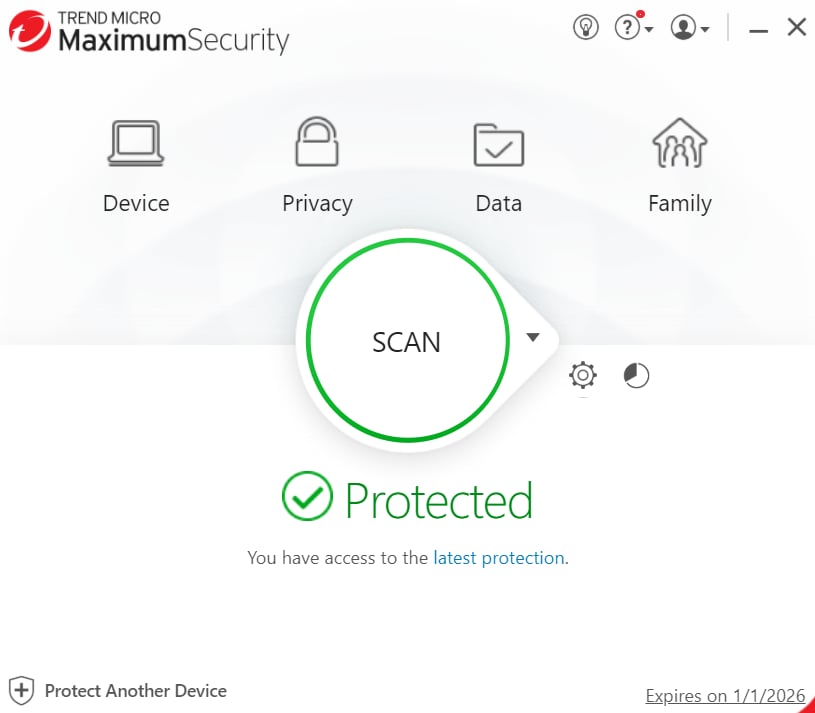
The Maximum Security main window on Windows: four feature tabs, the Scan button and the protection status. (Trend Micro help centre)
Features
Trend Micro Maximum Security stops malware and ransomware in real time
Trend Micro Maximum Security scans files as they're opened and downloaded and checks suspicious ones against Trend Micro's cloud threat data. Folder Shield blocks unknown programs from changing the files in folders you choose (Documents, Pictures and OneDrive by default, plus Dropbox or Google Drive folders and USB drives), which is the layer that stops ransomware from encrypting them.
Maximum Security blocks scam sites and phishing emails
Trend Micro Maximum Security rates web pages before they load and blocks known malicious and fraudulent sites. Its email scam protection checks messages in webmail for phishing, and the browser extension flags dangerous links in search results and social media. Phishing protection is the part testers rate highest.
Pay Guard opens banking and shopping sites in a protected browser
Trend Micro Maximum Security's Pay Guard launches a hardened copy of your browser when you visit a bank or payment site, so other programs on the PC can't watch or tamper with the session. You choose whether it opens automatically, asks first or does nothing.
Parental controls filter websites and limit screen time on Windows
Trend Micro Maximum Security's parental controls work per Windows user account: pick an age group (child, pre-teen or teen) and it blocks the matching website categories, then set hours when the internet is off and block specific programs. On the Mac, the parental control is a content filter only.
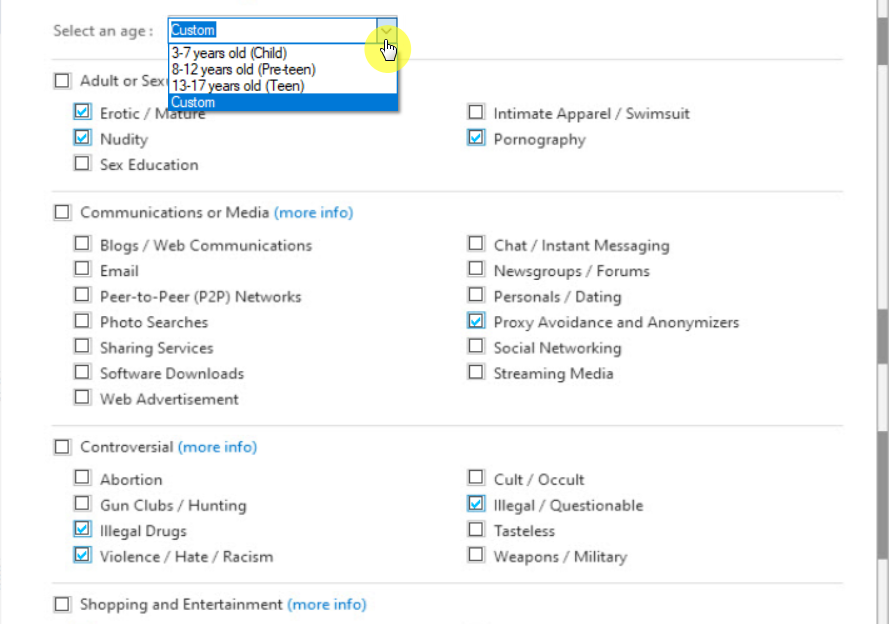
Website Filter Rules: pick an age group or a custom set of blocked categories. (Trend Micro help centre)
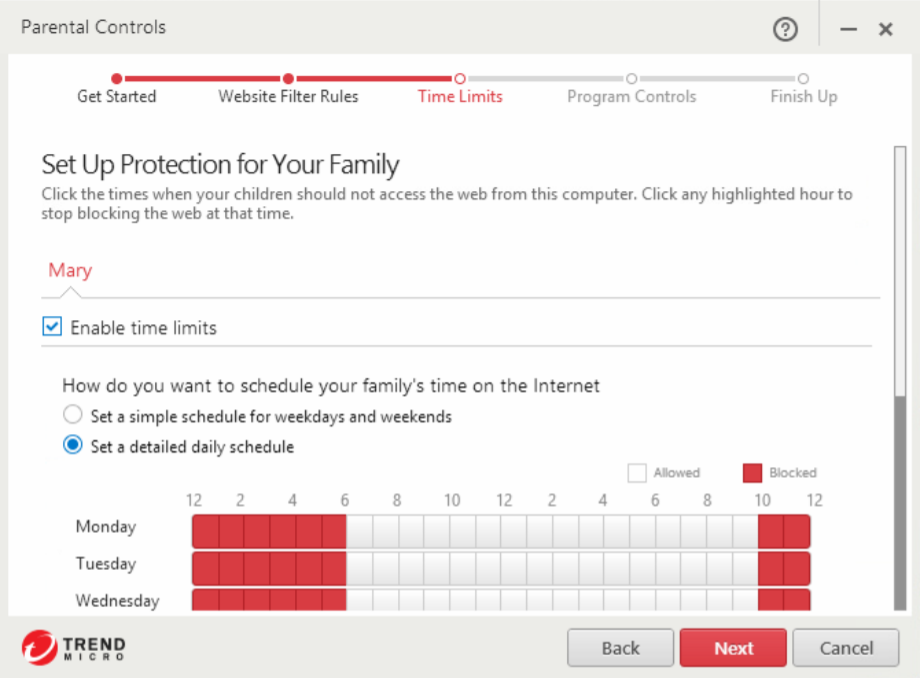
Time Limits: mark the hours when a child's account can't go online. (Trend Micro help centre)
Maximum Security protects Android and iOS phones too
Trend Micro Maximum Security includes Trend Micro Mobile Security for Android and iOS, counted against the same 5 devices. On Android it scans apps, warns about unsafe Wi-Fi and blocks scam sites; on iOS it filters dangerous websites, ads and trackers. You send the app to a phone by email, link or QR code from your Trend Micro account.
Maximum Security adds privacy and tune-up tools
Trend Micro Maximum Security has a social media privacy scanner that checks your Facebook, X (Twitter) and LinkedIn privacy settings, a Mute Mode that pauses notifications while you game, and PC optimisation tools that clear junk files and fix common slow-downs. Trend Micro's newest addition is protection for AI applications on the PC against tampering and abuse.
Benefits
The main benefit is one subscription for a mixed household. A family with two Windows laptops, a Mac and two phones is covered by one 5-device plan for less than buying antivirus per device. The protection is quiet: once Folder Shield and Pay Guard are set up, you rarely need to open the app.
The second is the scam protection. Most infections today start with a fake website or a phishing email rather than a virus attachment, and that's where Trend Micro is strongest in testing.
Real-World Uses
- A family PC with children's accounts. Give each child a Windows account, set the age filter and the hours when the internet is off, and check the reports from time to time.
- Online banking on a shared laptop. Pay Guard opens your bank in a protected browser every time, even if someone else installed something dodgy on the machine.
- Freelance work files. Folder Shield guards your work folder and its OneDrive or Dropbox copy against ransomware.
- A parent's phone. Mobile Security on an older relative's Android phone warns them away from scam sites and texts that lead to them.
Who It's For, and Who Should Skip It
It's a good fit if you want one plan for Windows, Mac and phones, value phishing and scam-site blocking, and are buying from the UK or elsewhere in Europe, where the price is low for 5 devices.
Skip it if you only have Windows and Mac computers: Internet Security gives the same Windows and Mac protection for 3 devices at £39.95. Skip it too if independent lab scores matter most to you; Bitdefender and Norton still enter the big lab tests. And if you want a VPN and identity monitoring as well, Premium Security Suite includes them.
Usage Guide
- Buy the plan and sign in to (or create) your Trend Micro account. The activation code is in your account and the order email.
- Run the Windows downloader on your PC (or the Mac installer on a Mac), enter the activation code, and let it finish. Allow time: Tom's Guide timed the Windows installation at over 12 minutes.
- When asked, switch on Folder Shield and add any folder you keep important work in.
- Open the Privacy tab to set Pay Guard's behaviour and run the social media privacy scan.
- Open the Family tab and click Configure beside Parental Controls to set filters and time limits for each child's Windows account.
- Click Protect Another Device to send the Mobile Security app to a phone by email or QR code.
Where it falls short
- No recent independent lab scores. Trend Micro used to earn top marks from the independent labs, but PCMag noted in early 2025 that it "hasn't participated in tests with AV-Comparatives since 2023 and stopped appearing in AV-Test reports in early 2024". So there's no recent lab score to check its malware detection against rivals such as Bitdefender or Norton.
- False alarms and scan slow-downs. Tom's Guide and Trusted Reviews both saw legitimate files and websites flagged, and Tom's Guide measured a heavy slow-down during full scans.
- No firewall of its own. Trend Micro relies on the Windows firewall and adds only a "firewall booster" for network threats.
- Thinner on the Mac. On a Mac you get Trend Micro Antivirus for Mac, and its parental control is website filtering only.
- Password manager. When PCMag reviewed Maximum Security in February 2025, the included Password Manager was only a free trial.
What Users Say
Trend Micro's own shoppers and the professional testers tell two different stories. Long-time customers praise the set-and-forget protection and the phone support, independent reviewers rate the Windows engine as middling in recent years, and Trustpilot is dominated by billing and support complaints.
Customer reviews on Trend Micro's UK store
The store shows reviews for the Trend Micro Security range as a whole, not per suite. Two of the most recent:
"I have been with Trend Micro for quite a number of years and my computer and mobile devices have been well-protected and no invasions by hackers [nor] other infiltrators have [since] occurred. ... Your technicians are always helpful and understanding." Bill Goodie, Trend Micro UK store
"I have been a Trend Micro customer since 2013. In that time, I have never been attacked by any malicious software [nor] infected with harm-causing software. I have been warned a number of times that particular websites were potentially dangerous and should be avoided." woodsie13, Trend Micro UK store
Independent reviews
PCMag (Neil J. Rubenking, February 3, 2025, 3 out of 5): "Trend Micro Maximum Security provides licenses for many devices and comprehensive Android and iOS protection, but its core Windows security is weak." It also points out that "Upgrading from Trend Micro Internet Security to Trend Micro Maximum Security doesn't really get you any more security on Windows or macOS, but it does extend protection to your Android and iOS devices." Its pros include an "Excellent score in our phishing protection test" and "Unusually feature-rich iOS protection"; its cons, "Poor lab scores" and "Weak parental controls".
Tom's Guide (Brian Nadel, review of the Trend Micro range, last updated October 24, 2024, 3.5 out of 5): "Trend Micro's Maximum Security package provides many useful extra features, acceptable protection and fast scanning for malware, although it tends to rack up too many false positives and can place a heavy burden on a system." In its tests the installation "took 12 minutes and 15 seconds, making it one of the slowest installation processes around", and during a full scan the test laptop's benchmark showed "a 33% decline in performance possibilities".
Trusted Reviews (K.G. Orphanides, March 14, 2023, 3 out of 5) was kinder about speed: "Best known for enterprise-grade endpoint security, Trend Micro Maximum Security brings some of that malware detection prowess to home users, delivering great performance." Its main complaint was false alarms: it "Flagged a number of legitimate software and website samples".
Trustpilot
Trend Micro's Trustpilot page (www.trendmicro.com) had a TrustScore of 1.4 out of 5 from 142 reviews in late November 2026. Almost all recent reviews are one-star complaints about subscriptions, support and the add-on services rather than about missed malware:
- "Avoid it, don't even think about buying or using it otherwise they will charge you to the last day of your life" (Kriss, 1 star, September 2026)
- "I spent 2 hours on hold listening to the same recorded message repeatedly." (Tania Denise, 1 star, July 2026)
- "This product was a waste of time & effort . Wish I'd searched reviews before purchasing" (Marie Osborne, 1 star, August 2026, about Trend Micro VPN)
- "It does not protect you at all in real-time." (Graham Macfarlane, 1 star, May 2026, about the ID Protection breach alerts)
The pattern: people who have used Trend Micro for years tend to be happy with the day-to-day protection and the warnings about dangerous sites. The complaints cluster around three things: automatic renewal at a much higher price, slow or hard-to-reach support, and the extras (VPN, ID Protection) falling short of dedicated services. Professional testers agree the phishing and web protection is strong, and are less sure about the core malware engine, partly because Trend Micro stopped entering the big independent lab tests.
Comparisons
Maximum Security vs Internet Security
On Windows and Mac the two are the same. Maximum Security adds 2 more devices, Android and iOS protection and password management, for £10 more in the first year (£20 more at renewal).
Maximum Security vs Premium Security Suite
Premium Security Suite is Maximum Security for 10 devices plus Trend Micro VPN, ID Protection (dark web monitoring), ScamCheck for Android and 24x7 Premium Service. Choose it if you'd otherwise pay for a VPN separately.
Maximum Security vs Bitdefender Total Security
Bitdefender Total Security also covers 5 devices on every platform, still takes part in AV-Test and AV-Comparatives testing with top scores, and includes a firewall. Trend Micro's strengths are its phishing protection and Pay Guard.
Editions and Pricing
All four Trend Micro suites on the UK store, with the first-year price and the price the subscription renews at:
| Suite | Devices | First year | Renews at | Covers |
|---|
| Antivirus+ Security | 1 | £14.95 | £24.95 a year | Windows or Mac |
| Internet Security | 3 | £39.95 | £64.95 a year | Windows, Mac, Chromebook |
| Maximum Security | 5 | £49.95 | £84.95 a year | Windows, Mac, Android, iOS, Chromebook |
| Premium Security Suite | 10 | £79.95 | £124.95 a year | All of the above, plus VPN, ID Protection, ScamCheck and Premium Service |
Maximum Security is also sold as a 24-month plan for £99.90, which keeps the introductory price for the second year instead of renewing at £84.95.
FAQs
Does Trend Micro Maximum Security work on Windows 11?
Yes. Trend Micro Maximum Security supports Windows 10 and Windows 11, and the current 2026 edition is version 17.9.
Can I use Trend Micro Maximum Security on an iPhone?
Yes. Trend Micro Maximum Security includes Trend Micro Mobile Security for iOS 13 or later. On an iPhone it filters dangerous websites, ads and trackers and checks Wi-Fi networks; iOS doesn't let any app scan other apps for malware.
Is there a free trial of Trend Micro Maximum Security?
Trend Micro's UK store doesn't offer a free trial of Maximum Security. Instead, purchases from the Trend Micro online shop come with a 30-day money-back guarantee.
How do I stop Trend Micro Maximum Security renewing at the higher price?
Trend Micro Maximum Security renews automatically at £84.95 a year. Turn off auto-renewal in your Trend Micro account before the renewal date, or buy the 24-month plan (£99.90) to keep the introductory price for two years.
Can I buy Trend Micro Maximum Security from outside the UK?
The Buy Now button opens Trend Micro's UK store, which charges in pounds sterling. Trend Micro runs separate stores for other countries with their own prices and currencies.
Does Trend Micro Maximum Security include a VPN?
No. Trend Micro Maximum Security doesn't include a VPN or dark web monitoring. Both come with Premium Security Suite, and Trend Micro VPN is also sold on its own.
Can I move a Trend Micro Maximum Security licence to a new PC?
Yes. Trend Micro Maximum Security licences are managed in your Trend Micro account: uninstall it from the old PC and install it on the new one with the same account, as long as you stay within 5 devices.
System Requirements
- Windows: Windows 10 or Windows 11
- Mac: macOS 11 or later
- Android: 5.0 or later (Android Go and Android One aren't supported)
- iOS: iOS 13.0 or later, on a 64-bit device
- Chromebook: Chrome OS 79 or later, through the Trend Micro Security app on the Chrome Web Store
Conclusion
Worth it for a mixed household buying in the UK or Europe. At £49.95 for five devices including phones, Trend Micro Maximum Security is good value in its first year, and its phishing and scam-site protection is among the best tested. The reasons to hesitate are the jump to £84.95 at renewal and the lack of recent independent lab results for the malware engine. If you buy, take the 24-month plan or set a reminder to review the renewal.
Download Trend MicroBuy Now