Skoove Premium Lifetime: Piano Lessons That Listen to You Play
Skoove is a piano learning app for iPhone, iPad and Android that listens to you play on your own piano or keyboard and tells you in real time which notes were right. This deal, sold on StackSocial, is a Skoove Premium lifetime subscription for $99.97, one payment, for new Skoove users. That's less than one year of Skoove's own 12-month plan ($149.99).
It's built for the adult who always meant to learn piano: there's a keyboard in the corner, a phone on the music stand, and no time or budget for weekly lessons. Skoove plans each lesson for you, shows the notes on a staff and a keyboard, and waits until you play them.
Quick facts
- What you get: Skoove Premium, lifetime subscription: all lessons and courses, new songs as they're added, 1-on-1 support from Skoove's piano instructors
- Price: $99.97 one-time on StackSocial (excluded from StackSocial coupons); Skoove's own plans are $29.99 a month, $59.99 every 3 months or $149.99 a year
- Developer: Learnfield GmbH, Berlin
- Runs on: iPhone and iPad (iOS 15.2 or later) and Android phones and tablets. There's no supported computer version
- Instrument: any piano or keyboard, connected by USB MIDI or Bluetooth MIDI, or an acoustic piano heard through the device's microphone
- Devices: unlimited
- Who can buy: new Skoove users only
- Redemption: redeem within 30 days of purchase, on a computer; then sign in on your phone or tablet
- Refunds: an unredeemed code can be returned for StackSocial store credit within 30 days; once redeemed, the sale is final
- Free trial: the free app includes a limited number of lessons
- What we checked: the deal price ($99.97) and its terms on the StackSocial deal page, Skoove's plan prices in its help center, the lifetime clause in Skoove's terms, and the iOS app (version 2.6.40, 276 MB, released November 23, 2026) with its App Store and Google Play ratings, all on November 24, 2026. We didn't redeem a code or play through lessons ourselves.
Before you buy
- You need a phone or tablet. Skoove removed its web learning platform, and StackSocial's page says desktop use is no longer officially supported. You redeem the code on a computer, but you learn on iOS or Android.
- New accounts only. If you already have a Skoove account, this code isn't for it. Skoove's terms also say a lifetime subscription doesn't apply to previous purchases.
- What "lifetime" means here. Skoove's terms say a lifetime subscription lasts as long as Learnfield offers Skoove (capped at 99 years), ends if Learnfield stops trading, and covers the Skoove offering as it is when you buy, not future services. Learnfield is a small Berlin company, so this is a real risk: at $99.97 you're ahead of the yearly plan if Skoove lasts more than about eight months, but there's no guarantee beyond that.
- Billing complaints are about renewals. Skoove scores 2.6 on Trustpilot, mostly over yearly plans that renewed or trials that converted. A lifetime code doesn't renew, but don't start a separate in-app trial on the same account.
- Live teacher lessons cost extra. Premium includes 1-on-1 instructor support, but a StackSocial buyer notes that a "live" teacher option is a paid extra.
Try Free LessonsBuy Lifetime on StackSocial
Overview
Skoove has two tiers. Skoove Basic is free and gives you selected lessons; Skoove Premium opens every course (Skoove now counts 500+ lessons and courses) and adds 1-on-1 support from its piano instructors. The lessons combine short instructional videos with interactive practice: the app shows sheet music above an on-screen keyboard, you play along, and Skoove checks what it hears.
The course runs from finding middle C to reading both clefs, chords, technique and theory, with songs as the reward along the way: pop hits from artists like John Legend, The Beatles, Coldplay and Adele, and classical pieces by Bach, Beethoven, Debussy and Mozart. Most song versions are simplified arrangements for learners.
Features
Real-time feedback on what you play
Skoove listens as you play and marks each note as right or wrong while you go, then waits for you or keeps the beat depending on the exercise. A keyboard connected by USB or Bluetooth MIDI gives the most reliable detection; with an acoustic piano, Skoove listens through the phone or tablet microphone.

A Skoove lesson: both staves on top, a green marker on the current beat, and the keys to press lit up in green with a video of the teacher's hands below.
Practice tools: tempo, looping and hands separately
Skoove lets you slow a piece down and loop a hard passage, so you can drill four bars at half speed before playing the whole song. Lessons often start with one hand, then the other, then both.
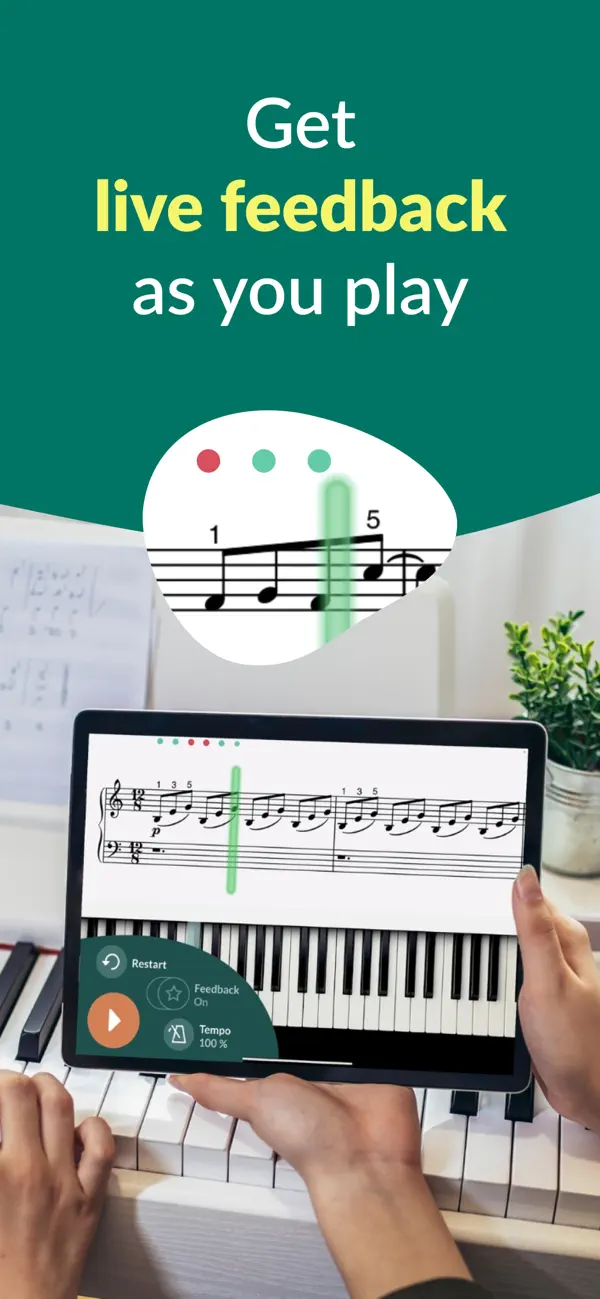
Skoove's App Store image of a lesson on a tablet, with the Restart, Feedback and Tempo controls at the bottom left.
A song library from pop to classical
Skoove's song library mixes chart hits and children's songs with classical favorites, sorted by level and category, and Premium adds new songs and lessons regularly. Songs are learner arrangements, so you get a playable version of the tune rather than the full original score.
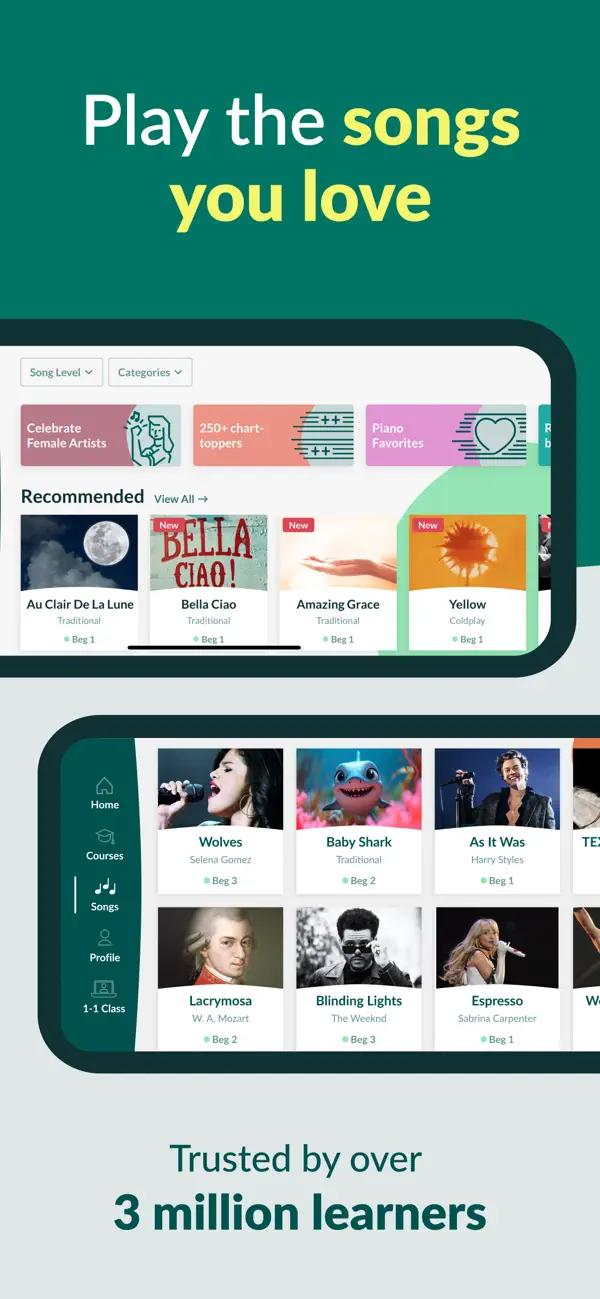
Skoove's App Store image of the song library: recommended songs, level and category filters, and song tiles marked by level.
Step-by-step courses with theory and note reading
Skoove's courses are laid out in order (Beginner 1, Beginner 2 and onward) with side courses on technique, reading bass clef, chords and progressions, and pop piano. Theory and sight-reading are worked into the lessons instead of taught as separate drills.

Skoove's App Store image of the course list (Playing Technique 2, Pop Piano 2, Reading Bass Clef, Chords) and the Beginner 2 lesson row.
Help from real piano instructors
Skoove Premium includes 1-on-1 support from Skoove's piano instructors: when you're stuck on a rhythm or a fingering, you can ask a person rather than a FAQ.
Benefits
- Cheaper than one year. At $99.97 the lifetime deal costs about two-thirds of a single year on Skoove's own yearly plan.
- Structure without a teacher's schedule. The app decides what comes next, which is what most self-taught beginners lack.
- Use the instrument you have. No special keyboard is needed; an old acoustic upright works through the microphone.
- No pressure from a monthly bill. You can stop for a busy month and pick up again without paying to keep access.
Real-World Uses
- Starting from zero as an adult. Work through Beginner 1 and 2 on a tablet on the music stand, 15 minutes after dinner.
- Coming back after childhood lessons. Skip ahead to the reading and chord courses and use songs to get your hands moving again.
- Learning a favorite song. Pick a pop or classical piece from the library, loop the hard bars and slow the tempo.
- A family keyboard. Unlimited devices means a parent's phone and a teenager's tablet can both run it (on one account).
Who It's For, and Who Should Skip It
Skoove suits adult beginners and returning players who want a guided course on a phone or tablet, own (or will buy) a MIDI keyboard or a piano, and like learning by reading notes rather than following falling-note games.
Skip it if you want to learn on a computer, since there's no supported desktop version; if you're an intermediate or advanced pianist, because the course and simplified song arrangements are aimed at beginners; or if you need someone watching your posture and technique, which no note-detection app can do. Existing Skoove users can't use this code.
Usage Guide
- Buy and get the code. StackSocial emails a redemption code with instructions after purchase.
- Redeem on a computer within 30 days. Follow the link from the email in a desktop browser and create a new Skoove account with the code.
- Install the app from the App Store or Google Play on your phone or tablet and sign in with that account.
- Connect your instrument. Plug in a USB MIDI keyboard (with an adapter for your device), pair a Bluetooth MIDI keyboard, or choose acoustic mode and place the device near the piano.
- Start with Beginner 1, or jump ahead if you can already read music.
Where It Falls Short
- Microphone detection can misread notes. StackSocial and Trustpilot reviewers report wrong notes accepted or right notes missed on an acoustic piano; a MIDI keyboard is more reliable.
- Songs are simplified. Players who want full, original arrangements will be disappointed.
- It can't coach technique. Timing, dynamics, hand position and posture are up to you or a teacher.
- Thin for advanced players. The course is strongest from beginner to early intermediate.
What Users Say
App store ratings are high: 4.6 out of 5 from 22,465 ratings on the US App Store and 4.5 from 12,536 on Google Play. Trustpilot is much lower, with a TrustScore of 2.6 from 74 reviews, most of them about billing. The StackSocial deal has 4.8 out of 5 from 66 buyer reviews (all as shown on November 24, 2026).
StackSocial buyers of this deal
"Got this at a fantastic price and its lifetime also, so no rushing to learn because of monthly subscription fees. Software I have used a few times and seems good, but will know more in a few months if it learns me anything :), hopefully it does. Recommended." (Michael Harney, StackSocial, November 8, 2026)
"Good app for help learning basics and basic Song versions. Works well for me on a E-Piano with midi adapter. Wish there would be more professional / original versions of music than only simplified versions." (Sascha Cehpunkt, StackSocial, October 14, 2026)
"Seems a good way to deepen practicing with the piano. Not for absolute beginners. Playing with iOS or Android apps is OK, but several false input notes are detected as valid. An external MIDI keyboard is recommended." (Stefano Papetti, StackSocial, September 4, 2026)
"For what I paid for unlimited lifetime access, I could have barely afforded ONE private or online piano lesson. ONE!" (Clint Coxwell, StackSocial, October 13, 2026)
"I chose this service partly because it is well-made; the lessons are easy to understand, and I would recommend it to users of all levels." (GIOVANNI MARFEO, StackSocial, October 22, 2026)
Trustpilot
"I discovered this app with a Roland digital piano I acquired recently and really enjoyed it immediately." (Florent L, 5 stars, October 8, 2026)
"I sampled a number of free trials for learn keyboard apps and found Skoove the best of the bunch." (Wendwell, 4 stars, May 29, 2026)
"When I tried the competitors, it felt more like a game, and with this I felt like I was really learning something." (André Santos Souza, 5 stars, October 27, 2025)
"Now 3 months later they charged me and I'm having no joy as yet getting my money refunded" (Nancy Harman, 1 star, November 3, 2026)
"For now I cannot recommend Skoove as an app to learn from a real piano due to its technical issues in note recognition" (Jan Zamboni, 1 star, November 15, 2025)
Midder Music review
Franka Blažić's review (updated November 7, 2026) concludes: "Skoove is worth it if you want a guided piano course on a phone or tablet that plans each lesson for you."
The main caveat: "The catch is that Skoove removed its web learning platform, so there is no way to take lessons on a computer." On technique, the review advises: "Check steady timing, dynamics, expression, hand position and posture yourself or with a teacher."
The pattern: learners like the structured, lesson-by-lesson path, the clear sheet-music display and the value of a one-time price, and many say it feels like real learning rather than a game. The complaints are note detection through a microphone, simplified songs, no computer version, and (for subscribers) renewals and refunds.
Comparisons
StackSocial lifetime vs Skoove's own plans
Skoove sells Premium at $29.99 a month, $59.99 every 3 months or $149.99 a year, all renewing automatically, and offers a lifetime plan only on request through its support team. The StackSocial deal at $99.97 is the clearest lifetime price and costs less than one year, but it's for new users, must be redeemed within 30 days, and can't be refunded once redeemed. If you only want to try piano for a month, Skoove's monthly plan or free lessons are the lower-risk start.
Editions and Pricing
| Plan |
Where |
Price |
Billing |
| Premium Lifetime | StackSocial (new users) | $99.97 | One-time |
| Premium 12 months | Skoove | $149.99 | Yearly, renews |
| Premium 3 months | Skoove | $59.99 | Every 3 months, renews |
| Premium 1 month | Skoove | $29.99 | Monthly, renews |
| Basic | App stores | Free | Selected lessons only |
FAQs
Can I use Skoove on a Windows PC or Mac?
Not officially. Skoove removed its web learning platform, and lessons run in the iPhone, iPad and Android apps. StackSocial's page mentions Android emulators such as BlueStacks as a workaround, but that isn't supported by Skoove.
Do I need a digital keyboard for Skoove?
No. Skoove works with any piano or keyboard: a digital one by USB or Bluetooth MIDI, or an acoustic piano through your device's microphone. MIDI gives the most accurate note detection.
Can I add the Skoove lifetime deal to my existing account?
No. The Skoove lifetime deal on StackSocial is for new users only, and Skoove's terms say a lifetime subscription doesn't apply to earlier purchases.
What happens to Skoove lifetime if the company closes?
Your Skoove lifetime access ends. Skoove's terms say lifetime membership lasts until the earlier of 99 years, the end of Skoove, your own termination, or Learnfield ceasing to trade, with no warranty on how long that will be.
Can I get a refund on the Skoove StackSocial deal?
Only before you redeem it. An unredeemed Skoove code can be returned for StackSocial store credit within 30 days; once redeemed, the sale is final.
Is Skoove good for children?
Skoove's terms are written for adults: minors may use Skoove only with a legal guardian's consent. The song library does include a section of childhood favorites.
System Requirements
- iPhone or iPad with iOS 15.2 or later (app version 2.6.40, 276 MB), or an Android phone or tablet
- A piano or keyboard: USB MIDI (with the right adapter), Bluetooth MIDI, or acoustic through the microphone
- A computer with a web browser once, to redeem the code
- An internet connection
Conclusion
A good buy for a beginner with a tablet and a keyboard. Skoove is a structured, well-reviewed piano course, and at $99.97 the lifetime deal costs less than one year of Skoove's own plan, so it pays off quickly even with the risk that a small company's "lifetime" ends. The reason to buy is guided lessons that hear what you play, for less than a few private lessons. The reasons to skip it: you want to learn on a computer, you're already past the intermediate stage, or you already have a Skoove account. Try the free lessons first to check that note detection works with your instrument.
Try Free LessonsBuy Lifetime on StackSocial