ISPProtect: Find Malware and Outdated WordPress Installs on Your Linux Web Server
ISPProtect is a command-line malware scanner for Linux web servers that searches your website folders for PHP and JavaScript malware and lists every outdated WordPress, Joomla, Drupal or other CMS installation it finds. It's for hosting companies, server admins and Linux support firms. A yearly license for one server costs $90.88 at checkout with unlimited scans, or you can buy packs of single scans from $5.50.
The typical moment you need it: your server starts sending spam, the load climbs without more visitors, or a customer's site gets flagged. Somewhere under /var/www, among tens of thousands of files, sits an injected PHP shell or a forgotten old_site folder with WordPress 3.x in it. ISPProtect finds both in one run.
Quick facts
- Version: 2.1.23, August 18, 2026
- Developer: ISPConfig UG / projektfarm GmbH, the team behind the open-source ISPConfig hosting control panel
- Platform: Linux (and FreeBSD) servers with command-line PHP and ClamAV; also a Docker image
- Interface: shell command, interactive or fully non-interactive for cron jobs
- Price: $90.88 a year per server, unlimited scans, BanDaemon included; or 5 to 100 scans from $5.50
- Trial: free, no registration: type TRIAL when it asks for the key
- What we checked: the scanner download ispp_scan.tar.gz (4.5 MB), whose script reports version 2.1.23 with files dated August 18, 2026, and that it refuses to start without PHP, ClamAV and root (unless told otherwise); order page prices of $90.88 for the yearly license, $5.50 to $65.95 for the scan packs and $39 for BanDaemon alone, on November 22, 2026. We didn't run a scan on a live server.
Download Free TrialBuy Yearly LicenseBuy 10 Scans
Overview
ISPProtect doesn't need installing. You download the tarball to /tmp, unpack it, run ./ispp_scan as root, enter your key (or TRIAL) and the folder to scan, usually /var/www. For regular use you unpack it to a permanent folder such as /usr/local/ispprotect and link the command into your path. It checks for a newer engine at start and downloads it after you confirm, and malware signatures update by themselves at every scan.
A scan runs in three levels. Level 1 is a signature scan through ClamAV, using ISPProtect's own web malware signatures together with the ClamAV antivirus database. Level 2 is a heuristic scan that catches malware no signature knows yet, such as obfuscated eval code. Level 3 looks for outdated web software. Results go to the screen and into text files, and can be emailed.
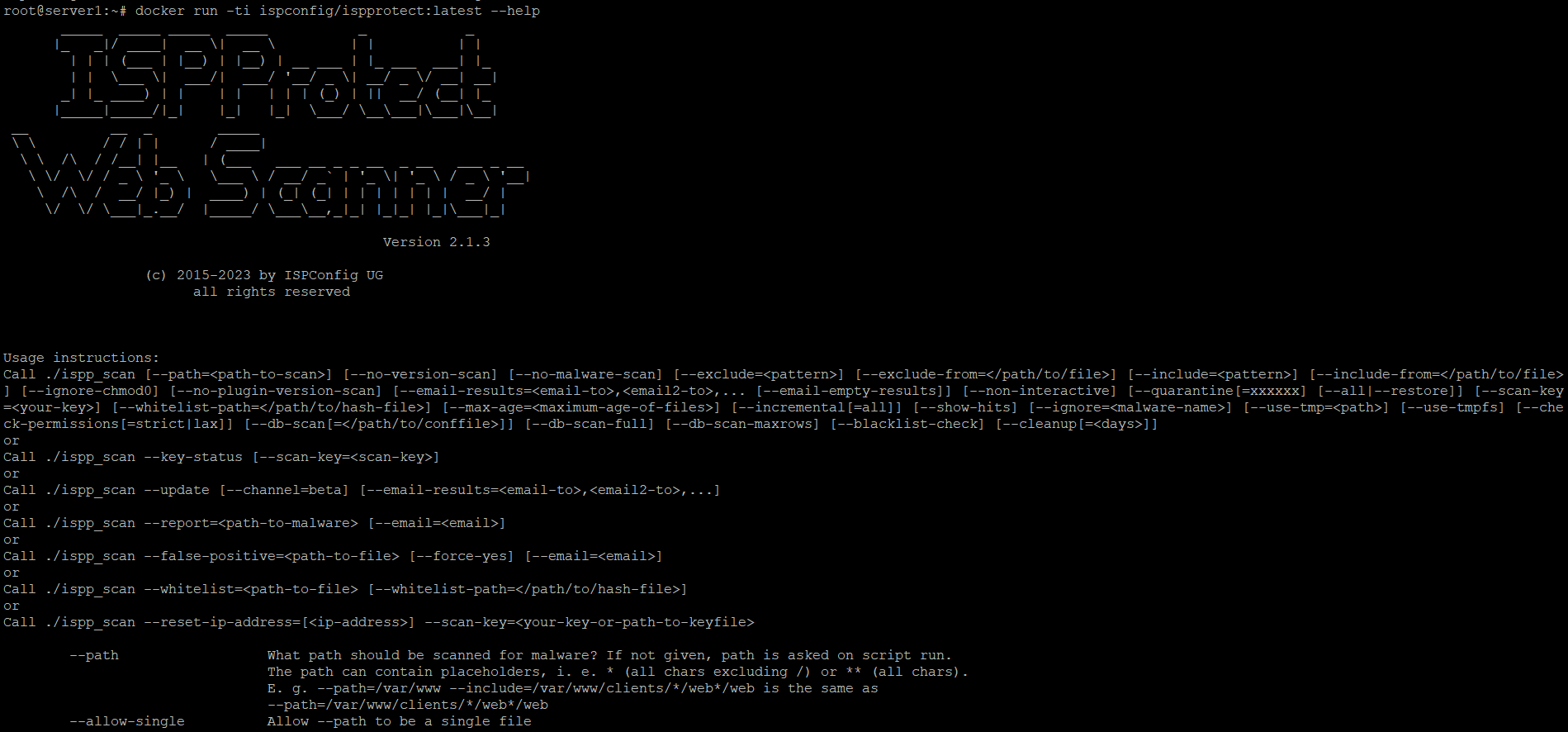
ISPProtect Web Scanner 2.1.3 started from its Docker image with --help: the options for paths, exclusions, email reports, quarantine, database scans, incremental scans, whitelists and updates.
Features
Signature and heuristic malware detection
ISPProtect combines ClamAV with signatures written for web malware (PHP shells, injected JavaScript, spam mailers, IRC bots) and a heuristic engine for unknown code. When it finds something it didn't recognise before, --report sends the file to the developers, who normally add a signature within one to two days; --false-positive reports the opposite case, and --whitelist marks your own files as known-good.
Outdated CMS and plugin report
ISPProtect lists the version and path of every WordPress (including most plugins from wordpress.org), Joomla, Drupal, Contao, Magento, Woltlab Burning Board, MediaWiki, CMS Made Simple, Typo3, phpMyAdmin and Shopware installation it finds, and flags the outdated ones next to the newest version. That catches the forgotten copies hackers love: /web/old/website, a staging folder, an unpacked upgrade directory. It also warns about WordPress plugins with known vulnerabilities.
Automation for hosting servers
ISPProtect runs unattended with --non-interactive, a path pattern such as /var/www/clients/*/web*/web, and --email-results to one or more addresses, so a cron job can mail you a malware and outdated-software report daily, weekly or monthly. Other options scan only files changed since the last run (--incremental), skip files by pattern or age, quarantine findings and restore them, scan databases, check file permissions, and run scans in parallel threads with the ClamAV daemon.
BanDaemon included with the yearly license
ISPProtect's yearly license also covers BanDaemon, a fail2ban-style service that watches SSH, Apache/Nginx, Postfix/Dovecot, Pure-FTPd and Bind logs and blocks attacking IPs with iptables, with GeoIP scoring, IPv6 subnet bans, daily email reports and an optional shared database that spreads bans across servers. It needs PHP 5.6 to 8.3 and MySQL or MariaDB, and is sold on its own for $39 a year.
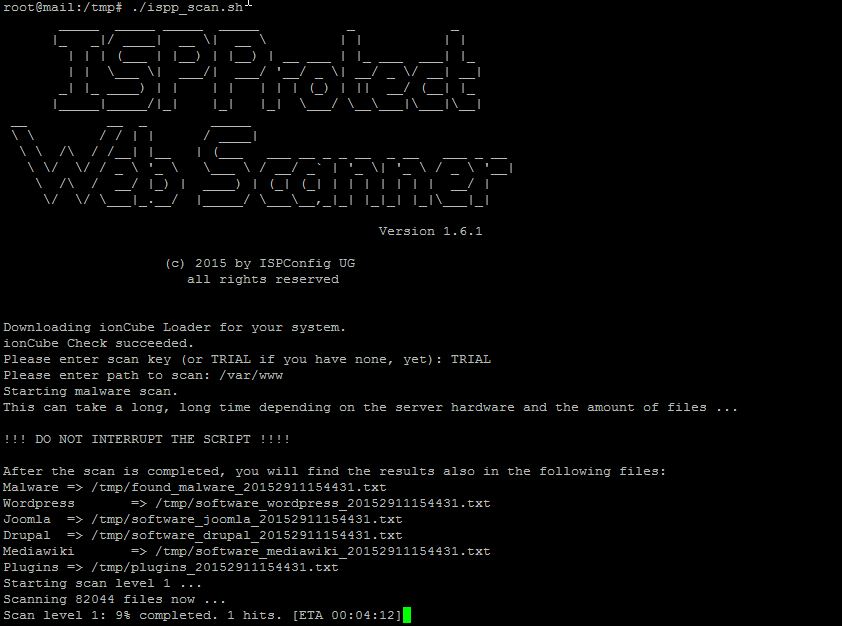
An ISPProtect scan from the documentation (version 1.6.1, older than today's 2.1 but the same flow): the TRIAL key, the path /var/www, the result files for malware and each CMS, and level 1 scanning 82,044 files with one hit so far.
Benefits
- Answers "which site is it?" fast on a server with hundreds of customer sites.
- Prevention, not only cleanup: the outdated-software list tells you which sites will be hacked next.
- Nothing to maintain: no daemon, no web interface, no installation; delete the folder and it's gone.
- Cheap for occasional use: support companies can carry a scan pack from server to server instead of licensing each one.
Real-World Uses
- A shared hosting server sends spam: scan
/var/www, find the mailer script in one customer's upload folder, quarantine it, then update the outdated WordPress it came through.
- Weekly hosting report: a cron job emails every customer site's outdated CMS versions to support, who warns the customers.
- Linux support call: a client's VPS is slow; copy ISPProtect to
/tmp, use one scan from your pack, find an IRC bot.
- Before migrating sites to a new server, scan them so you don't move the infection with them.
Who It's For, and Who Should Skip It
It suits anyone with root access to a Linux web server: hosting providers, agencies running their own VPS, and Linux support companies. It works with or without a control panel (ISPConfig, Plesk, DirectAdmin or none).
Skip it if you're on shared hosting with no shell access: ISPProtect needs root (or at least a shell with PHP and ClamAV), so a WordPress security plugin or your host's scanner fits better. It's also not a Windows server tool, and it doesn't clean infected files for you; it finds them and can quarantine them.
Usage Guide
- Install the prerequisites: command-line PHP and ClamAV (
clamscan), for example from your distribution's packages.
- Download and run:
cd /tmp, wget https://www.ispprotect.com/download/ispp_scan.tar.gz, tar xzf ispp_scan.tar.gz, ./ispp_scan.
- Enter your key or TRIAL, and the path where the websites live.
- Read the results on screen or in the files it names (found malware, one file per CMS, plugins).
- Automate it: install it permanently, then add a cron job with
--non-interactive --path=... --email-results=you@example.com.
Before you buy
- Yearly or per scan? The yearly license is bound to one server installation and allows unlimited scans; buy it for a server you'll scan on a schedule. Scan packs aren't tied to a server and never expire: 10 scans can be one server ten times or ten servers once.
- Prices are converted from euros (82.68 EUR a year excl. VAT on the vendor's site); EU customers without a VAT ID pay VAT on top.
- Check ClamAV first. The scanner won't start without the
clamscan binary, and multi-threaded scans also need the ClamAV daemon.
Where it falls short
- The documentation is dated. The main guide still shows version 1.6.1 from 2015, and its FAQ lists PHP 5.3 to 7.4 even though PHP 8 has been supported since version 2.1.1. Expect to read
--help rather than the manual.
- Big servers take a long time. The scanner itself warns that a scan "can take a long, long time" and not to interrupt it; use incremental scans and threads on large file trees.
- No dashboard. Everything is the shell and email; there's no web panel for clients to see their own results.
- No public detection tests. We found no independent comparison of its detection rate with other scanners.
What Users Say
Public reviews are few: its Trustpilot profile (3.8, "Great") has only two reviews, both five stars.
Trustpilot
"This product just saved my life. I have purchased a licence for all my servers and now there are no more complains about spams sent from them and no more wordpress websites getting hacked etc.. And the most important is that the licence key is very affordable." (Jajeuf Hosting, December 10, 2020, 5 stars)
"Thanks guys for the help setting up, this service is great to ensure your server is secure great product and service" (Adrian Duffy, September 13, 2017, 5 stars)
Quoted on ispprotect.com
"ISPProtect saves us a lot of time and trouble. Especially automated reports by mail for malware and outdated CMS offer a real benefit." (M. Cramer, Saturas GmbH)
TechRepublic also published a how-to on scanning websites for malware with ISPProtect. The pattern: hosts value the scheduled reports and the low price; the thin review base and dated documentation are the main gaps.
Comparisons
ISPProtect vs plain ClamAV
ClamAV alone is free but built for email and desktop files; it misses much obfuscated PHP malware and knows nothing about outdated CMS versions. ISPProtect uses ClamAV as its first level and adds web-specific signatures, a heuristic scan and the version check.
ISPProtect vs WordPress security plugins
A plugin such as a WordPress firewall scans one site from inside it, and a hacked site can tamper with it. ISPProtect scans every site on the server from the outside, including non-WordPress sites and abandoned copies no plugin knows about, but it doesn't block requests or harden a site.
Editions and Pricing
Prices at checkout on November 22, 2026. Each button orders that license.
FAQs
Does ISPProtect need ISPConfig?
No. ISPProtect works on any Linux web server, whether it runs ISPConfig, Plesk, DirectAdmin, another control panel or none. It's made by the ISPConfig team, and its sales help fund the open-source ISPConfig project.
Does ISPProtect install anything on my server?
No. ISPProtect runs from the folder you unpack it into. If the server's PHP lacks the loader it needs for its encoded files, it fetches that loader and uses it only for its own process, without changing your PHP setup. To remove it, delete the folder.
Can ISPProtect run inside Docker?
Yes. ISPProtect has an official image, ispconfig/ispprotect, so you can run a scan without putting PHP or ClamAV on the host itself.
What happens if ISPProtect misses a malware file?
ISPProtect has a built-in report command, ispp_scan --report=/path/to/file, that sends the file to its researchers after asking you. They normally add a signature within one to two days. Don't send files that contain passwords.
Can I move an ISPProtect yearly license to another server?
The ISPProtect yearly license is bound to one server installation, and the scanner has a --reset-ip-address option for the key. If you scan many different servers now and then, scan packs fit better, since they're not tied to a server.
Can ISPProtect scan my website over FTP without shell access?
Not the scanner itself, which runs on the server. The vendor also offers a separate online service, ISPProtect Web Scan, that scans webspace over FTP.
System Requirements
- Linux (or FreeBSD) server with shell access, run as root unless started with
--no-root
- Command-line PHP (PHP 8 supported since version 2.1.1)
- ClamAV (
clamscan); the ClamAV daemon for multi-threaded scans
- Or Docker with the
ispconfig/ispprotect image
- Download: 4.5 MB
Conclusion
ISPProtect is worth it for anyone who runs Linux web servers for other people. At about $91 a year per server, or a few dollars per scan, it finds the malware a hosting customer's site picked up and, just as useful, the outdated WordPress installs that will be next, and it can mail you that list every week without you touching it. The case against: it's a bare command-line tool with dated documentation and no independent detection tests, so it complements, rather than replaces, keeping sites updated. Run the free trial on your busiest server first; the results will tell you quickly.
Download Free TrialBuy Yearly LicenseBuy 10 Scans