Project Manager 4 for 3ds Max: An Asset Browser That Sorts and Finds Your 3D Library for You
Project Manager is a $60 asset browser for Autodesk 3ds Max (2016 to 2027) that catalogues your 3D models, materials, textures, HDRIs and IES lights, drops them into the scene by drag and drop, and fixes missing file links. Version 4 adds a local AI engine that sorts models by type, style and material and finds them from a plain description, a picture or a colour. It's for archviz artists, interior designers and studios with libraries too big to browse by file name. The license is perpetual.
Anyone who has bought a few model collections knows the problem: thousands of files called 001.max, AM251.max or Vizpcarshd v020, spread over several drives, and no way to find "a dark leather lounge chair" without opening folders one by one. Project Manager puts that library in a panel inside 3ds Max and, from version 4, tags it for you.
Quick facts
- Version: 4.02.87, November 20, 2026 (the 4.0 release with AI classification came out on June 8, 2026)
- Developer: Kstudio, Oleksandr Kramer's studio, which also makes Spline Flow, Sweep Profile and FilePathFinder for 3ds Max
- Host: Autodesk 3ds Max 2016 to 2027, so Windows only
- Renderers: any, including V-Ray, Corona, Arnold, Redshift, FStorm, Octane and Maxwell
- Price: $60 at checkout, perpetual license, with a free second license for another machine you use
- Trial: free demo that works with a limited number of files
- Rating: 4.97 out of 5 from 88 customer reviews on Kstudio's site
- What we checked: the demo download (ProjectManager_4_Demo.zip, 99.6 MB), whose installer is version 4.02.87 dated November 20, 2026; the order page price of $60, one-time, on November 22, 2026. We didn't install it into 3ds Max or run the AI classifier on a library of our own.
Download Free DemoBuy Now
Overview
Project Manager runs as a dockable window inside 3ds Max with two halves: an Explorer for browsing and placing assets, and Asset Tracking for the files a scene depends on. The Explorer has tabs for models, materials, textures and IES lights, a folder tree with virtual catalogs and categories, a thumbnail grid, and a large preview with a gallery of every image that belongs to a model.
You point it at the folders where your libraries already live; it doesn't move or copy anything. Thumbnails come from the preview images that ship with most model collections, or Project Manager renders its own. From there you drag a model into the viewport (as plain geometry, a V-Ray, Corona, Arnold, Redshift or FStorm proxy, or an xRef), drag a material onto an object or into the Slate Material Editor, or paint objects such as table decor or shrubs onto a surface.
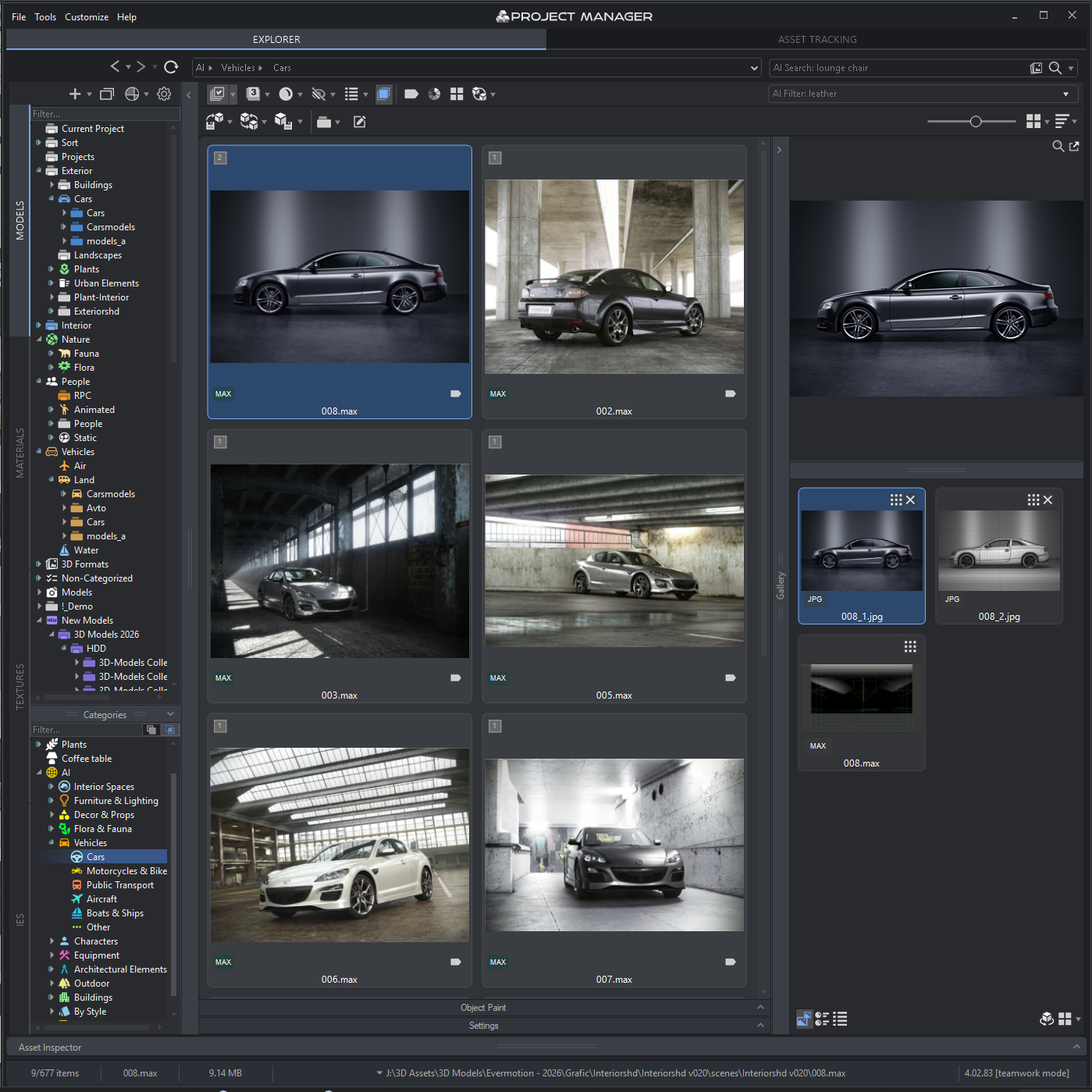
The Explorer in version 4.02.83: the folder tree and AI categories on the left (Vehicles, Cars selected), car models in the grid, and the selected model's preview and image gallery on the right. The AI Search box at the top reads "lounge chair".
Features
AI classification and plain-language search
Project Manager 4 classifies 3D models automatically by object type (chair, sofa, lamp), material (glass, wood, metal), style and brand, so a library organises itself without manual tagging. The AI proposes and you decide: any suggestion can be reviewed, moved or removed. AI Text Search finds models from a description such as "cube glass coffee table", in over 30 languages, and any search can be saved as a Smart Category in the tree (added in 4.01.88). The classifier runs on your own machine with GPU acceleration; nothing is uploaded and there's no subscription.
Find Similar and colour search
Project Manager's Find Similar picks models that match another model's shape and look, or a reference image you drag in, paste or crop, and keeps your references as reusable Reference Sets. Colour Search finds models and textures by a colour from a palette. Colour labels such as Draft, Approved, In Review or Urgent tag assets with a workflow state that the whole team sees.
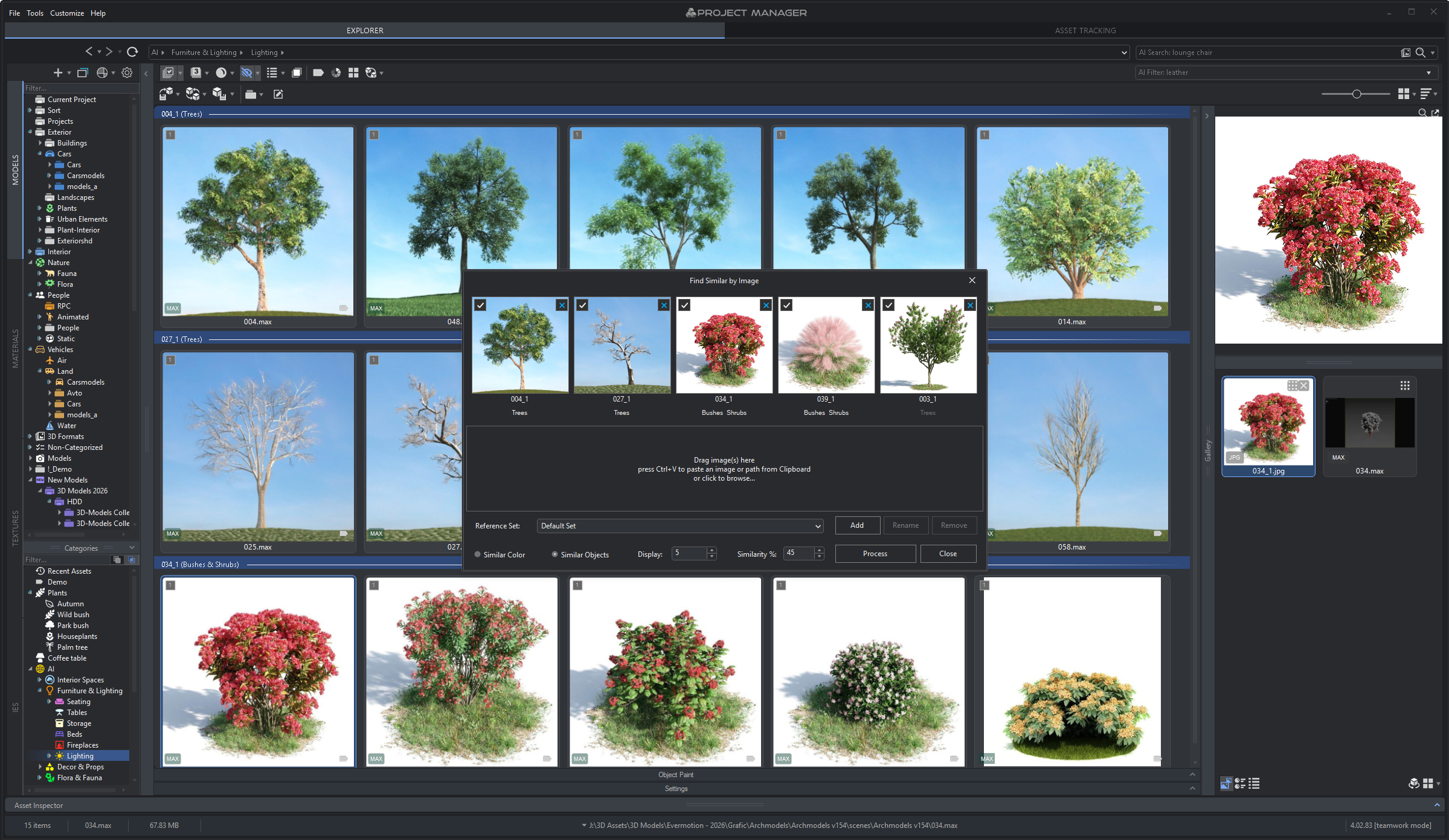
Find Similar by Image: five reference pictures (trees and flowering shrubs) at 45% similarity, with the matching models grouped under each reference in the grid behind.
AI renaming of meaningless file names
Project Manager's Advanced File Renamer can suggest names from what a model looks like, so 001.max becomes "White Car Is Parked In The Snow.max". You choose which name parts to use (style, colour, material, object), the naming model, and a file mask with counters, then apply or undo the last rename. Ordinary mask-based renaming, diacritics replacement and Cyrillic-to-Latin transliteration are there too.
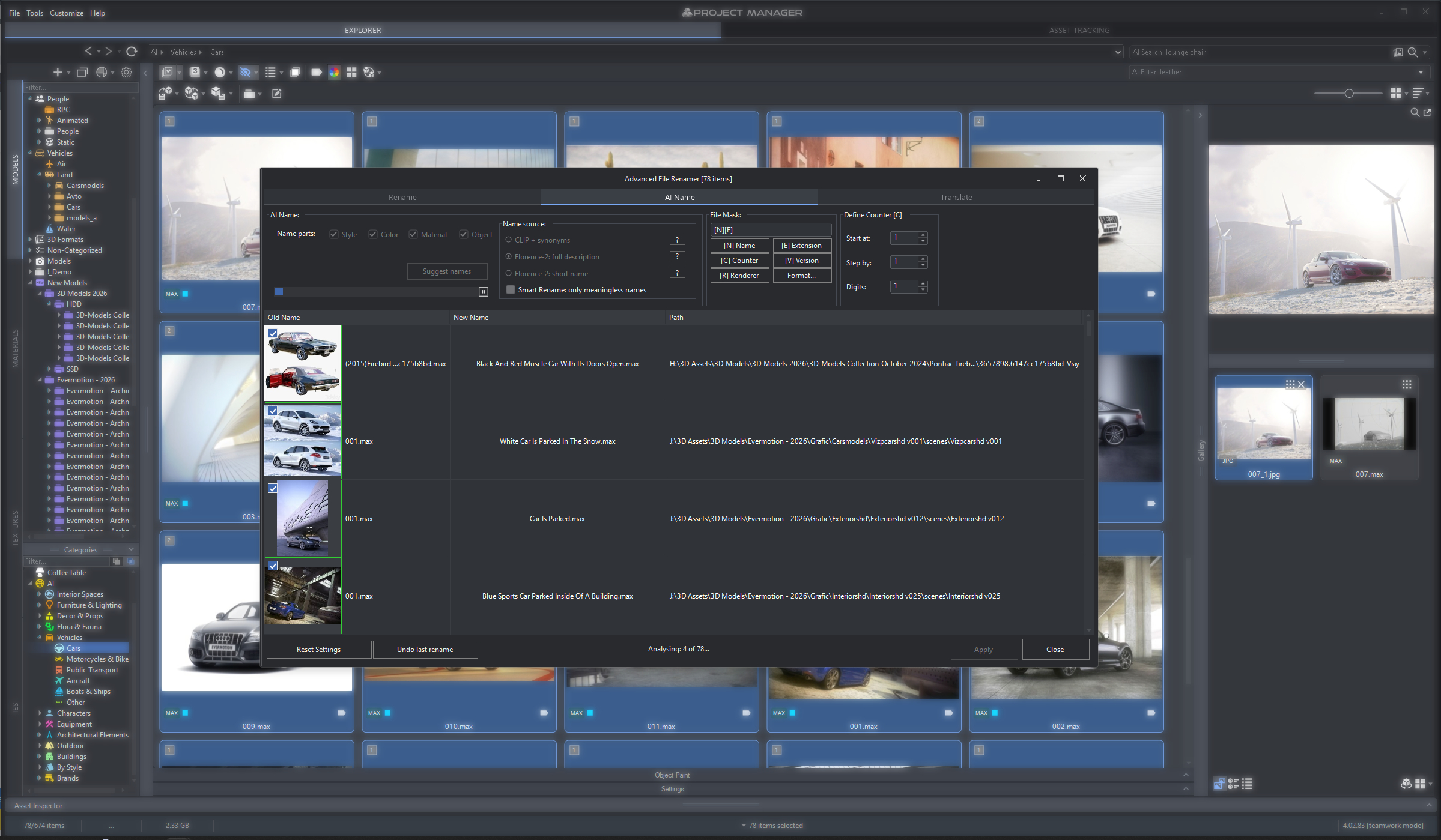
The Advanced File Renamer's AI Name tab analysing 78 car models: old names like 001.max on the left, suggested descriptive names in the middle, full paths on the right.
Asset tracking: relink, collect and archive
Project Manager's Asset Tracking side lists every external file a scene uses (bitmaps, proxies, IES files, xRefs), highlights missing ones and searches folders to relink them. It can collect all of a scene's files into one folder, archive them, rename links by mask, strip links, or select the objects that use a given file. Batch Render & Relink does the same across many .max files and material libraries without opening each one, which is what you need before sending a project to a render farm or another workstation.
Archives, previews and batch tools
Project Manager opens ZIP, RAR and 7Z files like folders, so you can drag a model straight out of a downloaded archive. It previews bitmaps including HDR, EXR and PSD, models, proxies, materials (with interactive rendering) and IES files, and creates PBR materials from a set of textures in one click. Batch tools import and export many files at once, convert and resize images, and render previews in bulk.
Team features
Project Manager can keep its catalogue in a shared MySQL or MariaDB database, so folder trees, categories, icons, colours and labels stay the same on every workstation, and files a teammate adds or removes show up live. It installs silently from a script for studio-wide deployment, and has a MAXScript API with code samples, customisable toolbars and hotkeys, and an interface in 12 languages.
Benefits
- You use the models you paid for. A purchased collection nobody can find is wasted money; a searchable library gets reused.
- Scenes come together faster. Dragging a proxy or material from a panel beats File, Merge, browse and guess.
- Fewer missing-texture surprises. Relinking and collecting before a deadline or a farm upload saves a failed overnight render.
- Private by design. The AI runs locally, which matters for client work and licensed assets that can't go to a cloud service.
Real-World Uses
- Interior visualisation: search "contemporary walnut dining table" across Evermotion, 3DSky and your own models, drop three candidates in as proxies and compare them in the scene.
- Cleaning up a messy library: let the classifier sort thousands of models into categories overnight, then AI-rename the
001.max files so they make sense outside Project Manager too.
- Landscaping a scene: paint shrubs and trees onto terrain from the Object Paint panel, using Find Similar to pick plants that match a client's reference photo.
- Handing off a project: collect every texture, proxy and IES file of a scene into one folder before sending it to a render farm or a freelancer.
- Studio library: share one database across ten workstations so categories and approval labels are the same for everyone.
Who It's For, and Who Should Skip It
It suits 3ds Max users with large model and material libraries: archviz and interior studios, freelancers who buy model packs, and teams that share assets over a network. At $60 it's priced like a single model collection.
Skip it if you don't use 3ds Max: it's a plugin, not a stand-alone browser, so Blender, Cinema 4D, SketchUp and Revit users need a different tool. A user with a few dozen models will get little from the AI. And if you mostly use assets from a single online store, that store's own browser plugin may cover you.
Usage Guide
- Install: download the demo and run the installer; it adds Project Manager to 3ds Max's menu. After buying, choose Activation from the Project Manager menu and enter the key from your confirmation email, or use an online license.
- Add your libraries: add the folders that hold your models, materials, textures and IES files to the tree; nothing is copied.
- Generate previews for models without images, and let the AI Classifier run in the background to categorise them.
- Search and place: type a description in AI Search, or filter by category, colour or label, then drag the model into the viewport and choose how to merge it.
- Before delivery, switch to Asset Tracking, fix any missing links, and collect or archive the scene's files.
Before you buy
- Test the demo on your own library. It works with a limited number of files, which is enough to see whether the AI categories and search suit the models you own. In the demo, Batch Render & Relink skips some files and can't relink.
- Prices can differ. Kstudio's own store sometimes runs sales (it showed $42 instead of $60 on November 22, 2026); the order page behind our Buy button charged $60 that day.
- One purchase covers two machines for the same person, such as a studio PC and a laptop; a company gets one free extra license per license bought.
Where it falls short
- Setup takes time. Several otherwise glowing reviews say the same: "Does take time to set up you libs" and "Takes a while to understand all the features." Big libraries also need previews generated and classified before search is useful.
- The AI is new. Version 4 shipped in June 2026, and the changelog since then is full of AI fixes: installation issues that stopped the AI from starting on some systems, low GPU memory handling, and classifier recovery after errors.
- Dense interface. A packed dark panel with many toolbars; an older review asked for bigger fonts on 4K monitors.
- 3ds Max only, and the AI features depend on your graphics card.
What Users Say
Project Manager is rated 4.97 out of 5 from 88 reviews by verified owners on Kstudio's site. Some reviewers have used it for over ten years.
Verified owners on 3d-kstudio.com
"Great great tool for 3ds max. Does take time to set up you libs but once you do it its a blast to work with." (Romas Noreika, August 25, 2026, 5/5)
"This is just a small thank you to Oleksandr for the last update 3.37.17, it running great for us, librarys load so much faster, icons are a great addition !! ability to share icons and colors with the database and team.. Been using PM for at least 10 years and its better than ever :)" (Juan Pablo Estupinan, January 8, 2025, 5/5)
"Indespensable tool for any serious viz-artist. I cannot imaging how much time this tool has saved me. Support and bug-fixing is extremely fast." (j.a.b, November 22, 2022, 5/5)
"I will not exaggerate, it is a great plugin. I bought it recently but I already use it in every project I do. It really speeds up my workflow and makes the tedious process of maintaining the library of objects, maps, materials even fun." (David Sáenz De Ynestrillas Vera, February 12, 2020, 5/5)
"A must have for any office size, PM is in the heart of our daily workflow, and the customer support is out of this world! Must buy!" (Daniel Diaz Del Castillo, October 17, 2018, 5/5)
"It is a necessary tool for organizing projects! I've tried other similar tools but Project Manager works best!" (jeanphi, July 13, 2020, 5/5)
The critical notes
"Takes a while to understand all the features. But after a while it rocks." (Tryharder, October 16, 2019, 5/5)
"It helps us a lot in several tasks and get our stock models organized and ready to populate our scenes. Keep improving it and for sure we will get a really great tool" (Sérgio Merêces, March 8, 2018, 4/5)
A January 2021 reviewer (mochinaga, 5/5) listed wishes: "I hope the font looks big for 4k monitors," a way to close it with the cross button, and double-click to open a file, adding "When organizing files, I made several mistakes in saving when merging."
Press
Digital Production covered version 4.01 in August 2026, describing its search as finding assets by "descriptions and category metadata" instead of file names, with "the aim is to find the right production asset before the artist has to remember which supplier called it."
The pattern: long-time users praise the speed it adds to daily work and the developer's quick support; the complaints are about the learning curve and setup time, not about it failing. The reviews all live on the vendor's own store, and nearly all are five stars, so weigh them with that in mind.
Comparisons
Project Manager vs Kstudio's smaller tools
Kstudio also sells FilePathFinder (asset tracking only) and Batch Relink (a stand-alone app for relinking .max files without 3ds Max). Project Manager includes asset tracking and Batch Render & Relink, so buy it if you want the browser as well; buy the smaller tools only if relinking is all you need.
Project Manager vs 3ds Max's own tools
3ds Max's Asset Tracking dialog and Material/Map Browser handle one scene's links and the material libraries you load, but they don't catalogue a drive full of models, show rendered thumbnails, merge proxies by drag and drop or search by description. Project Manager adds all of that for $60.
Pricing
Project Manager costs $60 at checkout (November 22, 2026) for a perpetual license, with one free additional license for a second machine. It's also part of Kstudio's All Products bundle on the vendor's store.
FAQs
Does Project Manager send my 3D models to the cloud for AI tagging?
No. Project Manager's AI classifier and search run entirely on your own computer, using your graphics card when it can. Your assets never leave the machine, and the AI features need no subscription.
Which versions of 3ds Max does Project Manager 4 support?
Project Manager 4 supports 3ds Max 2016 through 2027, and works with any renderer, including V-Ray, Corona, Arnold, Redshift, FStorm, Octane and Maxwell.
Can I use one Project Manager license on my desktop and laptop?
Yes. Every Project Manager purchase includes one free additional license for a second machine, for individuals and companies alike (a company gets one extra per license bought).
Can a whole studio share one Project Manager library?
Yes. Project Manager can store its catalogue in a shared MySQL or MariaDB database, so categories, icons, colour labels and folder trees are the same on every workstation and changes appear live. Kstudio has a team setup guide for the database, paths and licenses.
Does Project Manager move or copy my model files?
No. Project Manager indexes the folders where your files already are. It only changes files when you ask it to, for example renaming, collecting a scene's files into a folder, or extracting a model from an archive you drag into the scene.
Is there a Project Manager version for Blender or Cinema 4D?
No. Project Manager is a 3ds Max plugin only, and needs 3ds Max running on Windows.
System Requirements
- Autodesk 3ds Max 2016 to 2027 (Windows)
- Any renderer
- A graphics card speeds up the AI classifier
- Optional MySQL or MariaDB server for a shared team database
- Demo download: 99.6 MB
Conclusion
For a 3ds Max user with a real asset library, Project Manager is an easy yes at $60. It replaces folder-diving with search, placing and relinking from one panel, it's been maintained for over a decade, and version 4's local AI tackles the worst part of a bought library: names that mean nothing. The reason to hesitate is the setup effort and a brand-new AI layer that's still getting fixes; the demo on your own files will tell you quickly whether it suits you. If you don't use 3ds Max, it's not for you.
Download Free DemoBuy Now