signNow: Low-Cost E-Signatures With Unlimited Users, but Only 100 Invites a Year
signNow (airSlate SignNow) is a web-based e-signature service, with iPhone and Android apps, that lets you send PDFs and Word files for legally binding signatures, build reusable templates and track who has signed. The Business plan costs $96 a year ($8 a month billed annually) for the whole account with unlimited users, but every annual plan includes only 100 completed signature invites a year, and extra invites are billed on top.
If you send a handful of contracts, consent forms or offer letters a week and are tired of printing, signing, scanning and emailing them back, signNow does that job for a fraction of DocuSign's price. If you send hundreds of documents a year, read the invite rules below before you pay.
Quick facts
- Developer: airSlate Inc.
- Platforms: any web browser, plus iPhone/iPad (iOS 15 or later) and Android apps; signers don't need an account
- Price: Business $8/month billed annually ($96/year) or $20 month to month; Business Premium $20/$30; Enterprise $30/$50
- Users: unlimited users on every plan, priced per account, not per seat
- Usage limit: 100 completed signature invites per account per year on annual plans, 10 per month on monthly plans, then pay-as-you-go
- Trial: 7 days, all features
- Refunds: new customers can ask for a refund within 30 days of the invoice; plans renew automatically
- Compliance: GDPR, SOC 2 Type II, PCI DSS, HIPAA, CCPA and 21 CFR Part 11
- What we checked: plan prices, the invite allowance and the trial, refund and renewal terms on signNow's plans page on November 22, 2026. We didn't open the checkout or send documents for signature.
Before you buy: how signNow counts invites
signNow's low price comes with a usage cap. A signature invite is one request to sign a document or document group, sent to one or more recipients, and it counts once it's completed. A declined document still counts, and so does an invite you cancel after sending. If you share a signing link without restricting forwarding, every completed signature through that link counts as a separate invite. Opening a document doesn't count, and neither do merging, downloading or archiving.
Annual plans include up to 100 completed invites per account per year (monthly plans 10 a month). Past that, the account switches to pay-as-you-go and you keep sending, but you pay for each extra invite. Count how many documents you send in a typical year first: at 100 or fewer, signNow is one of the cheapest options there is; well above that, the extra invites change the math.
Start Free TrialSee Plans and Buy
Overview
signNow belongs to airSlate, the company that also makes pdfFiller. It runs in the browser, so there's nothing to install on a PC or Mac. You upload a document from your computer or from Google Drive, Dropbox, Box or OneDrive, drag fields onto it, assign each field to a signer, and send it by email or as a signing link. Recipients open the document in any browser or phone, sign by typing, drawing or uploading their signature, and you get a notification and an audit trail once it's done.
The pitch is simple: what DocuSign sells per user, signNow sells per account. A five-person office pays the same $96 a year as a one-person shop on the Business plan. The trade-off is the invite allowance, which is where most of the complaints about signNow come from.
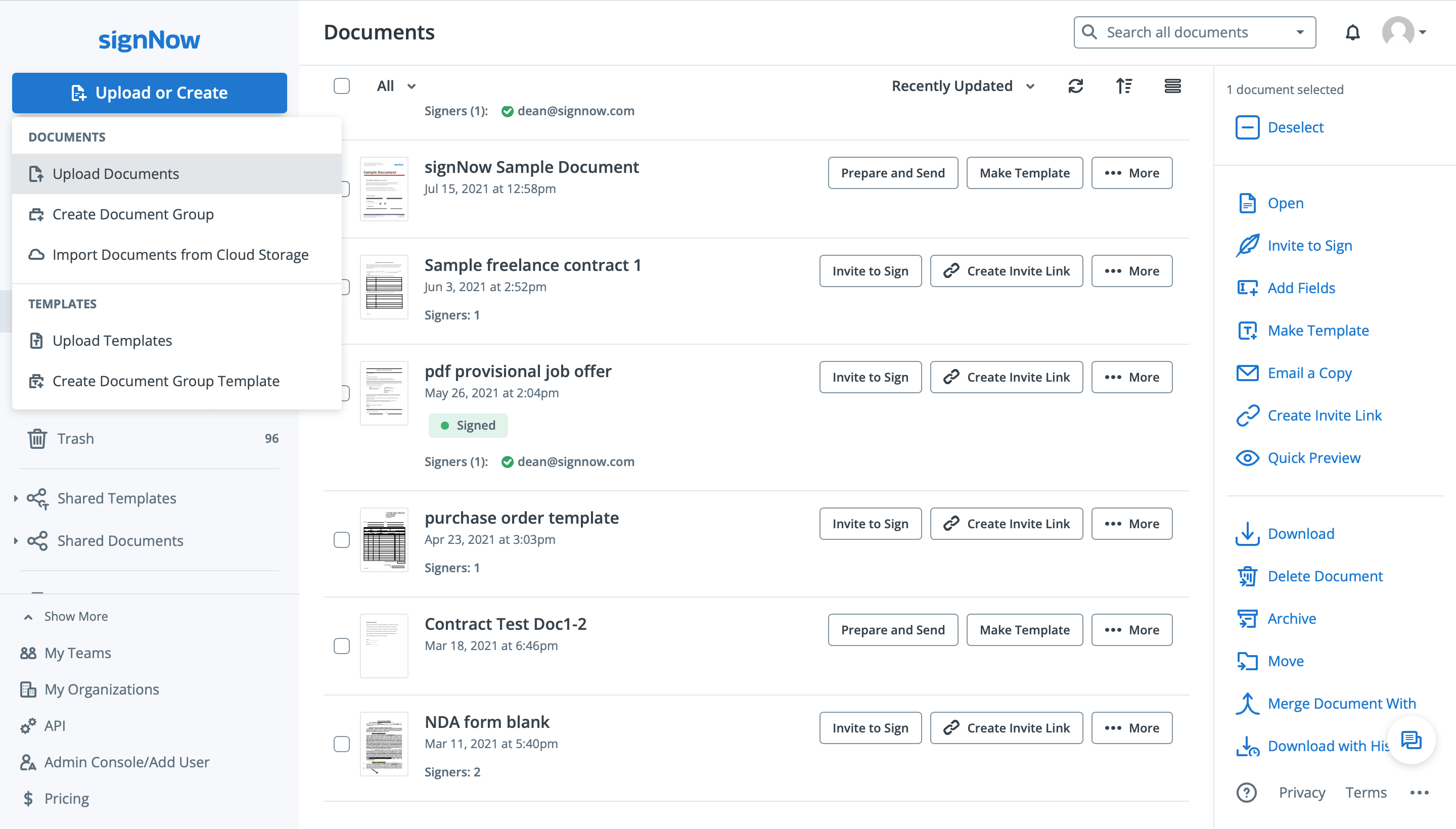
The signNow Documents list: the Upload or Create menu on the left, Invite to Sign, Create Invite Link and Make Template buttons on each document, and document actions in the right panel.
Features
Fillable fields you place by drag and drop
signNow's editor gives you signature, initials, text, date/time, checkbox, radio button group, dropdown, calculated, stamp and request-attachment fields. Each field gets a role (Signer 1, Signer 2...), a required flag, a label, prefilled text and validation such as a US date format, so the recipient can't skip it or type nonsense.
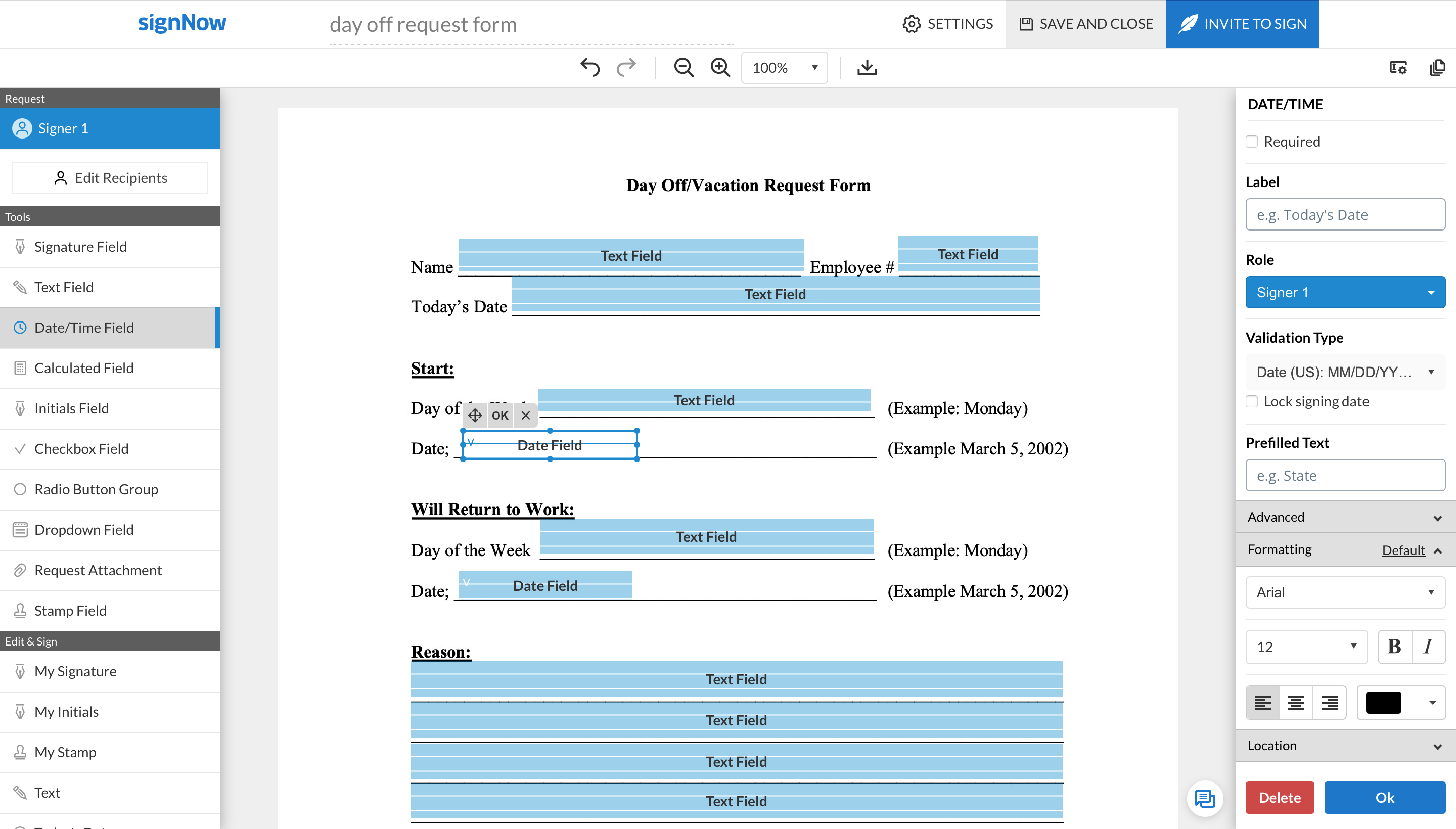
The signNow editor: field types on the left, text and date fields placed on a day-off request form, and the selected Date/Time field's role, validation and formatting settings on the right.
Unlimited templates and document groups
signNow lets you turn any prepared document into a template, so the fields are already in place the next time you send an NDA or engagement letter. Document groups bundle several files into one invite (and count as one invite), which suits onboarding packets and loan paperwork. Storage for documents and templates is unlimited on every plan.
Signing order, reminders and an audit trail
signNow lets you set the order in which people sign, send automatic reminders, and set an expiration date on an invite. You can require two-factor signer authentication, and every document keeps an audit trail of who viewed, changed and signed it and when, which signNow describes as court-admissible.
Signing links, bulk send and payments (Business Premium)
signNow Business Premium adds signing links you can put in an email or on a website, bulk send from a CSV list of email addresses, payment collection on a signed form, scheduled sending, team collaboration and team reports. Watch the invite count with signing links: an open link counts every completed signature separately.
Branding and advanced workflows (Enterprise)
signNow Enterprise adds your logo and colors on signing emails, sending documents by SMS, advanced signer authentication, formula fields, conditional fields that appear only when an earlier answer calls for them, and approval workflows before a document goes out.
Integrations and the API
Every signNow plan imports from Google Drive, Dropbox, Box and OneDrive, exports finished files back automatically, and works with Google Docs, Sheets, Gmail, Chrome and Zapier. Salesforce, NetSuite, HubSpot and Microsoft app integrations, full API access and SSO belong to the Site License, which is quoted per signature invite. Developers get a free sandbox with 250 test signature invites.
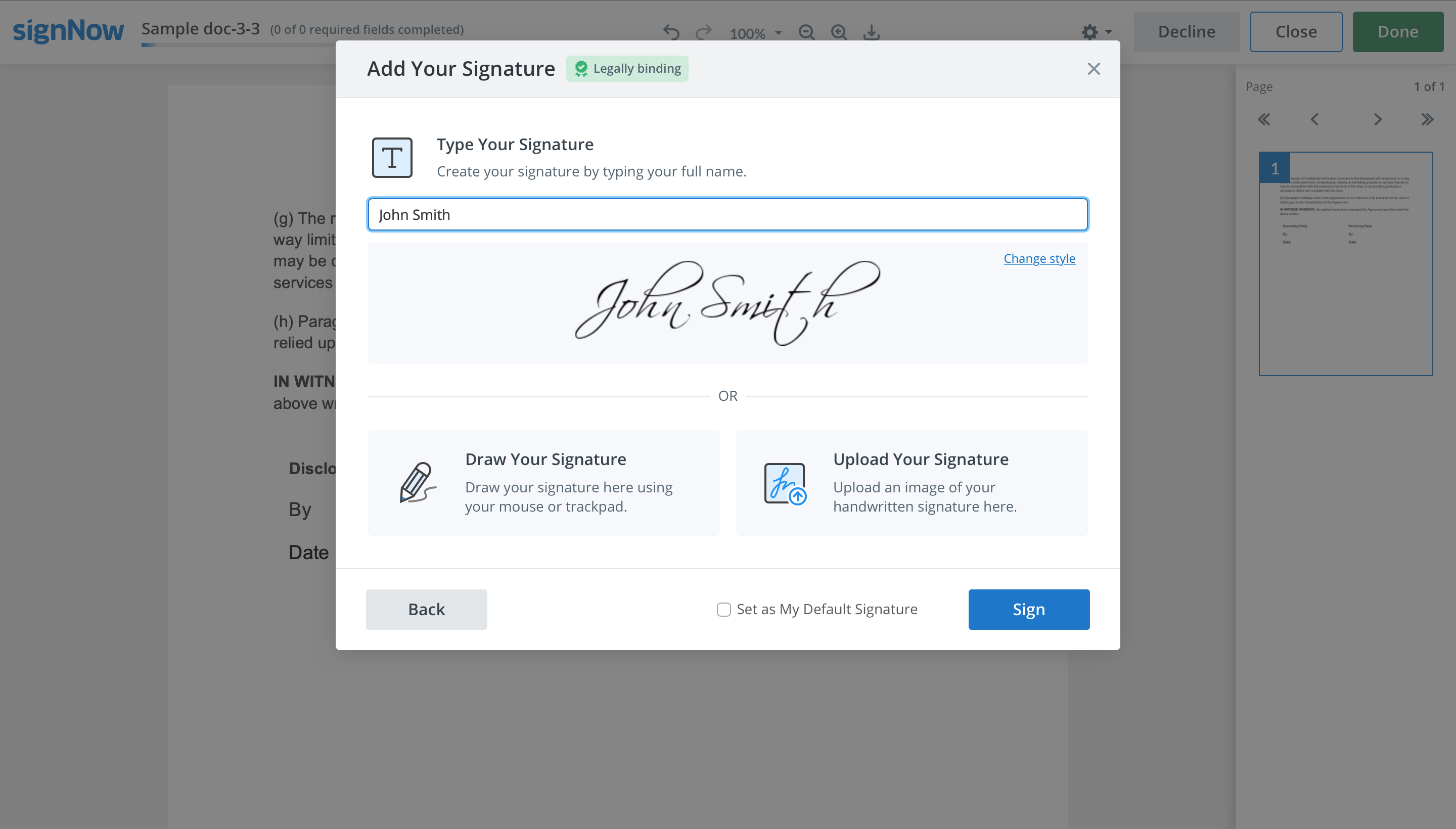
What a signer sees: the Add Your Signature dialog with a typed signature preview and the Draw and Upload options, over the document being signed.
Benefits
- Cheap for small teams. Unlimited users on one account means an office pays once, not per person.
- Nothing for clients to install. Signers open a link and sign in a browser or on a phone, with no account.
- Faster turnaround. Reminders and status tracking replace chasing people by phone.
- Fewer incomplete forms. Required fields and validation stop a document from coming back half filled in.
Real-World Uses
- A tax preparer sends an engagement letter template to each new client in January and sees in the dashboard who hasn't signed yet.
- A contractor gets a homeowner to sign an estimate on a phone at the kitchen table instead of driving back with paper.
- A small HR team sends offer letters and a document group of onboarding forms in one invite.
- A clinic on Business Premium collects intake and consent forms through a signing link, accepting that each completed form counts as an invite.
Who It's For, and Who Should Skip It
Good fit: freelancers, small offices and teams that send up to about 100 documents a year and want several people on one cheap account.
Skip it if you send hundreds of documents a year on the Business plan, because the extra invites add up, or if you want to put a public signing link on a busy website, where every signature is a separate invite. High-volume senders should ask signNow for a Site License quote or compare a per-user tool with no invite cap. If you only sign documents other people send you, you don't need a paid plan at all.
Usage Guide
- Start the 7-day trial and sign in at signnow.com in your browser (or install the iPhone or Android app).
- Click Upload or Create and add a PDF or Word file from your computer or cloud storage.
- Open it, add yourself and your recipients as signers, and drag signature, date and text fields onto the page for each one.
- Click Invite to Sign, enter the recipients' email addresses, set the signing order and reminders, and send.
- Track the status in Documents; the signed copy and audit trail are there when everyone is done.
- Save documents you send often with Make Template.
Where it falls short
- Long-time users were moved onto the invite allowance. Several Trustpilot reviewers who had signed up under older plans say they found out about the 100-invite limit only after being charged for extra invites.
- Auto-renewal. Plans renew automatically on the last day of the term; cancel in Admin Console > Manage Subscription before then if you don't want another year.
- Support. The negative reviews repeatedly describe slow or unresolved support and refund requests.
- Template editing takes some learning, and the mobile app's text tools draw complaints about alignment and font size.
- Premium integrations such as Salesforce, HubSpot and NetSuite, plus the API and SSO, are on the quoted Site License only.
What Users Say
signNow's ratings are good overall, but the most recent negative reviews almost all come back to the same thing: the invite allowance and how billing changed.
Trustpilot: 4.3 out of 5 from 3,211 reviews (praise)
- "This service works well at a competitive price." (Paul Bown, November 20, 2026)
- "I love it, easy to maneuver and follow-up to see what documents has been signed and which ones aren't." (Innocent Capital Mgmt Services, November 8, 2026)
- "So quick and easy. It's nice to have my clients get things done quickly and easily" (Aaron Slavik, October 26, 2026)
- "it has been an absolute game-changer." (Rafael Uribe, "I've been using signNow to manage my tax business", October 15, 2026)
- "Really good for sending documents to sign by another person." (Steven, "Great for sending, not for receiving and signing", October 21, 2026)
Trustpilot: the criticism
- "This is a terrible pricing method - 100 ANNUAL is a scam." (Hassan Hoque, "Using signnow since 2020", April 28, 2026)
- "I received no notification about this change to the way our subscription worked." (Fred, "Paid for a Year, Had to Cancel After Five Months", October 8, 2026)
- "I really feel like I've been ripped off here and am looking forward to leaving." (Cade Perry, May 27, 2026)
- "We emailed back and forth with management, tech support, with no resolution." (Jose Luis Jaramillo, "Worst product on the market", August 19, 2026)
- "The template function can be a little tedious and confusing, but it does save time once you figure it out." (April Watson M.Ed., Ed.S. NCSP, "Convenient and easy to use", October 15, 2026)
Several low-rated reviews mention per-invite charges of about $1.80 after the allowance ran out.
App Store: 4.5 out of 5 from 18K ratings
- "It is also NOT dependent on Dropbox or Google to access the signed documents." (MB 101, "Best of all signing apps!", 2018)
- "They've made updates that make everything more difficult and less convenient." (NonUnionScab, "Gone Downhill", 2020)
- Text boxes "cannot be aligned/font size adjusted to the space you're filling out." (amywhimsy, "No longer workable", 2020)
On signNow's own site
- "Totally worth the money. SignNow has made closing sales after the fact incredibly easy and saves me a ton of mileage instead of driving back to clients houses." (David Moriarty)
- "Have been using SignNow for a couple of years and it's our go-to for digitizing contracts in our business." (Scott MacMillan)
The pattern: people who send a modest number of documents like the price, the speed and how easy it is for clients to sign. The angry reviews come from long-time customers who hit the invite allowance, from surprise charges, and from slow support when they asked about them.
Comparisons
signNow vs DocuSign
signNow's own comparison table puts DocuSign's Business Pro plan, the first with bulk send, at $40 a month, against signNow Business Premium at $20 a month billed annually. DocuSign prices per user, while signNow's price covers unlimited users, so the gap widens with every extra person. DocuSign is the bigger name with deeper enterprise integrations; signNow is the budget pick as long as you stay near the invite allowance.
Business vs Business Premium vs Enterprise
Business covers sending, templates, mobile apps and reminders. Business Premium is the plan to pick if you need bulk send, signing links or payments. Enterprise is for branding, SMS delivery, conditional logic and approval steps. All three have the same 100-invite annual allowance.
Editions and Pricing
| Plan |
Billed annually |
Month to month |
What it adds |
| Business | $8/month ($96/year) | $20/month | Legally binding e-signatures, unlimited templates and storage, mobile apps, reminders |
| Business Premium | $20/month ($240/year) | $30/month | Bulk send, signing links, payment collection, scheduled sending, team reports |
| Enterprise | $30/month ($360/year) | $50/month | Custom branding, SMS delivery, advanced signer authentication, conditional and formula fields, approvals |
| Site License | From $1.50 per signature invite | Quoted by sales | Full API, premium integrations, SSO, user management, volume discounts |
All prices cover unlimited users. Annual plans include 100 completed signature invites a year and monthly plans 10 a month, with extra invites billed pay-as-you-go. You choose the plan on signNow's plans page, which the Buy button opens.
FAQs
Do my clients need a signNow account to sign?
No. signNow recipients open the invite and sign in a browser or on a phone without creating an account.
What happens when I use up my 100 signature invites?
signNow keeps working: your plan switches to pay-as-you-go and each additional completed invite is billed. Only completed invites count, but declined and cancelled-after-sending invites count as completed.
Are signNow signatures legally binding?
Yes. signNow e-signatures are legally binding for ordinary business documents, and the audit trail records who signed and when. signNow also lists HIPAA and FDA 21 CFR Part 11 compliance for healthcare and life sciences.
Can I get a refund from signNow?
signNow says new customers who aren't satisfied, or whose invoice was wrong, can contact support for a refund within 30 days of the invoice.
Does signNow renew automatically?
Yes. signNow monthly and annual plans renew on the last day of the term. To stop it, go to Admin Console, then Manage Subscription, then Cancel. Accounts set up by signNow's sales team and paid by invoice cancel by emailing support@signnow.com.
Is signNow the same as pdfFiller?
No. signNow and pdfFiller both come from airSlate but are separate products with separate subscriptions. signNow focuses on sending documents for signature and tracking them.
Can I use signNow on a phone?
Yes. signNow has apps for iPhone and iPad (iOS 15 or later) and Android, and you can sign, send and track documents from them.
System Requirements
- A current web browser on Windows, macOS, Linux or ChromeOS, and an internet connection
- iPhone or iPad with iOS 15 or later, or an Android phone, for the mobile apps
- No software for signers to install
Conclusion
signNow is worth it for a small business that sends up to about 100 documents a year: $96 a year for the whole team is hard to beat, and clients find it easy to sign. The one reason to buy it is that per-account price with unlimited users. The main reason not to is the invite allowance: if you send far more than 100 documents a year, or plan to post an open signing link, the extra invites erase the savings, and the reviews show how annoyed people get when they find that out late. Count your yearly volume, use the 7-day trial, and pick Business Premium only if you need bulk send or signing links.
Start Free TrialSee Plans and Buy