Visual LVM Remote: Manage Linux LVM from a Web Browser Instead of the Command Line
Visual LVM Remote from Welees is a graphical manager for the Linux Logical Volume Manager that runs on the server and is used from any web browser, so it works even on headless servers with no desktop. A key costs $129.95 once (lifetime) or $39.95 for one year per machine; the free download only displays the storage layout.
It's for administrators who manage LVM occasionally enough to forget the exact lvcreate and vgreduce syntax, and who'd rather see the disks, volume groups and logical volumes laid out on screen before resizing anything.
Quick facts
- Version: 5.6 (rev 1363), released January 5, 2025
- Developer: Welees, a small storage software studio, making Visual LVM since 2018
- Runs on: Linux with LVM installed, x86, x86_64, ARM32 and ARM64; Welees lists Ubuntu, Debian, RHEL, CentOS, Fedora, openSUSE, Arch, Kali and Deepin
- Interface: web pages served by the program, on the server itself or from another computer on the network, with a login password
- Price: $129.95 lifetime or $39.95 for one year, each for one machine
- Free download: shows the LVM layout; operations need a key
- What we checked: the order page on November 20, 2026: Visual LVM Remote lifetime $129.95 and Visual LVM Remote 1 year license $39.95, both one-time charges with no automatic renewal, and the vendor's release history (5.6, January 5, 2025, 5.1 MB for x86_64). We didn't run it against a live volume group.
Download Free VersionBuy Lifetime LicenseBuy 1-Year License
Overview
Visual LVM shows each disk as a horizontal bar split into its partitions, physical volumes and logical volumes, colored by type (simple, stripe, mirror, RAID, thin, cache, snapshot). Hover over a piece and the Detail panel underneath shows its name, UUID, size in extents, type, status and allocation policy. On the left are three buttons, PV Operation, VG Operation and LV Operation, each opening wizards for the tasks you'd otherwise type as commands.

The main panel: five disks with the rhel swap, home and root volumes, an orphan PV and unallocated space, and details of logical volume FW190/La11 below.
Features
A browser interface that works on headless servers
Visual LVM Remote installs with a script that asks for an install folder, a port, a login password and whether to start at boot. It then serves its interface over HTTP, so you open the server's address and port in any browser, locally or across the network. Most GUI LVM tools need a desktop on the server; this one doesn't. Access can be restricted by IP address, and the password and port can be changed from the interface.

Visual LVM Remote in a browser tab at a LAN address, showing an Ubuntu server's ubuntu-vg root and swap volumes.
Physical volume and volume group wizards
Visual LVM creates physical volumes on one or several partitions, with advanced settings for metadata copies, metadata area size, label sector and UUID, and changes or removes them. For volume groups it creates, deletes and renames them, appends or removes physical volumes, changes settings such as tags, maximum volume counts and system ID, and backs up and restores volume group metadata.
Logical volumes, including RAID
Visual LVM creates, deletes, renames, enlarges and shrinks logical volumes, and supports linear, stripe, mirror, stripe-mirror and RAID 4, 5 and 6 types. It can format a new logical volume right after creating it, detects LUKS-encrypted devices and software RAID, and shows broken volume groups.
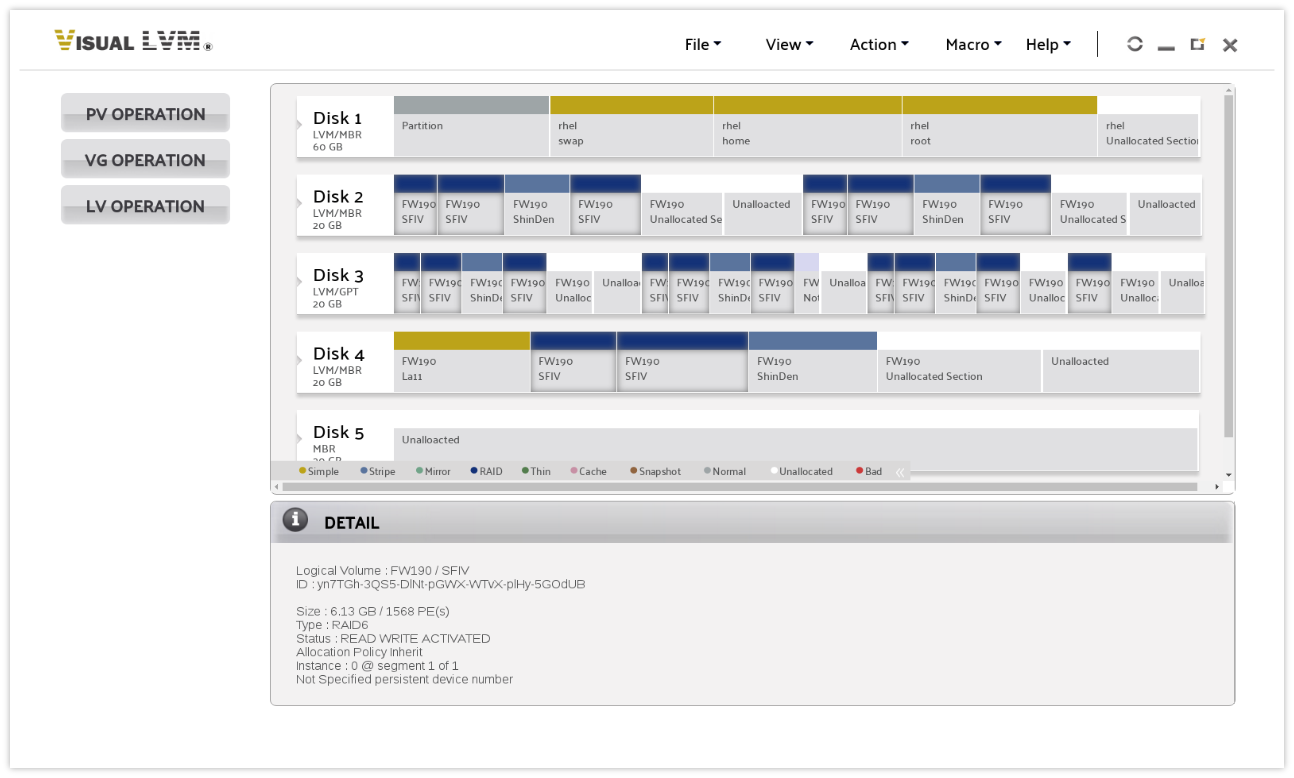
RAID 6 and stripe logical volumes of volume group FW190 spread across four disks, with the RAID6 volume SFIV selected in the Detail panel.
Guard rails against wrong operations
Visual LVM works out the allowed minimum and maximum sizes for you and refuses invalid input before anything runs, instead of letting a mistyped command fail, or succeed, on a production volume. Resizing is done by selecting and dragging rather than calculating extents by hand.
Benefits
- See before you change. The layout shows which disks a volume group actually spans, which is easy to lose track of in the terminal.
- Fewer typos on live storage. Wizards and size limits replace hand-typed commands.
- Remote by design. Manage a server room or cloud machine from your own desktop browser.
- Cheap entry point. $39.95 covers a machine for a year if you only need it for a migration project.
Real-World Uses
- Growing a full /home: add a new disk as a physical volume, append it to the volume group and enlarge the logical volume, all in wizards.
- Retiring an old disk: see which volumes live on it, then remove it from the volume group.
- Setting up RAID on a file server: create a RAID 5 or 6 logical volume across several disks without memorizing the options.
- Before a risky change: back up the volume group's metadata, so it can be restored if something goes wrong.
Who It's For, and Who Should Skip It
Visual LVM Remote suits Linux administrators, home-lab owners and developers who touch LVM a few times a year and want a clear picture and safe wizards, especially on headless servers.
Skip it if you're fluent in the lvm commands and script your changes, or if a free tool covers you: blivet-gui, KVPM, the old system-config-lvm and openSUSE's YaST Partitioner handle common LVM tasks on machines with a desktop. It also isn't a partition editor or backup tool. One reviewer missed pool operations.
Usage Guide
- Download Visual LVM Remote for your server's architecture from the download page and unzip it on the Linux machine.
- In the visual-lvm-remote folder, run
visual-lvm-install.sh install and set the install folder, port, login password and autostart option.
- Start it (it can start at boot, or by running
vlvmstart start).
- Open a browser on any machine that can reach the server, enter the server's address and port, and log in.
- Register your purchased key, then use PV, VG and LV Operation to make changes.
Before you buy
- Install the free version on the actual server first: it shows the layout, so you'll know it detects your disks before paying.
- Each key is for one machine. The 1-year key is a single payment that doesn't renew automatically; after a year you buy again.
- Welees no longer sells the older Visual LVM Standard (a desktop app); Remote is the current edition and has the same interface in the browser.
- Back up your data before resizing or removing volumes, whatever tool you use.
Where it falls short
- Slow release pace. After frequent updates from 2020 to 2023, the last release (5.6) came in January 2025.
- A web server on your storage host. It listens on a network port with password and IP-based access control; keep it off public networks.
- Lifetime is pricey for one box. $129.95 per machine adds up across a fleet.
- Little independent coverage. Most published articles about Visual LVM are written by Welees itself.
What Users Say
G2 and AlternativeTo
Visual LVM has very few public reviews. On G2 it averages about 4.8 out of 5 from 4 reviews; reviewers like the visual disk layout and the warnings before mistakes, while the complaints are a panel that stays fixed on screen and missing pool operations. AlternativeTo lists one like and a single positive comment, from a user who could create volumes without looking up configuration details.
The recurring themes
The few users who have reviewed it value the same two things: seeing the layout and not making mistakes. Comparisons of GUI LVM tools also credit Visual LVM with more configuration detail than the free alternatives and with remote administration, but those comparisons come from the developer, so the free version on your own server is the most reliable test.
Comparisons
Visual LVM Remote vs free GUI tools (blivet-gui, KVPM, YaST)
The free tools need a desktop session on the machine and cover the common create, delete and resize tasks. Visual LVM Remote works through a browser on headless servers, exposes more PV and VG settings, and backs up and restores volume group metadata. Pay for it if you manage servers without a desktop or want the extra detail.
Visual LVM Remote vs the lvm command line
The command line is free, scriptable and always available. Visual LVM is about visibility and safety for occasional, hands-on changes; it doesn't replace automation.
Editions and Pricing
| License | Price | Term | What you get | Buy |
|---|
| Free version | Free | Unlimited | Layout view only | Free download |
| Remote, 1 year | $39.95 | One year, one machine, no auto-renewal | All operations | Buy 1 Year |
| Remote, lifetime | $129.95 | Permanent, one machine | All operations | Buy Lifetime |
FAQs
Does Visual LVM Remote need a desktop environment on the server?
No. Visual LVM Remote serves its interface over HTTP, so the server can be headless; you use it from a browser on any machine that can reach the server.
Does Visual LVM run on a Raspberry Pi or other ARM board?
Yes. Visual LVM Remote has ARM32 and ARM64 builds alongside x86 and x86_64, since version 5.1 in 2023.
Can Visual LVM resize a logical volume on an encrypted LUKS device?
Visual LVM detects LUKS-encrypted devices, and Welees publishes a guide to resizing a logical volume on a LUKS device with it.
What happens when the 1-year Visual LVM license ends?
The 1-year Visual LVM key is licensed for one year, and the order page charges it once with no automatic renewal, so you buy a new key to keep using it after that year.
Is the Visual LVM license per user or per server?
Per machine: both the lifetime and the 1-year key cover one PC or server.
Can I restrict who can open the Visual LVM web interface?
Yes. Visual LVM Remote requires a login password set during installation, lets you change the port, and has access IP control.
System Requirements
- Linux with LVM installed: x86, x86_64, ARM32 or ARM64
- About 5 MB download
- Any modern web browser on the server or another machine on the network
Conclusion
Visual LVM Remote is worth it if you manage LVM on headless or remote Linux servers and want to see what you're changing before you change it. Its one real advantage is a browser GUI that works where desktop LVM tools can't. The main reasons for caution: updates have slowed since early 2025, the lifetime key is $129.95 per machine, and command-line regulars won't gain much. For a one-off migration, the $39.95 one-year key is the sensible buy; install the free version first to confirm it reads your disks.
Download Free VersionBuy Lifetime LicenseBuy 1-Year License