EastWest ComposerCloud+: Every EastWest Instrument for One Subscription
EastWest ComposerCloud+ is a subscription that gives you every EastWest virtual instrument, more than 80 collections and over 43,000 instruments, for $19.99 a month or $199 a year on Windows and macOS. On November 20, 2026, new subscribers could get the first year for $99. It's aimed at composers and producers who want Hollywood Orchestra, Hollywood Strings 2, Hollywood Fantasy Orchestra, the new Hollywood Scoring Tools and the rest of the catalogue without buying each library at $149 to $599.
If you've ever priced out a full orchestral template one library at a time, the appeal is obvious: a single EastWest flagship costs more than a year of the whole catalogue. The trade-off is just as plain. You rent the instruments, and when you stop paying they stop loading.
Quick facts
- Developer: EastWest Sounds (Sounds Online, a division of East West Communications, Inc.)
- What you get: all 80+ EastWest collections (43,776 instruments counted on the order page) plus every new release while you subscribe
- Player: EastWest Opus 1.6.6 (October 27, 2026), standalone or as a VST, VST3, AU or AAX plugin, with 46 mixer effects and MIDI tools
- Platforms: Windows 10 or later, macOS 10.15 or later, native on Apple Silicon
- License: iLok, on up to two devices (a computer or an iLok key) per subscription; no iLok dongle needed
- Price: $19.99 a month or $199 a year; student plan $9.99 a month or $69 a year
- Offer on November 20, 2026: first year $99 (student $49) for new subscribers, then the normal yearly price
- Trial: none listed on the store
- Royalty free: yes, for commercial use
- What we checked: the plan prices on the ComposerCloud+ page and in the store's live price feed (yearly $99 first year, renewing at $199, monthly $19.99, student $49 and $69), the two-device limit, the online check-in rules and the current Opus version on soundsonline.com on November 20, 2026. We didn't subscribe or install the instruments.
Before you buy
- The $99 is a first-year price. The yearly plan renews at $199, and the student plan at $69. EastWest doesn't publish an end date for the offer; Sonic State reported on November 3, 2026 that it runs until December 6. One Trustpilot reviewer says he was billed $199 a year for three years without a notice, so put the renewal date in your calendar.
- Cancel and the instruments go silent. Your projects stay intact and any audio you've rendered keeps playing, but the EastWest tracks won't load again until you resubscribe. Bounce your parts to audio before you leave.
- Software isn't returnable once delivered. There's no trial on the store, so watch the walkthrough videos first.
- Check in online. Browsing and downloading need an internet connection, and EastWest's FAQ says the license needs to go online once a month for validation, or only once a year on the yearly plan, which is why it suggests the yearly plan for offline studio machines.
- Plan your disk space. The flagship libraries are huge (Hollywood Orchestra Opus Edition alone is 944 GB in full), so download only the instruments you'll use, to a fast SSD.
Buy Individual PlanBuy Student Plan
Overview
Sounds Online's copyright line runs back to 1988, and most of its catalogue now runs in one player, Opus. ComposerCloud+ is the key to all of it. You sign up on soundsonline.com, activate the license in the EastWest Installation Center, and then download any instrument you want, one patch or one whole library at a time. New releases appear in the subscription on launch day: Hollywood Scoring Tools, released October 29, 2026, was already part of it on the order page we checked.
The catalogue spans far more than orchestral scoring. Next to the Hollywood series sit rock and pop libraries (Ministry of Rock 1 and 2, Ghostwriter, Fab Four, ProDrummer), drum machines (DrumX, Stormdrum 2 and 3, The Dark Side, Goliath), synths (ICONIC, LO-FI, Forbidden Planet, String Machine), vocal libraries (Voices of Opera, Voices of Soul, Voices of Passion, Voices of the Empire, Hollywood Backup Singers, Hollywood Choirs, Symphonic Choirs), world instruments (Silk, RA, Gypsy, Ancient Kingdom) and the Spaces II convolution reverb.
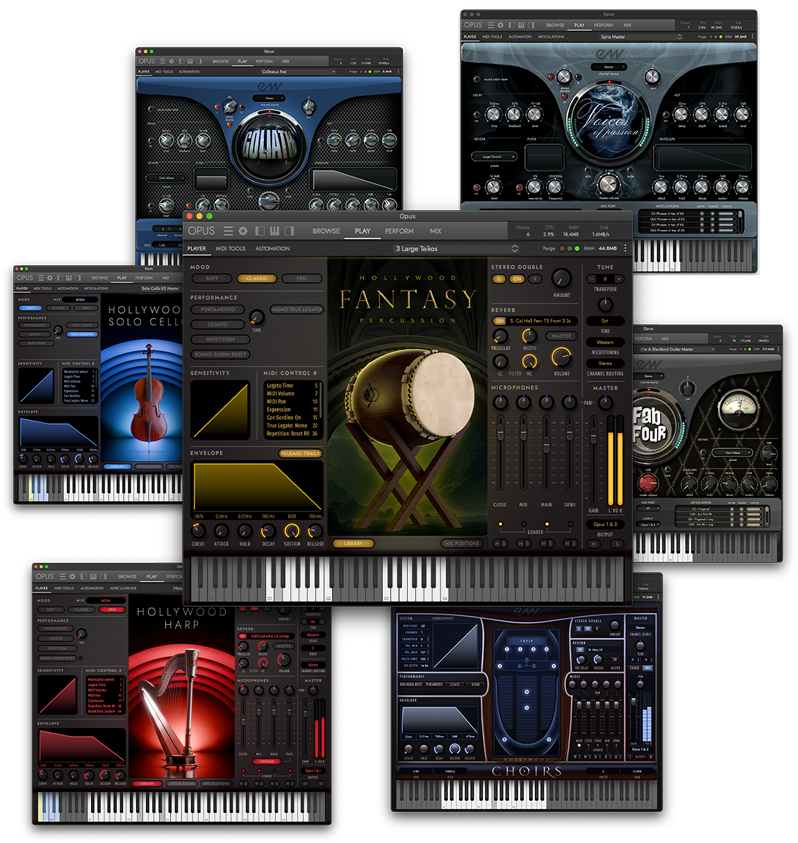
A collage of Opus instrument windows from the subscription, among them a Hollywood Fantasy instrument, Hollywood Harp, Hollywood Solo Cello and several synth and percussion libraries.
Features
The whole Hollywood orchestral series
ComposerCloud+ includes Hollywood Orchestra Opus Edition (Hollywood Strings, Brass, Orchestral Woodwinds, Orchestral Percussion, Solo Violin, Solo Cello, Harp and Hollywood Orchestrator), the close-miked Hollywood Strings 2, all six parts of Hollywood Fantasy Orchestra, and Hollywood Scoring Tools. Bought separately, the first three alone listed at $599, $499 and $599 on the order pages on November 20, 2026.
Pop, rock, beats, synths and world instruments
ComposerCloud+ isn't only for film composers. DrumX packs ten classic drum machines (LM-1, LinnDrum, TR-808, TR-909 and others) programmed with Jimmy Jam, ICONIC reworks synths such as the ARP 2600, Minimoog Model D, Oberheim OB-X and Yamaha CS-80, String Machine covers vintage string synths like the ARP Solina, and Ghostwriter and The Dark Side bring heavy, processed sounds for rock, metal and horror.
Download only what you need
ComposerCloud+ installs nothing you don't ask for. In the Opus browser you can search and audition instruments, then download a single one in minutes instead of pulling a full 160 GB or 944 GB library. That keeps a laptop usable, though a full orchestral setup still wants a dedicated SSD.
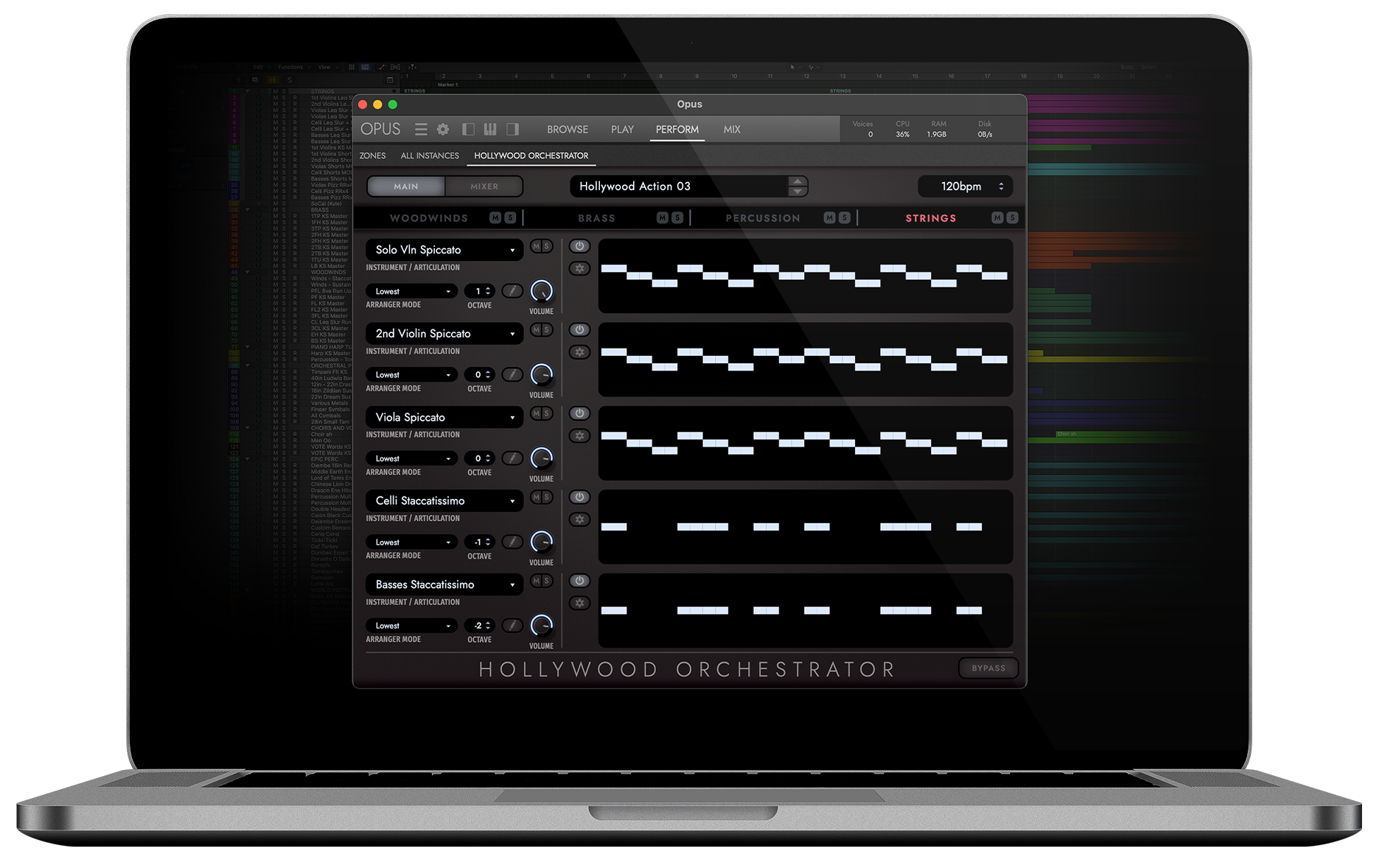
Hollywood Orchestrator, part of Hollywood Orchestra Opus Edition, running in Opus with its string pattern lanes.
One player, one mixer
Every ComposerCloud+ instrument loads in Opus, which adds a mixer with 46 effects, MIDI tools, keyswitch and articulation handling, and NKS support for Native Instruments keyboards. Opus runs on its own or inside Ableton Live, Logic Pro, Pro Tools, Cubase, Studio One, FL Studio, Reaper, Bitwig and the other hosts on EastWest's tested list. Sibelius, Finale and Dorico also work, without some features such as WordBuilder.
Royalty-free use and a two-device license
Everything you make with ComposerCloud+ is royalty free for commercial work. The license sits on up to two devices at once, directly on a computer or on an iLok key, so a desktop and a laptop are covered. A third machine means moving a license over.
Benefits
- The cost of one library buys the catalogue. Even at the sale prices we saw, Hollywood Orchestra Opus Edition alone cost more than the first year of ComposerCloud+.
- You can try styles you'd never buy for. A one-off pop session or a horror cue doesn't need a $199 library purchase when it's already in the subscription.
- New releases arrive at no extra cost. Subscribers got Hollywood Scoring Tools on release day, while buyers paid $299 to $399 for it.
- Costs are predictable. One yearly payment instead of buying each upgrade and expansion.
Real-World Uses
- A student scoring their first short films gets the full Hollywood orchestra, choirs and Spaces II reverb on the $69 student plan instead of piecing together free libraries.
- A media composer on deadline sketches a cue in Hollywood Scoring Tools or Hollywood Orchestrator, then rewrites the key lines with the full Hollywood Strings and Brass patches.
- A game composer moves between a fantasy map theme (Hollywood Fantasy Orchestra), a battle cue (Stormdrum 3 and Hollywood Brass) and a menu loop (ICONIC synths) in one project.
- A producer or songwriter uses DrumX grooves, Hollywood Backup Singers' WordBuilder and Ministry of Rock guitars on a pop record without buying three separate libraries.
Who It's For, and Who Should Skip It
ComposerCloud+ suits working and aspiring media composers, students and producers who want a large, consistent sample palette and expect to keep composing for years. It also suits anyone who wants to try EastWest's sound before committing to a perpetual license.
Skip it if you need only one library and plan to keep it for a decade: buy that library outright during a sale and it's yours. Skip it too if your studio computer is permanently offline (the yearly plan still needs a yearly sync), if you have less than 16 GB of RAM, or if you dislike subscriptions on principle. And if you already own a competing orchestral library you like, check whether you'd really use the rest of the catalogue.
Usage Guide
- Pick the individual or student plan on soundsonline.com and pay for the month or the year.
- Create a free iLok account if you don't have one (EastWest can create one for you), and install the iLok License Manager.
- Download and run the EastWest Installation Center (version 2.0 since September 22, 2026), sign in and activate the ComposerCloud+ license on your computer or iLok key.
- Install Opus, then choose a folder on a fast drive for your instruments, ideally an SSD separate from the system drive.
- Browse, audition and download the instruments you want, then load Opus in your DAW as an instrument plugin (VST3 is EastWest's recommendation in Cubase and Nuendo).
- If you cancel later, bounce your EastWest parts to audio first.
Where It Falls Short
- Billing and support complaints. On Trustpilot, the most common complaints are about automatic renewals, cancellation and refunds, and slow support, not about the sounds.
- The Play-to-Opus switch. Owners of older Play-era libraries report having to move to Opus Editions. Opus 1.6.6 now loads legacy Play libraries, but this history explains some of the anger in older reviews.
- Heavy system demands. EastWest's minimum is a quad-core 2.7 GHz CPU and 16 GB of RAM, and it recommends eight cores and 32 GB or more for big orchestral templates.
- iLok is required. Some first-time buyers found the extra account confusing during activation.
- Only two activations. Teams or studios with several rooms need several subscriptions.
What Users Say
ComposerCloud+ splits opinion more than any single EastWest library. Magazines that review EastWest products keep calling the subscription the best deal in the catalogue, while store reviews focus on billing.
Music magazines
"if you are a working composer, the annual subscription to ComposerCloud+ is one heck of a way to manage your budgeting. Given the huge range of top-quality sounds it provides access to, I really do think it has become one of the best deals available." John Walden, Sound On Sound, in his Hollywood Strings 2 review (July 2024).
"No, Fantasy Orchestra is not cheap as a one-off purchase but, for working composers, it's just another reason to argue that EastWest's ComposerCloud+ subscription offers exceptional value for money." John Walden, Sound On Sound (February 2024).
"This arguably represents an incredible deal, and exceptional value for money. As with all subscription models, this only remains the case if you are regularly using the sounds" Dave Gale, MusicRadar (4 out of 5, August 2023).
Users on forums
"The other offerings in Composer Cloud are very good also. I think the choirs are fantastic with the WordBuilder software options available." inaheartbeat, KVR Audio forum (December 2022).
Trustpilot
Trustpilot rates EastWest Sounds 3.4 out of 5 from 66 reviews, most of them 1-star or 5-star. The negative reviews are mostly about the subscription itself:
"They do not let you cancel until it is the very last month of your year subscription and if you miss that moment then you are auto renewed for a new year" Ebby M, 1 star (July 2023).
"Soundsonline/EastWest did not send 1 single notice of upcoming billing or of my card being billed $199 each time." Glenn Morrissey, 2 stars (June 2025).
"Great dark sounding strings, but billing plan / automatic renewal is deceptive. Just wanted to try for one month, now i can use it for one year." InsaneEyesMINI, 1 star (March 2023).
"I bought ComposerCloud+ for one month to try it out. I was thoroughly disappointed by the experience. Every step of the way was clunky, hard to use, and not at all user-friendly." Teige Rollins, 1 star (June 2025).
On the positive side, Lester Vandewalle (5 stars, October 2025) wrote "I love these libraries", while noting that the older ones have limited keyswitches, and William Camilleri (5 stars, December 2024) praised "Fantastic realistic sound samples - to fit any style of music and excellent support !!"
The recurring themes
People who use ComposerCloud+ regularly think it's excellent value for the sounds. The complaints are about the business side: yearly auto-renewal, a narrow window to cancel, no billing reminders, no refunds, and an install process (Installation Center plus iLok) that some first-time users find clunky. If you subscribe, choose the plan deliberately and note the renewal date.
Comparisons
ComposerCloud+ vs buying libraries outright
On November 20, 2026, during EastWest's Cyber Month sale, the perpetual flagships cost $179 (Hollywood Orchestra Opus Edition, list $599), $179 (Hollywood Fantasy Orchestra, list $599), $149 (Hollywood Strings 2, list $499), $299 (Hollywood Scoring Tools, list $399) and $89 (Spaces II, list $299). Buying just those five at sale prices comes to $875, while ComposerCloud+ costs $99 for the first year and $199 a year after that. After about four and a half years at $199, the subscription costs more than those five libraries bought on sale, but it also covers 75-plus other collections and future releases. Perpetual licenses also run on more than two computers at once; subscription instruments don't.
ComposerCloud+ vs the student plan
The student plan has the same "over 43,000 instruments" and every new release, for $9.99 a month or $69 a year ($49 for the first year on November 20, 2026). It's sold on its own ComposerCloud+ EDU page.
Plans and Pricing
| Plan | Price | First year on November 20, 2026 | Commitment |
|---|
| Individual, monthly | $19.99 a month | $19.99 a month | Cancel anytime, monthly online check-in |
| Individual, yearly | $199 a year | $99 for new subscribers | Renews at $199, yearly check-in |
| Student, monthly | $9.99 a month | $9.99 a month | Cancel anytime |
| Student, yearly | $69 a year | $49 for new subscribers | Renews at $69 |
The Buy Individual Plan button opens the ComposerCloud+ page, where you choose the monthly or yearly plan; the Buy Student Plan button opens the ComposerCloud+ EDU page. All plans include the same instruments and new releases.
FAQs
Does ComposerCloud+ work offline?
ComposerCloud+ works offline between check-ins, but searching, auditioning and downloading need the internet. The license must sync once a month on the monthly plan or once a year on the yearly plan, so EastWest recommends the yearly plan for offline studio computers.
Do I need an iLok dongle for ComposerCloud+?
No. ComposerCloud+ can use an iLok electronic license placed on your computer. If you already own an iLok 2 or 3 key you can use it instead, but the original iLok 1 isn't supported.
What happens to my songs if I cancel ComposerCloud+?
Your projects aren't touched, and exported audio keeps playing. The EastWest instrument tracks simply won't load until you resubscribe and reactivate the license, so render them to audio before you cancel.
Can I switch from monthly to yearly?
Yes. ComposerCloud+ plans can be upgraded in the My Account area of soundsonline.com with the "Upgrade Plan" option.
Can I still buy EastWest libraries to own?
Yes, most EastWest products are still sold as perpetual licenses, and anything you bought before stays yours whether or not you subscribe. Purchased products can run on more computers at the same time than the two-device subscription allows.
Can I get a refund on ComposerCloud+?
Don't count on it. EastWest's order pages say software isn't returnable once delivered, and Trustpilot reviewers who cancelled within days report not getting their money back. Start with the monthly plan if you're unsure.
Which DAWs does ComposerCloud+ support?
ComposerCloud+ instruments run in Opus, which EastWest has tested in Ableton Live, Logic Pro, GarageBand, Pro Tools, Bitwig Studio, Reaper, FL Studio, Digital Performer, Cubase, Nuendo, Studio One, Vienna Ensemble Pro and Mixcraft (Windows), plus Sibelius, Finale and Dorico.
Is ComposerCloud+ available in my country?
Yes. EastWest sells ComposerCloud+ worldwide.
System Requirements
- Operating system: Windows 10 or later with ASIO drivers, or macOS 10.15 or later (native on Apple Silicon)
- Minimum: quad-core CPU at 2.7 GHz, 16 GB RAM, 7200 rpm hard drive
- Recommended: eight-core CPU at 2.7 GHz, 32 GB RAM or more, SATA or PCIe SSD
- Plugin formats: VST, VST3, AU and AAX, plus standalone Opus
- Other: internet connection for downloads and license sync, iLok account
Conclusion
ComposerCloud+ is the best-value way into EastWest's sound, as long as you're comfortable renting it. At $99 for the first year, or $199 after, it costs less than buying even one flagship library at full price, and it covers orchestral, pop, rock, world and synth work in one player. The reason to buy is breadth: Hollywood Orchestra, Hollywood Strings 2, Hollywood Fantasy Orchestra and Hollywood Scoring Tools for the price of a plugin or two. The reason not to is ownership: miss a payment and your tracks fall silent, renewals have caught people out, and support gets poor marks on Trustpilot. Start with the monthly plan if you're unsure, and switch to yearly once you know it's staying in your studio.
Buy Individual PlanBuy Student Plan