Mylio Photos: One Private Photo Library Across Every Device
Mylio Photos is a photo, video and document organizer for Windows, macOS, iPhone, iPad and Android that keeps your library on your own computers and drives instead of someone else's cloud. The app itself is free on one device; the paid Mylio Photos+ subscription, which links all your devices into one synced, backed-up library, costs $240 a year (or $25 a month) for one person, with Duo, Family and business plans above that.
It's built for a familiar mess: twenty years of photos spread over an old laptop, three external drives, a phone camera roll, a partner's Android tablet and a box of scanned prints. Mylio pulls them into one timeline you can search by face, place and date, without uploading the originals anywhere.
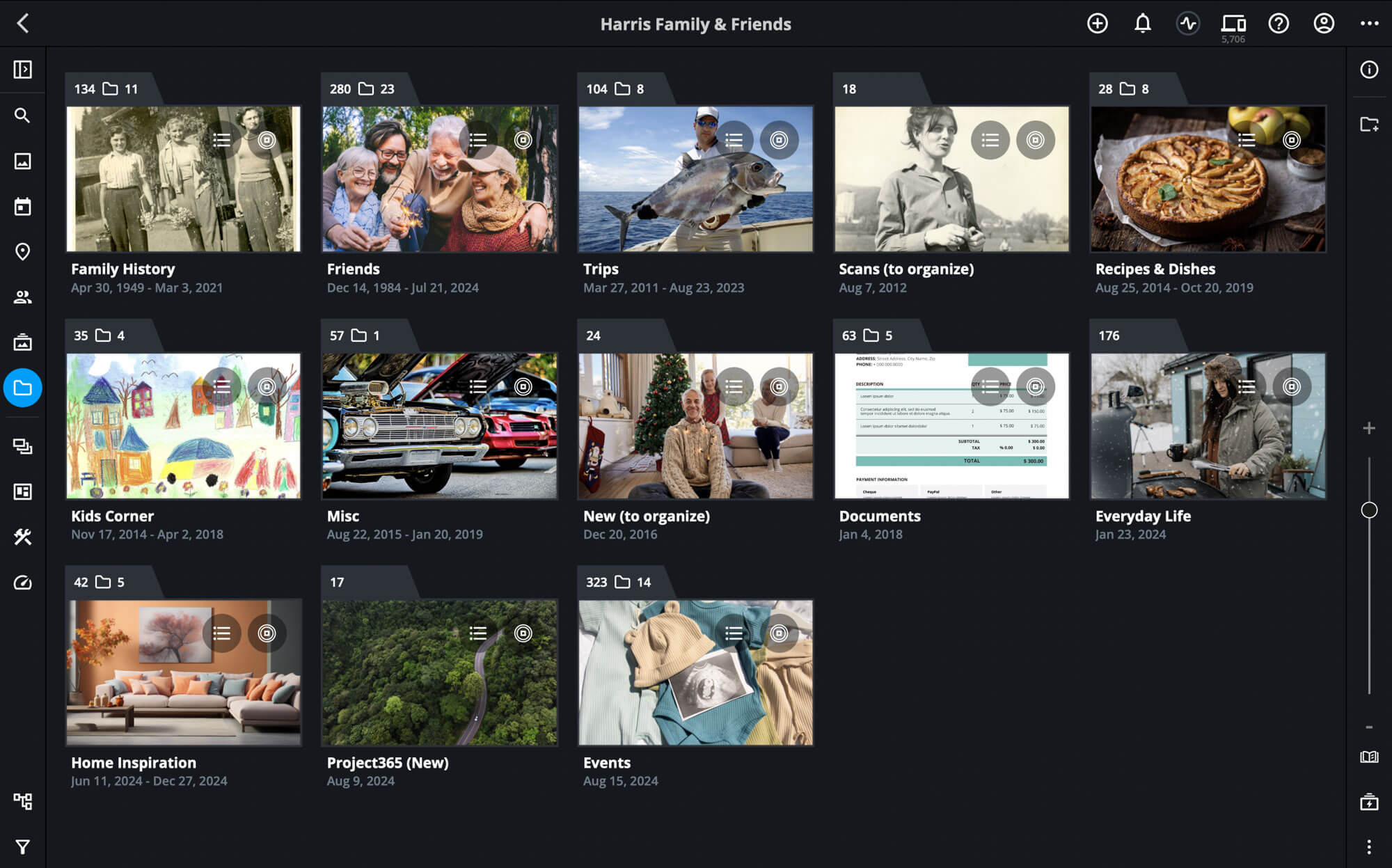
The Folders view of a family library: each folder shows its photo count, sub-folder count and date range, with the main views (search, photos, calendar, map, people, albums, folders) down the left.
Quick facts
- Version: 24.8 (Windows build 24.8.0.7905, released October 8, 2026; Mac and iOS on build 7904 from October 6, 2026)
- Developer: Mylio, LLC, Bellevue, Washington
- Platforms: Windows 10 (21H2 or later, 64-bit) and 11, macOS 11 Big Sur and later, iOS and iPadOS 16 and later, Android 11 and later
- Free app: organizing, face recognition, AI search, LifeCalendar, Map, editing and export on one device and its attached drives
- Mylio Photos+: sync across unlimited devices, Vault backups, Photo DeDupe, shared web albums, a setup session
- Price: Individual $240/year, $25/month or $360 for 2 years; Duo (2 users) $384/year; Family (5 users) $480/year
- Trial: 7 days of Mylio Photos+; you sign up with payment details and aren't charged that day
- Guarantee: 30-day money-back guarantee on Mylio Photos+
- License: subscription only; personal plans are for personal use, business plans cover commercial use
- What we checked: the Windows installer (Mylio_x64.msix, 194 MB) reports version 24.8.0.7905 in its package manifest; every personal plan price on the order page, where the Individual annual plan showed $240 next to a struck-through $280; and the support site's trial, refund and system requirement pages, all on November 17, 2026. We didn't sync a library across devices ourselves.
Before you buy
- The price went up a lot. Many reviews you'll find online quote $9.99 a month or $99 a year. Mylio raised its prices for new purchases from August 26, 2024, and the Individual plan is now $240 a year. Older subscribers moved to the new price at renewal, which is behind several angry reviews.
- The trial turns into a subscription. Signing up for the 7-day trial takes your payment details and bills you unless you cancel. Put a reminder in your calendar, and keep the cancellation email.
- Plan for storage. The desktop app wants 64 GB of free disk for itself and its working files, separate from your photos. Mylio recommends a 2-4 TB external drive for a family archive and 4-8 TB for a RAW shooter.
- Expect a learning curve. Even happy users say it took them weeks, or a second attempt, to understand Vaults and sync policies. Set it up slowly, starting with one computer and one drive.
- Try the free app first. It organizes a library on one computer at no cost, so you can judge the interface before paying for sync.
Download Free App (Windows)Buy Personal PlansBuy Business Plans
Overview
Most photo apps are tied to one company's cloud: Apple Photos to iCloud, Google Photos to Google's servers, Lightroom to Adobe's storage plans. Mylio takes the opposite approach. Your originals stay on the computers and drives you choose, and the devices talk to each other directly over an encrypted peer-to-peer connection, over your home Wi-Fi when they're together and over the internet when they're apart. Only changes move between them: new photos, edits, album updates.
A phone or tablet doesn't need room for the whole library. It keeps small Optimized copies (Mylio's SpaceSaver) and fetches originals on demand, while one or more Vaults (a desktop, an external drive, a NAS or an optional encrypted cloud) hold the full-resolution files. Everything you add, from face tags and keywords to ratings, captions and dates, is written to standard XMP sidecar files next to your photos, so the work isn't locked inside Mylio if you leave.
The free Mylio Photos app does the organizing on a single device and its attached drives. Mylio Photos+ is the service on top: device linking, sync, Vault backups, duplicate cleanup and shared web galleries. Mylio describes the subscription as both the app and the service that handles authentication and connections between your devices, which is why there's no one-time license.
Features
One library from every device and drive
Mylio Photos gathers photos, videos and documents from computers, phones, tablets, external drives, cameras, Apple Photos libraries and other sources into one catalog, and you can either import copies or link to files where they already are. It keeps your existing folder structure instead of moving everything into its own, and folders you add on one device appear on the others. Mylio says libraries of 500,000+ files are fine, and there's no limit on the number of photos, videos or documents.
Face recognition and AI search that run on your computer
Mylio Photos recognizes faces, objects and scenes on the device itself, without sending anything to a server. The People view groups each person's photos once you confirm a name, and Batch Face Tagging lets you name many untagged faces at once. SmartTags label things like animals, smiles, sunsets and blurry or badly exposed shots, text inside images is read with OCR, and Dynamic Search combines those labels with dates, places, cameras and people, so a search for "wedding" or a family member's name works without hand-tagging. QuickCollections save a search as a live album that fills itself as new matches arrive.

The People view (from the Mylio Photos manual): one card per named person, with an Untagged group of faces still waiting for a name.
LifeCalendar and Map: browse by when and where
Mylio Photos' LifeCalendar lays the whole library out by decade, year, month and day, and one click on any photo shows everything else from that day. You can add Events (a reunion, a holiday, a tournament) that show as bars on the calendar, link Google, iCloud or Outlook calendars so birthdays and trips appear alongside the photos, and give old scans a fuzzy date (a year, a month or a range) so they land in the right decade. The Map view plots geotagged shots, and you can drag a photo without GPS data onto the map to set where it was taken.

The Calendar view at decade level (from the Mylio Photos manual): one tile per year, each showing a photo from that year.

The Map view (from the Mylio Photos manual): photos pinned on a satellite map, with a list of countries and their photo counts on the left.
Sync without a cloud account (Mylio Photos+)
Mylio Photos+ connects an unlimited number of your devices into one library, across Windows, Mac, iPhone, iPad and Android in any mix. A photo taken on an iPhone appears on a Windows PC at home as soon as Mylio opens there, with no iCloud, cable or manual import. You approve every device that joins, set a sync policy per device (originals, optimized copies or nothing for a given folder), and can add a family member's device as a guest with limited access. Each device keeps working offline and catches up when it reconnects.
Vault backups for the 3-2-1 rule (Mylio Photos+)
Mylio Photos+ keeps complete, full-resolution copies of the library on the devices you mark as Vaults: your computer, an external drive, a second drive kept at the office, or an encrypted cloud. Once they're set, new photos from every phone reach the Vaults in the background, which covers the usual 3-2-1 backup advice (three copies, two kinds of media, one offsite). The Dashboard lists any files that aren't yet protected, so an empty list means the backup is complete. If you'd rather pay for an offsite copy than keep a drive somewhere, Mylio SecureCloud (powered by Backblaze) costs $11.98 a month for 2 TB or $29.95 a month for 5 TB.

The Dashboard's Devices panel (from the Mylio Photos manual): this laptop, a MacBook Pro, a family iPad and an iPhone in one account, with an ADD button for more.
Duplicate and burst cleanup (Mylio Photos+)
Photo DeDupe in Mylio Photos+ finds exact duplicates, even when the copies have different names or metadata, as long as the file size and resolution match. Before it removes one, it merges the metadata from the copy into the version you keep, and Auto Tick rules decide which one that is (the oldest, or the edited one, for example). Find Similar groups burst shots and near-identical frames taken within a time interval you set, so you can keep the best and delete the rest.

Photo DeDupe (from the Mylio Photos manual): 22 sets of duplicates, each original paired with its "Copy", with Delete Marked, Move Marked and Auto-Mark buttons.
Editing, sharing and printing
Mylio Photos edits photos and videos non-destructively: exposure, color and tone with a histogram, crop and straighten, one-click presets you can save from your own edits, and brush adjustments to dodge and burn. It also hands a photo to an outside editor such as Photoshop. SafeShare removes personal information from a copy before you post it, shared albums can be published as web galleries for people without Mylio, and photo books, calendars and wall art can be ordered from Printique without leaving the app.
Real-World Uses
- The family archivist. You scan your parents' albums, give the scans fuzzy dates, tag grandparents once, and the LifeCalendar puts 1950s prints in the same timeline as last summer's phone photos.
- The mixed-device household. One partner on iPhone and a Mac, the other on Android and a Windows laptop: with a Duo or Family plan both camera rolls back up to a drive at home, and each person keeps private albums too.
- The traveling photographer. You cull and tag RAW files on a laptop with no internet in the field, and everything lands on the Vault drives at home once you're back online.
- The cluttered library. Years of copying phones to "Backup (2)" folders left thousands of duplicates. Photo DeDupe finds them across drives and merges their tags before deleting.
- The small office. Site photos taken on staff phones appear on the front-desk PC without a shared cloud account, using a business plan.
Who It's For, and Who Should Skip It
Mylio Photos suits people with a large, scattered library across several devices and operating systems who care about privacy and are willing to own and manage their storage: family historians, serious hobby photographers and households that mix Apple, Android and Windows. It also suits anyone who refuses to put a lifetime of photos in a big tech company's cloud.
Skip it, or stay on the free app, if:
- You only use one computer. Sync is the main thing you pay for, and the free app already organizes a library on one machine with its drives.
- You live in Apple's world and already pay for iCloud. Apple Photos already syncs your iPhone and Mac, and $240 a year is a lot to add on top.
- You already use Lightroom Classic. It catalogs, links to offline drives and edits RAW files in a similar way, so Mylio mostly duplicates it.
- You want a one-time purchase. Mylio Photos+ is subscription-only.
- You want something that just works out of the box. Reviews are full of people who gave up on the Vault and sync setup; Google Photos or iCloud asks far less of you.
Usage Guide
- Install it on the computer that holds your photos. Download the Windows or Mac app from mylio.com (the Windows installer is about 194 MB), or the iOS or Android app from the app stores, and sign in or create a Mylio account.
- Add your media. Use the + button to add folders from internal and external drives, an Apple Photos library or your phone's camera roll. Choose whether Mylio links to files where they are or imports copies.
- Let it index. Mylio builds thumbnails, reads dates and GPS data, and runs face and object detection in the background. A big library takes a while on the first pass.
- Name people. Open the People view and confirm a few faces for each person, then use Batch Face Tagging for the rest.
- Clean up. With Mylio Photos+, run Photo DeDupe from the Tools menu, then use Find Similar and Quick Review to weed out bursts and weak shots.
- Add devices and Vaults (Mylio Photos+). In the Dashboard, open Devices and click ADD for each phone, tablet, computer or drive, then mark one or two of them as Vaults and set a sync policy for the others.
- Check protection. The Dashboard shows which files haven't yet reached the Vaults; when the list is empty, the backup is done.
Where it falls short
- Setup mistakes can bloat your drives. Reviewers describe Mylio filling drives with its own folders and backup copies, and one App Store reviewer says a 1.5 TB library grew to 4.7 TB. Decide which device holds originals before you add everything, and start with a dedicated Vault drive.
- Syncing a phone can fill the phone. Adding an iPad or phone with the wrong sync policy can push the whole library onto it. Set mobile devices to Optimized copies.
- The Android app lags behind. Google Play reviewers complain about crashes with gesture navigation and vault connections dropping when the app sits in the background; the Windows, Mac and iOS apps get far better marks.
- Google Takeout imports lose data. A Trustpilot reviewer reports that location and camera details from Google Photos exports, and Google's face tags, didn't carry over.
- Support is a common complaint. Several reviewers describe slow email-only replies and billing disputes, including charges after a trial was cancelled.
- Editing has limits. Digital Camera World noted it lacks Photoshop-style masking and cloning, and a photo linked on a disconnected drive can't be edited at full resolution until you plug the drive back in.
What Users Say
Mylio splits opinion more than most photo apps. Magazine reviewers, who tested it carefully and at the old $99-a-year price, liked it a lot. Store and Trustpilot reviews are much rougher: App Store 3.9 out of 5 from 277 ratings, Google Play 2.6 out of 5 from 869 reviews (100K+ downloads) and Trustpilot 2.2 out of 5 from 8 reviews, as shown on November 17, 2026. Capterra and G2 pages wouldn't load for us.
Magazines and review sites
Digital Camera World (George Cairns, June 2023, 4 out of 5): "Mylio Photos+ is a slickly designed digital asset management app that enables you to take control over clips and stills stored in a wide range of locations and devices." He also warned: "Mylio Photos+ is a powerful and feature-packed app, so there is a learning curve to climb before you get it fully up and running." His verdict was that it's "a fantastic alternative to other digital asset management tools on the market but it's not a 'must have' if you're already using apps such as Lightroom Classic or Apple Photos iCloud."
Reviewed (Tessa Bahoosh, May 2024): "For me, Mylio Photos+ was absolutely worth it. It's a great option for collecting and organizing your photos from across multiple spaces." But: "In general, it took me a while to get comfortable working in Mylio. There are a lot of tools packed into this platform, which is a great thing. But I found it took a fair bit of poking around before I was even confident what I was looking for."
Digital Photography School (Jaymes Dempsey, July 2022): "The application is easy to use, the interface is sleek and intuitive, and the entire process, from importing and sorting files to syncing and even editing, is carefully designed for maximum effectiveness."
Shotkit (June 2022): "I found that after tagging only once, Mylio did an astonishingly good job of identifying the members of my family – the fact that it can do this with no online connection is impressive." All four reviews were written when Mylio Photos+ cost $9.99 a month or about $99 a year, well under today's price.
App Store: the fans
Motoservo (5 stars, April 2025, "Surprised Mylio isn't better known—it's tops!"): "Mylio is the first app, of any sort, that I've been excited about in a long while. I just spent 2 months importing and organizing my 150K photos and video that I've created using 15 or so cameras through my decades of photography." He keeps the library on a QNAP NAS and adds: "Multi-folders, allowing Finder organization with industry standard XMP means that if Mylio disappeared tomorrow my collection would still be well sorted and ready for another app."
jcf_reviews (5 stars, September 2024, "Fantastic but it does have a steep learning curve"): "This is the only app I've found that allows me to keep a common photo library across all devices regardless of the operating system. Despite their extensive manual and online help, the program is tough to learn and takes some trial and error to fully understand how it works."
heyrobt (5 stars, July 2024): "Now that I have taken the time to work through Mylio Photos Fundamentals (about 75 videos), I have a much better understanding of the potential Mylio+ offers, and I'm pretty impressed. This is the app for organizing my photos I have been looking for. My MacBook, iPad, iPhone, and two vaults are synced—very nice."
App Store and Google Play: the complaints
Tillacat2 (1 star, July 2026, "It's a great concept"): "This would be great if it actually worked, but it just completely glitches out on iPhone. It completely freezes up and won't let me scroll past the first couple of photos in my camera roll."
polarbutterflies (1 star, January 2026, "Regretting this"): "Mylio photos took my 1.5 TB of photos and turned it into 4.7 TB. My computer will not load thumbnails and locks up now."
Zepperini (1 star, November 2025, "Glitchy and patchy customer service"): "It all worked great until it was time to renew. I was charged twice for the renewal and their prices skyrocketed."
Scott (3 stars, January 2025, "Needs more development"): "I love the concept of Mylio. I've been using it for a few years now. However, there are several critical bugs and missing features that Mylio refuses to address, or get backlogged."
Mr. T (Google Play, October 18, 2026): "Not sure if the app is better on another platform but they clearly didn't make this app for Android users. navigation Jestures DO NOT WORK."
Trustpilot
Mylio's Trustpilot page has only eight reviews, all 1 or 3 stars. We read them through a summarizing tool, so these are short excerpts. Amy Stonelake (1 star, October 2026, "Complicated expensive Mylio software"): "Tried mylio software for the past year never felt like i mastered it is complicated and costs too much". Jo (1 star, August 2026) says that after cancelling a trial, Mylio "tried to take £1890 from my account", which the bank declined. Martin (3 stars, August 2023): "I was really loving Mylio and the idea of it backing up my photos into one place was great", until it filled his drives with its own folders and backups of backups.
What keeps coming up: people love the idea and, once it's set up, the cross-platform library, offline face search and the drag-to-map geotagging. The complaints are about the learning curve, sync setups that duplicate files or fill a device, a weaker Android app, slow support, and billing: the higher price since 2024 and charges around trials and renewals. The happiest reviewers are the ones who took the training videos and set it up slowly.
Comparisons
Mylio Photos vs Google Photos and iCloud Photos
Google Photos and iCloud Photos are simpler: install, sign in, and your phone backs up. Both store your library on their servers, charge by the storage you use, and favor their own platforms (iCloud barely works on Android). Mylio keeps originals on your drives, works the same across Windows, Mac, iOS and Android, and runs face and object search locally, but you manage the hardware and pay a flat subscription instead of a storage fee.
Mylio Photos vs Adobe Lightroom Classic
Lightroom Classic is the stronger RAW editor, with masking and healing tools Mylio lacks, and it also links to originals on offline drives through Smart Previews. It's a desktop catalog, though, with no sync to an Android phone or a family member's tablet. Mylio is the better organizer for a whole household's library, and it can hand photos to Lightroom or Photoshop for serious edits.
Free Mylio Photos vs Mylio Photos+
| Feature | Mylio Photos (free) | Mylio Photos+ |
|---|
| Devices | One device and its attached drives | Unlimited devices, synced |
| Organizing, face and AI search | Yes | Yes |
| LifeCalendar, Map, editing | Yes | Yes |
| Vault backups | No | Yes |
| Photo DeDupe | No | Yes |
| Mylio Drive (optimized copies) | No | Included, unlimited |
| Setup session | No | One 30-minute session |
Editions and Pricing
Mylio Photos+ personal plans, as shown on the order page on November 17, 2026 (prices in US dollars):
| Plan | Users | Monthly | Annual | 2 years |
|---|
| Individual | 1 | $25/month | $240/year | $360 |
| Duo | 2 | $40/month | $384/year | $576 |
| Family | 5 | $50/month | $480/year | $720 |
All three include unlimited photos, videos and documents, face recognition and AI search, sync across Windows, Mac, iOS and Android, and a free personalized setup session; Duo and Family add family sharing, with private and shared libraries. Business plans carry a commercial license: Pro for one user starts at $40 a month or $480 a year, and team plans start at $950 a year for 5 users. Every plan starts with a 7-day free trial and has a 30-day money-back guarantee. Non-profits, students, educators, military members and first responders can ask Mylio for a discount with proof of status.
The buttons below open Mylio's order pages, where you pick the plan and billing term after a short contact form.
Buy Personal PlansBuy Business Plans
FAQs
Is Mylio Photos really free?
Yes. The Mylio Photos app is free to use on one device with its built-in storage and directly attached drives, with no file limit. You pay only for Mylio Photos+, which adds syncing to more devices, Vault backups and duplicate cleanup.
What happens to my photos if I cancel Mylio Photos+?
Mylio Photos+ keeps working until the end of the period you've paid for. After that your files stay on your devices and Vault drives, readable in Windows Explorer or Finder, your tags and edits stay in XMP files beside them, and the free app still opens the library, but syncing and protection stop.
Can I get a refund on Mylio Photos+?
Yes. Mylio Photos+ has a 30-day money-back guarantee: cancel within the first 30 days and contact Mylio support for a full refund. The Concierge photo-organizing service can only be refunded before you're matched with an organizer.
Does Mylio Photos work with iCloud Photos?
Yes. Mylio Photos can bring in photos from an iCloud Photo Library and an Apple Photos library on a Mac. If you already pay for iCloud and only use Apple devices, though, iCloud already syncs them, so Mylio Photos+ mainly adds a local backup and a different organizer.
What file types does Mylio Photos support?
Mylio Photos handles JPEG, TIFF, PNG, PSD, HEIC, camera RAW formats (new cameras are added in updates, such as Sony bodies in October 2026), videos, and documents such as PDFs and Office files.
Is Mylio Photos available in other languages?
Yes. Mylio Photos runs in English (US and UK), German, Spanish, French, Italian, Dutch, Portuguese, Japanese and Korean.
Can I use a personal plan for my business?
No. Mylio's Individual, Duo and Family plans are personal-use licenses. Photographers selling their work, offices and non-profits need a business plan (Pro or Team), which also adds a dedicated success team and premium onboarding.
System Requirements
- Windows: Windows 10 version 21H2 or later (64-bit only) or Windows 11; a DirectX 12-capable GPU with 4 GB of GPU memory; 8 GB of RAM (16 GB or more recommended); at least 64 GB of free disk space for the app and its working files
- Windows on Arm: Surface Pro X, Windows 10 21H2 or later or Windows 11
- Mac: macOS 11 Big Sur or later, Core i5 processor or better, 8 GB of RAM (16 GB or more recommended), at least 64 GB of free disk space
- iPhone and iPad: iOS and iPadOS 16 or later
- Android: Android 11 or later, 64-bit
- Storage for your library: separate from the above; an external drive of 2-4 TB for a family archive, 4-8 TB or more for a RAW photographer
Conclusion
Mylio Photos is the most complete answer we know of to one specific problem: a big photo library spread across Windows, Mac, iPhone and Android devices that you want in one place without handing it to a cloud company. The organizing tools are excellent, the face and object search runs offline, and your folders and XMP metadata stay usable if you leave.
Is it worth $240 a year? For a family archivist or a multi-platform household with terabytes of photos, yes, once you've got it set up, since it replaces both a cloud plan and a separate backup tool. For everyone else it's a hard sell: the price has more than doubled since most reviews were written, the setup takes patience, and store reviews are full of sync, Android and billing complaints. The one reason to buy is a private, cross-platform library you control; the main reason not to is the price for what Apple or Google already do for most people. Start with the free app on your main computer, and only take the 7-day Photos+ trial once you like how it organizes your photos, with a reminder to cancel if it isn't for you.
Download Free App (Windows)Buy Personal PlansBuy Business Plans