PopAi: An AI Presentation Maker That Builds a Deck From a Prompt, PDF or Word File
PopAi is a web-based AI presentation maker from 01.AI Pte. Ltd. in Singapore: you type a topic or upload a PDF, Word document, PowerPoint or webpage, edit the slide outline it proposes, pick a theme, and it builds a deck you can edit in the browser and export to PPTX or PDF. It's for students, teachers and office workers who need a first draft of slides fast and don't mind tidying it up. There's a small free allowance, and PopAi publishes the Pro plan at $99 a year ($79.20 with the code POPAI20OFF). The same account also includes chat with PDFs, AI writing, AI chat and image generation, on the web and in iPhone, iPad and Android apps.
The pitch is the blank-slide problem: you have a report, a lesson plan or a brief, and turning it into twelve tidy slides takes an evening. PopAi does the structuring and layout in a couple of minutes. What it can't do is know your audience, so expect to spend time checking facts and reworking slides before you present.
Quick facts
- Developer: 01.AI Pte. Ltd., Singapore
- Platforms: web app in any current browser, plus iPhone/iPad (version 2.5.3, May 8, 2026) and Android apps
- Inputs: a typed prompt, PDF, Word document, PPTX file, image or webpage; files can also come from Google Drive
- Output: an editable online deck, shared by link or exported as PPTX or PDF (full export on paid plans)
- Price: Pro at $99 a year, or $12 to $14.99 a month; Unlimited at $33 a month on yearly billing or $47 month to month. Code POPAI20OFF takes 20% off when you enter it on the order page
- Free plan: 500 credits in total, about one presentation, without full PPTX/PDF export or watermark removal
- Refunds: only for buyers in the EEA and UK, within 14 days. Everyone else gets no refund once a plan is paid and used
- Age: 13 and older; one account is for personal use on up to four devices
- What we checked: the plans and credit allowances on PopAi's pricing page (prices there appear only after you sign in), the Pro prices PopAi publishes on its App Store listing ($99/Year, $12/Month, $30/Quarter), the Unlimited prices on PopAi's own AI image and video pages, the refund clause in PopAi's Terms of Use, and the ratings on the App Store (4.3 from 494), Google Play (2.7 from 1.72K reviews) and Trustpilot (1.3 from 56 reviews), all on November 16, 2026. We didn't buy a plan or generate decks ourselves.
Before you buy
- A yearly plan is one payment. The $99 Pro plan (or the yearly Unlimited plan) is charged in full on the day you subscribe, not spread across the year. Several App Store and Trustpilot reviewers say they expected monthly charges.
- Try the free credits first. Outside the EEA and UK there's no refund once you've paid and used the service, so make one deck on the free plan and see if the quality is good enough for you.
- Turn off auto-renewal right away if you're only testing. Cancelling is the most common complaint about PopAi. Cancel in your account's subscription settings (or in your Apple or Google account if you bought in the app), keep a screenshot, and email customerservice@popai.pro if the option isn't where you expect it.
- Buy on the web or in the app, not both. App Store and Google Play subscriptions are billed and cancelled through Apple and Google, and the prices can differ from the web.
Try PopAi FreeBuy ProBuy Unlimited
Overview
PopAi started as an all-in-one AI workspace (chat, document Q&A, writing, images), and its presentation maker has become the headline product. The workflow has three steps. You describe the deck, with the audience, purpose, length and tone, or you upload source material. PopAi proposes a slide-by-slide outline, which you can reorder and rewrite before anything is designed. Then it generates the slides in a theme you pick, and you finish them in an online editor before sharing a link or exporting.
The outline step is the part that sets it apart from tools that go straight from prompt to finished slides. You fix the story while it's still text, which is much quicker than fixing it on twelve designed slides. The weak spot is the same as every AI slide tool: the content is only as good as your brief and your source, and reviewers often find the result needs real editing before it's fit for a client or a boardroom.

The PopAi presentation start screen: a prompt box with a 16:9 aspect-ratio selector and a "+" button for files, above theme cards such as Blue Sketch Innovation Deck, Academic Serif Research Deck and Navy Executive Financial Pro.
Features
Slides from a prompt
PopAi builds a full presentation from a written brief. A detailed one works best: PopAi's own example asks for "a 10-slide quarterly business review for senior leaders" with goals, KPIs, trends, wins, risks and next steps, in a concise professional tone. The more you specify the slide count, audience and sections, the less you rework later.
Slides from your own files
PopAi turns an existing PDF, Word document, PowerPoint file, image or webpage into a deck, so a report, lesson plan or proposal becomes slides without retyping it. You can upload a file, pick one you've already stored in PopAi, or connect Google Drive, and mix images with documents in one request. Figures and citations should be checked against the original afterwards.

The "+" menu under the PopAi prompt box: Upload File, Add from files and Connect Google Drive.
An outline you edit before the design
PopAi shows a proposed outline, with a title and the key points for every slide, before it generates the deck. You rename sections, change the order and cut slides that don't earn their place. This is where you catch a wrong angle or a missing section cheaply.
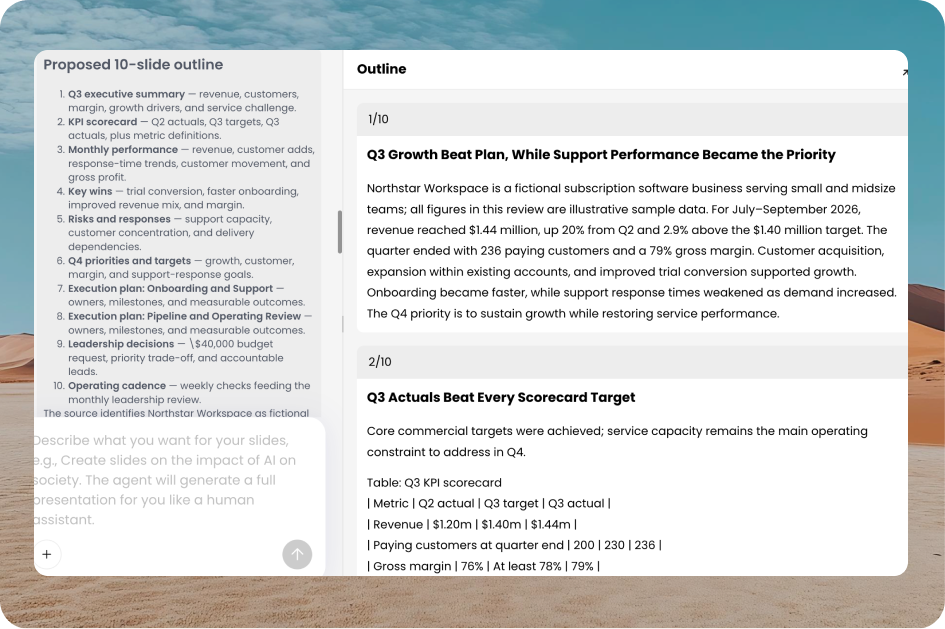
A proposed 10-slide outline for a quarterly review on the left, and the Outline panel on the right with the full text of slides 1 and 2, including a KPI scorecard table.
Themes, logo upload and an online editor
PopAi offers a theme gallery filtered by Education, Business & Finance, Marketing, Culture & Arts, Minimal, Light and Dark. Paid plans add the paid themes and let you upload your logo. After generation you change text, swap images and adjust layouts in the browser editor.
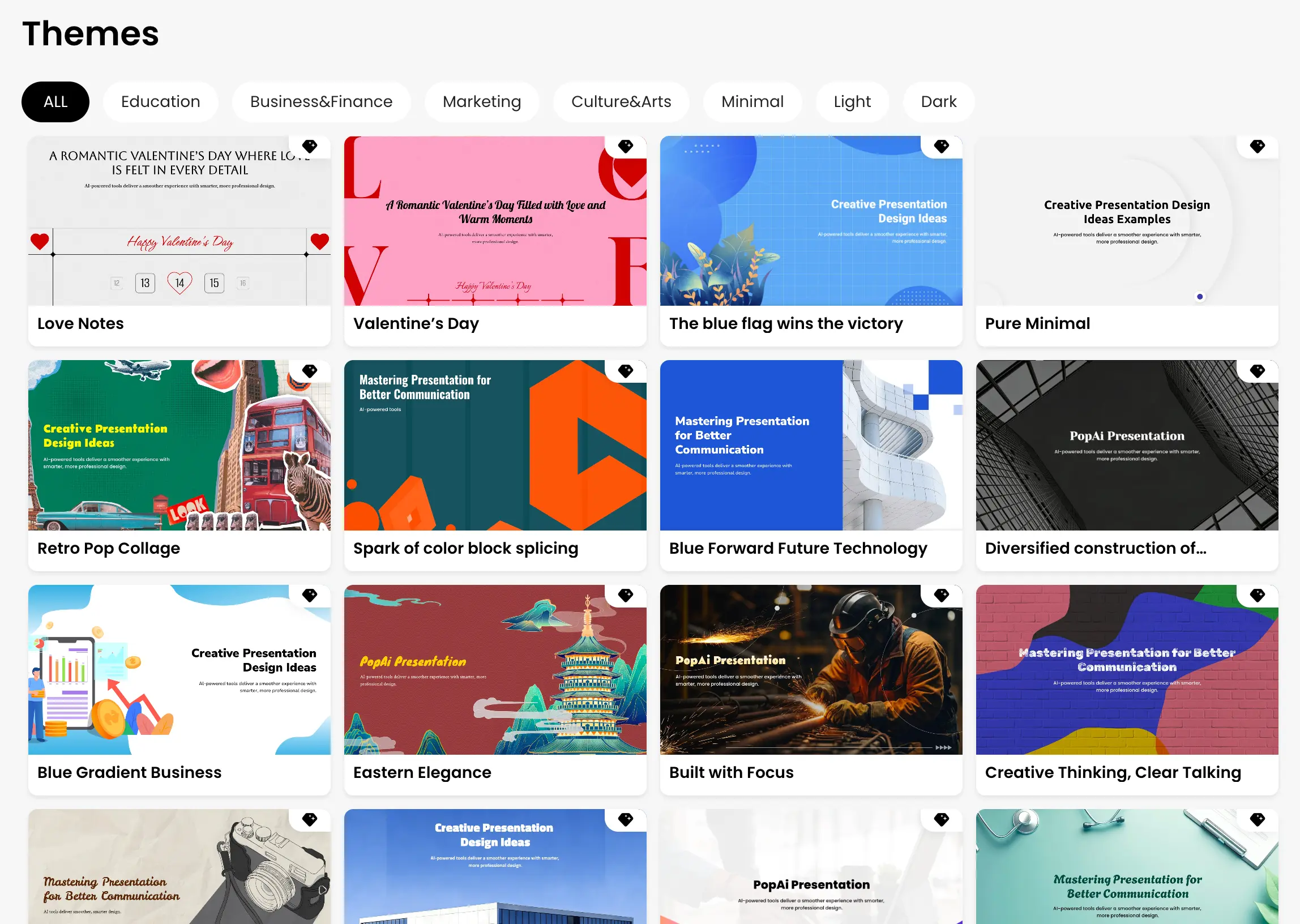
The PopAi Themes gallery with filters (All, Education, Business&Finance, Marketing, Culture&Arts, Minimal, Light, Dark) and previews such as Retro Pop Collage, Eastern Elegance and Blue Gradient Business.
PPTX and PDF export, or a share link
PopAi exports the finished deck as an editable PowerPoint (.pptx) or a PDF, or shares it by link. Full export and watermark removal are paid features. Open the exported file in PowerPoint before you present: AI layouts don't always survive the trip exactly.
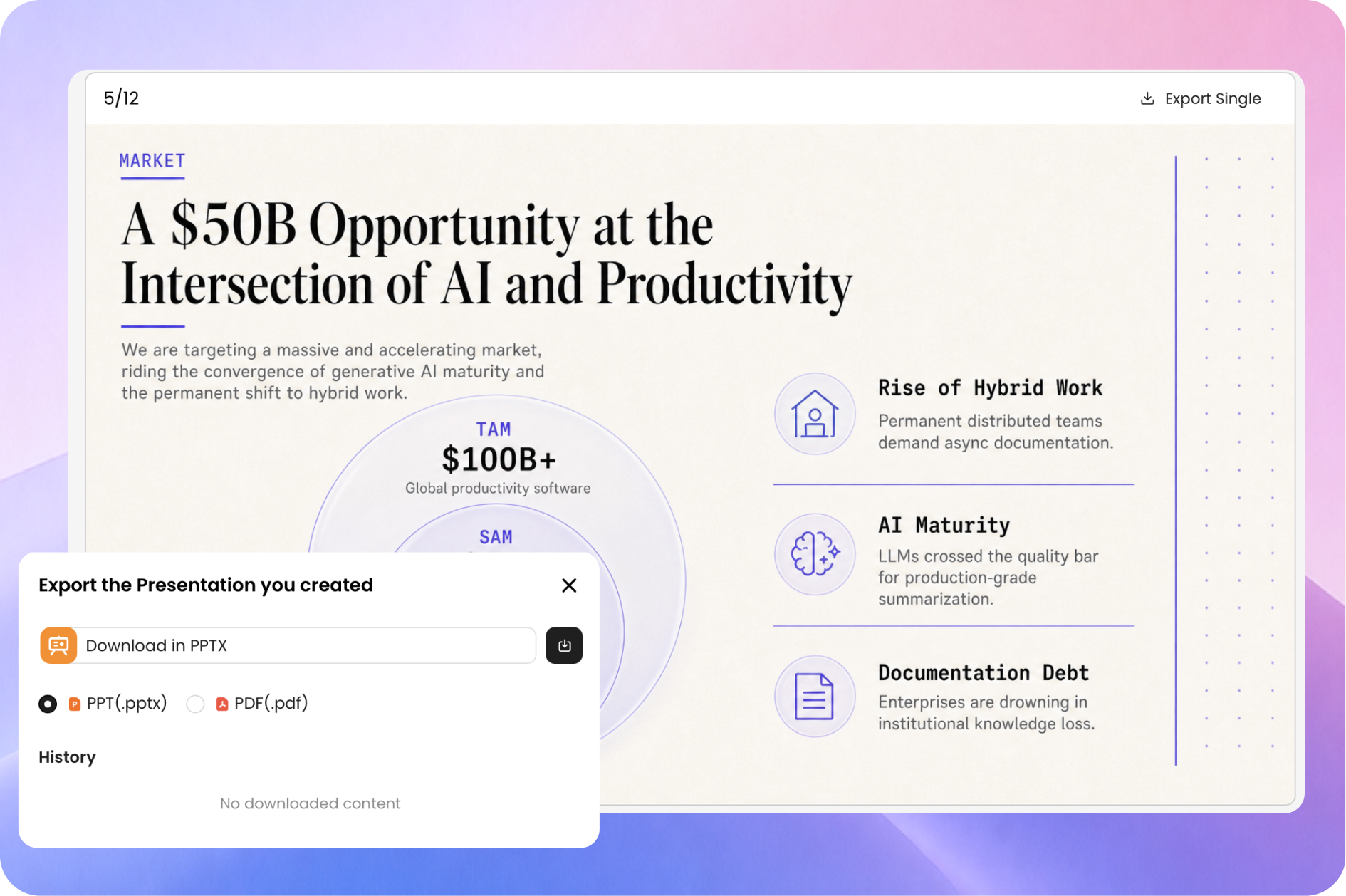
The "Export the Presentation you created" dialog with PPT (.pptx) and PDF (.pdf) options, over slide 5 of 12 of a generated pitch deck.
The rest of the workspace: ChatPDF, writing, chat and images
A PopAi account also covers chat with documents (ask questions of a long PDF and get a summary or mind map), AI writing, multi-model AI chat, and image and video generation. The mobile apps add homework scanning and photo identification. All of it draws on the same monthly credits as the presentation maker.
Benefits
- A first draft in minutes instead of an evening. The structuring and layout, the slowest parts of making slides, are done for you.
- Your existing material does the work. A report or lesson plan you already wrote becomes the deck, so you're not starting from a blank prompt.
- It still ends up in PowerPoint. PPTX export means colleagues can edit the deck in the tool they already use.
- One subscription for several AI tools. If you also chat with PDFs or write with AI, PopAi replaces more than one app.
Real-World Uses
- A teacher's weekly lessons: upload the lesson plan, cut the outline to ten slides, pick an Education theme and export for class.
- A quarterly business review: drop in the quarterly report PDF, ask for an executive summary, KPIs, risks and decisions needed, and check every number against the report before the meeting.
- A student group project: paste the group's outline, generate the deck, and split the editing between team members.
- A client proposal: brief PopAi on goals, approach, milestones and budget assumptions, add your logo, and send a share link for comments.
Who It's For, and Who Should Skip It
PopAi suits students, teachers, trainers and small-business staff who make a lot of routine decks, are happy to treat the AI output as a draft, and want PPTX files at the end. It also suits people who'd use the PDF chat and writing tools anyway.
Skip it if you need slides that follow a strict corporate template, brand rules or team approval workflows: there's no team workspace or brand kit beyond a logo. Skip it if you make a deck once a month, since the free credits or a single month cover that. And if you're wary of hard-to-cancel subscriptions, PopAi's reviews are a real warning: buy monthly first, or use an app-store purchase you can cancel in your Apple or Google account.
Usage Guide
- Open popai.pro in your browser and sign in with your email or Google account (or install the iPhone/iPad or Android app).
- Go to AI Presentation. Type your brief, with the audience, purpose, number of slides and tone, or click "+" to upload a file or add one from Google Drive. Pick the aspect ratio (16:9 by default).
- Read the proposed outline. Reorder, rename and delete slides until the story is right.
- Choose a theme from the gallery and let PopAi generate the slides.
- Edit text, images and layouts in the online editor, and check every name, date and figure against your source.
- Export as PPTX or PDF, or share a link. Open the exported file once in PowerPoint to check the layout.
Where it falls short
- Billing and cancellation. PopAi's most frequent complaint by far: reviewers on Trustpilot, the App Store and Google Play describe a cancel option that's hard to find, renewals they didn't expect, and support emails that go unanswered.
- Draft-quality slides. Some users find the decks too generic or poorly formatted for corporate use and spend a long time fixing them.
- Credits, not counts. Every plan is metered in credits shared between slides, chat and images, so the number of decks you get each month depends on what else you use.
- Personal accounts only. The Terms limit an account to personal use and may throttle accounts active on more than four devices, for example to four new presentations in three hours.
- Prices are hidden on the web until you sign in. You see the exact amount only at checkout.
What Users Say
PopAi's ratings split sharply by where people review it. App-store users who use it for slides or documents are mostly happy (4.3 on the App Store); reviewers on Trustpilot and Google Play, who are mostly writing about billing, are not.
Apple App Store: 4.3 out of 5 from 494 ratings
"Solid AI Platform" (@officalappstore, May 15, 2025): "I've been a Pro subscriber for over a year now to PopAi, as well as many others in this space. Every startup is going to have its limitations and growing pains, but PopAi manages to stay competitive and has introduced several innovative products and tools that are next to none in some cases."
"Five star product" (Mustard_Tree, February 8, 2024): "I have the desktop subscription and mainly use it to summarize or locate info in lengthy documents. The App does the same thing. You can upload books into this thing and it immediately summarizes the info and tells you whatever you want to know about it."
"Subpar Product and Poor Customer Service" (LAhiDNL, November 14, 2025): "The website suggests you will be charged month to month and the total yearly fee will equal $99 when in reality you are charged the entire year at once." On the slides: "The results were always something a high schooler would have created and were not acceptable for use in a corporate setting. They were also poorly formatted."
"Misleading billing and no customer support- avoid" (plamnsa, May 9, 2025): "I canceled the same day I was charged yet the subscription still shows as active for a full year and there's no clear or accessible way to request a refund." PopAi replied that iOS subscriptions are cancelled in the Apple account settings and pointed to customerservice@popai.pro.
Google Play: 2.7 out of 5 from 1.72K reviews, 500K+ downloads
Kelley Gordon-Minott (October 26, 2026): "DO NOT pay for a subscription for this app! I have been trying to cancel for months and continue to get AI generated instructions on how to cancel that are not applicable to what I see on my screen/app."
Innocentia Maisela (February 8, 2026): "There is no clear warning that once you upgrade, you cannot easily downgrade. No refunds once you have paid your fees, no 30-day notice, and no flexibility at all."
Trustpilot: 1.3 out of 5 from 56 reviews
Almost every Trustpilot review is one star, and most are about subscriptions rather than the slides. Excerpts:
- Lane Matheson (September 24, 2026, "Subscription cancellation difficulty"): "the cancellation option is effectively hidden in plain sight."
- TK (October 5, 2026): "I have now been charged another US$14.99 on 1 October, bringing the three monthly charges to US$44.97."
- Ben Har (July 20, 2026): "Paid for Plus, they kept my account as the free version even though I provided an invoice"
- Andrew Gregson (June 30, 2026): "The engine is completely incapable of providing what the website advertises."
Testimonials on PopAi's own site
PopAi's homepage shows customer quotes, which are naturally positive:
- Sarah J., Marketing Manager: "This AI presentation maker saved me hours of formatting. I uploaded our quarterly report PDF, and it generated a beautiful slide deck instantly."
- Emily R., High School Teacher: "I create 3-4 presentations a week for my classes. PopAi makes it so much faster to turn my lesson plans into engaging visuals."
- Sophie T., Creative Director: "I was skeptical about AI design, but the layout quality here is surprisingly good. It gives me a great starting point to add my own creative touches."
The pattern: people who use PopAi for drafts, lesson slides and document summaries like the speed. The complaints are about money far more than features: yearly plans charged up front, cancellation that's hard to find, no refunds outside Europe, and slow support. A smaller group finds the slides too basic for professional use. Use the free credits first, and know how you'll cancel before you subscribe.
Comparisons
PopAi Pro vs PopAi Unlimited
PopAi Pro is the plan for moderate use: a monthly credit allowance that covers regular decks, full PPTX/PDF export, watermark removal, logo upload and paid themes, with a small image and video generation allowance. Unlimited removes most usage limits and raises the image and video allowance, at several times the price.
Which one to pick
Start with Pro if slides are your main use: a few decks a week fit comfortably. Choose Unlimited only if you also lean hard on PDF chat, writing, images or video every day. You can upgrade from Pro to Unlimited at any time, but you can't step back down, so Pro is the safer first purchase.
Editions and Pricing
PopAi's pricing page offers two paid plans, Pro and Unlimited, each billed monthly or yearly (the app also sells quarterly Pro). Its feature list measures usage in credits: Free 500 credits in total (about 1 presentation), Plus 10,000 credits a month (15 to 20 presentations, full PPTX/PDF export, watermark removal, logo upload, paid themes), and Pro 50,000 credits a month (75 to 100 presentations). The web shows exact prices only after you sign in; the figures below are the ones PopAi publishes on its App Store listing (Pro) and on its own AI image and video pages (Unlimited). Enter POPAI20OFF on the order page for 20% off.
| Plan | Yearly | Monthly | Best for | Buy |
|---|
| Free | $0 | $0 | Trying one deck (500 credits in total, watermark) | Try Free |
| Pro | $99 a year ($79.20 with POPAI20OFF), charged at once | $12 to $14.99 | Regular decks, moderate use of chat and writing tools | Buy Pro |
| Unlimited | $33 a month, billed yearly (20% off with POPAI20OFF) | $47 | Heavy use with most limits removed, more image and video generation | Buy Unlimited |
Each Buy button opens PopAi's pricing page, where you sign in and choose that plan and the billing period. You can move from Pro to Unlimited at any time, but not back down, and a yearly plan can't be switched to monthly until it ends.
FAQs
Can I get a refund from PopAi?
PopAi refunds only buyers in the EEA and UK who cancel within 14 days of purchase, by emailing customerservice@popai.pro. Elsewhere, its Terms say you aren't entitled to a refund once you've paid and used the service. App Store and Google Play purchases go through Apple's and Google's own refund processes.
How do I cancel a PopAi subscription?
PopAi subscriptions bought on the web are cancelled in your account's subscription settings; you keep the plan until the end of the period you paid for. If you bought in the iPhone or Android app, cancel in your Apple or Google account instead. If you can't find the option, email customerservice@popai.pro and keep a copy.
Does PopAi make real PowerPoint files I can edit?
Yes, PopAi exports decks as .pptx files you can open and edit in PowerPoint, or as PDFs. Full export without the watermark needs a paid plan.
Can PopAi use my company's PowerPoint template?
PopAi can start from an existing PPTX file and paid plans can upload a logo, but there's no brand kit for fixed fonts, colours and layouts. If decks must follow a strict template, plan to restyle the export in PowerPoint.
How many presentations does a PopAi plan include?
PopAi meters every plan in credits rather than decks. Its pricing page estimates about 1 presentation in total on Free, 15 to 20 a month on 10,000 credits and 75 to 100 a month on 50,000 credits; chats, documents and images use the same credits.
Is the POPAI20OFF code permanent?
POPAI20OFF is the 20% code PopAi gives our readers, with no end date announced. Enter it on the order page before you pay; the price won't change on its own.
Can I share one PopAi account with my team?
No. PopAi's Terms make each account personal and allow PopAi to limit accounts used on more than four devices. Each person needs their own plan.
Who makes PopAi?
PopAi is made by 01.AI Pte. Ltd., a company registered in Singapore, which also publishes the PopAi apps on the App Store and Google Play.
System Requirements
- A current web browser (Chrome, Edge, Safari or Firefox) on Windows, macOS, Linux or ChromeOS, and an internet connection
- Or the PopAi app for iPhone and iPad, or for Android
- A PopAi account (email or Google sign-in); users must be 13 or older
- PowerPoint or another app that opens PPTX files, to edit exported decks offline
Conclusion
PopAi is worth it if you make routine decks often, want PPTX files at the end, and will treat the slides as a first draft. The outline-first workflow and the ability to start from your own PDF or Word file are the real reasons to buy it, and $99 a year for Pro ($79.20 with POPAI20OFF) also buys PDF chat and AI writing on the same account. The main reason not to is the company's billing record: yearly plans are charged at once, there are no refunds outside Europe, and cancelling is the top complaint in its reviews. Make a deck on the free credits first, and if you buy, set a reminder to cancel or renew on your own terms. Teams that need brand control and collaboration should look at a slide-first tool instead.
Try PopAi FreeBuy ProBuy Unlimited