Scamless: An AI Scam Detector That Warns You Inside WhatsApp, Texts and DMs
Scamless: AI Scam Detector is a $1.99-a-month Android app from Protexo Inc. that watches incoming messages in your texting and chat apps and puts a warning over any message that looks like a scam, with the reasons spelled out. It's meant for people who get a steady stream of fake delivery texts, "Hi mum, new number" messages and bank impersonations, and especially for families setting up protection on an older parent's or a teenager's phone. There's a free trial, and no iPhone version.
Instead of asking you to copy a suspicious text into a checker, Scamless reads the message as it arrives and overlays an alert such as "Likely Scam: impersonating a family member, urgent request for money", with buttons to trust the sender or report the scam.
Quick facts
- Developer: Protexo Inc., Wilmington, Delaware (founded 2023 by Arjun Singri)
- Platform: Android only, from Google Play; no iPhone app
- Apps covered: text messages (SMS), WhatsApp, Facebook Messenger, Instagram Messenger, TikTok, Telegram, TextNow and X chat
- Price: Personal plan $1.99 a month through Google Play, cancel anytime; Enterprise volume plans quoted on request
- Trial: a free trial period before billing starts
- How it works: Android Accessibility permission; on-device analysis first, suspicious messages checked in the cloud
- Ratings: 4.3 on Google Play from 234 reviews, 10K+ downloads
- Last updated: November 11, 2026 on Google Play
- What we checked: the $1.99 monthly price and the list of supported apps on Scamless's pricing page, the Google Play listing (rating, downloads, update date, data-safety section and recent reviews) and the onboarding screens on the vendor's site, all on November 16, 2026. We didn't install it or test it against real scam messages.
Get Scamless for AndroidBuy Now
Overview
Most phone-level spam protection works on the caller or sender: a number on a blocklist, a domain known to be bad. Scams that arrive through WhatsApp or Instagram from a brand-new account slip past that. Scamless looks at the message itself, its wording, urgency and links, and judges whether it reads like a scam, which is how it can flag a "cousin" asking for money from an unknown number.
The setup is short: install, give Scamless Android's Accessibility permission so it can see messages on screen and draw a warning over them, and leave it running. There's nothing to forward or paste.

Scamless's site graphic of its alert: a WhatsApp "Hi mum, new number" message flagged as Likely Scam for impersonating a family member and an urgent money request, with Trust sender and Report scam buttons.
Features
Warnings shown over the message
Scamless puts its alert directly over the suspicious message inside the app you're using, before you reply, tap or pay. Each alert lists plain-English reasons, so you can judge the message yourself rather than trusting a red light.
Context-aware AI detection
Scamless looks for phishing links and fake websites, bank and government impersonation, delivery and package fraud, crypto and investment scams, job-offer scams, and urgent money requests. It reads intent and context rather than matching spam keywords, and it works in English and many other languages.
Link scanner
Scamless checks every link in a message for lookalike domains and known scam destinations, with no monthly cap on the number of links.
One subscription for every inbox
Scamless covers SMS, WhatsApp, Facebook Messenger, Instagram, TikTok, Telegram, TextNow and X chat on one plan, with no per-app limits and no higher tier holding features back.
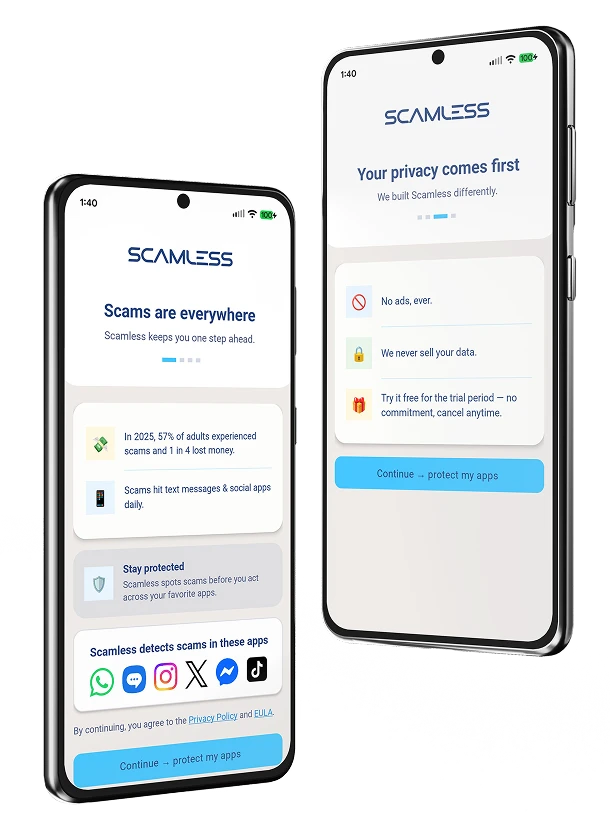
Scamless onboarding: the supported apps (WhatsApp, Messages, Instagram, X, Messenger, TikTok) and the privacy screen promising no ads, no data sales and a free trial period.
Benefits
- Protection where scams actually land. Chat apps and DMs, not only the phone's own SMS filter.
- A second opinion in the moment. The warning arrives before the reply, which is when scams succeed.
- Cheap. $1.99 a month is less than most security suites, and there's one plan with everything.
- Set and forget for relatives. Once installed and permitted, it runs without them doing anything.
Real-World Uses
- An aging parent's phone. Catching "grandchild in trouble" and fake bank-fraud-team messages.
- A teenager's phone. Fake job offers, giveaway DMs on Instagram and TikTok, and crypto "opportunities".
- Parcel season. The "your package could not be delivered, update your address" text with a lookalike link.
- Multilingual families. Scams written in languages other than English.
Who It's For, and Who Should Skip It
Scamless fits Android users, or the family members who look after them, who get scam messages across several chat apps and want a warning without changing habits.
Skip it if you use an iPhone (there's no iOS version); if you aren't comfortable giving an app Android's Accessibility permission, which lets it see what's on your screen; if many legitimate messages reach you from people not in your contacts, such as new clients or patients, since one reviewer found those flagged; or if you only need SMS filtering, which your phone's own messaging app may already do for free.
Usage Guide
- Install Scamless from Google Play and open it.
- Go through the in-app onboarding and turn on the Accessibility permission when asked; Scamless can't show alerts without it.
- Turn on contacts sync in Scamless's settings and save people you trust as contacts, so their messages aren't flagged.
- Use your messaging apps as usual. When an alert appears, read the reasons, then tap Trust sender or Report scam.
- Read the Learn tab for the list of scam types it watches for. Pause protection whenever you want from the app.
Before you buy
Know what the permission and the privacy claims mean. The homepage says messages "stay on your phone" and that Scamless never reads or stores your conversations. The pricing page and Google Play listing are more precise: analysis starts on the phone, and messages that look suspicious are sent to Scamless's AI in the cloud. Google Play's data-safety section says the app may share app activity and device IDs with third parties. Scamless says it never sells data or uses messages for advertising.
Billing is monthly through Google Play and renews until you cancel in your Play Store subscriptions; protection stays on until the end of the paid month.
Where it falls short
- False positives. A reviewer running a business found that messages from anyone not yet in her contacts, including her doctor and potential clients, were flagged. Scamless's fix is to save trusted people as contacts and turn on contacts sync.
- Setup can go wrong. One reviewer found it didn't check Google Messages; the developer says Google Messages is where it catches the most scams and pointed to the onboarding steps.
- Quiet by design. If you rarely get scams, it can feel like it isn't doing anything.
- Young product, small user base. 10K+ downloads and a 4.3 rating from a couple of hundred reviews; Protexo's "99%+ accuracy" figure is the company's own.
- No iPhone version, and no email scanning in the app list.
What Users Say
Scamless holds 4.3 out of 5 on Google Play from 234 reviews. There are no independent lab tests of its detection rate yet; its press coverage (USA Today contributor content, International Business Times, Business Insider markets news) consists of company profiles. The most recent Play reviews are critical, and Protexo replies to each.
Google Play (4.3, 234 reviews)
Sharon Bourassa (September 16, 2026): "I gave this App a very fair try. sure it detects spam and scams... it says everything is a scam or spam. I also do business so it has called my Dr spam other people who are potential clients pretty much if it's not in my contacts yet it is a scam or spam"
Protexo's reply: "Saving anyone you trust to your contacts and turning on contacts sync in settings will keep their messages from being flagged."
Ian C (September 26, 2026): "first, it doesn't even check Google messages."
Protexo's reply: "Google Messages is actually the app where Scamless catches the most scams, so it sounds like something went wrong with the setup on your device."
Donnell Bell (November 10, 2026): "Doesn't seem like it does much." Protexo's reply: "Scamless works quietly until a scam message arrives, so it can feel like it isn't doing much."
The pattern: the overall rating is decent, but the detailed reviews shown are about tuning (too many flags for unknown senders), setup (the Accessibility permission and onboarding) and uncertainty about whether it's working. Expect to spend a few minutes on contacts sync and to judge it over a couple of weeks of real messages during the trial.
Comparisons
Scamless vs your phone's built-in spam filter
Android's own messaging app filters suspected spam SMS, for free. Scamless adds coverage of WhatsApp, Instagram, Messenger, TikTok, Telegram, TextNow and X, and explains why each message looks wrong. If almost all your scams arrive by SMS, try the built-in filter first.
Scamless vs a full mobile security suite
Security suites bundle antivirus, VPN and web protection, usually for much more than $1.99 a month. Scamless does one job, reading messages for scam tactics, and is cheaper; it doesn't scan apps for malware.
Plans and Pricing
| Plan | Price | Who it covers | Billing |
|---|
| Personal | $1.99 a month | Your own Android phone, unlimited detection and link checks | Monthly through Google Play, free trial first |
| Enterprise | Custom quote | Employees, members, clients or policyholders, with a named contact | Invoiced |
FAQs
Is there a Scamless app for iPhone?
No. Scamless is Android only, because it relies on Android's Accessibility service to read messages and draw alerts over other apps.
Why does Scamless need the Accessibility permission?
Scamless uses Android's Accessibility permission to detect risky messages on your screen and show a warning over them. Protexo says it's the only way to protect you inside messaging apps without copy-paste, and that the permission is used for nothing else.
Does Scamless block or delete scam messages?
No. Scamless warns you and explains why; the message stays where it is, and you decide whether to trust the sender or report it.
Can I install Scamless on my parent's phone?
Yes, Scamless is designed for that: install it on their Android phone, complete the onboarding and permission step with them, and it runs on its own. Each phone needs its own $1.99 Personal subscription.
Does Scamless check emails?
Scamless's list of supported apps covers text messages and chat apps (WhatsApp, Messenger, Instagram, TikTok, Telegram, TextNow, X chat), not email apps.
How do I cancel Scamless?
Cancel Scamless in your Google Play subscriptions. There's no fee, and protection stays on until the end of the month you've paid for.
System Requirements
- Android phone or tablet with Google Play
- Accessibility permission granted to Scamless
- Internet connection (suspicious messages are checked in the cloud)
Conclusion
Scamless is worth trying on an Android phone that gets scam messages through WhatsApp, Instagram or other chat apps, and especially on a vulnerable relative's phone: at $1.99 a month, a single prevented "send money to my new number" transfer pays for years of it, and the free trial lets you see how noisy it is first. The main reasons to hold back are the broad Accessibility permission with cloud checks of suspicious messages, false alarms for unknown but legitimate senders, and a product too new to have independent detection tests. iPhone users can't use it at all.
Get Scamless for AndroidBuy Now