Mockitt Pro: Online Prototyping, UI Design and Whiteboard for Product Teams
Mockitt is an online prototyping tool for building wireframes and clickable app, web and dashboard prototypes, with a UI design editor, a whiteboard and an AI assistant that drafts screens from a prompt. It's for product managers, UX designers and developers, runs in the browser and as desktop apps for Windows, macOS and Linux, and Mockitt Pro costs $299 once for a lifetime plan or $72 a year. A free plan lets you try it with three files.
The problem it solves is the gap between "here's my idea" and "here's something the team can click through". Instead of a slide deck of static mock-ups, you build the screens, wire up what each button does, and send one link that stakeholders can tap through on their phone and comment on.
Quick facts
- Type: web app, with desktop apps for Windows, macOS and Linux
- Developer: Sharpening Stone Technology Co., Ltd. (Beijing); Mockitt is the upgraded successor of MockingBot
- Tools: prototypes, UI design, whiteboard, flowcharts, AI slides, Mockitt AI
- Price: Pro $299 lifetime, $72 a year or $10 a month; Team $288 a year; Enterprise $480 a year
- Free plan: 1 workspace, 3 files and 200 AI credits per person
- What we checked: the plans and their contents on Mockitt's pricing page, and checkout prices of $299 (Pro Lifetime), $72 (Pro Annual), $10 (Pro Month), $288 (Team Annual) and $480 (Enterprise Annual) on November 15, 2026. We didn't build a prototype in it ourselves.
Buy Pro LifetimeBuy Pro AnnualBuy Team Annual
Overview
Mockitt puts several product-design tools in one workspace. The prototype editor is the core: drag buttons, inputs, lists and navigation onto a phone, tablet, web or dashboard canvas, then link screens with click, hover or gesture triggers. Around it sit a vector UI design editor, an online whiteboard for research and journey maps, a flowchart tool, AI slides and Mockitt AI, which turns a written brief or a reference image into an editable first draft.
The browser version behaves like a desktop program. TechRadar noticed this in its review: "To all intents and purposes, the browser app is a desktop experience, which makes it particularly impressive." Everything is saved in the cloud, so teammates edit the same file at the same time and reviewers comment beside the screen in question.
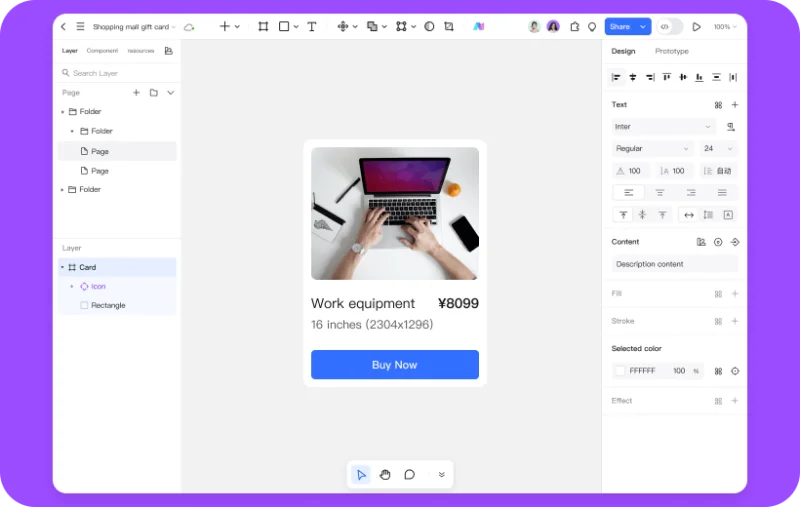
The Mockitt design editor: pages and layers on the left, a product card on the canvas, and text, fill, stroke and effect settings on the right, with Design and Prototype tabs at the top.
Features
Clickable prototypes without code
Mockitt builds interactive prototypes from a library of reusable components, including Android and iOS controls, web navigation, tables, charts and pagination. You connect screens with click, hover or gesture triggers, add dynamic states and in-page animations, and preview the flow in realistic device frames. Updating a shared component changes every screen that uses it.
Mockitt AI drafts prototypes, UI and documents
Mockitt AI generates an editable multi-page prototype from a description of your requirements, an interface from a brief or a reference image, and drafts of PRD documents, flowcharts, mind maps, roadmaps and slides. It can also create a custom code component from a description of a function. Each plan includes a set number of AI credits, and extra credits are sold as top-ups. Mockitt also offers an MCP connection so coding assistants such as Codex, Cursor or Claude Code can work with its AI workflow.
A vector UI design editor that opens Sketch and Figma files
Mockitt's design editor has auto-layout, vector tools, variables and Boolean operations, keeps design specifications in sync for developer review, and imports Sketch and Figma files so you can carry on work started elsewhere.
Whiteboard and flowcharts on the same canvas
Mockitt's online whiteboard holds user research, personas, journey maps and competitor notes, lets the team brainstorm in real time, and can turn sketches and notes into a starting prototype. The flowchart tool maps processes and decision paths for business processes and system architecture.
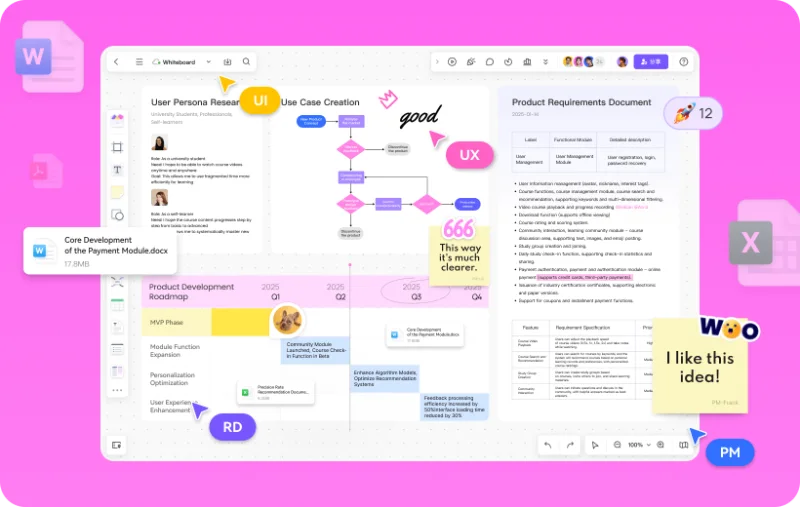
Mockitt's whiteboard in a vendor image: persona notes, a use-case flowchart, a product roadmap and a requirements table on one canvas, with sticky notes and collaborators' cursors added for illustration.
Sharing, review and offline demos
Mockitt shares a prototype as one link that always shows the latest version, with overview, presentation and annotation views for different review meetings and comments pinned to the screen they refer to. For a demo without internet, you export an offline package, and the Lifetime plan adds export of the prototype source files.
Benefits
- Fewer tools. Research board, flowchart, wireframe, high-fidelity UI and shareable prototype live in one place instead of four apps.
- Faster first drafts. The AI turns a paragraph of requirements into screens you edit, rather than a blank canvas.
- Decisions happen next to the design. Comments and co-editing in the file cut down on screenshots in chat threads.
- A one-time option. The $299 Lifetime plan avoids another monthly subscription for a solo designer.
Real-World Uses
- A product manager's spec. Draft the PRD with Mockitt AI, map the flow as a flowchart, and attach a clickable prototype to the same workspace for engineering review.
- A startup pitch. Generate a mobile app prototype from a description, polish the key screens, and present it in a phone frame to investors, offline if needed.
- An admin dashboard. Use table, chart and navigation components to lay out an internal tool and get sign-off before any code.
- Usability testing. Send the prototype link to testers, watch them tap through signup or checkout, and fix the flow in the same file.
Who It's For, and Who Should Skip It
Buy it if you're a product manager, UX designer or small product team that wants prototyping, wireframing and early-stage collaboration in one inexpensive tool, and especially if you like the idea of paying once with the Pro Lifetime plan.
Skip it if your team already works in Figma and is happy there (Mockitt imports Figma files, but switching tools has a cost), if you need offline-first desktop design with no cloud account, or if you only need a quick mind map or flowchart: TechRadar found those modes "bolted on" next to the prototyping tool, and a dedicated diagram app is a better fit.
Usage Guide
- Sign up free on Mockitt's site in the browser, or install the desktop app for Windows, macOS or Linux.
- Create a prototype file and pick the device (app, web, dashboard and so on), or start from a template.
- Drag in components to lay out each screen, or describe the product to Mockitt AI to generate a first draft.
- Add interactions: select an element, choose a trigger (click, hover, gesture) and the target screen or state.
- Preview in a device frame, then share the link and collect comments.
- Upgrade when you need more than three files: buy a plan and it applies to your account.
Before you buy
- Start on the free plan and build one real flow; three files is enough to judge the editor.
- Pro plans are for one editor seat. For co-editing with a team, the Team plan covers up to 10 collaborators.
- AI credits are counted per member: 1,000 on Pro Monthly, 12,000 on Pro Annual, 20,000 on Pro Lifetime, 15,000 on Team and 18,000 on Enterprise. Heavy AI use can run them down, and extra credits cost more.
- The yearly and monthly plans renew automatically; the Lifetime plan is a single payment.
Where it falls short
- Secondary tools are thinner. TechRadar rated the prototyping tool excellent but found the mind-map and flowchart modes weaker than dedicated apps.
- Desktop apps had sign-in problems in testing. In TechRadar's tests (July 2024) the Windows and Ubuntu apps crashed when signing in with the Google account used in the browser.
- Help resources are limited. TechRadar noted an online user guide but no proper knowledge base.
- Cloud-based. Your files live on Mockitt's servers, which some companies' policies won't allow; data ownership controls come only with Enterprise.
What Users Say
TechRadar (Christian Cawley, July 2024, 4 out of 5)
TechRadar tested Mockitt by building a UX interface, a flowchart and a mind map in the browser and the desktop apps:
"Mockitt is an excellent UX prototyping tool, with wireframe design, flowcharts, and mind map, underpinned with a handy generative AI tool."
"The real stand out feature of Mockitt is the prototyping tool – the mind mapping and flowchart feel bolted on."
"Generative AI is able to create a design for you with a single sentence. It's quite basic, but there is scope for that to become a compelling feature in this software."
"An online user guide is provided, but curiously there is no knowledge base for Mockitt."
TechRadar's review predates the current plans and the latest AI tools, so its prices no longer apply. The recurring themes are the same ones the product leads with today: a strong prototype editor, a browser app that feels like desktop software, and an AI assistant that gets you a starting point rather than a finished design.
Comparisons
Mockitt vs Figma and Axure
Figma is the standard for collaborative UI design and has a huge plugin and community ecosystem; Axure RP is the heavyweight for complex, logic-driven prototypes and documentation. Mockitt sits between them: simpler interaction setup than Axure, built-in AI drafting and PRD tools that Figma doesn't focus on, and a one-time Lifetime plan. It opens Sketch and Figma files, which makes trying it less risky.
Free vs Pro vs Team vs Enterprise
Free is for trying it (3 files). Pro is for one editor (100 files on the subscriptions, unlimited on Lifetime). Team adds real-time co-editing for up to 10 people, shared design systems and component libraries, and roles and permissions. Enterprise adds unlimited workspaces, people and files, central account management, data ownership and transfer, activity and audit logs, and dedicated support.
Editions and Pricing
Prices at checkout on November 15, 2026. Each Buy button orders that plan.
| Plan | Price | Seats and files | AI credits | Buy |
|---|
| Pro Lifetime | $299 once | 1 editor, unlimited files and pages, source file export | 20,000 | Buy Lifetime |
| Pro Annual | $72 a year | 1 editor, 100 files | 12,000 | Buy Annual |
| Pro Monthly | $10 a month | 1 editor, 100 files | 1,000 | Buy Monthly |
| Team Annual | $288 a year | Up to 10 collaborators, 3 workspaces, real-time co-editing | 15,000 per member | Buy Team |
| Enterprise Annual | $480 a year | Unlimited workspaces, collaborators and files, audit logs | 18,000 per member | Buy Enterprise |
FAQs
Is Mockitt the same as MockingBot?
Mockitt is MockingBot's successor. Mockitt's own upgrade guide describes how MockingBot was upgraded to Mockitt and helps MockingBot users recover and continue their projects and licenses.
Does the Mockitt Pro Lifetime plan include future updates?
Yes. Mockitt's Pro Lifetime plan is a one-time payment that includes free lifetime updates, unlimited files and pages, export of prototype source files and 20,000 AI credits.
Can I import my Figma or Sketch designs into Mockitt?
Yes. Mockitt's design editor imports Sketch and Figma files so you can keep working on them there.
Can I present a Mockitt prototype without internet?
Yes. Mockitt exports an offline package of a prototype for presentations and reviews where there's no connection.
What happens when I run out of Mockitt AI credits?
Mockitt sells AI credit top-ups in packs of 1,000, 5,000 and 10,000 credits, so you can add more without changing plans. The plan's credit allowance is per member.
Is there a discount for students and teachers?
Mockitt has an education program: students and educators can apply for free education access from the Mockitt site.
System Requirements
- A current web browser and an internet connection
- Optional desktop apps for Windows, macOS and Linux
- A free Mockitt account
Conclusion
Mockitt Pro is worth it for product managers and designers who want one affordable place to go from idea to clickable prototype, and the $299 Lifetime plan is unusual value in a category where everything else is a subscription. The one reason to buy it is the prototype editor with AI drafting on top. The main reason not to is that its whiteboard, flowchart and mind-map tools are weaker than dedicated apps and its help resources are thin, so a team happy in Figma has little reason to move. Build one flow on the free plan before you choose a plan.
Buy Pro LifetimeBuy Pro AnnualBuy Team Annual