SparrowDesk: An AI-First Help Desk With a Shared Inbox, Live Chat and the Zoona AI Agent
SparrowDesk is a web-based help desk from SurveySparrow Inc. that puts email, live chat, phone calls, WhatsApp, Slack and social messages into one shared inbox, and lets its Zoona AI agent answer the repeat questions for you. It's built for small and mid-sized support teams: there's a free plan for up to 3 users, paid plans start at $16 per agent per month billed yearly ($192 per agent per year), and a 14-day trial needs no credit card.
If your support still lives in a shared Gmail inbox and a chat widget nobody watches at night, SparrowDesk is the kind of tool that turns it into tickets with owners, deadlines and an AI that handles the "how do I reset my password" messages at 2am.
Quick facts
- Developer: SurveySparrow Inc., San Francisco (also makes SurveySparrow and ThriveSparrow)
- Type: cloud help desk in the browser, with iPhone/iPad (iOS 15.1 or later) and Android apps for agents
- Channels: email, live chat, phone calls, WhatsApp, Slack, Facebook, Instagram, Discord, customer portal and help center
- Latest release: October 28, 2026 (Zoona for Zendesk, scheduled exports, AI routing in phone menus)
- Price: per agent per month: Free (up to 3 users), Starter $16, Professional $49, Enterprise $89 billed yearly; $19, $59 and $99 billed monthly
- AI add-ons: Zoona AI agent $0.49 per resolution; AI Copilot from $8 per agent per month; Account Intelligence from $8 per month
- Trial: 14 days, no credit card, with 500 Copilot credits per agent and 500 Account Intelligence credits
- Discounts: 20% for NGOs and non-profits; a startup program with up to 90% off
- What we checked: every plan price (yearly and monthly) and the plan comparison on SparrowDesk's pricing page, the latest changelog entry and the iOS app (version 1.0.10) on November 15, 2026. We didn't run a support team on it.
Start Free TrialBuy Now
Overview
SparrowDesk is the newest product from SurveySparrow Inc., and it's moving fast: the changelog shows major releases every couple of weeks, with Zoona answering phone calls, HIPAA mode and GitHub, Shortcut and Instatus integrations in October 2026 alone. SurveySparrow uses it for its own support, and the vendor says more than 1,000 support teams do too.
The idea is a split of work. Zoona, the AI agent, reads incoming conversations and answers the ones it can from your help center, website, Notion pages, PDFs and past conversations. Your agents get everything else in one inbox, with AI Copilot drafting replies. Account Intelligence groups conversations into topics, flags problem threads and drafts new help center articles from resolved tickets.
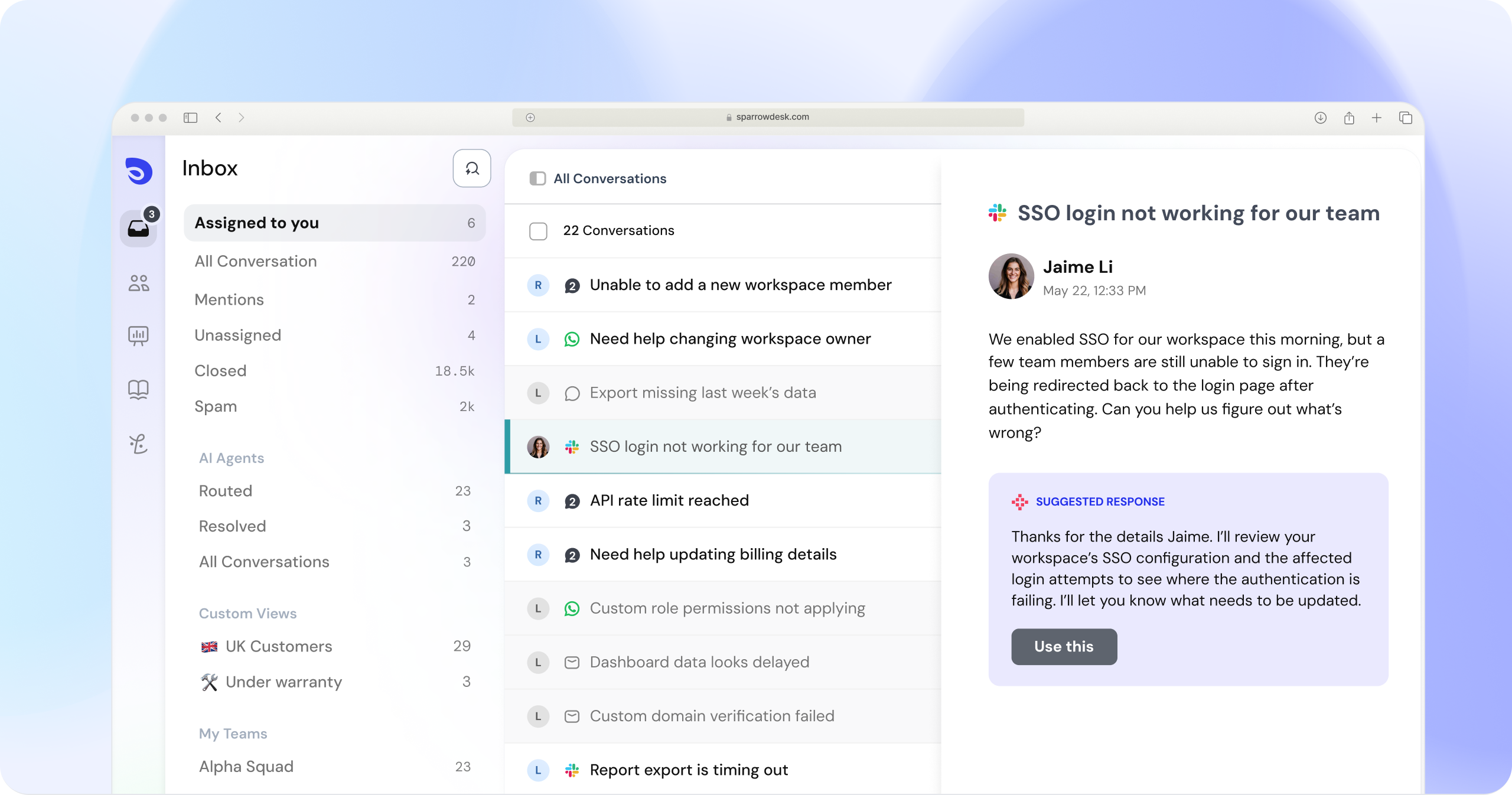
The SparrowDesk inbox: folders for assigned, unassigned and AI-agent conversations, custom views such as "UK Customers", tickets arriving from Slack, WhatsApp, chat and email, and an AI suggested response on the open conversation.
Features
One inbox for every channel
SparrowDesk collects email, live chat, phone calls, WhatsApp, Slack, Facebook, Instagram and Discord in one shared inbox. Each conversation becomes a ticket with a status, priority, owner and custom fields. Agents can merge duplicates, add watchers, @mention colleagues in private notes, forward to an outside contact and filter the inbox into custom views. SparrowDesk translates threads both ways, so an agent can answer a customer writing in another language.
Zoona AI agent: pay only when it solves the problem
SparrowDesk's Zoona AI agent answers customers on chat, email and phone calls, around the clock, in 40+ languages. You train it by pointing it at your website, help center, Notion, PDFs and notes, and it hands anything it can't solve to a person with the full context. On Professional and Enterprise it can also run Commands that call your own APIs and MCP servers, for example to look up an order or update a record. Zoona costs $0.49 per resolved conversation, prepaid or postpaid, and since October 2026 it can also answer tickets inside Zendesk for teams that keep Zendesk as their help desk.
AI Copilot inside the inbox
SparrowDesk AI Copilot summarises long threads, drafts replies for the agent to review, translates conversations and pulls context from HubSpot, Linear and Attio. You can also ask it questions about your support data in plain English, such as which customers' satisfaction dropped most.
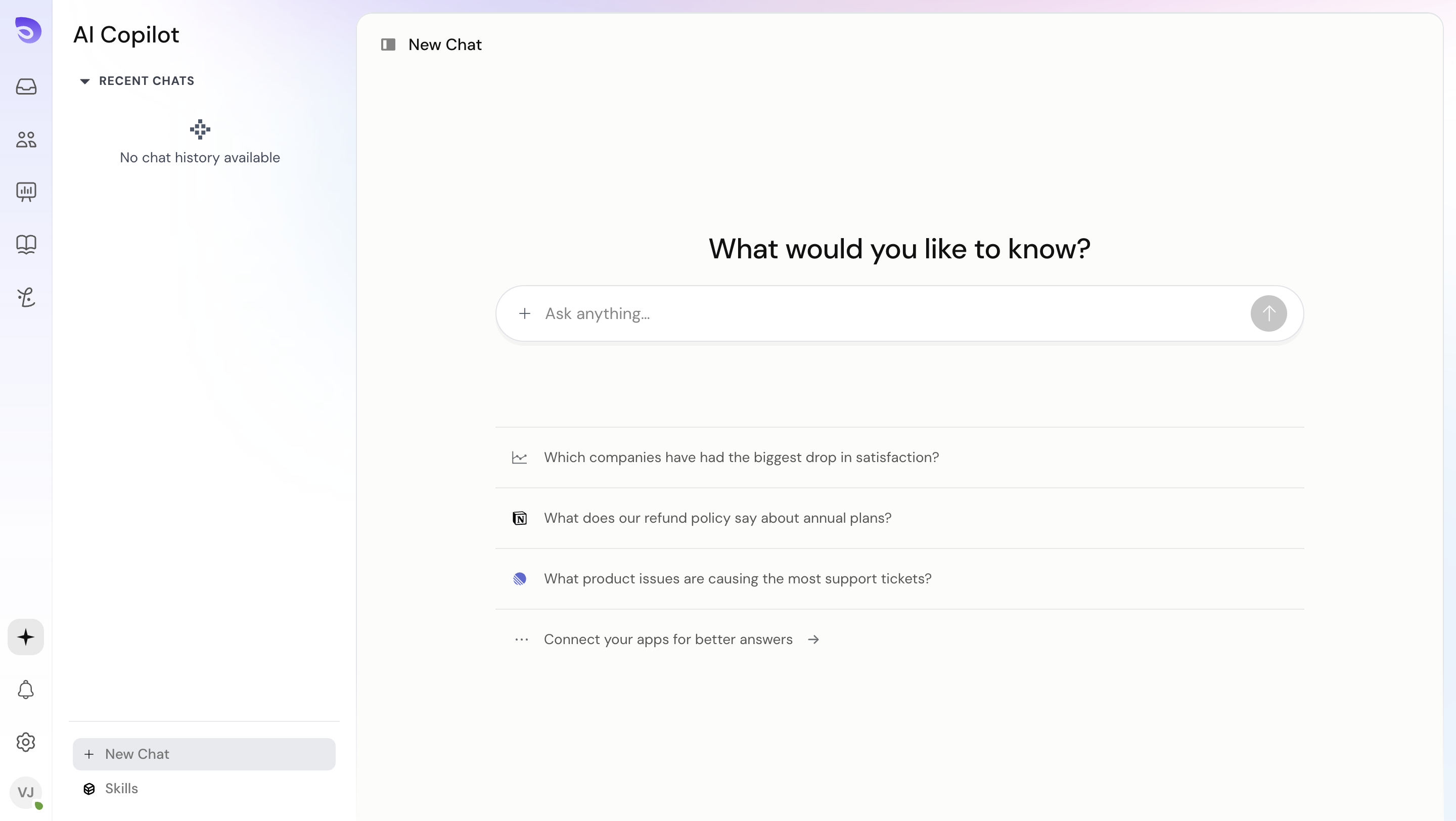
The AI Copilot screen with suggested questions such as "Which companies have had the biggest drop in satisfaction?" and "What product issues are causing the most support tickets?"
Workflows, SLAs and automatic assignment
SparrowDesk automates routine handling with macros (on every plan), basic workflows, and on Professional and Enterprise, advanced workflows, round-robin assignment, multiple business hours, parent-child tickets and service level agreements. Each ticket shows its first-response and resolution deadlines, so agents act before the clock runs out, and SLA reports show where the team misses them.
Help center, customer portal and CSAT
SparrowDesk includes a branded public help center (1 on Free and Starter, 5 on Professional, 10 on Enterprise) that customers can search, and that also trains Zoona. From Starter up, customers get a portal to submit and track their tickets, and a one-tap CSAT survey goes out when a ticket closes.
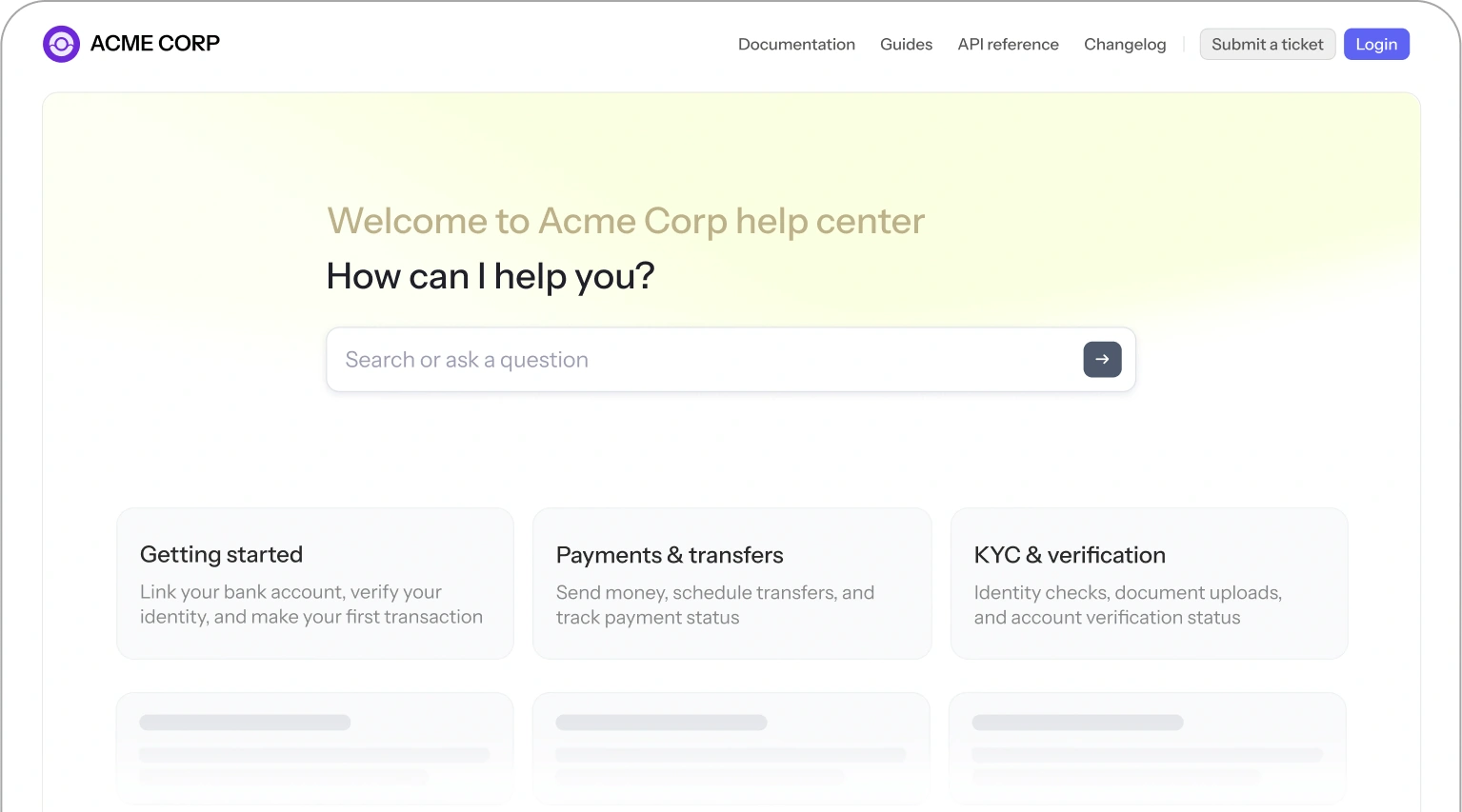
A sample SparrowDesk help center for "Acme Corp", with a search box and article collections, plus Submit a ticket and Login links for the customer portal.
Reports you can read
SparrowDesk has prebuilt conversation and team-performance reports on every plan, SLA and AI agent reports from Starter, and custom reports on Professional and Enterprise. Reports export as PDF, and you can save filters and date ranges as views.
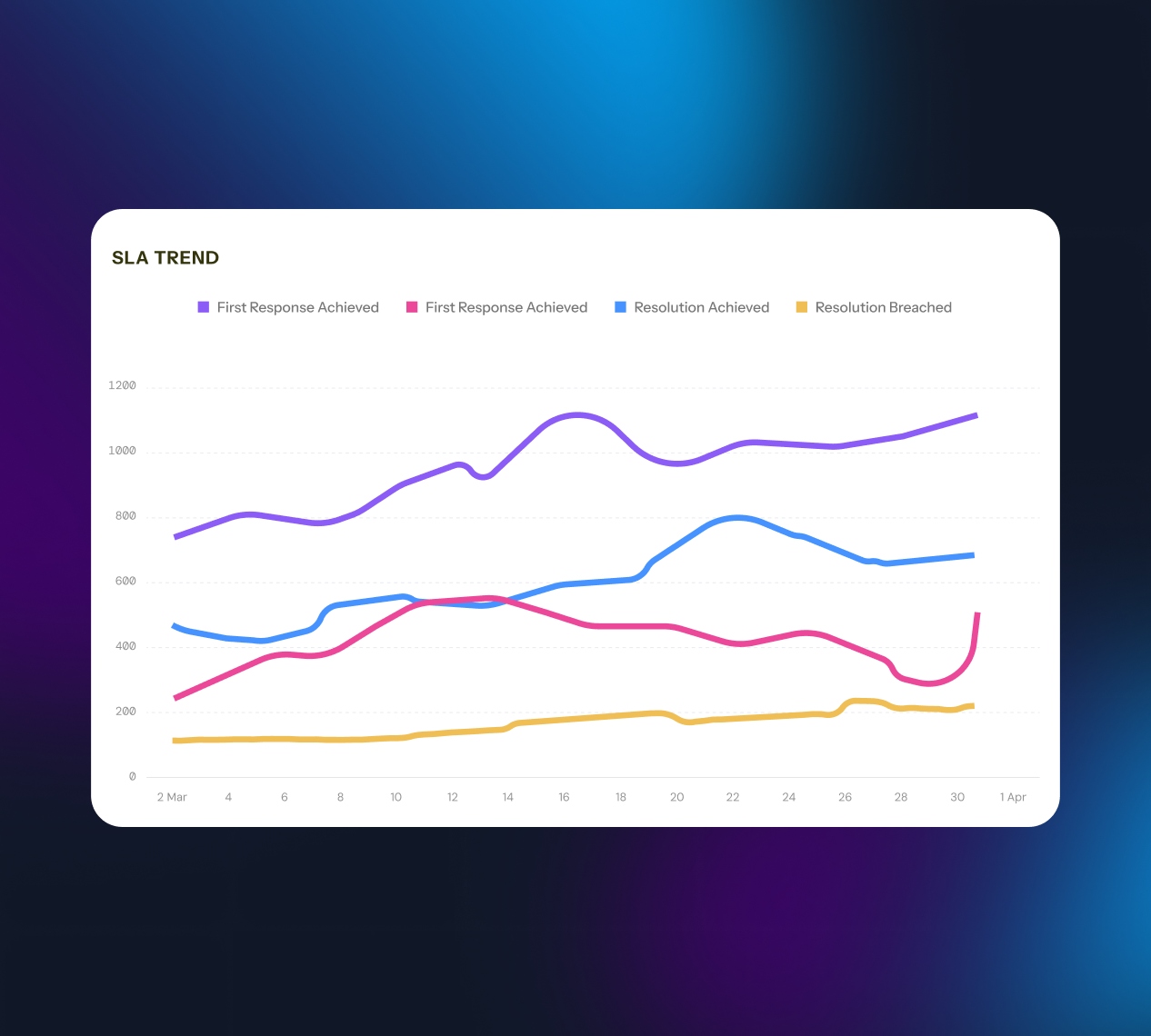
The SLA Trend report for March: first response achieved, resolution achieved and resolution breached, day by day.
Integrations and security
SparrowDesk connects to Slack, Linear and HubSpot (Starter and up), Salesforce (Professional and up), and also lists Gmail, Microsoft, Pipedrive, Attio, Shopify, Jira, GitHub, Shortcut, Zapier and SurveySparrow among its integrations. Every plan has two-factor authentication; Enterprise adds SSO, custom roles, password policies, audit logs and multiple brands. A HIPAA mode is available for teams that handle health information.
Benefits
- Fewer tickets reach a person. Zoona and the help center take the repeat questions, and you only pay for the AI when it actually resolves one.
- Nothing falls through the cracks. Every message from every channel has an owner, a status and a deadline.
- Small teams can start free. Three users, live chat, email ticketing and a help center cost nothing, and the step up to Starter is $16 per agent.
- Light users don't need full seats. Paid plans include free "Lite" seats (5, 20 or 50) for colleagues who only occasionally help on tickets.
Real-World Uses
- A SaaS start-up runs support from Slack, adds the chat widget to its app and lets Zoona answer setup questions from its docs overnight.
- An online shop brings WhatsApp, Instagram and email orders questions into one inbox and uses macros for "where is my order" replies.
- An IT team sets SLAs per priority, routes tickets round-robin and tracks breaches in the SLA report.
- A travel company answers phone calls through SparrowDesk's phone menu, with AI routing callers by what they say.
Who It's For, and Who Should Skip It
SparrowDesk fits small and mid-sized support teams that want a modern help desk with AI built in, at a lower per-agent price than the big suites, and that like the idea of paying for AI by results. It's a particularly good fit for teams that already work in Slack.
Skip it if you need a long track record and a deep marketplace of third-party apps: SparrowDesk is young, and the established help desks have far more integrations and independent reviews. It's also overkill for a one-person business answering a few emails a week, where a shared mailbox is enough. And if Zendesk is already working well for you, consider adding only Zoona to it instead of switching.
Usage Guide
- Start the 14-day trial on SparrowDesk's sign-up page; no credit card is needed, and SparrowDesk pulls in your brand logo automatically.
- Connect your support email address and add the live chat widget to your website.
- Add channels you use: WhatsApp, Slack, Facebook, Instagram, Discord or phone.
- Invite agents, create teams and set business hours.
- Write or import your help center articles, then point Zoona at them and at your website to train it.
- Set up macros for common replies and, on Professional, workflows, round robin and SLAs.
- Install the iOS or Android app to answer tickets and get SLA alerts on your phone.
- Pick a plan and billing period on the pricing page before the trial ends.
Before you buy
- Budget for AI on top of seats. Plans include some free Copilot and Account Intelligence credits each month, but heavier AI use and Zoona's $0.49 per resolution are billed separately. Credits reset monthly and don't roll over.
- Key features start at Professional. Workflows beyond the basics, round robin, SLAs, multiple business hours and custom reports need the $49 plan; SSO and audit logs need Enterprise.
- The Free plan is capped. It allows up to 3 users and 500 conversations a month, without CSAT, a customer portal or integrations.
- Cancel any time. You keep access until the end of the billing period you've paid for.
- Pick the plan on the order page. The Buy Now button opens SparrowDesk's pricing page, where you choose the plan and monthly or yearly billing.
Where it falls short
- A short track record. SparrowDesk's iOS app is at version 1.0.10, and there are very few independent user reviews yet, so you can't lean on years of other teams' experience.
- The changelog shows recent fixes. The October 28, 2026 release fixed requester notification emails being dropped by Gmail as duplicates, CSAT surveys skipping freshly resolved conversations, and Zoona telling customers to "contact support" while they were already in a support conversation.
- Costs can creep. AI is billed by credits and resolutions on top of per-agent seats, so a busy month costs more than the plan price.
- Fewer integrations than the market leaders. The list covers the common CRMs and dev tools, but it's far shorter than the big help desks' app marketplaces.
What Users Say
Customers quoted on SparrowDesk's site
- Robin, UprootSecurity: "I never imagined setting up customer support could be this easy. Setting up email, live chat, and our help center was a breeze with SparrowDesk. We use the Slack integration to run support right from Slack, and with Zoona handling more than 67% of conversations, our small team can keep up as customer support grows."
- Toshihide Hara, AndGo: "With SparrowDesk, we can keep track of inquiries simply by adding an emoji to the Slack message, and we can respond with AI assistance directly from the system. The intuitive and excellent user experience is truly worth noting."
- Venkata, SurveySparrow (the sister company): "SparrowDesk has completely transformed how we deliver support. Integrating Zoona and AI Copilot helped us automate common resolutions faster and bring complete visibility into every interaction."
These are testimonials the vendor chose to publish, so treat them as the best case. SparrowDesk has very few reviews on G2 and Capterra so far and none on Product Hunt, which is normal for a help desk this new but means the 14-day trial is the most reliable test you'll get.
Comparisons
Starter vs Professional
Starter ($16) is a solid ticketing system: teams, ticket forms, a customer portal, CSAT surveys, Slack, Linear and HubSpot integrations, SLA reports and 5 Lite seats. Professional ($49) is where SparrowDesk becomes an operations tool: advanced workflows, round-robin assignment, SLAs with business hours, parent-child tickets, custom reports, Zoona Commands, Salesforce, 5 help centers and 20 Lite seats. Most teams with more than a handful of agents end up on Professional.
SparrowDesk vs keeping your current help desk
If your current help desk works and only the AI part is missing, SparrowDesk's Zoona can answer tickets inside Zendesk without a migration. If you're starting from a shared inbox, or paying enterprise prices for a small team, moving to SparrowDesk gives you ticketing, chat, phone and AI in one place at a lower seat price.
Plans and Pricing
| Plan |
Billed yearly (per agent per month) |
Billed monthly |
Free AI credits a month |
What it adds |
| Free | $0 | $0 | None | Up to 3 users, 500 conversations a month, live chat, email ticketing, prebuilt reports, public help center |
| Starter | $16 ($192 a year) | $19 | 100 Copilot per agent, 250 Account Intelligence | Unlimited conversations, teams, ticket forms, customer portal, CSAT, 5 Lite seats |
| Professional | $49 ($588 a year) | $59 | 250 Copilot per agent, 500 Account Intelligence | Workflows, round robin, SLAs, business hours, custom reports, 20 Lite seats |
| Enterprise | $89 ($1,068 a year) | $99 | 500 Copilot per agent, 1,000 Account Intelligence | SSO, custom roles, password policy, audit log, multiple brands, 50 Lite seats |
AI add-ons on any paid plan: Zoona AI agent $0.49 per resolution; AI Copilot from $8 per agent per month for 1,000 credits; Account Intelligence from $8 per month for 1,000 credits for the whole account. Our listed price, $192, is the Starter plan for one agent for a year, billed yearly. You choose the plan and billing on SparrowDesk's order page. Prices in US dollars as shown on November 15, 2026.
FAQs
What happens when the SparrowDesk trial ends?
SparrowDesk's 14-day trial simply ends; you aren't charged, because no card was taken. To keep using it you choose a paid plan, or a team of up to 3 users can move to the Free plan.
Do I need AI Copilot for every SparrowDesk agent?
No. SparrowDesk sells Copilot seats separately, so you can buy them only for the agents who'll use it. Account Intelligence is priced for the whole account, not per agent.
What happens when SparrowDesk AI credits run out?
When SparrowDesk's included credits are used up, Copilot or Account Intelligence stops until you add more from the billing page. Credits reset every month and unused ones don't carry over. Since October 2026, credits are charged to the exact decimal used rather than rounded up.
Can I switch between monthly and yearly billing in SparrowDesk?
Yes. SparrowDesk lets you upgrade, downgrade or switch between monthly and yearly billing at any time from the billing settings. Yearly billing saves about 20%.
Is SparrowDesk suitable for healthcare support?
SparrowDesk offers a HIPAA mode for teams that handle health information. On HIPAA accounts, custom reports and help center analytics are turned off, while default reports still work.
Does SparrowDesk have a discount for startups or non-profits?
Yes. SparrowDesk gives NGOs and non-profit organisations 20% off (requested through a demo booking), and its Startup Program gives eligible early-stage startups Professional-level access for up to 90% off.
System Requirements
- A current web browser on Windows, macOS, Linux or ChromeOS
- Internet connection
- Mobile app for agents: iOS or iPadOS 15.1 or later, or Android
Conclusion
SparrowDesk is worth a trial for small and mid-sized support teams that want ticketing, chat, phone and an AI agent in one modern tool without enterprise pricing. The one reason to buy it is the AI model: Zoona costs nothing until it actually resolves a conversation, and the Free and $16 Starter plans make it cheap to start.
The main reason not to is maturity. SparrowDesk is new, with few independent reviews and a shorter integration list than the established help desks, so test your real channels and integrations during the 14-day trial before you commit to a yearly plan.
Start Free TrialBuy Now