jAlbum: Turn Photo Folders Into Web Galleries You Host Anywhere
jAlbum is a desktop program for Windows, Mac and Linux that turns folders of photos, videos and music into finished web galleries and uploads them to your own website, a blog or a jalbum.net account. It's for photographers, families, clubs and schools who want to own their galleries; there's a free version for small albums, and the Standard License costs $29.50 for private use ($59.50 for Pro, which allows commercial use).
If you've ever wanted a fast, good-looking photo site without fighting a CMS or handing your pictures to a social network, jAlbum does the dull part: it resizes every image, writes the pages, and uploads only what changed the next time.
Quick facts
- Developer: Jalbum AB, Sweden
- Latest version: jAlbum 42, released November 10, 2026; current Windows build 42.0.5
- Platforms: Windows 8 or newer (64-bit), macOS 11 Big Sur or later (Intel and M-series), Linux (.deb and .rpm, x86_64 and ARM)
- Price: Standard License $29.50, Pro License $59.50; both never expire and include 12 months of updates and priority support, renewing yearly
- Hosting plans: Premium 10 GB $53.88 a year, Power 100 GB $142.68 a year, Super 300 GB $285.48 a year, each with a license included
- Free version: albums of up to 24 objects, skin and style changes only, jAlbum credit links
- Guarantee: full refund within 30 days
- What we checked: the Windows installer (358 MB, file version 42.0.5, signed by JAlbum AB) downloaded from jalbum.net, and the US prices on the order page (Standard $29.50, Pro $59.50, storage plans as listed) on November 15, 2026. We didn't build or upload a gallery.
Download Free VersionBuy Now
Overview
jAlbum has been making web albums for over two decades, and the idea hasn't changed: you point it at folders of images, pick a skin (an album theme), press Make album, and it produces a complete set of HTML pages, thumbnails and web-sized images. Upload then sends it to your server through its built-in FTP/SFTP client, or to jalbum.net.
Because the output is plain files, there's no database to maintain and little lock-in. jAlbum works in your existing folder structure, keeps captions, ratings and keywords in standard XMP metadata (so Lightroom, Photoshop and Bridge see them), and stores its settings as plain text and XML. Most skins are open source.
Version 42, released in November 2026, brought a cleaner interface with new icons, album making and uploading that run in the background, an instant preview that rebuilds the album and reloads your browser after each change, and a rebuilt "share from this computer" mode that can run from the system tray.

jAlbum's Explore mode before the version 42 redesign: project folders on the left, thumbnails in the middle, the right-click menu with editing, rating and organizing tools, and the skin and style pickers with the Make album and Upload buttons at the bottom left.
Features
Skins that decide the look and features
jAlbum ships with about ten skins, and dozens more install from its skins library. Each skin sets the layout and the features: Tiger builds full websites with "about" and "contact" pages, Projector makes a clean full-screen album, and others add Google Maps, Exif data, video playback, social sharing, comments or a shopping cart. Every skin has a settings window with a live preview, and advanced users can edit or create skin templates in the built-in editor.

The Album Settings window for the Projector skin: colors and background images for the lightbox, sidebar and cover page on the left, with a preview of the album on the right.
Image editing and protection
jAlbum's Edit mode lets you crop and straighten, adjust gamma and levels, apply effects (gray, sepia, sharpen, blur, red-eye, text and more) and add captions without touching your originals: only the web copies change. To protect images, it can stamp a watermark or logo on every picture in a batch, write copyright notices into the metadata, keep images at web sizes, and, in skins that support it, disable right-click saving. A "Hide faces" effect blurs or pixelates the faces you choose.

jAlbum's Edit mode: the Effects menu (Red Eye, Gray, Sepia, Sharpen, Blur, Invert, Pixelate, Text, Arty), gamma sliders and an RGB histogram beside the photo.
Video and music galleries
jAlbum converts more than 160 video formats to MP4 for playback in any browser, so phone clips and camcorder files can sit next to your photos. Audio clips can be attached to images, and albums can have an audio playlist.
An organizer for messy photo folders
jAlbum can sort scattered images into folder trees by camera date, name or GPS location, compares duplicates by their actual contents, and has multi-level undo. Its face recognition names people (and can leave out people you don't want tagged), and the names can be saved in the image files as standard XMP face regions that other programs read.
Publishing and sharing
jAlbum uploads to any site over FTP or SFTP and sends only changed files on later runs; in version 42 uploads run in the background while you keep working. Without hosting, you can publish to a jalbum.net account or share an album straight from your computer. Collaborative albums get a username@jalbum.net address: images emailed there appear in the project. A Lightroom Classic plugin and a WordPress plugin round it out.
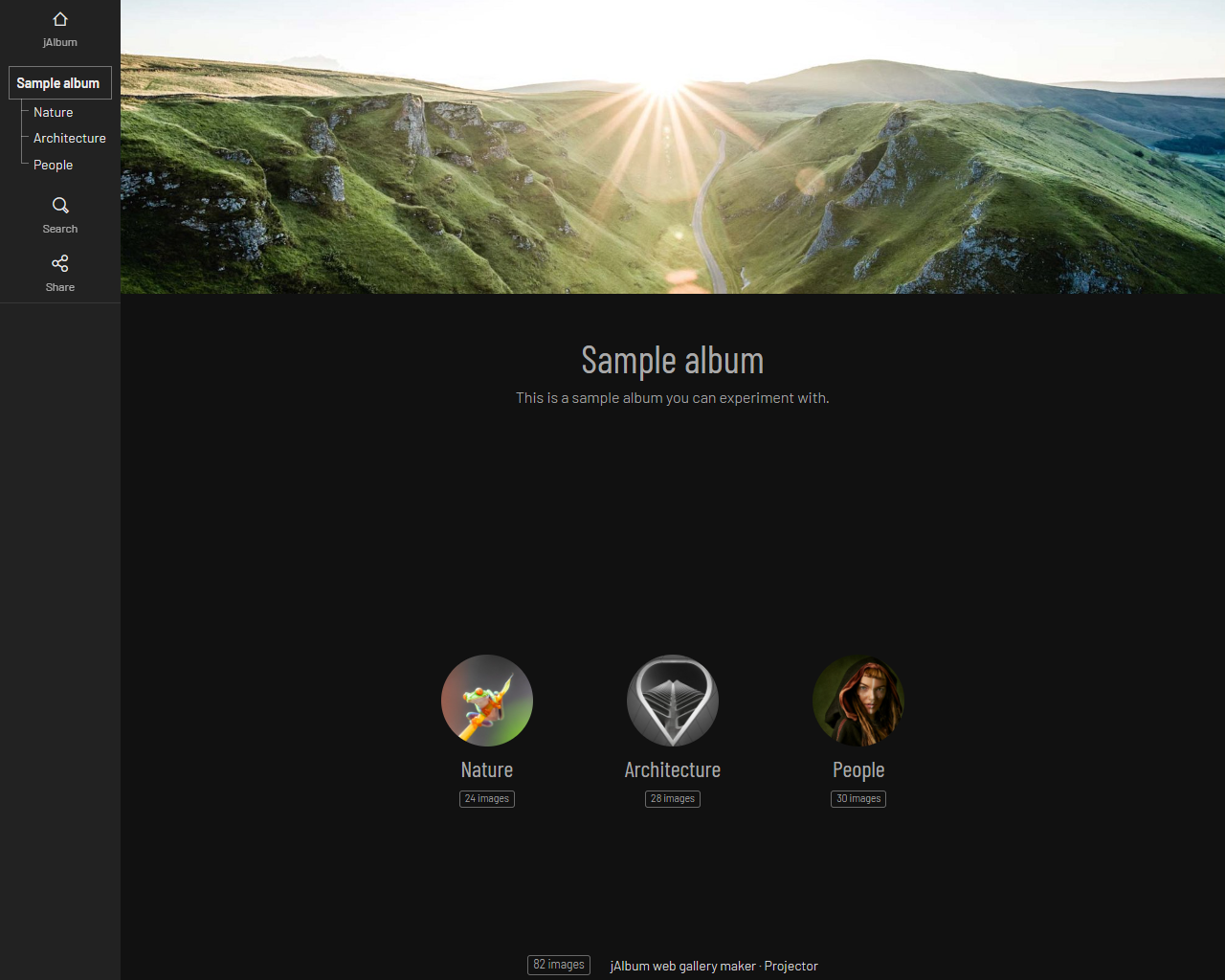
A sample album made with the Projector skin: a banner image, folder links in the sidebar, and round thumbnails for the Nature, Architecture and People sub-albums with their image counts.
Benefits
- You own the result. Galleries are static files on your server, with no platform fee unless you choose jAlbum hosting.
- Fast pages. Pre-built HTML and resized images load quickly and need no database or plugin updates.
- Big collections are fine. Galleries of thousands of images rebuild and re-upload only what changed.
- Your metadata stays put. Captions, keywords and ratings live in XMP inside the image files, not in a private catalog.
Real-World Uses
- Family archive: organize a decade of phone photos by date, name the people, and publish an album for relatives.
- Event photographer: put a wedding or sports event on your own site the same evening, with watermarks and a shopping cart for prints (Pro License).
- Club or school: keep a yearly gallery of events, with several members emailing photos into one collaborative project.
- Portfolio site: build a full photography website with about and contact pages using the Tiger skin.
- Travel blog: place a jAlbum gallery with a map of where photos were taken into a WordPress post through the plugin.
Who It's For, and Who Should Skip It
jAlbum suits people with their own hosting who want control over how their photos look and where they live: hobbyist and professional photographers, families with big archives, clubs, schools and small businesses. It's also a good fit if you're tired of re-uploading to a social network every time it changes its rules.
Skip it if you only want to share a few photos privately with friends: a cloud photo service is simpler. Also skip it if you want a modern drag-and-drop website builder with a blog and SEO tools; jAlbum is a gallery generator first, and some users find its themes and SEO options dated.
Usage Guide
- Install: download the installer for your system and run it (Windows) or drag jAlbum to Applications (Mac). Java is bundled.
- Sign in: start jAlbum and sign in with your jAlbum account; signing in also activates a license you bought.
- Add images: create a new album project and drag photos, videos and folders into it. Sub-folders become sub-albums.
- Pick a skin and style: choose them at the bottom left, then fine-tune the look in Settings.
- Make album: click Make album and check the result in your browser, or turn on instant preview.
- Upload: click Upload and choose your own server (FTP/SFTP) or your jalbum.net account. Later uploads send only the changes.
Before you buy
- Standard vs Pro is about commercial use. Both remove the free version's limits; only Pro (or a Power or Super account) allows commercial use and the shopping cart.
- The license plan renews automatically each year for updates and support. You keep the software if you stop, so turn off renewal in your account if you don't want the next year.
- No hosting? Buy an account instead. Premium, Power and Super include a license plus storage on jalbum.net; a license alone needs your own web space.
- Choose on the order page. The Buy Now button opens jAlbum's pricing page, where you pick the license or storage plan.
Where it falls short
- Lots of settings. Rich skins have so many options that customizing them can be hard to navigate, and several reviewers mention a learning curve.
- Interface changes. The interface gets reworked often (again in version 42), which annoys users who then hunt for settings in new places.
- Dated look for some. A few users find the themes and SEO options dated next to modern website builders.
- Older systems are out. Current versions need 64-bit Windows 8 or newer, or macOS 11 or later; older Macs need an older jAlbum release.
What Users Say
jAlbum has a large and loyal user base. On Trustpilot it has a TrustScore of 4.7 out of 5 from about 6,100 reviews, with 76% five-star and 18% four-star ratings and only a few percent at three stars or below. Many reviewers have used it for ten years or more.
What people like
"I have been using jAlbum for many years, it remains my preferred method of displaying galleries online," SuggPix Australian Photography, 5 stars, Trustpilot, November 3, 2026
"The ease of use of templates as well as the processes. Also the fees are reasonable. Also great designs." Victor, 4 stars, Trustpilot, November 3, 2026
"I started to use jAlbum in 2021, and have renewed every year since then. It fulfils all my needs," Colin B, 5 stars, Trustpilot, September 26, 2026
"Great options, very fast to use and update your albums. Helpful staff if needed." Peter, 5 stars, Trustpilot, September 2, 2026
"Your customer service is outstanding. I received great help from Anders to upload my album" Ludwig Riml, 5 stars, Trustpilot, September 29, 2026
Mixed and critical
"The settings are not intuitive to my mind, but I will get there even if it takes several abortive attempts." TB, 4 stars, Trustpilot, September 25, 2026
"I don't like you often change GUI, so I have to looking for some settings I previusly finf it at another place in GUI." Dominik Snedec, 3 stars, Trustpilot, January 10, 2026
"If you want to adjust something it is not easy because of all the options." Gerard van B, 3 stars, Trustpilot, February 11, 2026
"the software is quite dated, the themes are quite dated ther SEO options are very limited" Xanathon, 2 stars, Trustpilot, September 2026
"Now Jalbum generates tons of over-engineered javascripts. Skins are too complex, buggy and difficult to handle." Jaroslav Fojtik, 2 stars, Trustpilot, August 9, 2026
"Renewed my license. Found out later that it had a autorenewal part. Was not aware." Michiel, 2 stars, Trustpilot, April 2025
The pattern: long-time users praise how quickly jAlbum turns folders into polished galleries, its templates and its support staff. The complaints are about complex skin settings, frequent interface changes, a dated feel for some, and the yearly auto-renewal catching buyers by surprise.
Comparisons
Free vs Standard vs Pro vs an account
The free version is fine for trying jAlbum or making small albums of up to 24 objects, but it keeps the jAlbum credit links and limits customization to the skin and style choice.
Standard ($29.50) removes those limits for private use on your own site. Pro ($59.50) is the same software with commercial rights and the shopping-cart features.
Premium, Power and Super accounts make sense if you don't have hosting: they include a license and 10 GB, 100 GB or 300 GB on jalbum.net, at the cost of a recurring hosting fee.
Editions and Pricing
| Plan | Price (US) | Term | Storage | Use |
|---|
| Free | $0 | Never expires | Your own site | Private; max 24 objects per album |
| Standard License | $29.50 | Never expires; 12 months of updates, renews yearly | Your own site | Private, non-commercial |
| Pro License | $59.50 | Never expires; 12 months of updates, renews yearly | Your own site | Commercial use, shopping cart |
| Premium account | $53.88 a year ($5.29 monthly) | Subscription | 10 GB on jalbum.net | Private; license included |
| Power account | $142.68 a year ($13.99 monthly) | Subscription | 100 GB on jalbum.net | Commercial; Pro license included |
| Super account | $285.48 a year ($27.99 monthly) | Subscription | 300 GB on jalbum.net | Commercial; Pro license included |
You pick the plan on jAlbum's pricing page after clicking Buy Now; prices were checked on November 15, 2026. Multi-user licenses get 25% off for 2-10 users, 35% for 11-50 and 45% for 51-100.
FAQs
Is jAlbum free?
jAlbum has a free version that never expires, but it limits each album to 24 objects, allows only skin and style changes, and leaves jAlbum credit links in your galleries. A Standard License ($29.50) removes those limits for private use.
Does the jAlbum license expire if I stop paying?
No. A jAlbum Standard or Pro License never expires for the version you bought; the yearly $29.50 or $59.50 is for updates and priority support. If you stop renewing, you keep using your current version, though a future skin update may need a newer jAlbum.
Can I use one jAlbum license on several computers?
Yes. A jAlbum license is personal, so you can use it on any number of computers by signing in to the app with the account that bought it.
Do I need my own website to use jAlbum?
No. jAlbum can upload to your own site or blog, but if you don't have hosting, a Premium or Power account stores your albums on jalbum.net and includes a license. You can also share an album straight from your computer.
Which jAlbum license do I need to sell photos or work for clients?
jAlbum's Pro License ($59.50) or a Power or Super account is required for commercial use, which includes promoting a business, building galleries for paying clients and turning on the shopping cart in skins such as Tiger, Photoblogger or LightFlow. One Pro License covers all your clients.
Can jAlbum handle very large photo collections?
Yes. jAlbum is built for large volumes and works from your existing folders; the vendor says an ordinary computer can typically make galleries of up to about 50,000 images, with RAM being the limit.
Does jAlbum work with Lightroom and WordPress?
Yes. jAlbum's Lightroom Classic plugin publishes collections to jAlbum projects, and its WordPress plugin (jAlbum bridge) lets you insert and manage jAlbum galleries from the WordPress editor.
Can I get a refund on jAlbum?
jAlbum offers a full refund within 30 days if you are unsatisfied for any reason.
System Requirements
- Windows: 64-bit Windows 8 or newer; the 358 MB installer bundles Java
- macOS: macOS 11 Big Sur or later, with separate downloads for Intel and Apple M-series Macs
- Linux: 64-bit .deb (Ubuntu, Debian) or .rpm (Fedora, SUSE, Red Hat) packages for x86_64 and ARM
- Memory: RAM sets the practical gallery size, typically up to about 50,000 images
- Publishing: your own web hosting with FTP or SFTP access, or a jalbum.net account
Conclusion
jAlbum is worth $29.50 if you have your own web space and want photo galleries you fully control. Few tools turn thousands of photos and videos into a fast, finished gallery site this quickly, and the license never expires, so the yearly fee only buys updates. The main reason to pass is complexity and style: if you want a modern website builder or find dozens of skin settings tiring, look elsewhere. Start with the free version on a small album, and upgrade when you're ready to publish the whole collection.
Download Free VersionBuy Now