EasyWebinar: Live and Automated Webinars That Sell, With the CRM Built In
EasyWebinar is a browser-based webinar platform for coaches, course creators and SaaS teams who want to run a webinar live, then replay it automatically every day as an evergreen sales funnel. Plans run from $44 to $349 a month; the popular Pro plan costs $1,980 a year (or $198 month to month) for up to 500 live and 2,500 automated attendees, and every plan starts with a 7-day full-access trial.
The usual webinar stack is a meeting tool, a page builder, an email tool, an evergreen replay service and a CRM, all glued together with Zapier. EasyWebinar puts the registration page, the room, the replay schedule, the checkout and the follow-up in one account, so the webinar that converted on Tuesday can run itself every 15 minutes from then on.
Quick facts
- Developer: EasyWebinar, LLC
- Platform: web-based; hosts and attendees use a browser, attendees install nothing
- Webinar types: live, simulive, just-in-time, evergreen (automated) and on-demand replays
- Plans: Launch $44, Growth $116, Pro $198, Scale $349 a month; yearly billing gives two months free
- Capacity: 50 to 1,000 live attendees and up to 5,000 automated viewers, depending on plan
- Payments: sell paid webinars and offers inside the room through your own Stripe account
- Trial: 7 days of full access; cancel before it ends to avoid the first charge
- Refunds: none; subscription fees are non-refundable
- What we checked: monthly and yearly prices for all four plans on the pricing page, plan limits in EasyWebinar's product docs (last verified by EasyWebinar on October 16, 2026), the refund and cancellation terms, and ratings on Trustpilot and G2, all on November 15, 2026. We didn't run a webinar on it.
Before you buy
Use the trial properly, because EasyWebinar gives no refunds once you've paid, not even prorated ones when you cancel mid-year. Pick your plan by audience size: the cheapest plan, Launch, runs live webinars only, and automated and evergreen webinars start at Growth. In November 2026 EasyWebinar also ran a Black Friday offer for new accounts (a first year of Pro for $1,188, with no free trial).
Start Free TrialBuy Now
Overview
EasyWebinar has been around since 2014 and built its name on evergreen webinars: recorded presentations that run on a schedule and feel live to the people who register. It now covers the whole funnel. An AI builder drafts the script, pages and emails; the room handles chat, polls, Q&A and timed offers with checkout; and the built-in EasyCRM scores leads and sends different follow-ups to no-shows, attendees and buyers.
Attendees join from any browser on a computer or phone with no app, plugin or account, which matters for show-up rates. The live room streams on Dolby OptiView (formerly Millicast) with sub-second latency, and EasyCast sends the same session to YouTube, Facebook, LinkedIn or any RTMP destination.
Features
Evergreen and just-in-time webinars
EasyWebinar's automated webinars play a recorded or uploaded video on a daily or weekly schedule, or as just-in-time sessions that start every 2, 15, 30, 45 or 60 minutes in the attendee's own time zone. You can add an on-demand instant replay, blackout dates and an end date, and a live session that converted well can be reused as the evergreen version. Videos can be uploaded (MP4, up to 4 GB) or pulled from YouTube, Vimeo or Wistia.
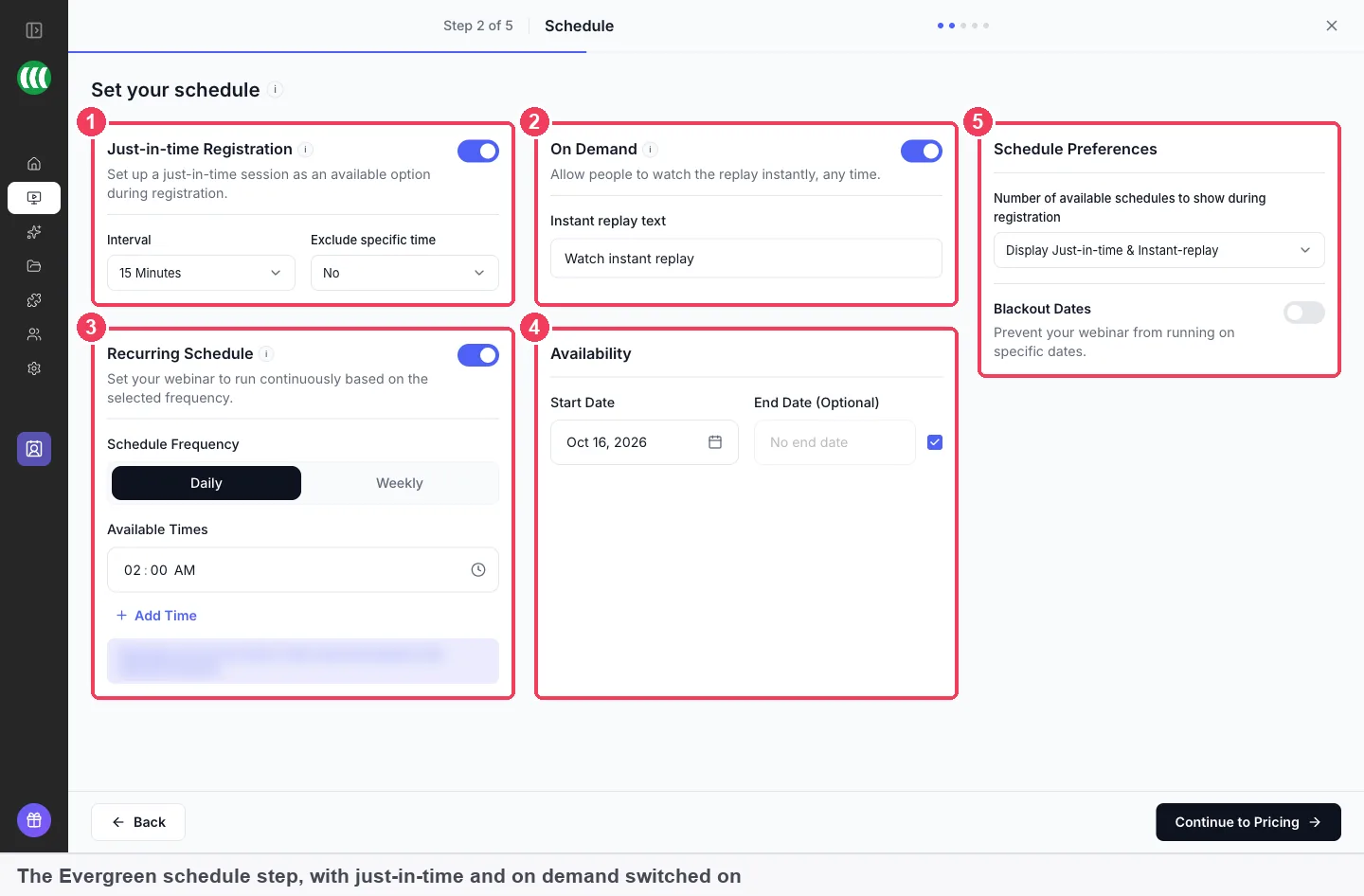
The evergreen schedule step: just-in-time registration with a 15-minute interval, On Demand replay, a daily recurring schedule, start and end dates, and blackout dates.
An AI builder for the whole funnel
EasyWebinar AI drafts a webinar's script, registration and thank-you pages, email sequence, polls and offer from your topic, audience and offer, for you to edit before publishing. A full build takes about ten minutes and about 23 AI credits; each plan includes a monthly allowance of credits and AI funnels (2 on Launch up to 20 on Scale). On Growth and up you can upload your own content so it writes in your voice. If you prefer, Create Manually opens the classic builder instead.
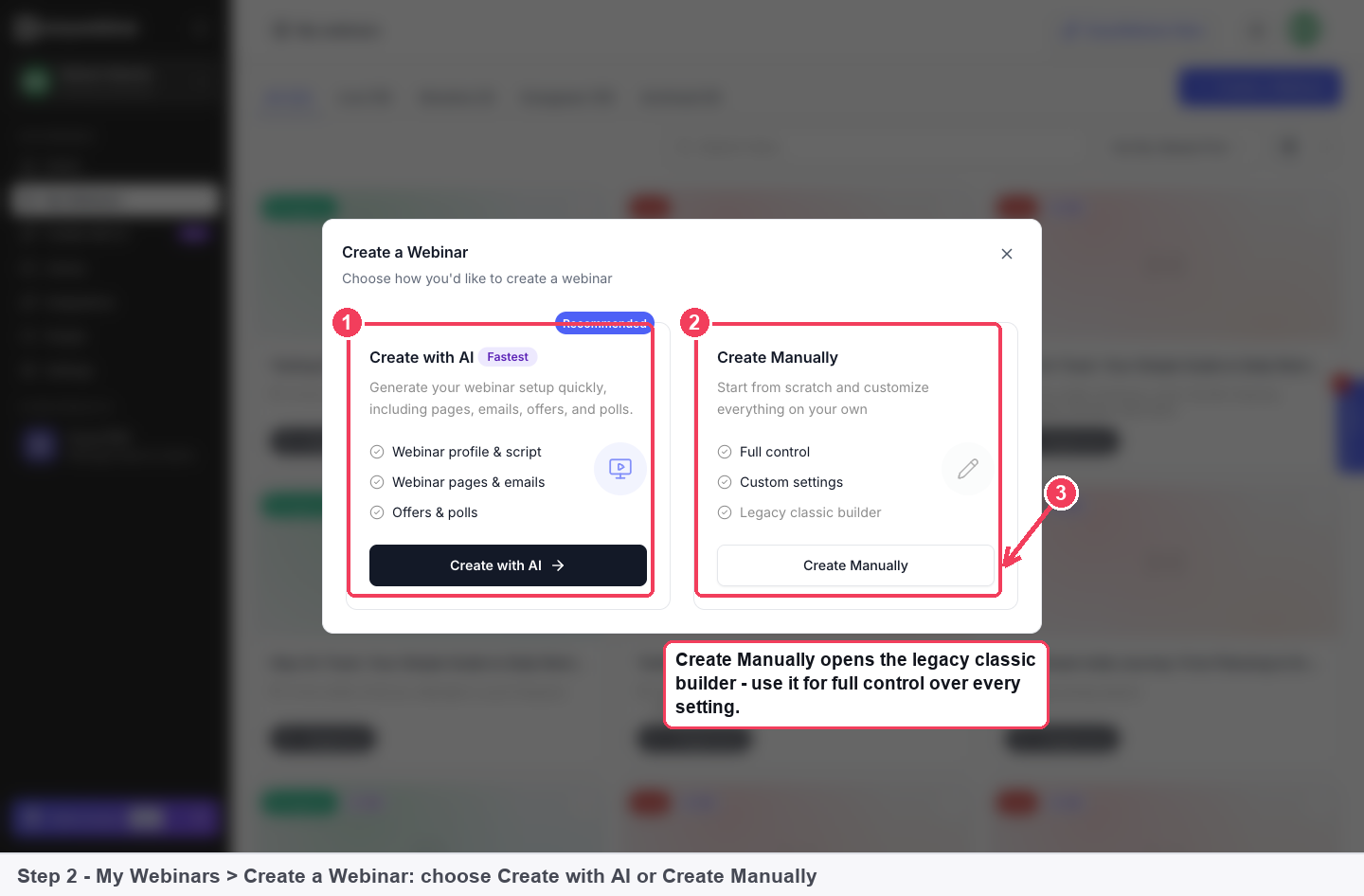
The Create a Webinar dialog: Create with AI (profile and script, pages and emails, offers and polls) or Create Manually in the classic builder.
Registration pages and reminders
EasyWebinar comes with 17 registration page templates (agency, coach, education, health and wellness, lead magnet, marketing) plus your own saved ones, custom registration fields and embeddable forms. Confirmation and reminder emails go out automatically, and EasyCRM can add SMS and WhatsApp reminders.
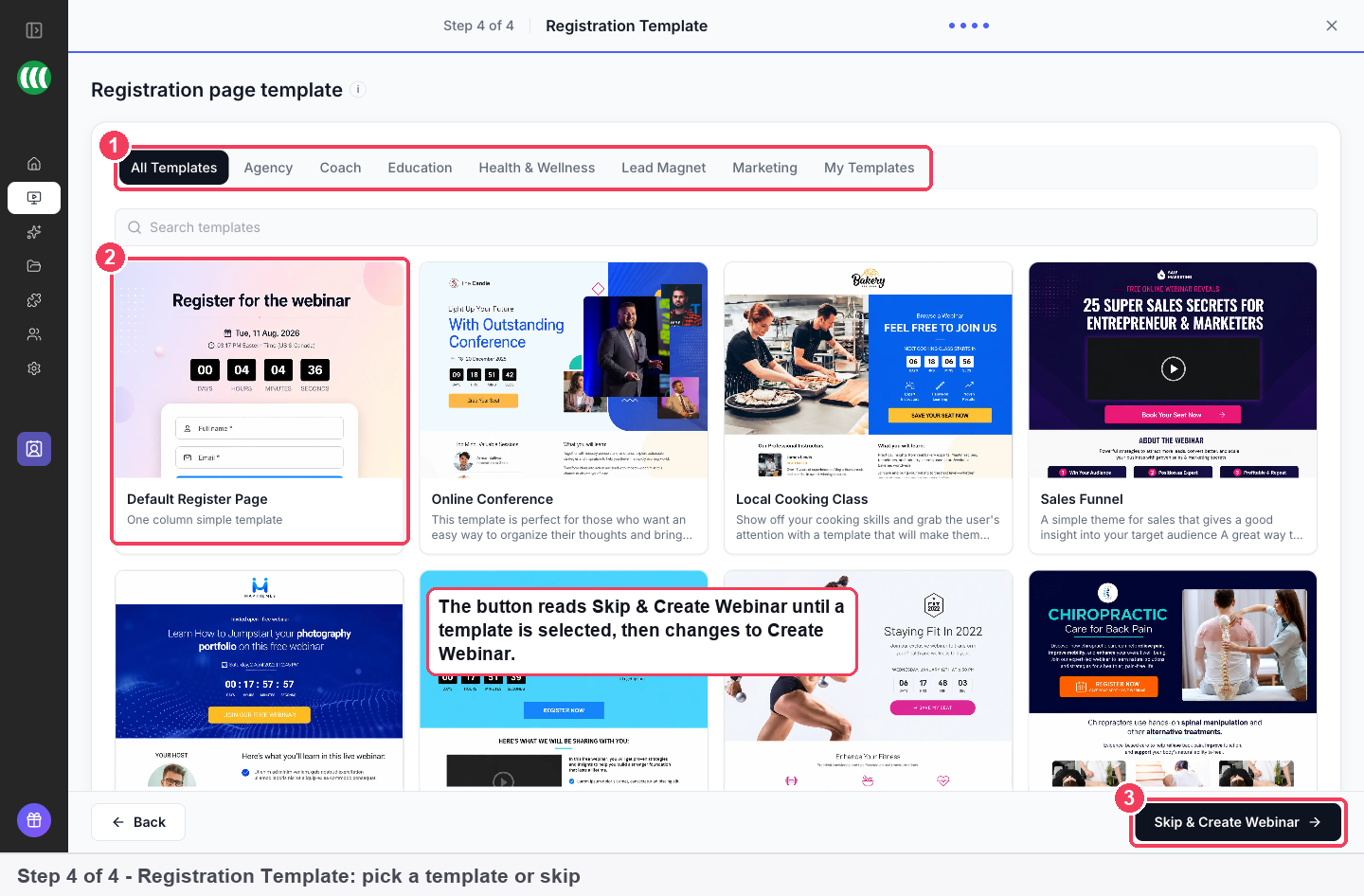
Choosing a registration page template, filtered by Agency, Coach, Education, Health & Wellness, Lead Magnet or Marketing.
Paid webinars and offers in the room
EasyWebinar can charge for registration (a live price, or a live plus replay bundle) and show timed offers with countdown timers during the session, with checkout inside the room so buyers aren't sent away. Payments run through your own Stripe account and are priced in US dollars. Built-in checkout comes with Growth and higher plans.
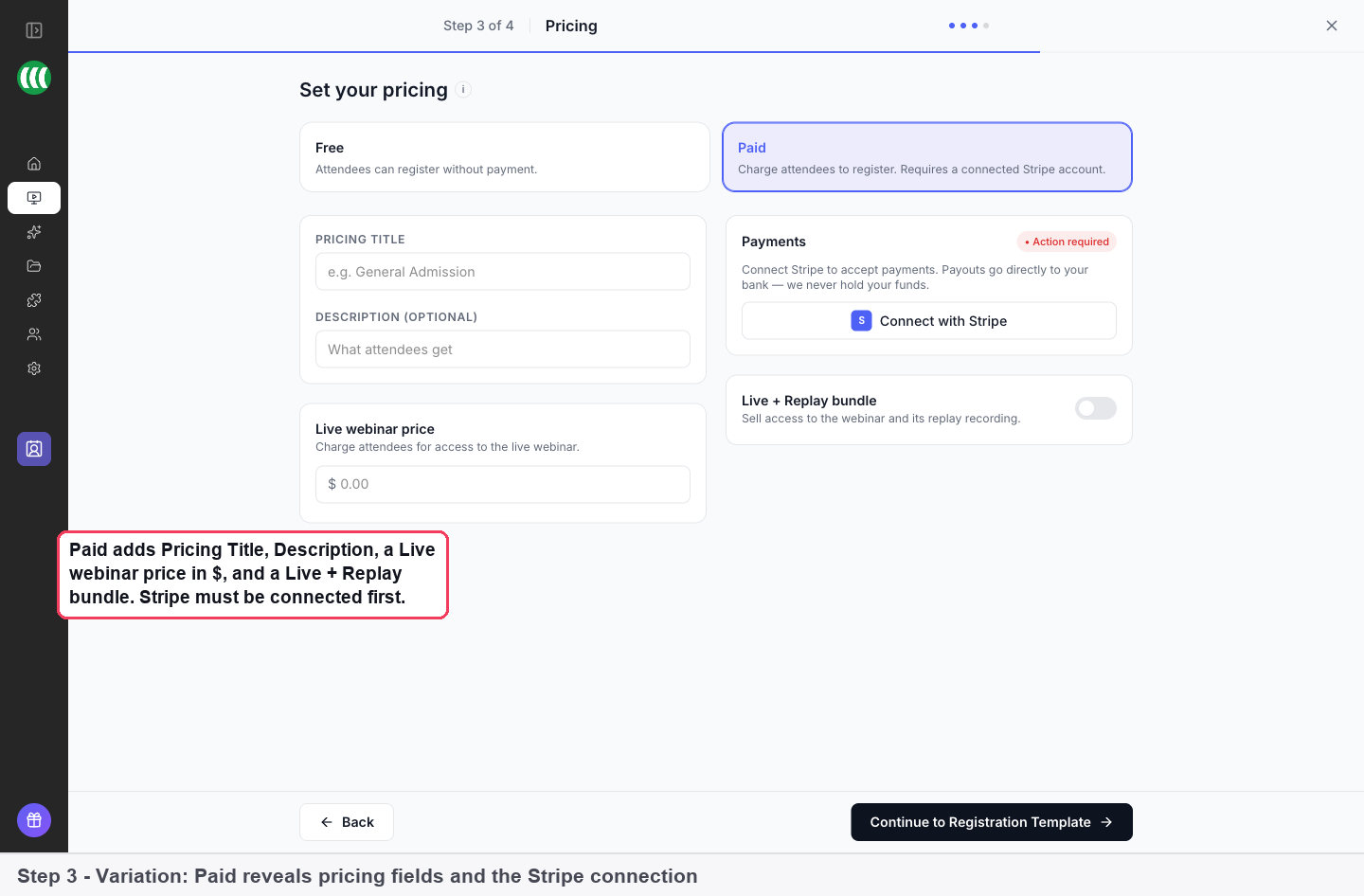
The pricing step set to Paid: pricing title and description, a live webinar price, a Live + Replay bundle switch and the Connect with Stripe button.
A live room with a green room
EasyWebinar's live room has a green room and backstage so presenters can set up before going live, plus chat, polls, Q&A, reactions, screen sharing, layouts and automatic recording. Pro and Scale add an AI Moderator (in beta) that answers attendee questions from PDFs, Word files or slides you upload.
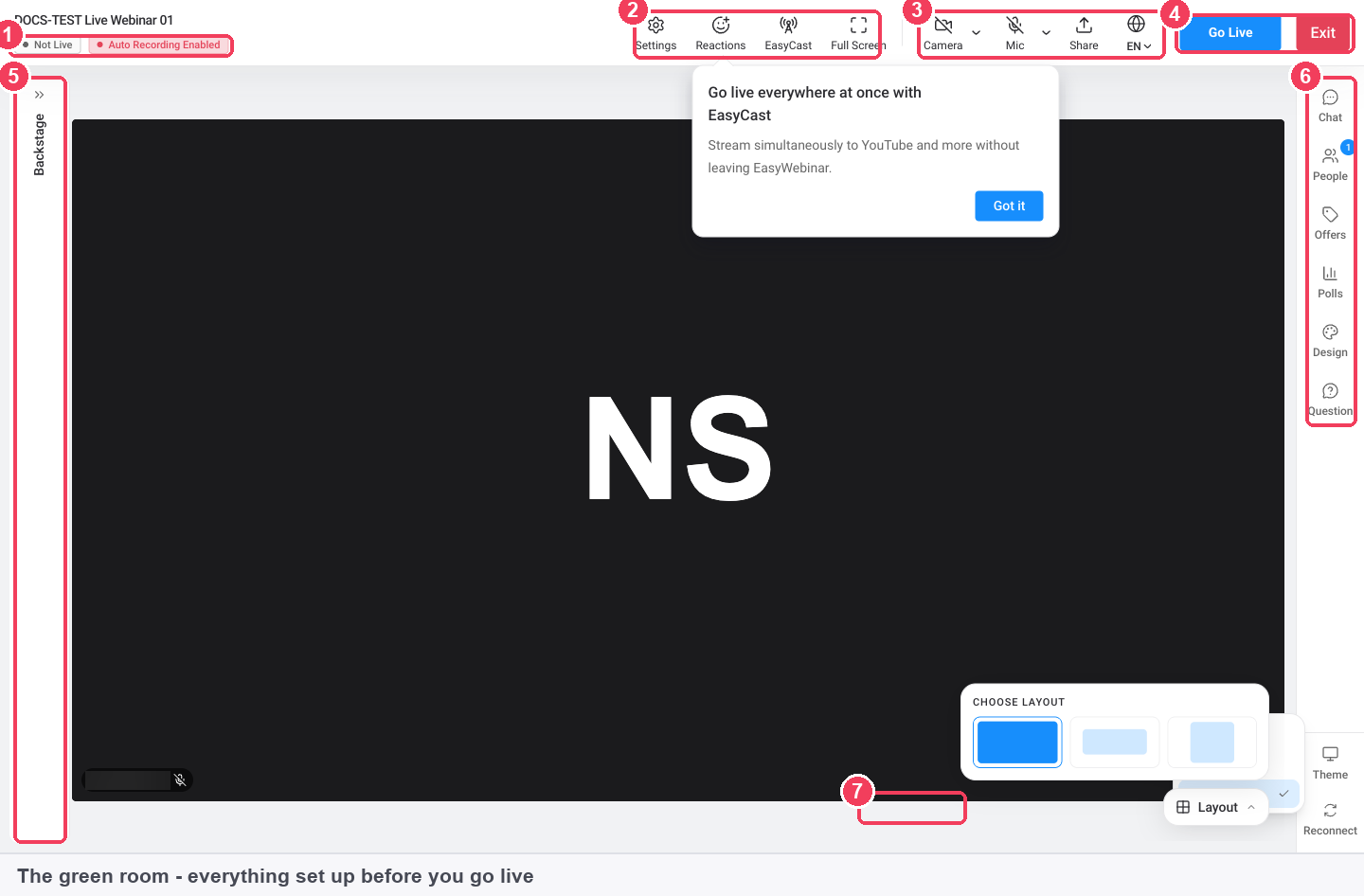
The green room before going live: settings, reactions, EasyCast, camera and mic controls, the Go Live button, layout choices and the side panel for chat, people, offers, polls and questions.
EasyCRM follow-up and integrations
EasyWebinar's EasyCRM (Growth and up) tracks what each person did in the webinar, scores leads and runs follow-up sequences, so no-shows get the replay and buyers get a welcome. It includes 1,000 emails, 100 SMS and 100 call minutes a month. If you already have a CRM, Growth connects to 13 CRM and email tools (ActiveCampaign, Kit, Zapier and others), Pro adds native HubSpot and Salesforce Pardot sync, and Scale adds the full API, webhooks, SSO and white labelling.
Benefits
- Your best webinar keeps working. A live session that sold well becomes an evergreen funnel that runs every day without you.
- Fewer tools to pay for and connect. Pages, room, replays, checkout and CRM share one login and one set of attendee data.
- Higher show-up rates because attendees click a link and are in, with reminders by email, SMS or WhatsApp.
- A faster first launch, since the AI drafts the parts most people get stuck on: the script, the page and the emails.
Real-World Uses
- A course creator runs a live masterclass, then turns it into a just-in-time webinar with a timed offer that sells the course every day.
- A SaaS company runs a recorded product demo on a daily schedule and syncs every attendee into HubSpot for the sales team.
- A coach charges $29 for a live workshop plus replay, with payment taken through Stripe at registration.
- A customer success team runs onboarding sessions on demand so new customers can watch at any hour.
Who It's For, and Who Should Skip It
EasyWebinar fits people who use webinars to sell or generate leads: course creators, coaches, info-product sellers and B2B marketing teams who want automated funnels and follow-up in one tool.
Skip it if you only need occasional internal meetings or a quick team call; a general video meeting tool is cheaper and simpler. Very large events (more than 1,000 live attendees) need EasyWebinar's custom Enterprise plan or a dedicated virtual events platform. And if you want a monthly plan you can try and drop with a refund, the no-refund policy is a poor fit.
Usage Guide
- Start the 7-day trial and sign in to the EasyWebinar dashboard in your browser.
- Go to My Webinars and choose Create with AI or Create Manually, then pick the webinar type (live, simulive or evergreen). The type is fixed once created, so clone the webinar if you change your mind.
- Set the schedule: a specific date, daily or weekly, or just-in-time sessions for evergreen webinars.
- Choose Free or Paid; for paid webinars, connect Stripe first.
- Pick a registration template, edit the page and check the reminder emails.
- For a live webinar, open the green room, test camera and mic, and click Go Live. For an evergreen one, select the video and share the registration link.
- Review attendance and revenue in the webinar's Analytics tab and let EasyCRM handle the follow-up.
Where it falls short
- Support is uneven. Many reviewers praise the onboarding team, but others on Trustpilot and G2 describe slow or canned replies when something breaks.
- Not cheap at the top. Automation starts at $116 a month, and several G2 reviewers call the price a con.
- One live event at a time. An account can only have one webinar live at once.
- Limited recording editing. One G2 reviewer edits recordings in a separate video editor before uploading, because recordings can't be edited inside EasyWebinar.
- Setup has many steps. Reviewers mention lots of tabs to fill in, and the evergreen schedule settings take some getting used to.
What Users Say
EasyWebinar scores 4.2 out of 5 on Trustpilot from 61 reviews and about 4.5 out of 5 on G2 from more than 100 reviews. Most praise is for ease of use, evergreen webinars and support; most complaints are about support response times, bugs and price.
G2 reviewers
"Setting up evergreen webinars is so simple that we've used several so far." (Meaghan L., Business Manager, G2, March 2019) She added that the knowledge base is "a little sparse, but they make up for this with amazing customer service that is very responsive, knowledgeable, and helpful."
"It has various triggers for when integrating with email marketing software e.g. triggers for people who registered but didn't attend or attended, attended but left early, and so on..." (Mohan Lal D., Automation Specialist, G2, August 2020)
"Too many tabs you have to fill out. I have missed several things from time to time and has made me look bad with clients." (Ricky S., Founder, G2, March 2019)
"The support is pretty unhelpful. They take ages to reply and they ask silly unhelpful questions." (Maia C., Project Coordinator, G2, August 2019), who still liked that "You can host live webinars and also record them for evergreen."
"I don't like not having the ability to edit the recording after I've recorded it in EW." (Marijo T., Founder, G2, March 2019)
"A bit pricey, so when it was first being implemented it didn't seem worth it." (Verified Reviewer, Founder, G2, May 2022)
Quoted on EasyWebinar's own site (G2 verified)
"The end user experience has been fantastic. Zero complaints from our attendees around being able to watch a webinar." (Zach Holcomb, Chief Growth Officer, Foundry Financial)
"Once I have run one webinar, I can clone and set up multiple in a breeze." (Darrin Brodie, Marketing Director, Davenport and Associates)
Trustpilot
Of the 61 Trustpilot reviews, 78% give five stars and 10% one star. Many of the recent five-star reviews (September and October 2026) thank the onboarding specialist by name for a patient walkthrough of the dashboard, and reviewers such as Matt Jones and RC Powell like having live and evergreen webinars plus follow-up emails in one tool.
The one-star reviews are about support and billing: Bálint Nagy (October 2026) reported getting no reply to two support requests, Peter Yang (September 2026) reported bugs including wrong attendee counts and webinar times, and a reviewer named Kam (August 2026) reported being charged for an unused subscription and not getting a promised refund. Four-star reviewers such as Mike Poteet find the new interface mostly intuitive but some customization options hard to find, and Pierce notes that you still have to make your own presentation slides.
The pattern is consistent across sites: people who get through setup like the evergreen funnels and the onboarding help, while the complaints centre on support speed when something goes wrong and on billing, which the no-refund policy makes more painful.
Comparisons
EasyWebinar vs Zoom Webinars
Zoom Webinars is built for live events and meetings. EasyWebinar is built for marketing: evergreen and just-in-time replays, registration pages, in-room checkout and a CRM, with attendees joining in the browser. If you never sell on a webinar, Zoom is the simpler choice; if webinars are your sales funnel, EasyWebinar does more of the work.
EasyWebinar vs WebinarJam and EverWebinar
WebinarJam (live) and EverWebinar (automated) are two products from one company; EasyWebinar does live, simulive and evergreen in one plan from Growth up, and adds its own CRM and AI builder.
Plans and Pricing
You choose the plan and the monthly or yearly term on EasyWebinar's order page. Yearly billing gives two months free.
| Plan |
Monthly |
Yearly |
Attendees (live / automated) |
Adds |
| Launch | $44 | $432 ($36/month) | 50 / none | Live webinars, replays for up to 250 viewers, 2 AI funnels a month |
| Growth | $116 | $1,152 ($96/month) | 200 / 1,000 | Automated and evergreen webinars, checkout, EasyCRM, multistreaming to 3 destinations |
| Pro | $198 | $1,980 ($165/month) | 500 / 2,500 | AI Moderator, HubSpot and Pardot sync, revenue reporting, account manager |
| Scale | $349 | $3,492 ($291/month) | 1,000 / 5,000 | SSO, full API, white labelling, Slack support |
The price shown for this listing is the Pro plan billed yearly, $1,980. Prices are in US dollars before tax. An Enterprise plan for up to 100,000 live attendees is quoted by sales, and add-ons include white label, a custom domain, extra storage (5 GB each) and a done-for-you webinar setup.
FAQs
Can I get a refund from EasyWebinar?
No. EasyWebinar's terms say all subscription fees are non-refundable and there are no prorated refunds when you cancel; you keep access until the end of the period you paid for. The free trial is meant as your chance to test it.
Do my attendees need to install anything to join an EasyWebinar webinar?
No. EasyWebinar attendees join from any modern browser on desktop or mobile, with no download, plugin or account.
Does the EasyWebinar Launch plan include evergreen webinars?
No. EasyWebinar Launch covers live webinars and replays; automated, simulive and evergreen webinars start with the Growth plan at $116 a month.
What happens if more people register than my EasyWebinar plan allows?
EasyWebinar meters live and automated attendees per billing period on the Plan tab under Settings, and usage resets each period. Check the meters before a big promotion and upgrade or add capacity in advance.
Can I sell in currencies other than US dollars with EasyWebinar?
EasyWebinar prices paid webinars in US dollars and takes payment through your own Stripe account; Stripe may show attendees outside the US their local currency.
Can I run EasyWebinar in another language?
Yes. EasyWebinar's dashboard, EasyCRM and attendee-facing webinar language can each be set to one of 11 languages; English is the default.
Can I switch EasyWebinar plans later?
Yes. An upgrade is charged straight away and resets the billing cycle; a downgrade takes effect at the next billing cycle with no credit for the current one.
System Requirements
- A modern web browser on Windows, macOS, Linux, iOS or Android
- A webcam and microphone for presenters of live webinars
- An internet connection
- A Stripe account to sell paid webinars or offers
Conclusion
EasyWebinar is worth it if webinars are how you sell: its strength is turning a live presentation into an evergreen funnel with registration, offers, checkout and follow-up in one place, and the Growth or Pro plan pays for itself if that funnel brings in even a few sales a month. The main reason to hesitate is risk: there are no refunds, and support gets mixed marks when things break. Use the 7-day trial to build and run one real funnel before you commit to a year.
Start Free TrialBuy Now