Splice: Royalty-Free Samples, Presets and Plugins Delivered Straight to Your DAW
Splice is a subscription sample library for music producers: more than 3 million royalty-free samples, loops, one-shots, MIDI patterns and presets that you browse in a free Windows, Mac or mobile app and download with monthly credits. Plans start at $12.99 a month (Sounds+, about 100 downloads), and the Creator plan with about 200 monthly downloads and the INSTRUMENT preset library costs $199.99 a year. Everything you download is cleared for commercial release and stays yours after you cancel.
If you've ever bought a $40 sample pack for the one snare you needed, Splice is the answer to that problem. You pay per sound, not per pack, and you hear each sound in your track's key and tempo before you spend a credit on it.
Quick facts
- Developer: Splice (Distributed Creation Inc., New York)
- Desktop app version: 5.4.14, released October 29, 2026
- Platforms: Windows 10 or later, macOS 12 or later, iPhone/iPad and Android apps; Bridge, INSTRUMENT and the Sounds Plugin run inside your DAW as VST3/AU (INSTRUMENT and the Sounds Plugin also as AAX)
- Catalogue: 3M+ human-made samples, one-shots, loops, MIDI and presets for Serum and Vital, with new packs every week
- Price: Sounds+ $12.99 a month or $129.99 a year; Creator $19.99 a month or $199.99 a year
- Trial: no free trial of the sounds plans; the apps and browsing are free, and Creator's first month costs $4.99 (the yearly Creator plan's first year is offered at $120)
- Licence: 100% royalty-free, cleared for commercial use; downloads are yours to keep
- Refunds: fees are non-refundable under Splice's terms; you can cancel any time and keep the plan until the end of the paid period
- What we checked: the Windows desktop app build 5.4.14 (published October 29, 2026; a 0.7 MB web installer that pulls a 161 MB app package), and the plan prices on Splice's plans page on November 15, 2026. We didn't download sounds with a paid account.
Download Splice DesktopBuy Now
Overview
Splice started in 2013 and is now one of the best-known sample subscriptions in music production. The catalogue holds sounds from labels and producers such as Southside, KSHMR, Oliver and Origin Sound, plus Splice's own packs, and Splice says every sound is made by a credited and paid human creator. Splice also owns Spitfire Audio, whose orchestral libraries show up in INSTRUMENT and in the rent-to-own plugin store.
The subscription works on credits. A sample costs one credit; presets and MIDI patterns cost up to three. Sounds+ gives you about 100 credits a month and Creator about 200. Unused credits roll over to the next month while you're subscribed, and the files you download are yours, even after you cancel.
The Splice Desktop app is where most of the work happens. It browses the whole catalogue, downloads to a folder on your computer, and lets you drag sounds straight into Ableton Live, FL Studio, Logic Pro, Cubase, Studio One or any other DAW.
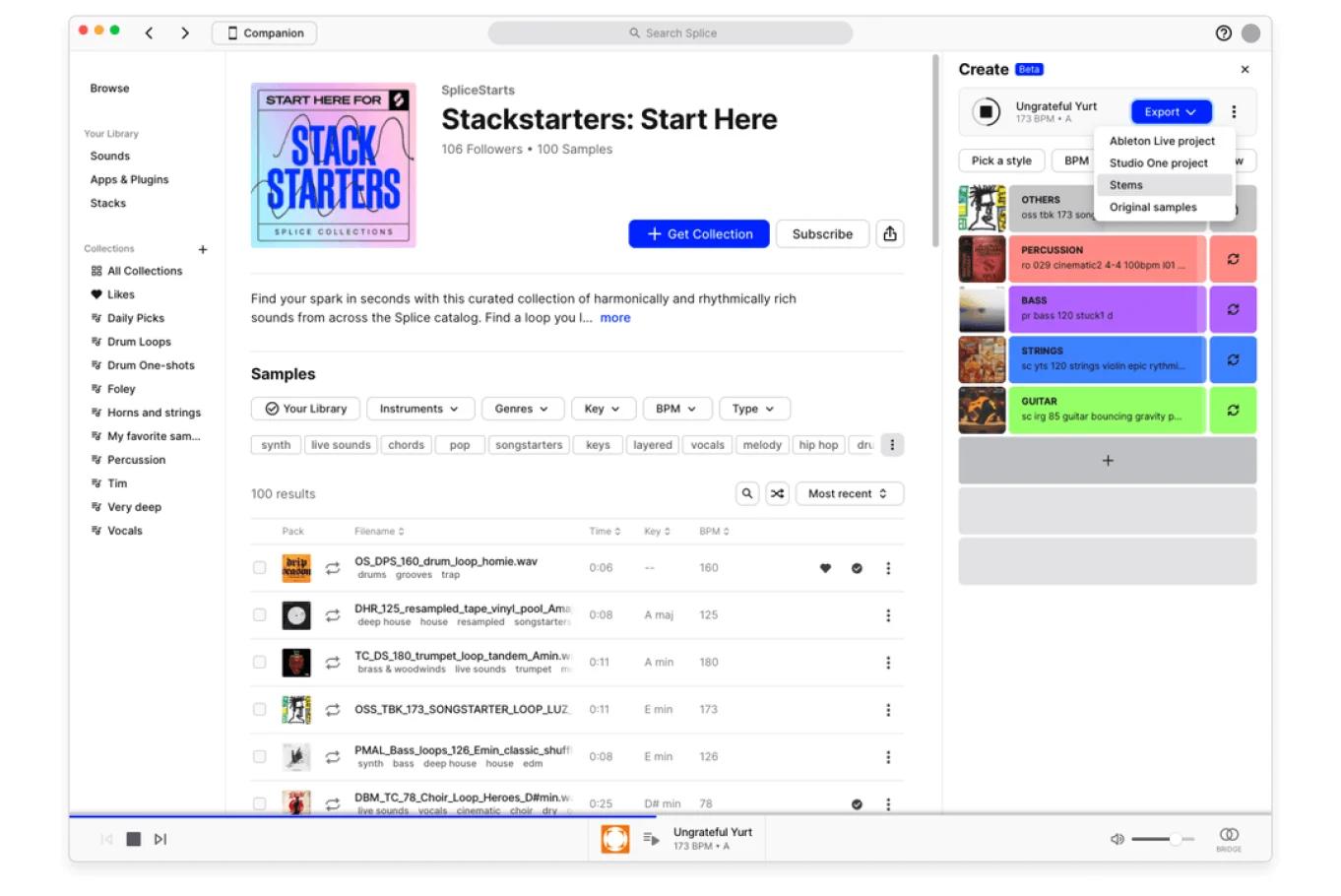
The Splice Desktop app: a collection's sample list with Instruments, Genres, Key, BPM and Type filters, and the Create panel on the right with its Export menu (Ableton Live project, Studio One project, Stems, Original samples).
Features
Pay per sound, keep it forever
Splice charges credits per download instead of per pack: one credit for a sample, up to three for a preset or MIDI pattern. Every download is royalty-free and cleared for commercial release, so you can put it in a track, a beat you sell or a sync placement without asking anyone. If you cancel, your library stays on your drive and you can still re-download what you already licensed.
Bridge: hear samples in your song's key and tempo first
Splice Bridge is a free VST3/AU plugin for every subscriber. It runs in your DAW and syncs the desktop app to your session's tempo and key, so a loop you preview plays transposed and time-stretched to fit, with your own effects chain on it. You can switch between normal, half- and double-time, and copy the modified sample straight into the DAW. Splice lists Ableton Live 10+, Logic Pro, GarageBand, Studio One, FL Studio and Cubase as tested hosts.
Splice Bridge 3.6.9 on a track in Ableton Live, showing the sample being previewed and a "Connected" status.
Transpose and pitch controls in the app
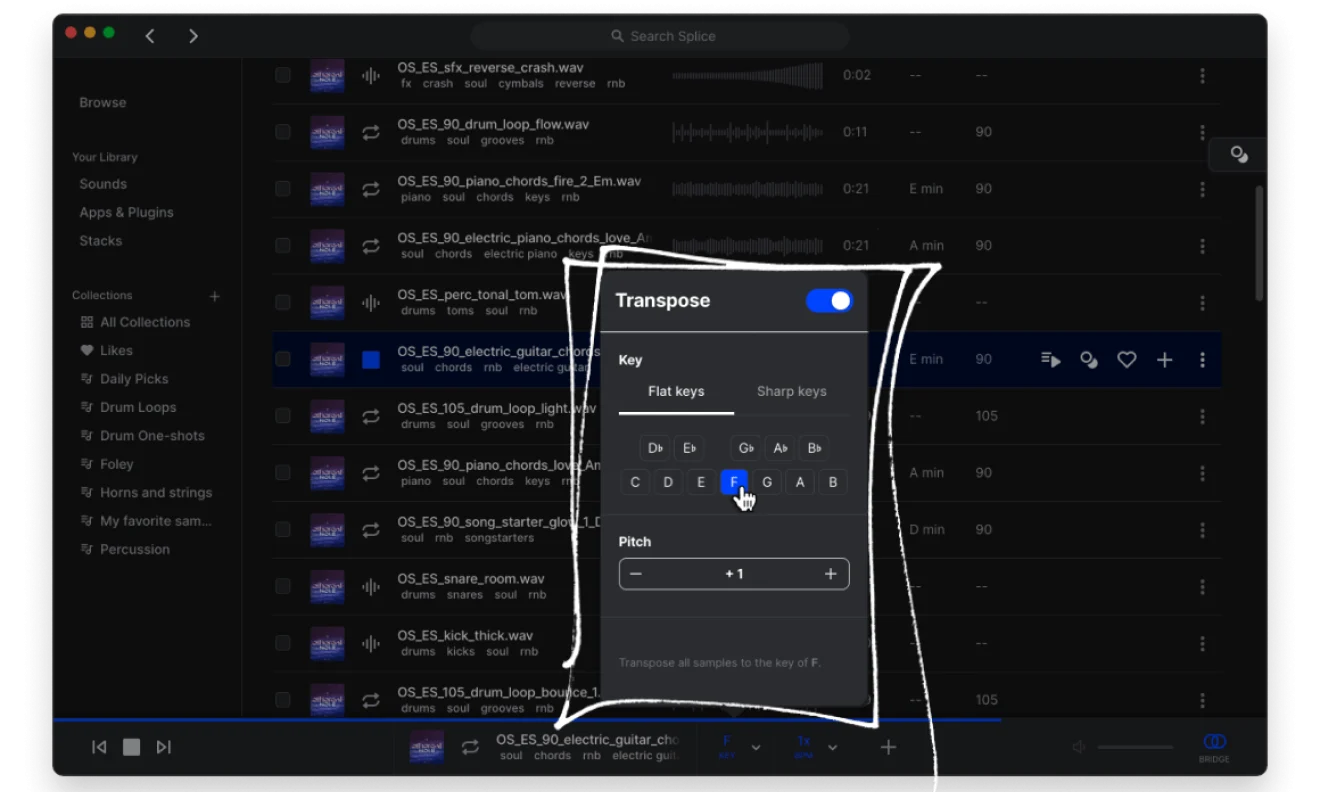
Splice Desktop can transpose every sample you audition to one key and shift its pitch in semitones, so you can compare a dozen chord loops against your track without opening each one in the DAW.
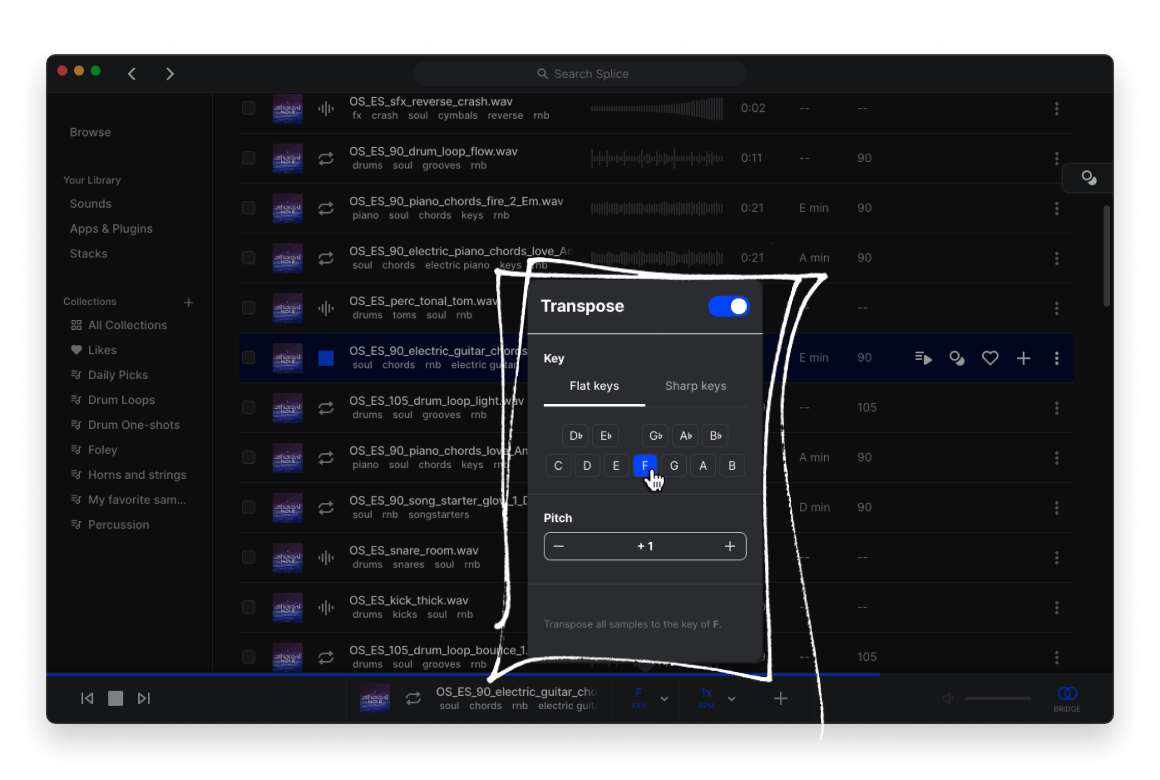
The Transpose panel in Splice Desktop, set to transpose all samples to F with the pitch raised by one semitone.
Stacks and Create mode for starting ideas
Splice's Create mode builds a "Stack" of layered loops (drums, bass, chords, strings and so on) that fit together in key and tempo. You can swap any layer, pick a style, and export the result as an Ableton Live or Studio One project, as stems, or as the original samples. Stacks you make on the web, desktop or mobile app are available everywhere.

Splice Desktop beside an Ableton Live project on a Mac: the Daily Picks sample list in the middle and a new Stack with drums, chords, keys, brass and bass layers in the Create panel.
Plugins included with the plans
Besides Bridge, Splice's plans include the Astra and Beatmaker plugins, and Creator currently includes all of Splice INSTRUMENT's premium presets. INSTRUMENT is a sample-based virtual instrument (AU, VST3, AAX or standalone) with pianos, strings, synths and percussion from Spitfire Audio and Splice, including the John Legend electric piano and Eric Whitacre choir presets, with two premium packs added each month. The newer Sounds Plugin (AU, VST3, AAX) brings the catalogue into the DAW itself, with a drum pad grid and a Variations feature that reworks a sample into new versions. The desktop app installs and updates all of these from its Apps & Plugins section.
DAW integrations and rent-to-own plugins
Splice is built into Pro Tools 2025.6+ and Studio One 7+, with an Ableton Live 12.3 integration in beta. Separately from the sounds plans, Splice's rent-to-own store lets you pay off full licences for plugins such as Serum 2, Arturia V Collection, XLN Audio RC-20 Retro Color and Spitfire Audio libraries in monthly payments; when the payments are complete the licence becomes perpetual.
Benefits
- You spend money only on the sounds you use. A pack-based library makes you buy 300 files to get 5; with credits, 100 downloads a month cover most hobby producers.
- Less time auditioning in the wrong key. Bridge and the transpose controls let you judge a loop in context before it costs a credit.
- No licensing paperwork. Every sound is cleared for commercial use, which matters the day a track gets picked up.
- Your library survives cancellation. You can pause or quit for a few months and keep everything you downloaded.
Real-World Uses
- Beat makers pull drum one-shots and a melodic loop into FL Studio, tuned to the beat with Bridge, and finish a beat for a client the same evening.
- Songwriters use Create mode to build a four-layer Stack around a chord idea, export it as an Ableton Live project, and write on top of it.
- Electronic producers download Serum and Vital presets instead of designing every patch from scratch.
- Film and game composers use INSTRUMENT's Spitfire presets for sketches, then grab foley and FX hits from the catalogue.
- Students learning production get a huge legal sound library for less than the price of two commercial packs a month.
Who It's For, and Who Should Skip It
Splice fits anyone who makes music regularly in a DAW and keeps needing fresh sounds: hip-hop, pop, EDM and R&B producers above all, since that's where the catalogue is deepest. Creator suits people who finish several tracks a month; Sounds+ is enough for a weekly session.
Skip it if you make music only now and then: you'll pay every month for credits you rarely spend, and buying one pack outright is cheaper. It's also the wrong buy if you mainly need a full orchestral or acoustic instrument library for scoring, where a dedicated sample library or Spitfire's own products go deeper, or if you record everything yourself and never use samples.
Usage Guide
- Download Splice Desktop for Windows or macOS and sign in with your Splice account (the Windows installer is a small web installer that downloads the full app).
- Choose a plan on Splice's plans page. Without a plan you can browse and preview, but not download.
- In the app, open Apps & Plugins and install Bridge (and INSTRUMENT or Astra if your plan includes them).
- Add Splice Bridge to a track in your DAW. The app's player bar shows "Bridge" when it's connected and follows your session's key and tempo.
- Search or browse, filter by instrument, genre, key, BPM and loop/one-shot, and preview sounds in context.
- Click to download (credits are taken here), then drag the file from Splice into your DAW. Downloads also land in Splice's folder on your drive.
- To start from scratch, open Create, pick a style and build a Stack, then export it as stems or a DAW project.
Before you buy
- Use your credits before you leave. When you cancel, unspent credits expire 28 days after your last billing period ends. If you only need a break, put the plan on hold for up to two months instead.
- Introductory prices change. The $4.99 first month and the $120 first year of Creator are offers; the plan renews at the regular price.
- No refunds by default. Splice's terms say fees are non-refundable and cancelling doesn't refund the current period, although some Trustpilot reviewers describe getting refunds from support.
- Pick the plan on the order page. The Buy Now button opens Splice's plans page, where you choose Sounds+, Creator, monthly or yearly.
Where it falls short
- Too much choice. Reviewers keep coming back to it: with 3 million sounds, it's easy to scroll for an hour instead of finishing a track.
- Library organisation. Downloads go into Splice's folder structure, and one Trustpilot reviewer complains you can't sort lists alphabetically to grab a set of related sounds.
- Credits feel tight on big projects. Presets and MIDI cost up to three credits, so Sounds+ runs out quickly if you download preset packs.
- Price creep and AI concerns. One Trustpilot reviewer complains that "The subscription keeps going up", and some App Store reviewers dislike the AI-driven Create mode recycling the same samples.
- Sound quality varies by pack. One Trustpilot reviewer heard "AI sounding artifacts" in some sounds; quality depends on the label behind each pack.
What Users Say
Trustpilot (4.2 out of 5, 2,912 reviews)
Splice rates "Great" on Trustpilot: 64% of reviews give five stars and 11% give one. Much of the praise is for quick support; most of the criticism is about credits and pricing.
- Brendan O'Neill, 5 stars: "Such an awesome way to experiment"
- Nick Headon, 5 stars, "Great customer service": "they responded really quickly and going above and beyond to help me out."
- Davon Johnson, 5 stars: "they reimburse me my full credits after I subscribed no hassle no push great service"
- karl, 4 stars: "amazing tool but couldve used a bit more credits"
- A customer, 3 stars, "Make a cheaper option with less credits": "i pay for credits every month and if i dont pay i cant use the ones i ALREADY paid for."
- RG, 2 stars, "Loads of great samples, poor UI": "Can't sort lists alphabetically to download sounds in a set from the same snare, piano etc"
- A customer, 2 stars, "Sounds like stem sounding artifacts": "It seems like a lot of these sounds have AI sounding artifacts."
- A customer, 1 star: "The subscription keeps going up, credits disappear"
App Store: Splice mobile app (4.6 out of 5, 686 ratings)
- volta7, "This app has changed how I make music forever": "I find myself every day downloading samples and making stacks with the apps selection AI and it's just phenomenal."
- Skizzraw410, "Dope": "You can get creations you would have never thought were possible."
- sara6774388, "BEST APP EVER. HOWEVER...": "$20 a month...for paying customers, would you consider allowing more tracks to be added in a stack?"
- Donlouie, "They had it right BEFORE they forced AI create mode": "the algorithm recycles the same samples over and over and won't give you anything new."
Independent reviews
- Violet Recording (editorial team, August 2026, 4.5/5): "Splice is the benchmark sample subscription" and "the per-credit, royalty-free workflow comfortably earns its monthly fee." The downside: "The sheer size can lead to endless scrolling instead of finishing tracks."
- Deviant Noise (updated January 2025): "The sounds are all VERY high quality because they're essentially curated by the team at Splice." But "The real problem is there's just too much stuff." The verdict: "Bottom line, if you're a producer or songwriter Splice should be in your tool-kit."
The pattern across sites is consistent. People love the size and quality of the catalogue, the per-sound pricing and the in-DAW preview, and support gets a lot of credit for sorting out billing problems. The complaints are about money (credits running out, rising prices, credits locked behind an active plan), the sheer volume of choice, and, among some mobile users, the AI-assisted Create mode.
Comparisons
Sounds+ vs Creator
Both plans give the full 3M+ catalogue, the desktop and mobile apps, Bridge and the other DAW plugins. Creator doubles the monthly downloads (about 200 against 100) and adds Splice INSTRUMENT's premium presets and the Rare Finds collection. If you download presets or MIDI, which cost up to three credits each, Creator is the one that doesn't run dry mid-month.
Splice vs buying sample packs
A single commercial pack often costs as much as two or three months of Sounds+, and you get every file in it whether you need it or not. Splice wins if you want variety across genres; buying packs wins if you use one producer's sound heavily or make music only a few times a year, since there's no monthly charge.
Plans and Pricing
| Plan |
Monthly billing |
Yearly billing |
Downloads |
What it adds |
| Sounds+ |
$12.99 a month |
$129.99 a year ($10.84 a month) |
~100 a month |
Full catalogue, desktop and mobile apps, Bridge and DAW plugins |
| Creator |
$19.99 a month ($4.99 the first month) |
$199.99 a year ($120 the first year) |
~200 a month |
Everything in Sounds+, 1,000+ presets, Rare Finds, INSTRUMENT premium presets |
| INSTRUMENT |
$12.99 a month after a 14-day free trial |
Not offered |
Instrument presets only |
All INSTRUMENT premium presets and the Spitfire Audio Originals collection |
Our listed price, $199.99, is the Creator plan billed yearly at the regular rate. You choose the plan and billing period on Splice's order page. Prices are in US dollars before any local tax, as shown on November 15, 2026.
FAQs
Can I keep Splice samples after I cancel?
Yes. Every sound you downloaded with Splice credits stays yours and remains cleared for commercial use after you cancel, and you can still re-download sounds already in your library. What you lose are unspent credits (28 days after the last billing period) and access to the plugins included with the plan.
Do Splice credits expire?
Splice credits roll over from month to month as long as your plan is active. They expire only after you cancel, 28 days after your final billing period ends. To keep them during a break, put the plan on hold for up to two months.
Does Splice work with FL Studio, Logic Pro and Ableton Live?
Yes. Splice samples are ordinary audio files that work in any DAW, and the Bridge plugin (VST3 and AU) is tested in Ableton Live 10+, Logic Pro, GarageBand, Studio One, FL Studio and Cubase. Pro Tools 2025.6+ and Studio One 7+ also have built-in Splice integrations.
Can I release songs that use Splice samples commercially?
Yes. Splice sounds are 100% royalty-free and cleared for commercial use, and Splice says you own everything you make with them, with no permission needed. Splice's terms don't let you redistribute the samples themselves as a sample pack.
Is there a free trial of Splice?
Splice's sounds plans don't have a free trial. You can install the apps and browse and preview the catalogue for free, and Creator's first month is $4.99. The separate INSTRUMENT plan has a 14-day free trial.
Can I switch between Sounds+ and Creator?
Yes. An upgrade to a bigger Splice plan is charged immediately, refills your credits and restarts the billing cycle from that day. A downgrade takes effect at your next renewal, and your credits carry over either way.
Does Splice need an internet connection?
Splice Desktop needs a connection to browse, preview and download sounds. The files you downloaded are stored on your computer, so you can use them in your DAW offline.
System Requirements
- Windows 10 or later (64-bit), or macOS 12 Monterey or later (Apple silicon and Intel)
- About 160 MB for the desktop app, plus disk space for the sounds you download
- A DAW that hosts VST3 or AU plugins for Bridge (AAX also for INSTRUMENT and the Sounds Plugin)
- Internet connection and a Splice account
- Mobile: iPhone/iPad app and Android app
Conclusion
Splice is worth it if you make music every week. The one reason to buy it is the workflow: you can hear any of 3 million sounds in your track's key and tempo, pay a credit for the one you want, and own it for good. Sounds+ at $129.99 a year covers most hobbyists; Creator at $199.99 a year (or $120 for the first year) is the better deal for producers who use presets and finish several tracks a month.
The main reason not to is the subscription itself. If you make music only now and then, unspent credits are wasted money, and buying the odd sample pack costs less.
Download Splice DesktopBuy Now