Blog2Social for WordPress: Publish Once, Post to 25 Social Networks
Blog2Social is a WordPress plugin that shares your posts to Facebook, LinkedIn, Instagram, Pinterest, TikTok, Bluesky and other networks from the WordPress dashboard, with a free plan and paid licenses at $96, $144 or $348 a year. It suits bloggers, small businesses and agencies whose content already lives in WordPress.
You know the routine: you hit Publish, then spend half an hour opening each network, pasting the link, trimming the text and picking an image. Blog2Social moves that work into one screen, and the Autoposter can do it without you.
Quick facts
- Version: 9.1.7, released November 6, 2026
- Developer: Adenion GmbH, Grevenbroich, Germany
- Runs on: WordPress 6.2 or later with PHP 7.4 or later
- Price: Pro plan $144 a year (Smart $96, Business $348), renewing automatically
- Free options: a permanent Free plan, plus a 30-day Premium Pro trial
- Interface languages: English, German, French, Portuguese, Russian, Spanish, Italian, Swedish, Korean
What we checked: plugin package version 9.1.7 (10.75 MB) downloaded from WordPress.org and its plugin header read, 2,107 ratings averaging 4.5 out of 5 on WordPress.org, order-page prices of $96.00, $144.00 and $348.00 for the three yearly plans, all on November 9, 2026. We didn't connect live social accounts or run the Autoposter.
Before you buy
- X (Twitter) costs extra on every plan. It's a separate monthly add-on starting at $14.99 for 70 posts a month. YouTube and Vimeo posting need the Video add-on at $69 a year.
- Plans renew automatically. The first term is one year, and you can end or downgrade the subscription at the end of a term with written notice. Adenion can raise prices at renewal with 90 days' notice.
- Upgrade fees aren't refundable under Adenion's terms. PayPro Global, which handles the payment, reviews refund requests made within 30 days of purchase, and the EU right of withdrawal ends once a digital product has been accessed.
- Use the trial first. You don't have to cancel it: after 30 days the account drops back to the Free plan by itself.
Download Free TrialBuy Now
Overview
Blog2Social has been on WordPress.org since November 2014, and Adenion is still releasing updates. The plugin adds its own section to the WordPress menu, with pages for sharing posts, scheduled and shared posts, re-sharing, auto-posting, the calendar and connected networks.
The plugin itself is free to install from the WordPress plugin directory. A paid license is a key you enter in that same installation, so moving from Free to Smart, Pro or Business doesn't mean installing anything new. Each license covers either several users on one site or one user across several sites, and every WordPress user who posts through Blog2Social needs a seat.
Features
The Autoposter shares new and updated posts for you
Blog2Social's Autoposter watches for new or updated posts, pages and custom post types and sends them to a saved group of accounts. You can post at once, after a delay of up to 10 minutes, or at your best-time settings. Paid plans can also auto-post imported content from RSS feeds or other plugins: 25 items a day per user on Smart, 50 on Pro and 100 on Business.
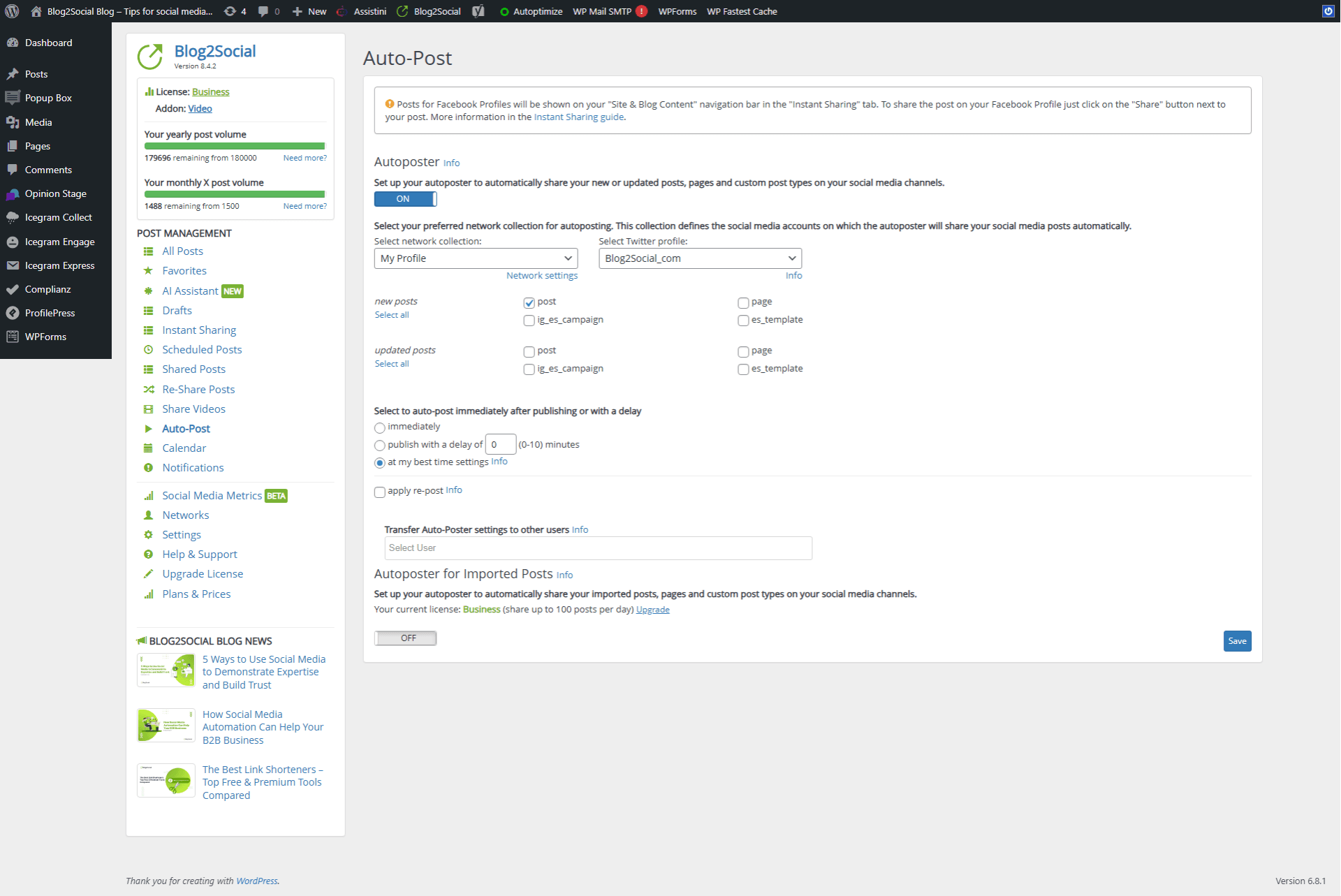
The Auto-Post page, with post types, network collection and timing options (shown in version 8.4.2).
A separate version of each post for each network
Blog2Social builds a preview for every selected account, where you can rewrite the text, change hashtags, swap or crop the image and pick a link or image format. Post templates set the default layout per network, so a LinkedIn post and a Pinterest post don't have to look alike.
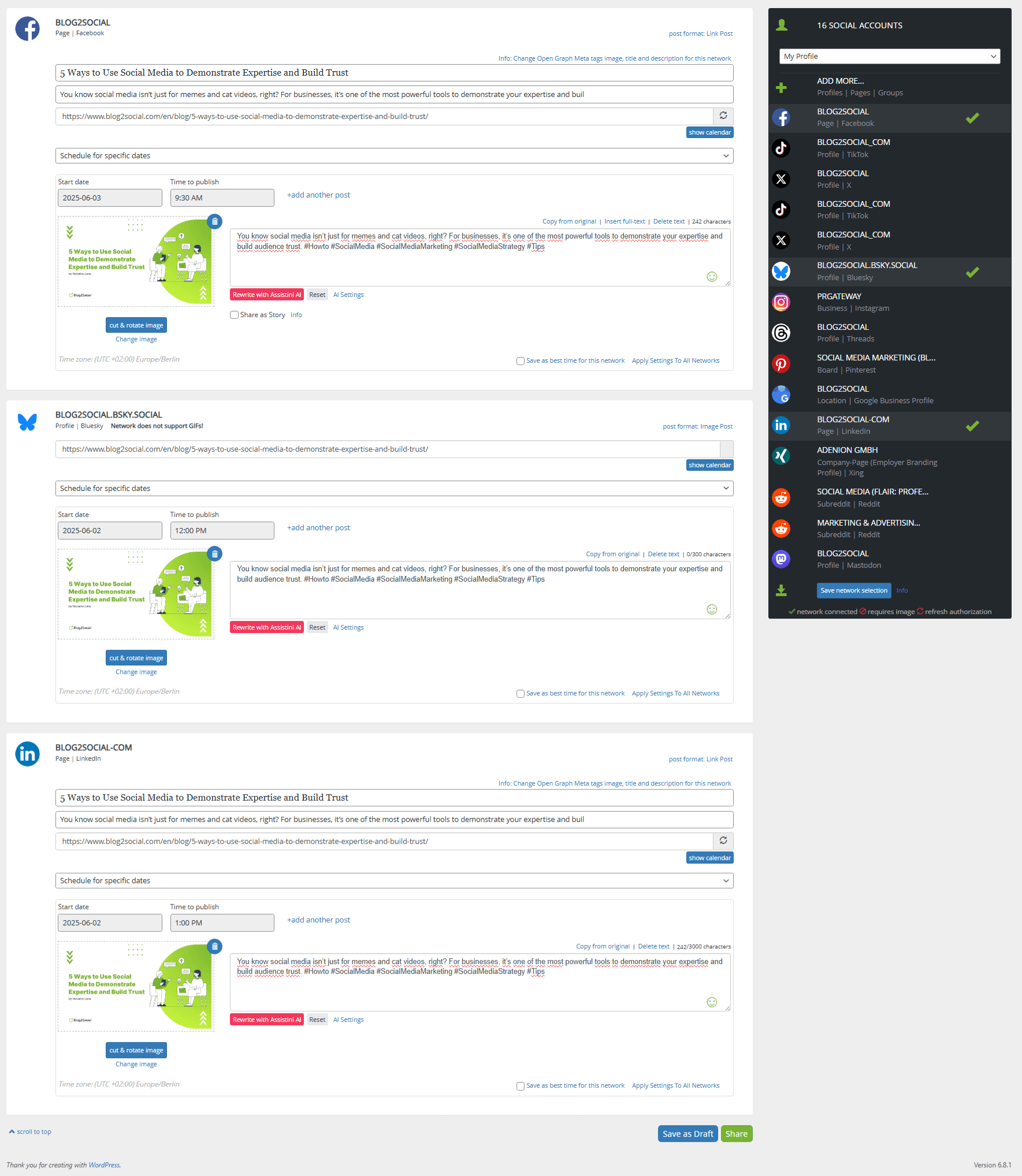
One blog article prepared as separate Facebook, Bluesky and LinkedIn posts, each with its own date and time.
A drag-and-drop calendar for everything scheduled
Blog2Social's calendar shows scheduled and shared posts by month or week, and each WordPress user gets a color. Drag an entry to move it, click it to edit the text or image, or filter the view to one network.
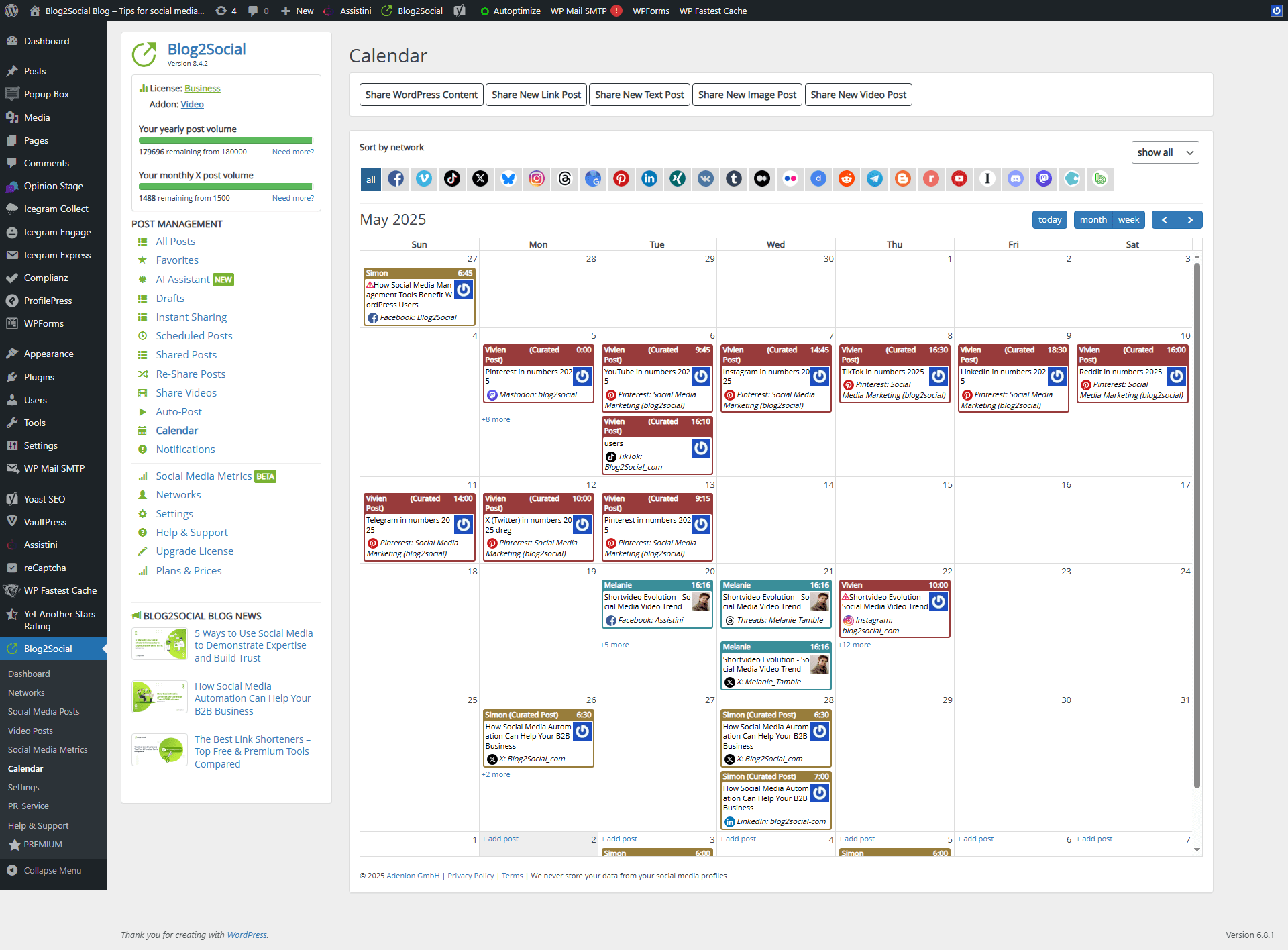
The calendar's month view, with network filters across the top and posts colored by team member.
Best Time Manager schedules for each network
Blog2Social ships with suggested posting windows per network and lets you save your own, so a scheduled post can go out at 10:30 AM on Facebook and 1:00 PM on X without any further setting.
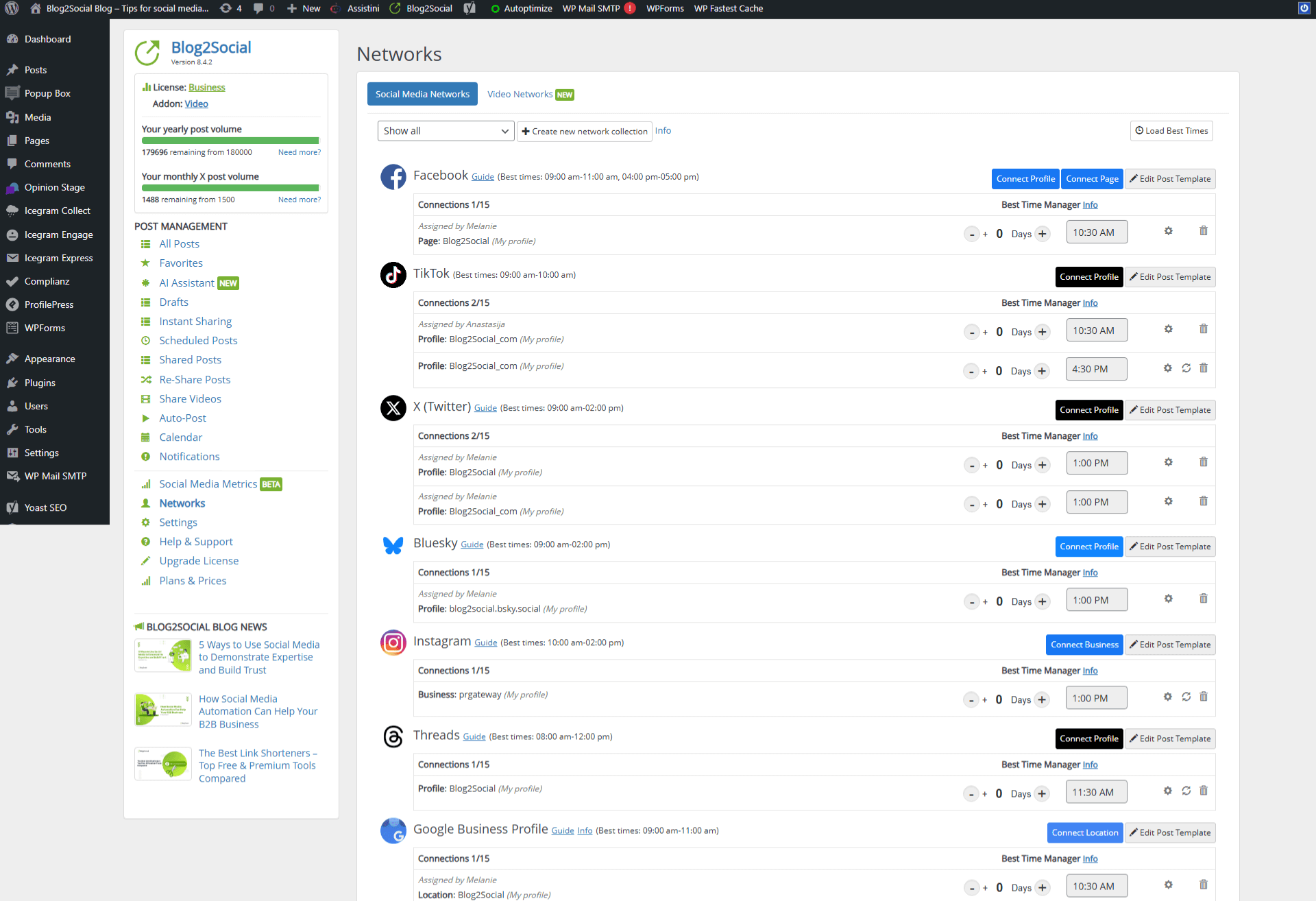
The Networks page, listing connected accounts with suggested best times and individual time slots.
Re-sharing keeps older posts in circulation
Blog2Social's Re-Share queue picks older content by post type, date, category, tag or author and sends it out on a repeating schedule. The queue holds 25 posts on Smart, 50 on Pro and 100 on Business.

Re-Share settings: which posts to pick, how often to send them and which accounts receive them.
AI text help and link tracking
Blog2Social includes the Assistini AI writer for rewriting captions and suggesting hashtags, with per-network prompts and tone settings. It also connects to Bitly, Rebrandly and Sniply for short links, adds UTM parameters for analytics, and lets you edit the Open Graph title, description and image that networks show.
Benefits
- You stay in one login. Writers don't need network passwords, and Business plans can share accounts among team members without handing out credentials.
- Your feed doesn't go quiet. Old articles keep working while you're busy with new ones.
- A changed plan costs minutes. A moved launch date means dragging a few calendar entries.
Real-World Uses
- A solo blogger publishes twice a week and lets the Autoposter send each article to a Facebook page, LinkedIn and Bluesky.
- A WooCommerce shop schedules product posts weeks ahead of a seasonal sale and checks the gaps on the calendar.
- A marketing team of up to 10 on one WordPress site shares its social accounts on a Business license and sees everyone's scheduled posts by color.
- A long-running site puts 50 evergreen tutorials in the Re-Share queue on a Pro plan and sends one out every two weeks.
Who It's For, and Who Should Skip It
It's a good fit if WordPress is where your content starts and you post to several networks regularly. Pro is the plan most people should look at first, because it adds LinkedIn pages, Google Business Profile, image collections and five seats.
Skip it if you don't run WordPress, since this edition lives inside the dashboard. Adenion's separate browser-based Blog2Social WebApp is the one for that case. Skip it as well if X is your main network, because the add-on's post limits and monthly cost change the math, or if you have many occasional contributors, since each one takes a seat.
Usage Guide
- In WordPress, open Plugins, Add New, search for Blog2Social, then click Install Now and Activate. Blog2Social appears in the menu.
- Open Networks and connect your profiles, pages or groups.
- If you're on the trial or a paid plan, enter your license key.
- Open Auto-Post, switch it on, choose post types and a network collection, then save.
- To tailor one article, open it from the Site and Blog Content list, adjust each network's preview and choose a date.
- Check the calendar and drag anything that needs moving.
Where it falls short
- Autoposting has gaps. Blog2Social's Auto-Post page notes that posts for Facebook profiles appear under Instant Sharing and need you to click Share. Only business accounts can be connected on Instagram.
- Connections can break. Reviewers report networks dropping out and needing to be reconnected, and that posts created by other tools, such as form plugins, may not trigger the Autoposter.
- Networks have moved behind paid tiers over time. X and Instagram both come up in complaints from people who bought or chose the plugin for a network that later changed.
- Deactivating stops the schedule. Scheduled posts stay in your WordPress database, but they aren't sent until the plugin is active again.
What Users Say
WordPress.org shows 2,107 ratings averaging 4.5 out of 5: 1,729 five-star and 162 one-star. Trustpilot shows 3.7 from just 4 reviews, so that figure means little.
Praise on WordPress.org
"Great support from Benedikt, even though I am just starting a 30-day free trial... Unlike so many supposed help videos and guides I could easily follow these. I should add that I am 78 and a TBI survivor so following instructions can often prove difficult. Apart from the Support the plugin itself is easy to work with and get things done." tydbyte, 5 stars, October 2026
"For me, it has been a great and hassle-free helper for 6 years. Well done Blog2Social!" kemada, 5 stars, October 2026
"Makes updating social media pages a breeze." manfred2p718, 5 stars, October 2026
Mixed views on WordPress.org
"The features and functionality, in theory, are great – perhaps the best in class. Unfortunately in practice, the behaviour is haphazard and unpredictable. Something that works fine for weeks will abruptly stop working fully and each patch or update is a crap shoot as to whether it will make things better or worse. Customer service and support has fallen of a cliff since they introduced a completely useless AI chatbot layer." thecraggus, 3 stars, March 2026
"This is one of the best plugins for sharing content on social networks but it’s too expensive. The low-cost options are very limited, just like the free version." abdelmalek3d, 2 stars, January 2024
"I would have happily given this solution 5 stars if it wasnt for the fact that they are unable or unwilling to discuss alternative models. You need a license for each person, which probably makes sense in some cases, but there isnt a volume license or a license that works for different models." kissfmaustralia, 2 stars, July 2022
"It could be a great plugin, although not easy to use, but the network connections break very frequently, and they are very difficult to restart (esp. BlueSky is hardly impossible)." jordiparera, 2 stars
Complaints and problems on WordPress.org
"The plugin is not user-friendly, complicated to configure, and we encountered frequent issues, such as failures to post automatically after publishing articles... Furthermore, even after uninstalling the plugin and no longer using it, we were unexpectedly charged for a renewal." newspulpaper, 1 star, January 2025
"I bought the pro version of the plugin because it allowed sharing on Twitter. Suddenly, they removed this feature and made it a paid option." highspeed86, 1 star, December 2024
"If you are a pure blogger, and login and create posts via the UI. This is for you. If you leverage other methods to create content it is going to struggle." ngcmos, 2 stars, June 2021
"However, as a foreigner living in China, I face difficulties purchasing the premium version because I do not have a MasterCard or another internationally supported payment card." DrPlatform, 5 stars, July 2026
Elsewhere
"Blog2Social is the most elaborate social media plugin that I have tested so far. I purchased the premium license, and I can only recommend it." Andreas Hecht, noupe.com, as quoted on Blog2Social's site
"Very fast and competent!" Medicoreha Steffi Baselt, 5 stars on Trustpilot, January 2025
"The worst tech support, they make you hate yourself" أحمد إسماعيل أحمد, 1 star on Trustpilot, April 2021
The pattern: most users like how much time it saves and how quickly it gets going, and recent reviews often praise individual support staff. The recurring complaints are price, features moving to paid tiers or add-ons, connections that break, and renewals people didn't expect.
Editions and Pricing
| Plan |
Price per year |
Networks / accounts each |
Users or sites |
Posts per day |
| Free | $0 | 12 / 1 | 1 | No autoposting or scheduling |
| Smart | $96 | 16 / 3 | 2 | 100 |
| Pro | $144 | 24 / 5 | 5 | 250 |
| Business | $348 | 25 / 15 | 10 | 500 |
Pro adds LinkedIn, Xing and VK pages, Google Business Profile, Mastodon, the image editor, image collections and first-comment publishing to what Smart offers. Business adds Telegram and team management with shared accounts. Extra seats cost $40 a year and extra accounts per network $19 a year.
Buy Pro ($144/year)Buy Smart ($96/year)Buy Business ($348/year)
FAQs
Does the free Blog2Social plan schedule posts?
Blog2Social Free lets you share and re-post manually on 12 networks with one account each, but autoposting, the calendar and the Best Time Manager start with the Smart plan.
Do I have to cancel the Blog2Social trial?
Blog2Social's 30-day Premium Pro trial ends by itself. You register for a license key by email, and when the 30 days are up the account returns to the Free plan.
Can Blog2Social post to a personal Instagram account?
Blog2Social connects to Instagram Business accounts only, starting with the Smart plan. A personal account has to be switched to a business account first.
Does Blog2Social work with WooCommerce and page builders?
Blog2Social lists compatibility with WooCommerce, the Gutenberg editor, page builders, WP Automatic and RSS importers.
Can I use one Blog2Social license on several websites?
A Blog2Social license works either for several users on one website or for one user across several websites, up to the plan's limit: 2 on Smart, 5 on Pro and 10 on Business.
How much does X (Twitter) posting cost in Blog2Social?
Blog2Social's X add-on needs a Smart, Pro or Business license and costs $14.99 a month for 70 posts, $24.99 for 100 posts or $59.99 for 250 posts.
Is there a monthly plan for the Blog2Social plugin?
Blog2Social's plugin plans are billed yearly, although the pricing page shows a per-month figure. Monthly billing is only offered on the separate WebApp.
System Requirements
- WordPress 6.2 or later (tested up to 7.1)
- PHP 7.4 or later
- Default WordPress plugin folder permissions (755)
- Your own accounts on the networks you post to
Conclusion
Blog2Social is worth $144 a year if your site runs on WordPress and you post to several networks every week. The reason to buy is the depth of per-network control inside the dashboard you already use, with an active developer behind it. The reason to hold back is reliability and cost creep: connections can drop, and X or video posting adds to the bill. Run the 30-day trial on your real accounts, and if your connections stay up for the month, Pro is a fair buy. If you only share a post now and then, stay on the Free plan.
Download Free TrialBuy Now