HWiNFO Pro: The Licensed Edition of the Hardware Monitor PC Builders Already Use
HWiNFO Pro is the paid license for HWiNFO64 (and HWiNFO ARM64), REALiX's free Windows tool that shows every detail of your hardware and monitors hundreds of temperature, voltage, clock and fan sensors in real time. The Pro license is a key file you add to the same program: it allows commercial use, removes the free version's 12-hour limit on Shared Memory for add-ons like Rainmeter and Stream Deck, and adds command-line logging, automatic updates and an advanced stress test. A Personal license costs $29 for one user on up to 5 computers, with a year of updates.
Most home users never need to pay: HWiNFO64 is free for personal use and fully featured for looking at your hardware. Pro is for people who use HWiNFO at work, run sensor dashboards around the clock, or log sensors from scripts.
Quick facts
- Version: 8.54, released September 30, 2026 (HWiNFO is updated frequently)
- Developer: Martin Malík, REALiX s.r.o., Malacky, Slovakia; HWiNFO has been developed since 1995
- Platform: 64-bit Windows 7 and later, on x64 or ARM64 processors
- Price: Personal subscription $29 (1 user, 5 computers, 1 year of updates); Lifetime license from $199; Engineer and Corporate licenses for business use
- License terms: versions released during your update period stay licensed forever; renewal is optional, at 50% off
- Free version: HWiNFO64 without a key, free for non-commercial use, and a 14-day evaluation in a business
- Refund: requests accepted up to 14 days after the order, reviewed case by case
- What we checked: the HWiNFO64 installer from hwinfo.com is 21.4 MB (21,399,480 bytes), file version 8.54, digitally signed by REALiX s.r.o.; on the order page the Personal License with 1 year of updates was $29.00, 2 years $42.00, 3 years $52.00, the Corporate License $44.00, the Engineer License $232.00 and the Lifetime license $199.00, on November 8, 2026. We didn't buy a key to test the Pro features.
Before you buy
- Try the free version first. It's the same download. If you only open HWiNFO to check temperatures or look up a part number, you don't need Pro.
- A Personal license doesn't allow business use. At work you need an Engineer license (per user) or a Corporate license (per computer); buying Personal on behalf of a company doesn't make commercial use legal.
- Your name goes into the license. The license type, name and company you enter at checkout are embedded in the key and shown in every licensed copy, so enter them carefully.
- The key is a file, not a code. It arrives by email and must be copied into the HWiNFO folder; activation is offline.
Download Free TrialBuy Now
Overview
HWiNFO is one of the longest-running hardware tools for PCs, and among overclockers, PC builders and support technicians it's often the first thing they install. It reads your hardware directly and shows it as a tree that unfolds from a one-screen summary (CPU, motherboard, memory, GPU, drives) down to memory timings, PCIe link speeds, VRM controllers and individual drive SMART values. Its Sensors window lists every reading it can find, with current, minimum, maximum and average values, and new hardware is often supported before it reaches stores.
Until version 7.00 in March 2021, HWiNFO64 was entirely freeware. Martin Malík then introduced HWiNFO64 Pro to fund the project: personal use stayed free, while commercial use and a few power-user features moved to a paid license. Versions before 7.0 remain full freeware.
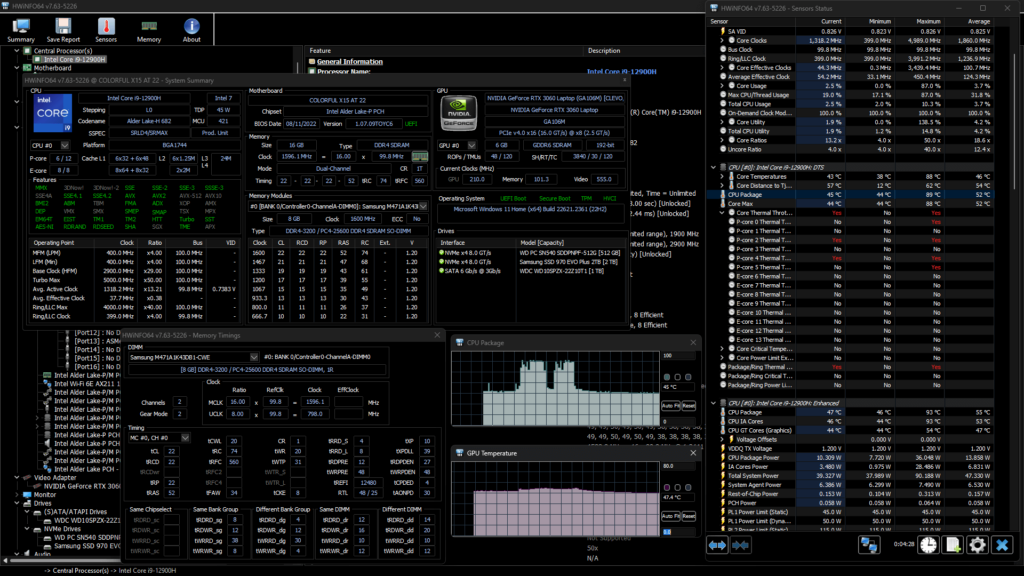
HWiNFO64 (version 7.63) on an Intel Core i9-12900H laptop with an RTX 3060: the System Summary, the Memory Timings window, CPU package and GPU temperature graphs, and the Sensors Status list on the right.
Features
Commercial use under a proper license
HWiNFO Pro with an Engineer or Corporate license is the only way to use HWiNFO64 legally in a business beyond the 14-day evaluation. Engineer licenses are counted per user, which suits a technician who carries HWiNFO to many PCs; Corporate licenses are counted per computer and can be used in a domain. Your company name is embedded in the license and shown in every licensed copy.
Unlimited Shared Memory for dashboards and add-ons
HWiNFO Pro keeps the Shared Memory Interface running without a time limit. That's how other programs read HWiNFO's sensor values: the Rainmeter plug-in, the Elgato Stream Deck plug-in, Aquasuite, the PromDapter adapter for Prometheus and Grafana, LCD screens and remote monitoring. In the free version, Shared Memory switches itself off after 12 hours and has to be re-enabled by hand, so a desktop gauge or Stream Deck button that runs all day goes blank. If you don't use any of these add-ons, this limit doesn't touch you.
Command-line reports and sensor logging
HWiNFO Pro can create reports and start sensor logging from the command line, without anyone clicking through the interface. IT staff can collect hardware inventories from many PCs by script, and testers can start a CSV sensor log at the beginning of a benchmark run and analyze it afterwards, for example with the free GenericLogViewer.
Advanced stress test
HWiNFO Pro's stress test adds AVX, FMA, Vulkan, NPU and multi-threaded loads to the free version's basic test, so you can push a CPU, GPU or AI accelerator to its limits while you watch temperatures, clocks and throttling flags in the Sensors window of the same program.
Unlimited on-screen display and more remote connections
HWiNFO Pro shows any number of sensor values in the in-game on-screen display (through RivaTuner, MSI Afterburner or EVGA Precision); the free version allows 5. Remote Sensor Monitoring, which shows the sensors of other PCs on your network, is limited to 5 machines and 12 hours in the free version, while each Pro license raises the limit (a Personal license by 5 computers), up to 300 connections. Pro also updates itself automatically.
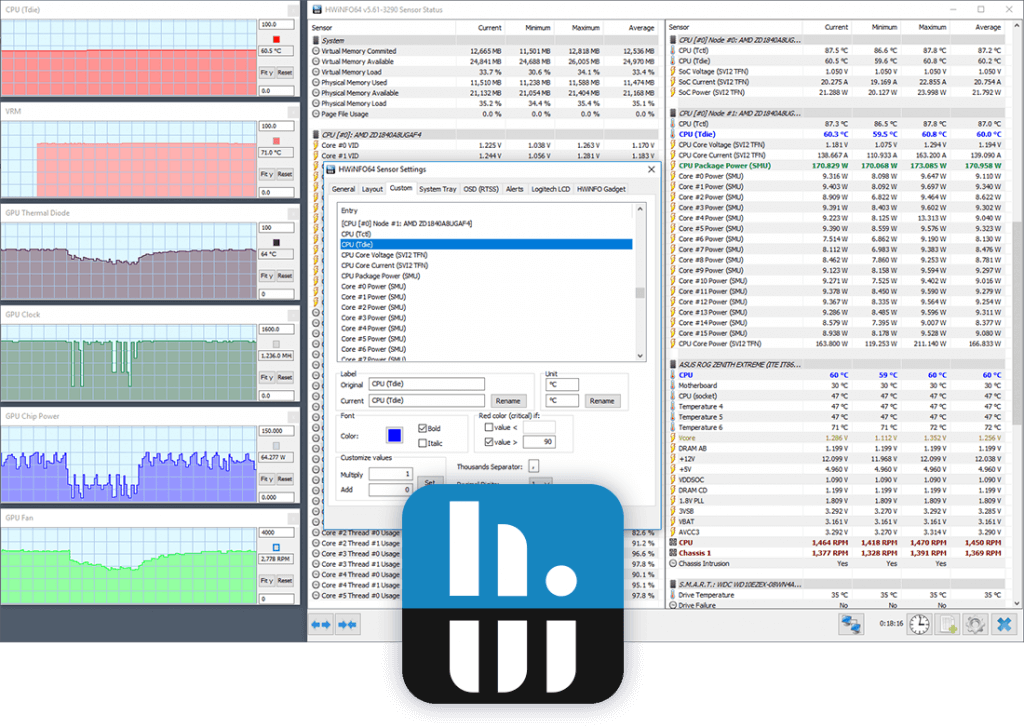
An older HWiNFO64 (version 5.61) on an AMD Threadripper system, with the HWiNFO logo over the corner: sensor graphs on the left, two Sensor Status columns, and the Sensor Settings dialog with tabs for OSD (RTSS), Alerts, Logitech LCD and the HWiNFO Gadget.
Benefits
- Stay legal at work. Many IT departments use HWiNFO; the Engineer and Corporate licenses make that compliant.
- Dashboards that don't quit. A Rainmeter skin or Stream Deck panel keeps showing live values for days, not 12 hours.
- Automation. Command-line reports and logs turn HWiNFO from a window you look at into a tool your scripts can use.
- Support the project. HWiNFO is largely one developer's work; a Personal license helps keep the frequent updates coming, which is one reason many home users buy it even without needing Pro features.
Real-World Uses
- A streamer's Stream Deck showing CPU and GPU temperatures all day during long sessions, without the readings stopping after 12 hours.
- A help-desk technician running HWiNFO on customers' PCs to find a failing drive or an overheating CPU, under an Engineer license that covers the technician rather than each machine.
- A hardware reviewer or overclocker logging sensors from the command line during a benchmark and stressing the CPU with AVX loads to check stability.
- A small office watching the temperatures of a handful of workstations and a server from one PC with Remote Sensor Monitoring.
Who It's For, and Who Should Skip It
HWiNFO Pro is for anyone who uses HWiNFO64 in a business, for enthusiasts who run Shared Memory add-ons around the clock, and for people who want to script HWiNFO's reports and logs. It's also a reasonable buy if you use the free version every week and want to support it.
Skip it if you only open HWiNFO now and then to look at temperatures or identify a part: the free HWiNFO64 does that with no time limits. Lifehacker's verdict on the free tool still holds for many people: "For most users, HWiNFO is probably overkill". If you want a simpler one-page summary of your PC, a lighter system-information tool will feel friendlier. There's no Mac or Linux version (only a DOS edition for legacy PCs), and the Pro license doesn't apply to the legacy 32-bit HWiNFO32.
Usage Guide
- Download and install HWiNFO64 from hwinfo.com: the installer picks HWiNFO64 or HWiNFO ARM64 for your PC, and there's also a portable ZIP. Run it with administrator rights so it can read all sensors.
- Buy the license type that matches your use (Personal, Engineer or Corporate) and enter your name and company exactly as they should appear.
- Copy the key file you receive by email into the HWiNFO folder and restart the program.
- Check that it took: HWiNFO should now call itself HWiNFO64 Pro and show "Licensed to:" with your name when it starts. If it doesn't, the key file is in the wrong folder.
- Turn on Shared Memory Support in Settings if you use add-ons (it's off by default), and set up logging, alerts or the OSD as you need.
Where it falls short
- The interface is dense. HWiNFO shows everything, in long tables and a deep tree, with little explanation; Dedoimedo's review wished for "detailed explanations what different options do".
- It only monitors. HWiNFO can't change fan curves, clocks or voltages; you need your motherboard or GPU vendor's software for that.
- Some users still resent the change. Moving Shared Memory behind a paywall in 2021 cost HWiNFO goodwill with some long-time users, as the AlternativeTo reviews below show.
- Business pricing adds up. At $232 per user per year, the Engineer license is a real cost for a small IT shop, and forum users questioned it when the licenses were announced.
- Key placement trips people up. A forum user who bought Pro found the 12-hour limit still there until the key file was in the right folder.
What Users Say
HWiNFO itself has a strong reputation: reviewers and users praise its depth and accuracy, and the main complaints are about the busy interface and, since 2021, the Pro paywall. Most reviews below are of the free program, which is the same software a Pro key turns into HWiNFO Pro.
Tech sites
Lifehacker (Eric Ravenscraft, August 2013): "When it comes to diagnosing hardware problems, there's not such thing as too much information. HWiNFO gets credit for trying to push that limit, though... Where it differs from apps like Speccy is that it also allows you to see a live view of system sensors like SMART, as well as keep an eye on your system temperature and voltages. For most users, HWiNFO is probably overkill, but if you're heavy into hardware tweaking, it can be a great aid."
Dedoimedo (updated June 2020): "All in all though, HWiNFO is an excellent program, and you should consider it a must-have in your Windows toolbox." The same review's complaints: "Lastly, the Driver Update thing feels weird, and I hope it gets fixed and improved," and "I think there should be detailed explanations what different options do so people don't blindly check or uncheck boxes."
AlternativeTo: 4.3 out of 5 from 22 ratings, 332 likes
- Dawid Ferenczy (5 stars, May 2025): "One of the best applications to get very detailed hardware information on Windows platform."
- jethro_tull (5 stars, January 2024): "One of my essential pieces of software."
- solistus (2 stars, February 2023): "added a paywall for shared memory access, which is required to access any of that info through anything but HWInfo itself."
- MVN (1 star, February 2022): "It's always sad when a previously open source program starts charging money for utilities that he already had"
HWiNFO forum: reactions to the Pro license
When Martin Malík announced the Pro edition in February 2021, most forum regulars backed it:
- Limy: "I think it is reasonable. I mean no other single app shows so much detail."
- d0mini: "An enthusiast making solid software for enthusiasts - what could be more worth supporting than that?"
- ManniX: "If you read again the first post you'll notice this is not a rental model. You will retain the last version released in the maintenance period as a perpetual license."
Business users were less happy about the commercial price. CobraPL asked: "How many small businesses (like one person IT help-desk) could afford sth like that? And what commercial usage means then?"
Snapfiles: 5 out of 5 from 5 user reviews
- gimpguy (September 2013): "It has pretty much everything you need to know about your system and actually, more than most even need to know unless you are a tech geek like myself."
- armaggedon51 (January 2012): "I have tried a lot of those data gathering software but have stop after finding this one. Very reliable and accurate. A lot of technical data easy to read."
The pattern: people trust HWiNFO's readings and value how much it shows, and they like that it's updated constantly. The criticism is about presentation (dense, little guidance) and about the 2021 move to put Shared Memory and commercial use behind a license. For a home user who doesn't need those, nothing changed; for add-on users and businesses, Pro is the price of using it fully.
Comparisons
HWiNFO64 free vs HWiNFO Pro
| Feature | HWiNFO64 (free) | HWiNFO64 Pro |
|---|
| Commercial use | 14-day evaluation only | Yes, with Engineer or Corporate license |
| Shared Memory for add-ons | 12 hours per run | Unlimited |
| Command-line reports and logging | No | Yes |
| Automatic update | No | Yes |
| OSD items | 5 | Unlimited |
| Remote monitoring | 5 machines, 12 hours | 5 plus more per license, no time limit |
| Stress test | Basic | Advanced: AVX, FMA, Vulkan, NPU, multi-threaded |
HWiNFO vs simpler system-information tools
Simple system-information tools give a tidy one-page summary of your PC and are easier for beginners. HWiNFO goes much deeper, adds live sensors with logging and alerts, and supports new hardware quickly, but asks you to find your way through a lot of data.
Editions and Pricing
| License | Price | Covers | Use |
|---|
| Personal, 1 year of updates | $29 | 1 user, up to 5 computers | Non-commercial |
| Personal, 2 or 3 years | $42 or $52 | 1 user, up to 5 computers | Non-commercial |
| Lifetime | from $199 once | All future updates | Per license type |
| Corporate, 1 year | $44 per computer | 1 computer, domain use | Commercial |
| Engineer, 1 year | $232 per user | 1 user, any computer | Commercial |
Subscription renewals are optional and cost 50% less; you can opt in to auto-renewal or renew by hand. Volume discounts apply to larger orders, and schools get 50% off the subscription license after contacting REALiX. The Buy Now button on this page opens the Personal 1-year license, and the license type and update period can be changed in the cart.
FAQs
Do I need HWiNFO Pro for personal use?
No. HWiNFO64 is free for personal, non-commercial use, and all the hardware information and sensor monitoring work without a license. HWiNFO Pro is only needed for business use, uninterrupted Shared Memory, command-line logging, more OSD items, more remote connections or the advanced stress test.
What happens when my HWiNFO Pro subscription ends?
HWiNFO Pro keeps working. Every version released during your update period stays licensed permanently; only versions released after it ends need a renewed license, which costs 50% less than a new one.
Can I use a HWiNFO Pro Personal license at work?
No. The HWiNFO Pro Personal license is for non-commercial use only, even if you enter a company name. Commercial use needs an Engineer license (per user) or a Corporate license (per computer).
Does HWiNFO Pro work with Rainmeter and Stream Deck?
Yes. HWiNFO Pro lets the Rainmeter plug-in, the Elgato Stream Deck plug-in and other Shared Memory add-ons read sensor values without the 12-hour cutoff of the free version. Shared Memory Support is off by default, so switch it on in Settings.
Does HWiNFO Pro need an internet connection to activate?
No. HWiNFO Pro is activated offline: the license key file arrives by email, and you copy it into the HWiNFO folder.
Does HWiNFO collect data from my PC?
HWiNFO doesn't collect personal information or send data over the network, according to REALiX; it only reads your hardware locally.
Can I get a refund for HWiNFO Pro?
HWiNFO Pro refunds are accepted up to 14 days after the order and are reviewed individually. Since the free version is the same program, test it first so you know the Pro features are what you need.
System Requirements
- 64-bit Windows 7 or later (Windows 11, 10, 8.1, 7)
- x64 or ARM64 processor
- Administrator rights to read all sensors
- About 21 MB for the installer
Conclusion
HWiNFO Pro is worth buying if you use HWiNFO at work, if a Rainmeter or Stream Deck dashboard has to run longer than 12 hours, or if you want to drive reports and sensor logs from scripts. For those people, $29 a year (or $44 per business PC) for the most detailed hardware monitor on Windows is easy to justify, and the license never stops working on the versions you already have. The main reason not to buy it is simple: if you just check temperatures now and then, the free HWiNFO64 already does everything you need. Install the free version first, and upgrade when you hit one of its limits.
Download Free TrialBuy Now