Forest Pack Pro: Scatter Millions of Trees, Plants and Rocks in 3ds Max
Forest Pack Pro is a $289 scattering plugin for Autodesk 3ds Max that fills a scene with instanced trees, grass, rocks, crowds or anything else you model, from a small garden to a whole city, and renders it natively in V-Ray, Corona, Arnold and other engines. It's for architectural visualization artists, landscape designers and CG studios who build environments in 3ds Max on Windows, and you pay once for a perpetual license.
Placing ten thousand plants by hand isn't a job anyone wants. With Forest Pack you draw a spline or paint an area on the terrain, pick your plants, and the plugin covers it with natural-looking variation, while the viewport stays fast because it shows a light points cloud instead of the full geometry.
Quick facts
- Version: ForestPack 9.4.3, released September 8, 2026
- Developer: iToo Software (ITOOSOFT), an Autodesk Authorized Developer
- Host app: Autodesk 3ds Max 2023 to 2027 (the installer also includes builds for older versions, which iToo doesn't test)
- Runs on: Windows 10 and 11, 64-bit. No Mac version, because 3ds Max is Windows-only.
- Renderers: Arnold 7.2 and later, V-Ray 2 to 6, Corona, Octane, Redshift, FStorm and Final Render
- Price: $289 excluding VAT for one standalone seat, a perpetual license with 1 year of maintenance
- Try it: no time-limited Pro trial. The free ForestPack Lite edition can be used for personal and commercial work, with limits.
What we checked: the price on the order page ($289.00 for Forest Pack Pro), the ForestPack 9.4.3 entry in iToo's changelog, and iToo's Lite vs Pro feature table, all on October 29, 2026. We didn't download the plugin, since even the Lite edition needs an ITOOSOFT account, and we didn't scatter or render a scene with it.
Download Free TrialBuy Now
Overview
Forest Pack has been around since 1999 and is one of the standard plugins in architectural visualization studios. The current Pro package is really a set of plugins: the Forest scatter object itself, ForestIvy for climbing plants (added in version 9), ForestSet and ForestLOD for managing variations and levels of detail, the Forest Lister for controlling every scatter in a scene from one table, and a library browser with over 430 ready-made models and presets.
Everything you scatter is an instance of a few source models, which keeps memory use far below copying the geometry. Forest Pack hands those instances straight to the renderer, which is why the renderer list matters: with a supported engine, you render the scatter without converting anything.
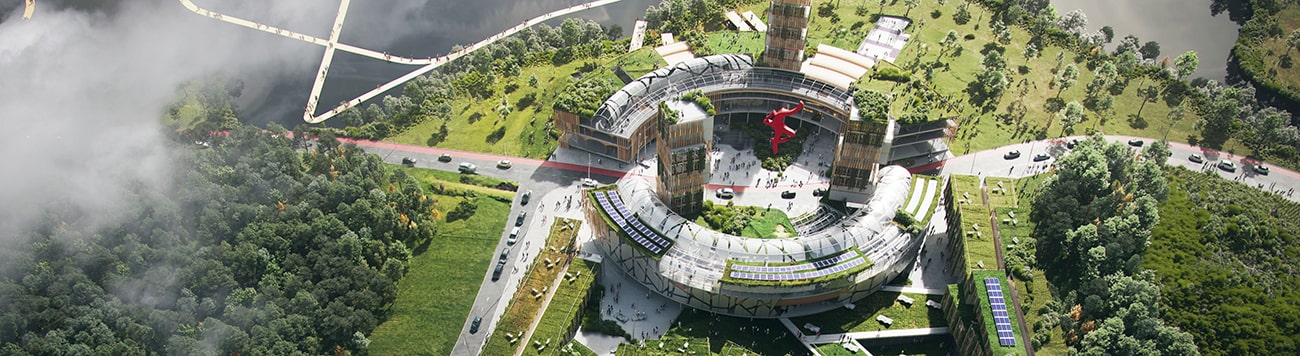
An aerial architectural render from iToo's ForestPack landscaping showcase: the trees, lawns and planting around the building are the kind of scene Forest Pack scatters. This is a finished render, not the plugin's interface.
Features
Scatter by spline, paint, path or map
Forest Pack Pro scatters over any surface, including uneven terrain, inside include and exclude splines, in areas you paint directly on the terrain, along a path, or by a bitmap or particle system. Pro allows unlimited areas and unlimited plant types per Forest object. Clusters and diversity mix species naturally, collision checking keeps objects from overlapping, and every item can get random position, rotation, scale and tint.
Fast viewports and camera-aware scattering
Forest Pack Pro shows huge scatters as a points cloud or proxies in the viewport, and its real-time camera clipping skips items the camera can't see. Version 9.3.5 extended collision checking to every distribution mode and added camera-based logic to Effects, so density and detail can respond to what's actually in shot.
ForestIvy for climbing plants (Pro only)
ForestIvy grows ivy and other climbers that creep up walls and along surfaces, using iToo's multithreaded growth algorithm that's close to real time. It came with ForestPack 9 and isn't in the free Lite edition.
A 430-item library you can extend
Forest Pack Pro's Library Browser holds trees, shrubs, grass, climbing plants, green walls, mulch, gravel, flowers, rocks, leaves, hedges and stumps, with materials for the supported renderers. The Pro library editor lets you add your own models and presets. iToo's paid 3DGarden collections plug into the same browser.

The Library Browser from iToo's documentation, showing grass and daisy presets, the material selector and the merge or XRef import options. The screenshot is from an older version on Windows 7. The current library is larger.
Effects: rules without scripting
Forest Pack's Effects apply short expressions to every scattered item to change its properties by rule, without writing a script. The free Lite edition can only use the built-in effects. Pro also loads, edits, creates and shares your own.
Forest Lister and scene management
The Forest Lister shows every Forest object in the scene in one table, with its models, areas, item count, camera, surfaces, effects and display mode, and lets you change them without hunting through the modifier panel. Version 9.4 added ForestIvy, ForestSet and ForestLOD objects to it.

The Forest Lister from iToo's documentation, with numbered callouts: 11 Forest objects (mowed grass, road, stones, bushes, ivy, trees and more), their item counts from 12 to 34,400, and display modes such as Proxy, Mesh and Points-cloud.
Benefits
- Huge scenes on a normal workstation. Instancing and points-cloud display keep memory and viewport speed under control.
- Art-directable. Splines and paint areas give you exact planting zones, which matters when a landscape architect's plan says where every hedge goes.
- Renderer freedom. The same scene renders in V-Ray, Corona or Arnold, so switching engines doesn't mean rebuilding the vegetation.
- You own it. The license is perpetual and keeps working after the maintenance year ends.
Real-World Uses
- Housing development render: lawns, hedges and street trees placed by the site plan's splines.
- Masterplan flythrough: a whole district's trees with camera clipping so only what's in shot is rendered.
- Facade with green walls: ForestIvy grows climbers up the building.
- Gravel path and ground cover: pebbles, leaves and mulch scattered along a path with collision checking.
- Stadium or plaza: scatter people models as a crowd with random variation.
Who It's For, and Who Should Skip It
Forest Pack Pro fits 3ds Max users in architectural visualization, landscape design, film and game environments who scatter regularly and need control over where things go. If your studio renders exteriors every week, it pays for itself quickly.
Skip it if you don't use 3ds Max: there's no Blender, Cinema 4D, SketchUp or Mac version. Skip the Pro license too if your scatters are simple (a lawn and a few tree types): the free ForestPack Lite allows three plant types and four areas per object and can be used commercially. And if you render only in V-Ray or Corona, compare it with Chaos Scatter, which comes with those renderers.
Usage Guide
- Buy and install: after purchase, iToo emails an authorization code. Download the installer from the My Products section of your ITOOSOFT User Panel and run it with 3ds Max closed.
- Activate: start 3ds Max and enter the authorization code when asked. Network licenses need iToo's License Server on a Windows machine.
- Create a Forest object: from the Create panel or the ITOOSOFT toolbar, add a Forest object and pick the terrain as its surface.
- Define areas: add include and exclude splines, or paint areas on the surface.
- Add plants: open the Library Browser and import presets, or add your own models in the Geometry rollout.
- Refine and render: set density, clusters, collisions and camera clipping, switch the viewport to points cloud for big scatters, and render.
Before you buy
- Test with Lite first. There's no time-limited Pro trial, so install the free Lite edition (an ITOOSOFT account is required) and check it works with your 3ds Max and renderer versions.
- Maintenance is yearly. The first year of updates and priority support is included. After that, the plugin keeps working, but new versions (including support for next year's 3ds Max) need a maintenance renewal. Plan on that cost if you upgrade 3ds Max every year.
- One license per computer. A standalone license is tied to one machine. Studios sharing licenses need the Network license and License Server.
- Render farms: check that your farm has Forest Pack installed before you send a scene, since the plugin must be available on the render nodes.
Where it falls short
- Older 3ds Max versions aren't tested. iToo officially supports only 3ds Max 2023 to 2027 because of Autodesk's licensing policy. Older builds are included but unsupported.
- Not every feature works in every renderer. The 2D billboard library works only in Scanline, Mental Ray and V-Ray, Forest Colour is only partly supported in V-Ray GPU, and Arnold needs Legacy 3ds Max Map support turned on for Forest Color and Forest Edge maps.
- A learning curve. There are many rollouts and options, and getting natural-looking results takes practice with clusters, effects and areas.
- The price adds up for a single artist. $289 plus yearly maintenance is a lot for occasional use, which is when Lite makes more sense.
What Users Say
Forest Pack is a professional plugin, so its reviews live in CG community sites rather than consumer review sites, and the detailed ones are older. They're still useful for what has stayed the same: the workflow, the support and the licensing.
CGPress review by Matt Guetta (Forest Pack Pro 3.5, 2011)
"The interface is clean and efficient, small images are used to help quickly identify the various features available, and most parameters are similar to those used in 3ds Max and other 3d packages."
"Diversity and clusters are surely some of the most useful features in Forest Pack Pro." He added that changes "can be seen in real-time in the viewport, a feature that is not available in some other scattering plugins."
His criticism was about map-based areas: "This feature could be improved: if you'd like to use a map instead of splines to define the area where meshes will be scattered, this could be done through the Distribution panel, but you'd lose the flexibility". Forest Pack has since added painted areas.
Ronen Bekerman's archviz blog and its readers (2011)
Ronen Bekerman, who runs one of the best-known architectural visualization sites: "It is no secret I use this plugin myself and actively promote it too, it just got better and better with each upgrade and is now a very complete scattering tool for 3dsmax that can do more than the chosen name for it suggests."
The studio xoio: "Forest from Itoosoft just rocks. One of our favourite plugins ever, not to forget extremely friendly developers there. Definitely worth spending the money."
Not everyone was convinced. ArLAcH: "I tried Forest Pack but RAM management wasn't very efficient when scattering VRay proxies whereas Multiscatter managed it better so that's why I bought Multiscatter." And PeteRobie found "the high price is prohibitive compared to other similar plugins", until iToo explained in the thread that the license is a one-time purchase and only the maintenance plan is yearly.
A render farm's comparison with Chaos Scatter
Super Renders Farm, which renders both plugins' scenes, compared Forest Pack with Chaos Scatter and concluded that "Both are excellent tools, and the choice depends on your specific production requirements rather than absolute superiority." On the difference: "If you're scattering trees on a landscape with painted regions and exclude zones, Forest Pack's area tools are more intuitive."
The pattern: artists value the control over where things go, the clusters, the fast viewport and iToo's support. The doubts are about price for occasional users and, years ago, memory use with V-Ray proxies, which other users in the same thread said had since improved.
Comparisons
Forest Pack Pro vs Forest Pack Lite
Lite is free, even for commercial work, and has the same scatter engine, clusters, camera clipping, collision checking, animation support, ForestSet, Lister and native Arnold and V-Ray shaders. Pro removes Lite's limits of three plant types and four areas per object and adds scattering over uneven surfaces, ForestIvy, custom effects, the library editor and full library, user presets, creation tools, Forest tools, tint by element and priority support.
Forest Pack Pro vs Chaos Scatter
Chaos Scatter is included with recent versions of V-Ray and Corona and covers surface scattering well. Forest Pack is renderer-independent, its spline and paint areas give finer control for planting plans, and it adds ForestIvy and a large library. If you're a V-Ray or Corona user with simple needs, try Chaos Scatter first.
Editions and Pricing
| Edition |
Price |
License |
Main limits |
| ForestPack Lite | Free | Personal and commercial use | 3 plant types and 4 areas per object, no ForestIvy, sample library only |
| Forest Pack Pro | $289 (excl. VAT) | Perpetual, 1 standalone seat, 1 year of maintenance | None |
iToo's store also sells Network licenses, more seats, a 3-year maintenance option at a discount, and bundles with RailClone Pro. Maintenance renewals are priced per license per year.
FAQs
Does Forest Pack Pro stop working when the maintenance plan expires?
No. Forest Pack Pro keeps working forever after maintenance ends. You just can't download newer versions until you renew, and renewing at any time restores access to the latest version with no penalty.
Does Forest Pack work with 3ds Max 2027?
Yes. Forest Pack added 3ds Max 2027 support in version 9.4.0, released April 1, 2026, which also added Arnold 7.5 support for 3ds Max 2025 and 2026.
Can I use Forest Pack with Blender or Cinema 4D?
No. Forest Pack is a 3ds Max plugin only, and 3ds Max runs only on Windows.
Can I use the free ForestPack Lite for client work?
Yes. iToo allows ForestPack Lite in personal and commercial projects. The library models still can't be redistributed or resold, in Lite or Pro.
Does Forest Pack work with renderers it doesn't list?
Partly. With an unlisted renderer, Forest Pack can't instance natively, but Forest Tools can convert the scatter to standard 3ds Max instances that any renderer can use.
What's the difference between a standalone and a network license?
A Forest Pack standalone license is tied to one computer. A network license puts a pool of licenses on a License Server in your office, and each 3ds Max session takes one while a Forest object is in the scene.
How is Forest Pack Pro delivered?
Forest Pack Pro is download-only. After payment, iToo emails your license and download instructions, and an authorization code activates the software.
System Requirements
- Host: Autodesk 3ds Max 2023, 2024, 2025, 2026 or 2027 (older versions unofficially)
- Operating system: Windows 10 or 11, 64-bit
- Renderers with native support: Arnold 7.2+, V-Ray and V-Ray RT 2 to 6 (V-Ray 4.3 for version 4), Corona 1+, Octane 1.x+, Redshift 2.x+, FStorm, Final Render
- Network licenses: iToo's License Server on any Windows computer
Conclusion
Forest Pack Pro is worth $289 if you build exteriors or environments in 3ds Max regularly: it's the scattering tool most archviz studios standardize on, the spline and paint areas give you exact control, it renders natively in almost every engine, and the license is yours for good. The main reason not to buy it is that you may not need it yet: the free Lite edition handles simple scenes, and V-Ray or Corona users already have Chaos Scatter. Start with Lite, and upgrade when you hit its three-plant, four-area limits or want ForestIvy.
Download Free TrialBuy Now