AdBlocker Ultimate: System-Wide Ad Blocking for Windows, Mac and Android
AdBlocker Ultimate is an ad, tracker and malware blocker that filters your whole device rather than one browser. This listing's $99.99 lifetime Personal license covers 3 devices in any mix of Windows, Mac (Apple Silicon), Android and iOS. It's for people who want ads gone everywhere at once: in every browser, in email and chat apps, and in games, with no browser extensions to keep in sync.
The free AdBlocker Ultimate browser extension already blocks ads in one browser, and it's popular: over a million Firefox users run it daily. The paid apps go further. They sit between your device and the internet, so every program on your PC gets the same filtering, including the ones a browser extension can't reach.
Quick facts
- Windows version: 5.5.6, installer dated October 20, 2026
- Developer: AdAvoid Ltd, Varna, Bulgaria
- Runs on: Windows 11, 10, 8.1, 8 and 7, macOS 13 or later on Apple Silicon Macs, Android 8.0 or later, and iOS (Safari)
- Blocks: ads, trackers, crypto-mining scripts, and known malware and phishing domains, system-wide
- Price: $99.99 at checkout, a one-time lifetime license for 3 devices
- Free trial: 14 days for the Windows, Mac, Android and iOS apps. The browser extensions are free.
- Guarantee: 30-day money-back guarantee
- Download: 15.6 MB Windows installer
What we checked: the Windows installer (AdBlockerInstaller.exe, 15.6 MB), which reports version 5.5.6.0 and is digitally signed by AdAvoid OOD of Varna, Bulgaria, and the price on the order page ($99.99 for a lifetime Personal license covering 3 devices), both on October 27, 2026. We didn't run the app or test how many ads it blocks.
Download Free TrialBuy Now
Overview
AdBlocker Ultimate for Windows installs a network driver that filters all internet traffic on the PC before it reaches any program. It blocks connections to ad servers, checks domains against malware and phishing lists at the DNS level, and uses HTTPS filtering to remove ads from encrypted sites such as YouTube and Facebook. For that last part it installs a locally trusted certificate during setup, the same approach other system-wide blockers use.
The company's selling point is that it has no acceptable-ads program: no advertiser can pay to be let through, and AdAvoid says it isn't sponsored by any advertising company. You decide what's allowed by adding sites or apps to your own exceptions.

The AdBlocker Ultimate for Windows window from the vendor's Microsoft Store listing: "You Are Protected" with the loaded filter rules, Real-Time Protection switches (Ad Blocking, Privacy Protection, Web Protection, Annoyances Blocking, Ghost Mode), Protection History counters and the list of Protected Applications. The text on the left is part of the store image.
Features
Ad blocking in every app, not just the browser
AdBlocker Ultimate for Windows filters all browsers at once (Chrome, Edge, Firefox, Brave and others) plus email clients, media players, games and messaging apps. The Protected Applications list shows which programs it's filtering. If you use two or three browsers, you get the same blocking in all of them with one install.
Tracker, fingerprint and crypto-miner protection
AdBlocker Ultimate blocks tracking scripts and analytics that build a profile of your browsing, tries to disrupt digital fingerprinting, and stops crypto-mining scripts that use your processor without asking. The Windows app also has a Ghost Mode switch, and AdAvoid describes a Privacy Mode with advanced tracking protection.
Malware and phishing domain blocking
AdBlocker Ultimate blocks connections to domains known for malware and phishing, including malicious ads, at the DNS level before a connection opens. It's an extra layer, not an antivirus: AdAvoid says it runs alongside your existing security software.
Per-app control and your own rules
AdBlocker Ultimate lets you exclude individual applications from filtering, which AdAvoid recommends for banking apps and other security-sensitive software that may not work with HTTPS inspection. You can also turn filter lists on and off, add custom rules and keep a list of allowed websites you want to support.
One license for Windows, Mac, Android and iOS
The AdBlocker Ultimate Personal license covers 3 devices in any combination, managed from your online account. The Mac app runs as a macOS Network Extension and filters every app including Safari. The Android app filters all apps through a local VPN tunnel, with no root needed and no traffic sent to outside servers, according to AdAvoid. The iOS app works as a Safari content blocker.
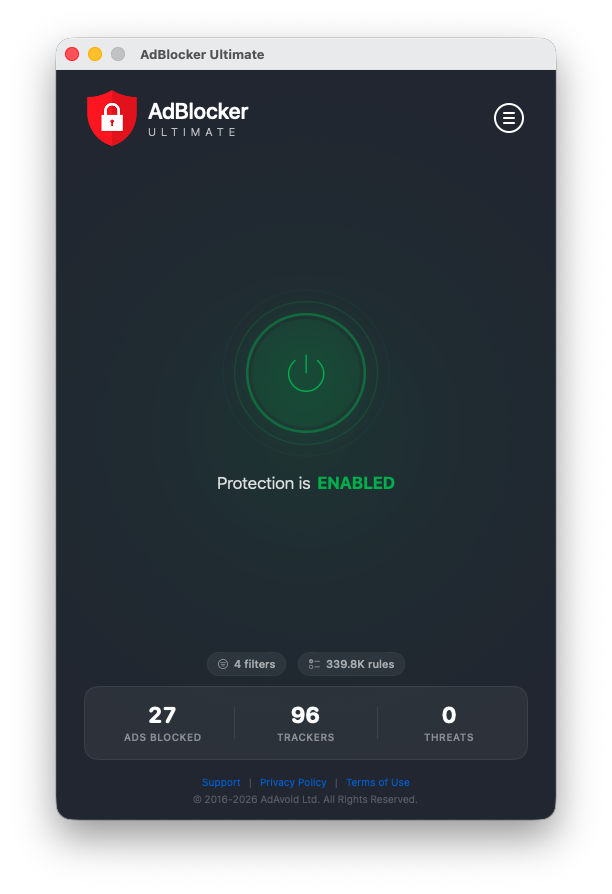
The AdBlocker Ultimate for Mac window: the on/off button with "Protection is ENABLED", 4 filters with 339.8K rules, and counters for ads, trackers and threats blocked.
Benefits
The main benefit is one setting for the whole device. You don't install, update and configure an extension in every browser, and programs that show ads outside a browser get filtered too. On a family PC where everyone uses a different browser, that's the difference between partial and full coverage.
The second is a cleaner, slightly safer connection. Blocking ad and tracker requests cuts the data your PC loads, and the malware-domain lists catch some bad links before anything downloads. AdAvoid also says it lowers CPU use and data traffic, which is plausible when ads never load, though we didn't measure it.
Real-World Uses
- A shared family PC where one person uses Chrome, another Edge and a third Firefox: one install covers all three.
- Free-to-play games and desktop apps that show banner ads in their windows.
- An Android phone where in-app ads are the problem, using the same license as your PC.
- A parent's laptop protected from scam ads and phishing domains without changing how they browse.
Who It's For, and Who Should Skip It
AdBlocker Ultimate fits people who use several browsers or apps that show ads, households that want one license across a Windows PC, an Apple Silicon Mac and an Android phone, and anyone who prefers a one-time price over a yearly fee.
Skip the paid app if you only browse in one or two browsers: the free AdBlocker Ultimate extension (or another free extension) already blocks ads there, and independent testers say that's enough for most people. Skip it if you have an Intel Mac, since the Mac app needs Apple Silicon and macOS 13. And skip system-wide HTTPS filtering if you're not comfortable with a program inspecting your encrypted traffic or you're on a work PC whose IT department forbids extra root certificates.
Usage Guide
- Install and launch. Download the 15.6 MB Windows installer, run it, and allow the network driver and certificate it installs. The 14-day trial starts right away.
- Check the main window. "You Are Protected" means filtering is on. The switches turn ad blocking, privacy protection, web protection, annoyance blocking and Ghost Mode on or off.
- Review Protected Applications. Exclude any app that misbehaves, especially banking software.
- Add exceptions for websites you want to support, and add custom rules if something slips through.
- Activate. After buying, enter the license code from your email. Your license keys are also in your account, registered to the email address you used for the purchase.
- Add your other devices from the vendor's site: the Mac app, the Android APK or the iOS app, up to 3 devices in total.
Before you buy
- Use the 14-day trial on the device you care about most, and check your own sites and apps, not just a test page.
- Lifetime vs yearly: the yearly Personal plan is $59.99 a year ($39.99 during the vendor's Halloween sale). At $99.99, the lifetime license pays for itself in under two years at the regular yearly price.
- The Android app isn't on Google Play. Google doesn't allow system-wide ad blockers there, so you install the APK from AdAvoid's site.
- Mac users need Apple Silicon and macOS 13 or later.
Where it falls short
- Some ads and trackers get through. Adblock Tester scored AdBlocker Ultimate 92 out of 100: it missed Yandex.Metrica analytics and the Sentry and Bugsnag error-monitoring scripts. Firefox reviewers report YouTube, Yahoo Mail and NextDoor ads that come back after a while.
- HTTPS filtering can break things. Banking apps and other security-sensitive software may not work with it, which is why per-app exclusions exist. One Trustpilot reviewer couldn't get onto AOL or Lowe's with it running.
- Few independent tests of the paid apps. Most reviews are about the free extension, so the system-wide apps have much less public feedback.
- Support is by email or web form only, with no live chat or phone. Adblock Tester got a reply within 24 hours and found the help center thin.
- The free extension nags. A Firefox reviewer complains it "pops up all the time to ask me to pay for it".
What Users Say
Firefox Add-ons: 4.8 out of 5 from 27,258 ratings (free extension)
These reviews are of the free browser extension, which uses the same filtering approach as the paid apps but only inside Firefox.
Nathan (5 stars, June 2026): "Best ad blocker I've used (I've used alot). It works on youtube, twitch, and almost every site I've used it on. Every once in awhile youtube sneaks an ad in, I hit refresh, and it's gone. 10/10 would recommend"
xray1324 (5 stars, May 2026): "Does a very good job at blocking ads though I have it in conjunction with uBlock Origin so they both simultaneously are hitting all the ads - though adblocker ultimate has a feature that uBlock Origin doesn't have -- You can block elements of a site, say if they have inbuilt ads that are from that site, you can block those ads - and each time you go to that site, those ads will be automatically blocked."
Firefox user 14506594 (5 stars, September 2026): "Absolutely reliable and very simple to use. Single exceptions are easy to configure. Does its job unnoticeably in the background."
eevie54935 (3 stars, March 2026): "It used to work great and blocked all ads. However, now I'm seeing ads on a lot of sites such as Yahoo email and news. It will block it again if I tell it to but once I click on an email or article the ads return."
TexTom101 (1 star, October 2026): "Misses too many ads that Brave simply blocks by default. NextDoor ads get through, YouTube ads annoy me endlessly."
Trustpilot: 4.6 out of 5 from 4,914 reviews
About 90% of AdBlocker Ultimate's Trustpilot reviews are 5 stars and 2% are 1 star. Most are short and don't say which product they're about.
Leandro Ribeiro Silveira (5 stars, October 2026): "no ads seen, didn't notice the extension working, perfect"
tituspintus (4 stars, October 2026): "Until now - I have istalled it a few days before -it works reliably"
Bida Cai (1 star, October 2026): "it actually blocks nothing and some websites are free only with ads"
Greg H (1 star, October 2026): "Can't get AOL. Can't get on Lowes." The company replied asking for browser and device details by email.
These Trustpilot excerpts were read through a summarizer, so treat the wording as close but not guaranteed exact.
Adblock Tester: 92 out of 100
Adblock Tester, a site that runs ad blockers through a standard set of ad and tracker tests, reviewed AdBlocker Ultimate and updated the review in October 2026. Parts of it are out of date: it says there's no macOS app, which AdAvoid now sells, and it quotes older yearly prices.
Its pros: "Blocks malicious sites", "Has a user-friendly interface", "Free and open-source" and "Cross-platform compatibility". Its cons: "Paid version not worth it", "Fails to block some background tracking and monitoring" and "Customer support is limiting".
On the paid version: "The paid version? Eh. Try the free trial and see if it works for you. But honestly, unless you need the desktop app for a specific reason, the free version is enough."
The recurring themes: people like that it's simple, quiet and blocks most ads without setup, and the element blocker gets specific praise. The complaints are about YouTube and webmail ads that creep back, sites that break, and occasional nagging to upgrade. Independent testers rate the blocking well but question whether the paid app adds enough over the free extension, so the deciding question is whether you need ads blocked outside your browser.
Comparisons
Paid app vs the free AdBlocker Ultimate extension
Both block ads, trackers and malware domains in the browser, including YouTube video ads. Only the paid app blocks ads in all applications, works in all browsers at once, filters email clients and games, lets you exclude individual apps, and includes premium support. If everything you do is in one browser, the free extension covers you.
AdBlocker Ultimate vs uBlock Origin
uBlock Origin is a free, highly customizable browser extension favored by technical users, but it works only inside the browser. AdBlocker Ultimate's paid app is the choice when you want system-wide filtering with a simpler interface. Some Firefox users run both extensions together.
Editions and Pricing
| Plan |
Price |
Devices |
Term |
| Personal Lifetime (this listing's Buy Now) |
$99.99 once |
3 |
Lifetime |
| Personal Yearly (vendor's store) |
$59.99 a year ($39.99 on sale) |
3 |
Renews yearly, cancel anytime |
| Family plans (vendor's store) |
Yearly or lifetime |
10 |
Yearly or lifetime |
| Browser extension |
Free |
Any |
Browser only |
FAQs
Can I use one AdBlocker Ultimate license on my PC and my phone?
Yes. The AdBlocker Ultimate Personal license covers 3 devices in any combination of Windows, Mac, Android and iOS. Each activation uses one slot, and you can see and name your devices in your account.
Does AdBlocker Ultimate block YouTube ads?
Yes, AdBlocker Ultimate blocks YouTube video ads in both the app and the free extension. Users say an ad occasionally slips through after YouTube changes something, and a page refresh or a filter update usually clears it.
Is it safe that AdBlocker Ultimate installs a certificate?
AdBlocker Ultimate's certificate lets it inspect encrypted HTTPS traffic locally so it can remove ads from secure sites, and AdAvoid says the filtering happens on your device. It's a common technique for system-wide blockers, but it means trusting AdAvoid with that access. Exclude banking apps if they don't work with it.
Does AdBlocker Ultimate work with my antivirus or VPN?
AdAvoid says AdBlocker Ultimate works alongside major antivirus software and most consumer VPNs. Corporate or split-tunnel VPN setups may need per-app rules.
Why isn't AdBlocker Ultimate for Android on Google Play?
Google Play doesn't allow apps that block ads across other apps, so AdAvoid distributes the system-wide AdBlocker Ultimate Android app as a signed APK from its own site. Its separate AdBlocker Browser for Android, which only blocks ads inside itself, is a different product.
Does AdBlocker Ultimate run on an Intel Mac?
No. AdBlocker Ultimate for Mac requires an Apple Silicon Mac with macOS 13 or later. On an Intel Mac, use the free browser extension instead.
Can I get a refund on AdBlocker Ultimate?
Yes. AdBlocker Ultimate has a 30-day money-back policy: if you're not satisfied with how it performs within 30 days, AdAvoid refunds the full amount of your order.
Do websites let advertisers pay to get past AdBlocker Ultimate?
No. AdBlocker Ultimate has no acceptable-ads whitelist, and AdAvoid says it will never allow ads in exchange for payment. Only the sites and apps you add to your own exceptions get through.
System Requirements
- Windows: Windows 11, 10, 8.1, 8 or 7, 512 MB RAM, 50 MB disk space, and an internet connection for filter and security updates
- Mac: macOS 13 or later on Apple Silicon, 512 MB RAM, 200 MB disk space, and one-time approval of the Network Extension and root certificate
- Android: Android 8.0 or later, installed from the vendor's APK, no root needed
- iOS: Safari on iPhone and iPad
Conclusion
AdBlocker Ultimate's lifetime license is worth $99.99 if you want ads and trackers blocked across a whole PC, Mac or Android phone, in every browser and app, for up to 3 devices and without a yearly bill. The one reason to buy it is that system-wide coverage, which a browser extension can't give you. The main reason not to is that, for browsing in one browser, the free AdBlocker Ultimate extension does most of the same job. Start the 14-day trial on your busiest device, check the sites and apps you actually use, and buy only if you notice the difference.
Download Free TrialBuy Now