Backuptrans Android iPhone WhatsApp Transfer + for Mac: Move Your Chats on a Mac
You're switching from an Android phone to an iPhone, or the other way round, and WhatsApp is the one app that refuses to come along. Its Google Drive backups only restore to Android. Its iCloud backups only restore to iPhone. Years of family chats, voice notes and photos are stuck on the old phone. If your computer is a Mac, most of the tools people recommend for this are Windows-only.
Backuptrans Android iPhone WhatsApp Transfer + for Mac is the Mac edition of Backuptrans's all-in-one WhatsApp manager. Plug both phones into your Mac, pick the chats, click Transfer, and the messages move across and merge with what's already on the new phone. The same program backs your chats up to the Mac, restores them later, exports them as documents, prints them and saves every attachment to a folder. No root or jailbreak is needed.
Quick facts
- Version: 3.2.184 (25.6 MB download)
- Developer: Backuptrans
- Runs on: macOS X 10.7 through macOS 12 Monterey (a Windows version is sold separately)
- Phones: iPhones and Android phones from Samsung, HTC, Motorola, Sony Ericsson, LG, Huawei and more
- Price: $34.95 USD for the Personal Edition (up to 3 phones, 1 Mac, lifetime license)
- Trial: free trial version, turned into the full version by entering a license code
- Root or jailbreak: not required
- Guarantee: 30-day money-back guarantee
Before you buy: check your Mac and your phones
Three things to know up front. First, Backuptrans lists macOS 12 Monterey as the newest macOS it supports, so if your Mac runs Ventura or anything later, you're outside what the vendor promises. Second, the newest phone systems in its update notes are iOS 16 and Android 12. Third, Backuptrans has a 1.9 out of 5 rating on Trustpilot from over 100 reviews, and a recent reviewer reported the software didn't work with Android 16. Run the free trial with your own Mac and both phones and make sure it can read your chats before you pay. If it doesn't work out, the 30-day money-back guarantee applies.
Overview
The program treats your Mac as the hub for all your WhatsApp history. Every phone you connect appears in a Devices list on the left, along with any Local Databases you've saved. Pick a phone and you see its message list. Pick a contact and the conversation appears on the right as chat bubbles, with photos and voice messages inline, much as it looks on the phone.
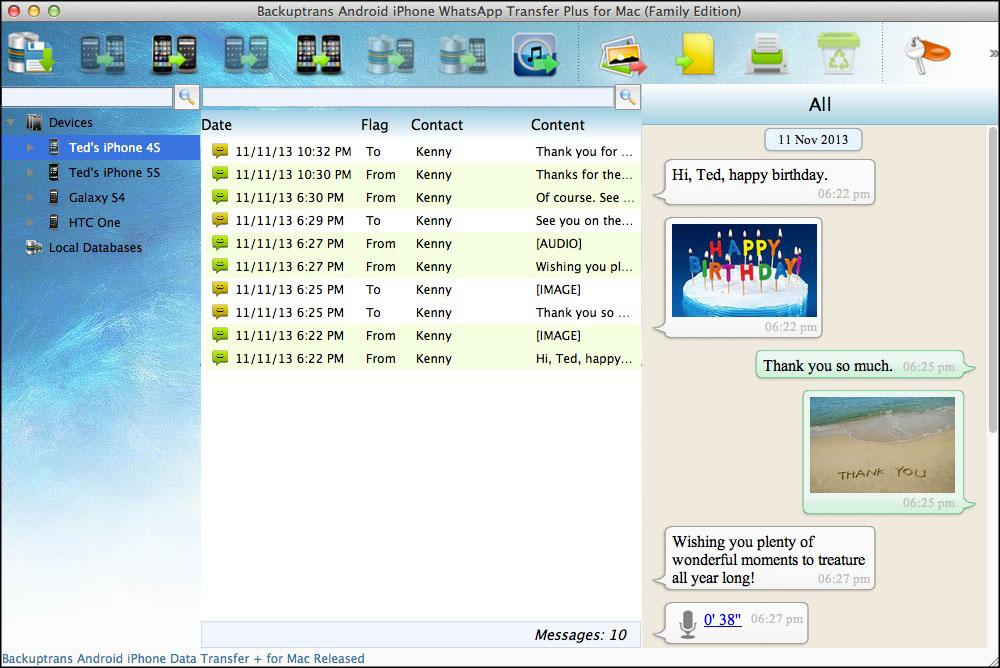
The main window (Family Edition title bar): two iPhones and two Android phones under Devices, a dated message list in the middle, and the conversation with photos and a voice message on the right.
The "+" means this is the all-in-one edition. Backuptrans also sells single-direction Mac tools, such as Android WhatsApp to iPhone only. This one covers every direction plus backup, restore, export and printing in one app.
Features
Transfer chats between Android and iPhone in either direction
Connect both phones to the Mac with USB cables and use the toolbar or the right-click menu: Transfer Messages from iPhone to Android or from Android to iPhone. You can move every chat at once or just one contact's conversation. Messages and their attachments are merged with whatever is already on the target phone rather than replacing it. Android to Android and iPhone to iPhone work too.
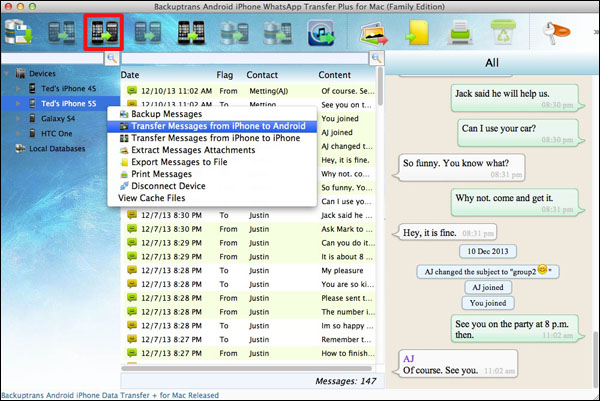
Right-clicking a connected iPhone: Backup Messages, Transfer Messages from iPhone to Android or to another iPhone, Extract Messages Attachments, Export Messages to File and Print Messages.
Back up WhatsApp to your Mac
Copy your whole WhatsApp history, attachments included, from any connected phone to the Mac. Chats are saved by conversation in a local database that shows up in the sidebar, independent of Google Drive, iCloud and their storage limits.
Restore chats from the Mac to any phone
Put a saved backup back onto an Android phone or an iPhone, attachments and all. It doesn't have to be the phone the backup came from, which is what you need after a phone is lost, broken or replaced.
Recover WhatsApp from an old iTunes backup
If you once backed up an iPhone with iTunes on your Mac, Backuptrans can read the WhatsApp messages inside that backup and copy them to a new iPhone or an Android phone, even when the old iPhone is long gone.
Export chats as TXT, CSV, Word, HTML or PDF
Turn conversations into ordinary documents. Export everything, or only the chats with one contact. A PDF is easy to archive. A CSV opens in Numbers or Excel for searching and sorting.
Print conversations in threaded form
Print WhatsApp chats so the printout reads like the conversation on the phone. Print all of them or one contact's messages. A printer needs to be connected to the Mac.
Pull every photo, video and voice note onto the Mac
Click Extract Attachment and the program saves all the pictures, videos and audio files from your WhatsApp chats into a folder. No more scrolling through chats saving pictures one at a time.
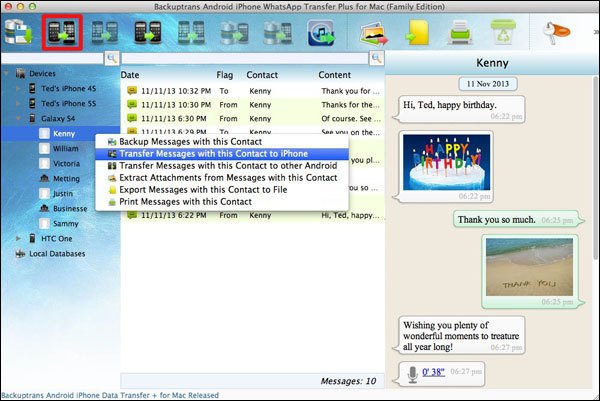
Working with a single contact on a Galaxy S4: transfer that contact's chat to an iPhone or another Android, extract its attachments, export it to a file or print it.
Benefits
A Mac-native answer to a cross-platform problem
You don't need to borrow a Windows PC to move your chats. Everything happens on the Mac you already own.
A backup you control
Your chat history sits on your own disk, so it survives a change of phone, platform or cloud account.
Chats in a form you can file
Documents and printouts turn conversations into records you can keep, search or hand to someone else.
One purchase for every direction
Android to iPhone now, iPhone to Android later: the same license handles both, with no second tool to buy.
Real-World Uses
Leaving Android for an iPhone
Your Huawei's chats are backed up to Google Drive, which the iPhone can't read. Connect both phones to your MacBook, transfer the chats, and open WhatsApp on the iPhone to find your conversations in place.
Keeping evidence of an agreement
Messages with a landlord or contractor matter. Export that single contact's chat as a PDF, file it with your paperwork, and print it if someone wants a paper copy.
Rescuing chats after a lost iPhone
The phone is gone, but there's an old iTunes backup on the iMac. Pull the WhatsApp messages out of it and restore them onto your replacement phone, whichever platform it runs.
A household of mixed phones
The Family Edition covers up to 8 phones on 2 Macs, so one purchase handles backups and phone changes for everyone at home.
Who it's for
- Mac owners switching between Android and iPhone who want to keep their WhatsApp history
- People who want a local copy of their chats, not only a cloud one
- Anyone who needs chat records as documents or printouts
- Owners of older Macs, since support stops at macOS 12 Monterey
Usage Guide
- Install and launch the app on your Mac. If you'll connect an iPhone, make sure iTunes is installed, and on Android turn on USB debugging.
- Start the trial or register. When the registration window appears, click Later to use the trial, or enter your license code to turn it into the full version.
- Connect your phones with USB cables. If your Android phone asks to back up data, tap Back up my data without entering a password, then click OK on the Mac.
- Browse your chats. The app reads WhatsApp from each phone and lists them under Devices.
- Pick an action from the toolbar, the File menu or a right-click: transfer all chats or one contact, back up, restore, export, print or extract attachments.
- Choose the target phone and click Confirm. Before transferring to Android, install and verify WhatsApp on it first. Before transferring to an iPhone, close WhatsApp on the iPhone.
- Check the result on the new phone before you reset or give away the old one.
Tip: if chats don't show up on Android
Backuptrans's own guide says that if transferred messages don't appear in WhatsApp on Android, go to Settings, Apps, WhatsApp and clear its cache and app data, then open WhatsApp again and wait a few seconds for the chats to load. Back up the old phone to your Mac first, so you always have a full copy if anything goes wrong.
What Users Say
These Trustpilot reviews are about Backuptrans's WhatsApp transfer software in general. None of them says whether the reviewer used the Mac or the Windows version. Backuptrans's overall Trustpilot rating is 1.9 out of 5, with many of the low scores about newer phones and slow support.
"Amazing Software" (5 out of 5)
"Amazing Software! I was able to transfer all my WhatsApp data from an Android Huawei Mate 10 Pro to my new IPhone 13! Before I purchased the Software I tried everything but neither WhatsApp nor IPhone offer a Tool to transfer the data. Would immediately buy the Software again, worth every penny!"
Clara Willand, Germany (Trustpilot)
"Great experience" (5 out of 5)
"Great service - got a refund after accidentally purchasing the wrong version. Product worked very well - I quickly transferred the Whatsapp data successfully from android to iPhone."
Sven, Germany (Trustpilot)
"Didn't work, but they returned the money" (4 out of 5)
"It was a ChatGPT recommendation. Unfortunately it was a bad one because the software doesn't work with Android 16 at the moment. Customer support replied super quick & also returned the money super quick."
carlos helder, Cyprus (Trustpilot)
Comparisons
vs. WhatsApp's own backups
Google Drive backups restore only to Android and iCloud backups only to iPhone. Backuptrans works across both platforms at any time and keeps a copy on your Mac that you can export and print.
vs. WhatsApp's Export Chat
Export Chat sends one conversation at a time as a file that can't be put back into WhatsApp. Backuptrans handles all your chats at once and restores them as real WhatsApp conversations.
Mac vs. Windows version
The features are the same. The Windows version is a separate purchase at a slightly lower price and supports current Windows releases, so if you have both kinds of computer and a newer Mac, the Windows version is the safer choice.
Editions and Pricing
- Personal Edition: $34.95 USD. Lifetime license, up to 3 phones, installs on 1 Mac.
- Family Edition: $54.95 USD. Lifetime license, up to 8 phones, installs on 2 family Macs.
- Business Edition: $174.95 USD. One-year license, unlimited phones, installs on 5 company Macs.
All editions have the same features and include free email support and lifetime free updates. Your license code arrives by email within minutes. The cart adds an optional Registration Backup Service ($3.95) that's selected by default and lets you retrieve a lost license key. Untick it if you'd rather keep the email yourself.
FAQs
Will it run on macOS Ventura, Sonoma or later?
Backuptrans lists macOS X 10.7 through macOS 12 Monterey. Newer macOS versions aren't on its list, so test the trial on your Mac before buying.
Do I need to root my Android or jailbreak my iPhone?
No. You do need USB debugging turned on for Android.
Will transferred chats wipe what's on my new phone?
No. They're merged with the messages already there.
What does the trial do?
Click Later at the registration window to use the trial version. Backuptrans doesn't publish exactly what the trial leaves out. Entering a license code turns the same install into the full version, so you don't reinstall.
Does it handle WhatsApp Business?
This program is for regular WhatsApp. Backuptrans sells a separate tool for WhatsApp Business chats.
Can I install it on more than one Mac?
The Personal Edition installs on 1 Mac. Family covers 2 Macs and Business covers 5.
What if it doesn't work with my phones?
Backuptrans offers a 30-day money-back guarantee on all its products, subject to its refund conditions. Reviewers report mixed experiences getting refunds, so try the trial first.
How fast is support?
Backuptrans offers email support and says it answers within one business day. Trial users can email too.
System Requirements
- Operating system: macOS X 10.7 through macOS 12 Monterey
- Processor: 64-bit kernel processor
- Memory: 2 GB RAM or more
- Disk space: 200 MB free for installation
- For iPhones: iTunes 10.0 or above (newer iOS versions need newer iTunes, up to 12.10 for iOS 10 through 14)
- Connection: USB cables for your phones
- Printing: a printer connected to the Mac
Conclusion
Backuptrans Android iPhone WhatsApp Transfer + for Mac does something WhatsApp itself won't: it moves your chat history between Android and iPhone using a Mac, and keeps a copy you can export, print and mine for photos. The catch is age. Its published support ends at macOS Monterey, iOS 16 and Android 12, and its Trustpilot rating is low. If your Mac and phones fall inside those limits, the trial will tell you quickly whether it works for you. If they don't, treat it as a gamble.