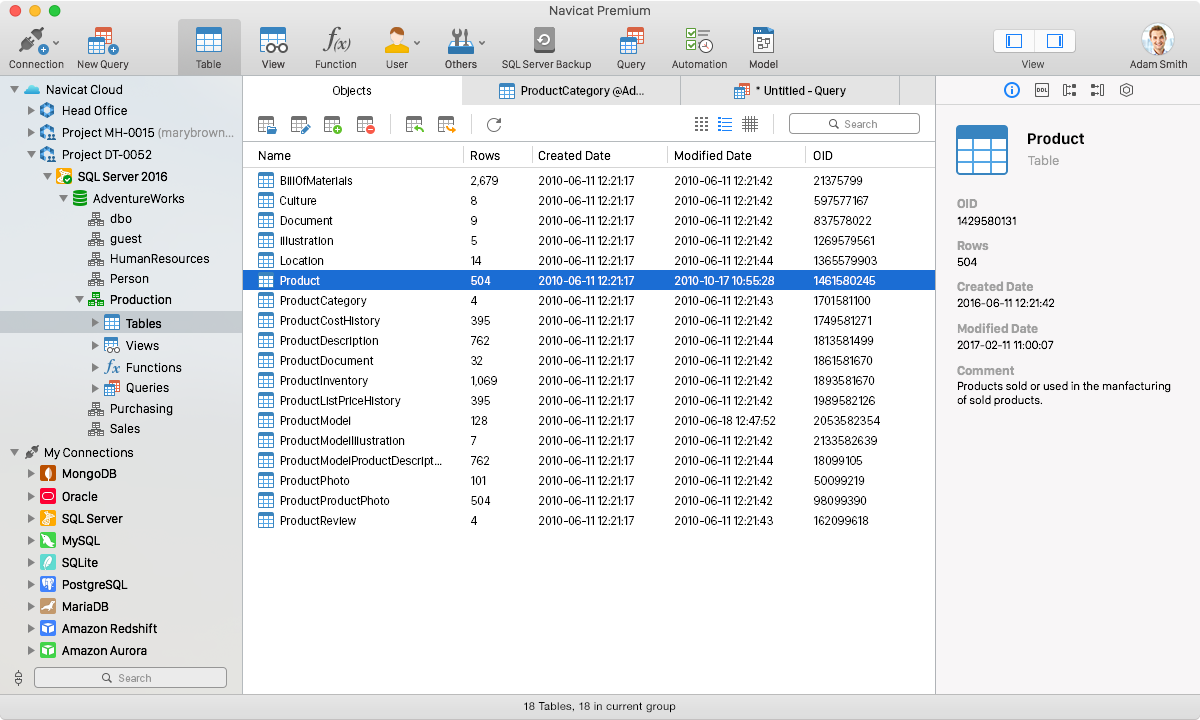
You have a MySQL database for the app, a PostgreSQL one for reporting, and an Oracle or SQL Server instance someone else set up years ago. Each one has its own client, its own habits, and its own way of exporting data. Navicat Premium puts them all in one window, so you stop switching tools to move a table from one engine to another.
Quick facts
- Product: Navicat Premium, a database administration and development tool
- Databases: MySQL, MariaDB, SQL Server, Oracle, PostgreSQL and SQLite. The vendor's current Navicat Premium page also lists MongoDB, Redis and Snowflake.
- Platforms: Windows, macOS and Linux across the vendor's current releases
- Trial: the vendor offers a trial download
Key features
Connect to several database types from one application
You can connect to MySQL, MariaDB, SQL Server, Oracle, PostgreSQL and SQLite at the same time. Connection Coloring puts a colored indicator on each sub-window tab, so you can tell a production connection from a test one. Virtual Grouping lets you sort connections and objects into groups.
Move data between different databases
Navicat's data transfer tools let you move data from one database engine to another. The Import and Export Wizard handles files, and Data Synchronization keeps two databases matched.
Design tables and other objects without writing complex SQL
The Object Designer covers tables, views, functions and procedures, indexes, triggers and sequences. You can see what you're editing without hand-writing every statement. An ER Diagram shows the schema graphically, including the relationships between tables.
Build queries and reports with visual tools
The Query Builder helps you assemble queries visually. The Report Builder turns query results into reports. The Job Scheduler and Backup tools let you automate recurring work.
Reach remote servers securely
SSH Tunneling gives you secure sessions with a password or a public/private key pair. HTTP Tunneling helps when an ISP blocks direct connections to a database server. Navicat Cloud syncs connection settings and queries, so they follow you between machines.
Edit records in a grid
The grid view lets you add, modify and delete records. You can sort and hide data groups, and use editors for memos, hex data and images.
Who it's for
It suits developers and database administrators who work with more than one database engine and want one interface for design, queries, transfers and backups. If you only ever use one database and rarely move data, a single-engine client may be enough.
Pros and cons
Pros
- One application covers six common database engines.
- Visual designers and a query builder reduce hand-written SQL.
- Cross-database transfer and synchronization are built in.
- SSH and HTTP tunneling cover restricted network setups.
Cons
- It is a paid, commercial tool, and the vendor also offers a free Lite edition.
- The vendor's current releases are newer than version 16, and its latest system support starts at macOS 14.
- It has a wide feature set, so you will need some time to learn it.
FAQs
Which databases does it connect to?
MySQL, MariaDB, SQL Server, Oracle, PostgreSQL and SQLite. The vendor's current version adds MongoDB, Redis and Snowflake.
Can I move data from one database type to another?
Yes. Data transfer and the import and export tools are meant for moving data between different databases.
Can I connect through SSH?
Yes. SSH Tunneling supports password or public/private key authentication.
Does it run on a Mac?
Yes. Navicat Premium is available for Windows, macOS and Linux. The Mac build tied to this older version targets macOS releases from Mojave to Monterey.
System requirements
This listing's older Mac build supports macOS 10.14 Mojave, 10.15 Catalina, 11 Big Sur and 12 Monterey. The vendor's current release lists Windows 8 through Windows 11, Windows Server 2012 through 2025, recent macOS versions from Sonoma, and Linux through Flatpak or AppImage.