A USB drive that won't format the normal way
You plug in a flash drive and Windows refuses to format it. Or it only offers FAT32 up to 32 GB. Or you suspect something nasty is living on it. USB Disk Storage Format Tool is a small utility from Authorsoft built for these situations. It lets you format almost any USB flash drive as FAT, FAT32, exFAT or NTFS.
Quick facts
- Version: 6.1
- Platforms: Windows 11, 10, 8.1, 8, 7, Vista, XP, and Windows Server 2022/2019/2016/2012/2008/2003
- Price: Free (100% freeware)
- Download size: about 550 KB
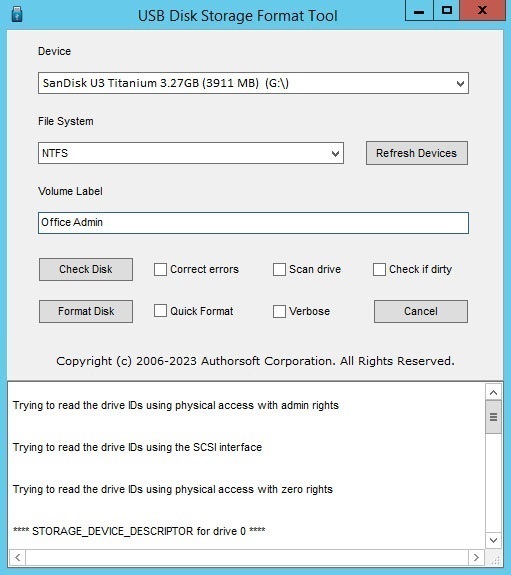
Key features
Quick format or safe format, your choice
Use quick format when you just need an empty drive fast. Use safe format when you want the data thoroughly erased.
Four file systems, including FAT32 above 32 GB
Pick FAT, FAT32, exFAT or NTFS. The tool can also create a FAT32 volume larger than 32 GB.
Clear out stubborn data and leftover malware traces
It can erase data and delete space on flash drives that can't be cleared the traditional way. It can also remove any tracks of malicious software that may have infected the drive.
Check and repair before you format
You can scan the drive for errors first, correct partition errors, and set a volume label.
Tested on many brands and card types
The vendor says it has been tested with thousands of drives: Compact Flash, CF Card II, Memory Stick Duo Pro, SDHC, SDXC, thumb drives and pen drives. Brands include SanDisk, Kingston, Transcend, Corsair, HP, Sony, Lexar, Imation, Toshiba, PNY, ADATA, Verbatim, LaCie, Silicon Power and IronKey.
Who it's for
It suits anyone who regularly reuses flash drives and SD cards. That includes people whose drive shows partition errors, people who want to wipe a drive before handing it over, and people who need a large FAT32 volume for a device that won't accept exFAT or NTFS.
Pros and cons
Pros
- Free, with no cost for any use
- Tiny download of about 550 KB
- Handles FAT, FAT32, exFAT and NTFS
- Supports old and new Windows versions, from XP to 11
Cons
- Windows only
- It's a single-purpose formatter, so don't expect partition management or disk imaging
FAQs
Is it really free?
Yes. The vendor describes it as 100% freeware, free for everyone.
Can it make a FAT32 volume bigger than 32 GB?
Yes. That is one of its listed features.
Does it work on Windows 11?
Yes. Windows 11 is on the vendor's supported list, along with Windows 10 and older versions.
Can it fix partition errors?
It can correct partition errors, and it can scan the drive for errors before formatting.
System requirements
Windows 11, 10, 8.1, 8, 7, Vista or XP, or Windows Server 2022, 2019, 2016, 2012, 2008 or 2003. The installer is about 550 KB.