Your RAID has stopped mounting. You've lost track of the drive order, nobody wrote down the block size, and every guess you make risks writing to disks that hold the only copy of your files. RAID Reconstructor is built for this situation. It works out the array's parameters for you and rebuilds the array as a copy somewhere else, so your original drives are never written to.
Quick facts
- Version: 5.17
- Platforms: Windows Vista, 7, 8, 10, 11, and Server 2008-2022, 32 or 64 bit
- Price: $99, with free lifetime updates for licensed users
- Memory: 4 GB RAM
- Hardware: a disk controller card that can handle every RAID drive individually
Key features
Finds the RAID parameters you no longer know
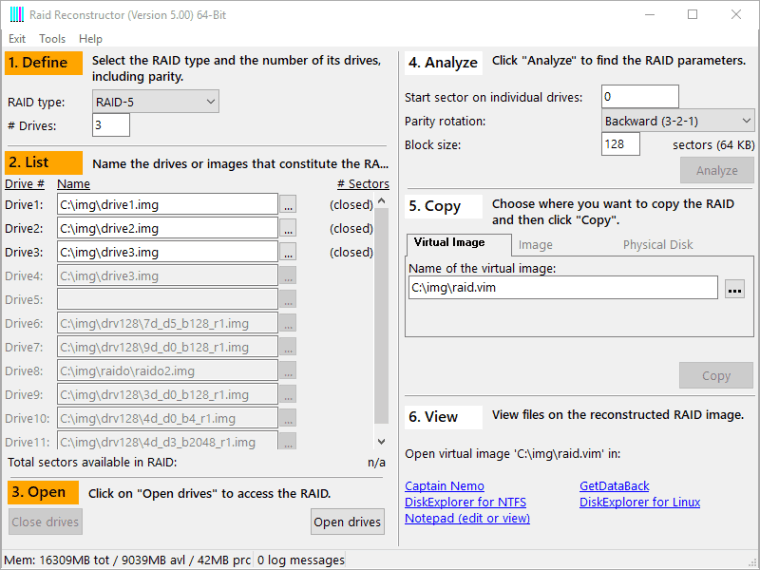
Many tools need you to enter the parameters up front. RAID Reconstructor is both a de-striper and an analyzer. It looks for the start sector, drive order, block size and direction of rotation by itself.
Rebuilds RAID-5 even with a drive missing
It handles RAID-5 arrays of 3 to 16 drives and RAID-0 arrays of 2 to 16 drives. RAID-5 arrays are allowed to have one drive missing, because the program recalculates the original data from the remaining drives. A RAID-0 array needs all of its drives.
Read-only, so your originals stay untouched
The program does not try to "fix" your RAID. It reads sector by sector from each drive and writes them in the correct order to a different destination. That destination can be a virtual image (.vim), an image file (.img) or a physical drive.
Try-and-error cycles that take seconds
Virtual images let you test a parameter guess in a few seconds instead of copying terabytes each time. That makes it practical to check several candidate layouts.
Analysis tools for hard cases
The toolbox includes images of individual drives, an entropy report that shows where the densest data sits, an MFT report, a file system report, and graphical views of XOR status.
Hardware, software and Dynamic Disk RAIDs
It recovers both hardware and software RAIDs, including broken Windows Dynamic Disk sets. It runs as a native 64-bit application on 64-bit Windows. You can also run it from the Runtime Live CD or a WinPE boot medium when the PC itself won't start Windows.
Who it's for
It suits IT staff, repair shops and home users with a failed RAID-0 or RAID-5 array whose settings are unknown or whose controller is dead. It does not suit RAID levels other than 0 and 5. For a broken NAS, the vendor points to its separate NAS data recovery product. For a broken Windows RAID, it points to a separate RAID Recovery for Windows product.
Pros and cons
Pros
- Detects the array parameters automatically
- Read-only, so your original drives are not altered
- Works with one missing drive in RAID-5
- Free lifetime updates for licensed users
Cons
- It only covers RAID-0 and RAID-5
- It is Windows-only
- It creates an image or copy, so you need spare disk space. Pulling files out of that image takes a second tool, Captain Nemo or GetDataBack Pro.
- Each drive must connect individually, which means a suitable disk controller
FAQs
Will it change my original drives?
No. It is read-only and only writes to the destination you choose.
What if I don't know the drive order or block size?
The analyzer works these out, along with the start sector and rotation direction.
How many drives does it support?
RAID-5 with 3 to 16 drives, and RAID-0 with 2 to 16 drives.
How do I get my files after rebuilding?
Mount the resulting image with Captain Nemo, or process it further with GetDataBack Pro.
Do I pay for updates?
Licensed users get free lifetime updates.
System requirements
- 4 GB RAM
- Windows Vista, 7, 8, 10, 11, Server 2008-2022, 32 or 64 bit
- A disk controller card capable of handling all RAID drives individually