Share a batch script without handing over your source
You wrote a batch file that does real work. The trouble is that anyone you send it to can open it in Notepad, read it, change it, or break it. Advanced BAT to EXE Converter turns that script into a native Windows .EXE and encrypts the code inside.
Quick facts
- Latest version: 4.70
- Platforms: compiled EXE files target Windows versions from Win98 to Win11
- Price: free to use on one PC with no limitations. The Pro upgrade adds a Distributor License. Pro is a one-time purchase with lifetime free updates, and one license covers up to 5 PCs.
- Extra: an Anti-Piracy Edition of Pro is sold separately
Key features
Encrypted source that people can't read or edit
Once compiled, users of your EXE cannot view or change your code. The result is a real Windows program. It needs no .DLL files and no .NET framework, and it can be digitally signed.
Invisible mode for silent runs
You can launch the batch file with no console window showing. The LaunchSilent command starts other programs invisibly. The HideWindow command hides programs that are already open.
Extended commands that plain batch files lack
The Advanced Commands include decimal math. The built-in set /a handles integers only. Example batch files show how to use the commands.
Mouse buttons and graphics in a console script
You can add clickable mouse buttons and graphics to your scripts. A Graphical Enhancement Wizard lets you create animation code by point and click.
Embed extra files for installer-style packages
You can embed and encrypt images, sounds and other .exe files inside your EXE. This is useful for building simple installation packages.
Professional EXE properties
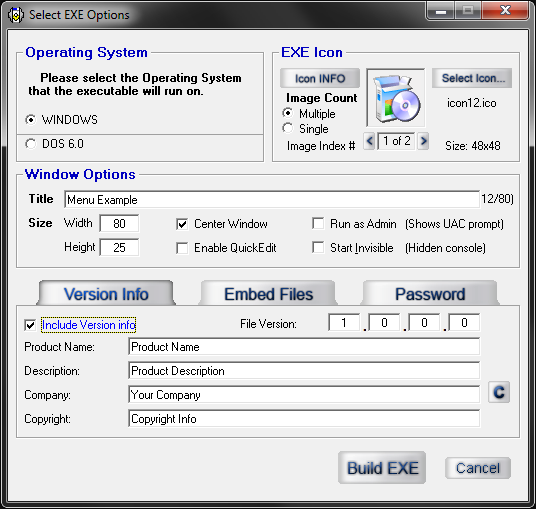
You can set a custom icon, product version and company information. You can also add an admin manifest and set the starting window title and size. You can disable the Windows 10+ QuickEdit text selection feature too.
Same behavior as the original script
The compiled EXE handles command line arguments and environment variables the way the original batch file does. Pro uses Intelli-Parse technology to adjust your code in memory so it runs as it did before compiling. An MSDOS compile option is also included.
Who it's for
It suits system administrators and anyone who distributes batch utilities to other people or other PCs. It also suits people who want to hide a script's logic or run it with no visible window. If you plan to ship compiled EXEs to many machines or sell them, you need Pro. Its license allows unlimited distribution of the compiled files with no royalty fees and no watermark.
Pros and cons
Pros
- Free to use on one PC without limitations
- Output EXE files are standalone
- Pro is a one-time purchase with lifetime free updates
- Targets old and new Windows versions, from Win98 to Win11
- Pro includes email or Teamviewer support, a command line compiler and a Windows context menu compile option
Cons
- The interface looks dated. The vendor says its development tools don't support modern UI elements.
- The built-in editor is basic. The vendor says it is not as good as a dedicated editor like Notepad++.
- Distributing your EXE files to other PCs requires Pro
- The Anti-Piracy Edition is a separate, pricier option for a narrower need
FAQs
Is it really free?
Yes, on one PC and without limitations. Pro adds a Distributor License for use on other computers.
Do people need anything installed to run my EXE?
No. The compiled files are standalone and don't need any .DLL or .NET framework.
How many PCs can I install Pro on?
You can install Pro on up to 5 PCs per license.
What does the Anti-Piracy Edition do?
It lets your compiled EXE run only on PCs you approve. The user sees your custom message and a Hardware-ID. You reply with an activation code made by the keygen.
System requirements
The compiler is for Windows. The EXE files it creates are described as working on Windows versions from Win98 to Win11, in all languages.