Got an old USB stick that crawls? Reformatting it the right way can help
Most of us have flash drives and SD cards sitting in a drawer because they felt too slow to bother with. USB Drive SpeedUp is a small Windows utility that reformats these drives with optimized structures so they transfer data faster again.
Quick facts
- Version: 2.01
- Download size: 537KB
- Platforms: Windows 11, 10, 8.1, 8, 7, Vista, XP and Windows Server 2003 to 2022
- Price: Freeware for personal and commercial use
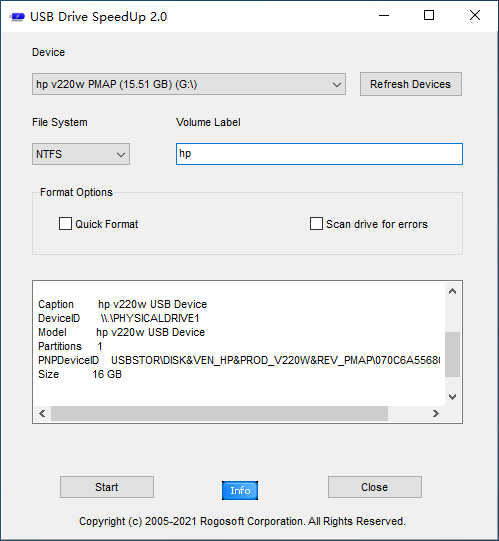
Key features
Faster read and write speeds after reformatting
The tool reformats the drive with optimized structures to improve read and write speed on slow flash drives.
Choice of FAT, FAT32, exFAT and NTFS
You can pick the file system that suits how you use the drive.
Works on many kinds of removable storage
It covers USB flash drives, sticks, pen drives, portable drives, thumb drives and SD cards. The vendor tested it on brands including SanDisk, Kingston, PNY, Samsung, Verbatim, Lexar, Toshiba and ADATA.
Factory-reset an old drive
You can factory reset a drive and make an older, smaller one usable again.
Who it's for
It suits you if you have old or sluggish USB sticks and SD cards you'd like to reuse. It's also a light, free option if you want a quick reformat with a chosen file system.
Pros and cons
- Pro: Free for personal and commercial use.
- Pro: Tiny 537KB download.
- Pro: Supports four file systems and a wide range of Windows versions.
- Con: Reformatting erases the drive, so back up first.
- Con: Windows only.
- Con: More features require the separate paid Pro tool, USB Flash Drive Format Tool Pro.
FAQs
Is it free?
Yes, it is freeware for personal and commercial use.
Which file systems can I choose?
FAT, FAT32, exFAT and NTFS.
Does it work with SD cards?
Yes, SD cards are supported along with USB flash drives and similar devices.
Is there a Pro version?
Yes. USB Flash Drive Format Tool Pro adds more features.
System requirements
Windows 11, Windows 10, Windows 8.1, Windows 8, Windows 7, Windows Vista, Windows XP, and Windows Server 2022, 2019, 2016, 2012, 2008, 2003.