You double-click an MKV or MP4 in Windows Media Player and get no picture, no sound, or a message about a missing codec. Windows 10 Codec Pack is a free bundle of DirectShow codecs, filters and splitters meant to fix that for desktop players that rely on installed system components.
Quick facts
- Version: 2.2.3
- Installer size: about 45.27 MB
- License: Freeware
- Platforms: Windows 10 and many earlier desktop Windows versions
- Players: Windows Media Player 10 and newer, Media Player Classic - Home Cinema, other DirectShow players
Key features
Decode modern and older video formats
Covers H.264, HEVC, AV1, MPEG-2, MPEG-4, XviD and DivX, using components such as LAV Video Decoder and ffdshow.
Get sound back on common audio tracks
Helps players handle AAC, AC3, DTS, FLAC and related streams through LAV Audio Decoder, madFLAC and other filters.
Open files in MKV, MP4, M2TS, AVI, MOV and WebM containers
Splitters such as LAV Splitter and Haali Media Splitter let players read the streams inside these files. Subtitle formats such as SRT and SSA/ASS are also listed.
Choose easy or detailed setup
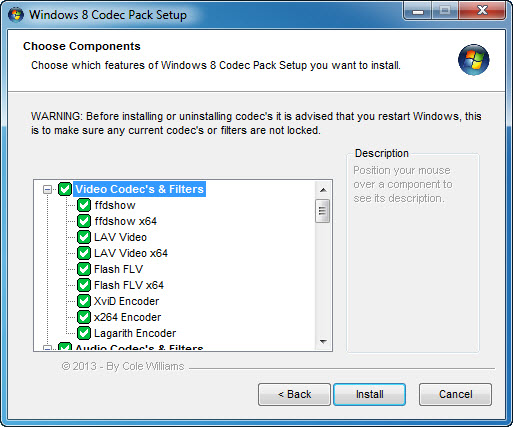
The installer offers an easy mode or detailed options. It also adds Media Player Classic - Home Cinema, a Codec Settings GUI, an update checker and tray menu tools.
Who it's for
It suits you if you use Windows Media Player, MPC-HC or another DirectShow player and want broader system-level format support. If you only use VLC, you probably don't need it, because VLC ships with its own codecs.
Pros and cons
- Pro: Free.
- Pro: Wide coverage of video, audio, container and subtitle formats.
- Pro: Includes a player and settings tools.
- Con: It doesn't fix damaged, incomplete or DRM-protected files.
- Con: It adds components at system level, so it only helps players that use them.
- Con: Windows default app settings are separate, so you may still need to change which program opens a file.
FAQs
Does it replace my media player?
No. It adds playback components and includes Media Player Classic - Home Cinema, but Windows decides which app opens each file.
Can it help with MP4 or MKV files?
Yes, when the missing piece is a decoder, splitter or audio filter. A broken or protected file may still fail.
Is Windows Media Player supported?
Yes, Windows Media Player 10 and newer.
Should I install it if I already use VLC?
Probably not. It's most useful for Windows Media Player, MPC-HC or other DirectShow software.
System requirements
Windows 10 and many earlier desktop Windows versions, plus a DirectShow-compatible player. DirectX 9 or higher is listed for the pack.